
We use the following, from an elevated (admin) powershell prompt:
Add-VpnConnection -Name 'VPN Name' -ServerAddress 'vpn.server.address' -TunnelType 'L2TP' -L2TPPSK 'redacted' -Force -DnsSuffix 'if.you.care' -AllUserConnection
This browser is no longer supported.
Upgrade to Microsoft Edge to take advantage of the latest features, security updates, and technical support.
' cx='32' cy='32' r='32' /%3E%3Ctext x='50%25' y='55%25' dominant-baseline='middle' text-anchor='middle' fill='%23FFF' %3EGL%3C/text%3E%3C/svg%3E)
Hi
I am trying to create a VPN connection that is available on the Windows 10 Pro logon screen. I've done much Googling and tried the add-vpnconnection method in Powershell but whatever I try the connection is not avaialble on login. Can anyone help?
Thanks,
Gareth.
' cx='32' cy='32' r='32' /%3E%3Ctext x='50%25' y='55%25' dominant-baseline='middle' text-anchor='middle' fill='%23FFF' %3EBS%3C/text%3E%3C/svg%3E)
I know this is an old thread... but trying to see if any other progress has been made. I tried everything listed in the thread for a non domain machine and still can not get the VPN to show at login screen.

Can I ask why you need this on the logon screen for a non-domain joined machine? The whole point of the login screen thing is to bring up the VPN so the domain-authentication can work for login (normally you would not have direct access to your AD over the internet, hence the need for a VPN).
We use the following, from an elevated (admin) powershell prompt:
Add-VpnConnection -Name 'VPN Name' -ServerAddress 'vpn.server.address' -TunnelType 'L2TP' -L2TPPSK 'redacted' -Force -DnsSuffix 'if.you.care' -AllUserConnection
while this adds a new vpn entry that can not be modified via gui... there is nothing on the login screen. This does not work on Win10 21h1 - 19043.1165
I am using the same version of windows and it definitely shows up on the login screen - but the difference is it's an enterprise version of windows 10, and joined to a domain.
Please also note that even though this "works", there's a bug and it doesn't actually allow you to log in with the domain creds as the VPN terminates due to an internal error in windows before it can fully auth and log in.
My advice is: don't try and do this, MS clearly doesn't care about it working, it's broken more often than not, and tbh it's not the most secure VPN anyway. Plus I honestly cannot see a point to bringing up the VPN before login on a non-domain joined machine anyway. Just open the VPN after you log in.
I am trying to create L2TP/IPSEC with pre-shared key
Authentication is username/password MS-CHAP v2
Command is
Add-VpnConnection -Name TEST -ServerAddress xxx.xxx.xxx.xxx -AllUserConnection $true -SplitTunneling $true -AuthenticationMethod MSChapv2 -TunnelType L2tp -EncryptionLevel Required -PassThru

Hi @Gareth Little ,
Could you lets us know what vpn are you trying to configure. Also what is the authentication mechanism.
Also, can you share the powershell command/script you used to deploy the profile
Regards
Aravinth
Hi Gloria,
Thanks for your reply. I have tried this method but the VPN does not appear on the login screen. I am connected to Azure AD if relevant.
Gareth.

@Gareth Little Hi,
Thank you for posting in Q&A!
Please try the following method to see if it works:
In Network and Sharing Center -> Set Up a New Connection or Network -> Connect to a Workplace -> [Configure as Needed] ->
Check the last box with the shield next to it (Allow other people to use this connection).
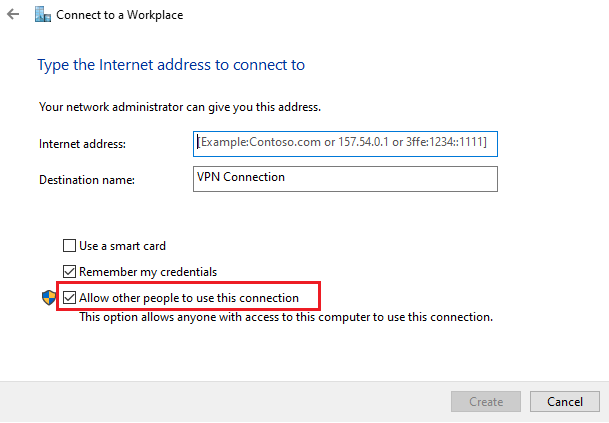
Hope you have a nice day : )
Gloria
============================================
If the Answer is helpful, please click "Accept Answer" and upvote it.
Note: Please follow the steps in our documentation to enable e-mail notifications if you want to receive the related email notification for this thread.
https://learn.microsoft.com/en-us/answers/articles/67444/email-notifications.html
This does not work on Win10 21h1 - 19043.1165
' cx='32' cy='32' r='32' /%3E%3Ctext x='50%25' y='55%25' dominant-baseline='middle' text-anchor='middle' fill='%23FFF' %3EGL%3C/text%3E%3C/svg%3E)
Yes this works. Tested and works great.
' cx='32' cy='32' r='32' /%3E%3Ctext x='50%25' y='55%25' dominant-baseline='middle' text-anchor='middle' fill='%23FFF' %3ES8%3C/text%3E%3C/svg%3E)