Developer technologies | Transact-SQL
A Microsoft extension to the ANSI SQL language that includes procedural programming, local variables, and various support functions.
This browser is no longer supported.
Upgrade to Microsoft Edge to take advantage of the latest features, security updates, and technical support.
' cx='32' cy='32' r='32' /%3E%3Ctext x='50%25' y='55%25' dominant-baseline='middle' text-anchor='middle' fill='%23FFF' %3EZA%3C/text%3E%3C/svg%3E)
Hello MS Community,
I am facing some difficulty in constructing the appropriate syntax to derive the right result.
The issue is as follows:
SELECT c.*, ROUND((("2020"-"2019")/"2019"),5) AS GrowthRate_pct, ROUND(c."2020"/a.Land_Area_Km_sq,0) "Density", Land_Area_Km_sq, WorldLandMass_pct, SubRegName, SDGRegName, GeoRegName
INTO Table2
FROM CountryPopYoY c
INNER JOIN LandArea a
ON c.Country = a.Country
INNER JOIN LocationMapping m
ON c.Country = m.Location
ORDER BY Land_Area_km_sq DESC;
SELECT * FROM TABLE2
declare @v1 int;
select @v1= vv from (select SUM (Land_Area_km_sq) as vv from Table2 )as ss
select @v1
UPDATE Table2
SET WorldLandMass_pct = Land_Area_km_sq / 130094783
where WorldLandMass_pct = 0;
select * from Table2;
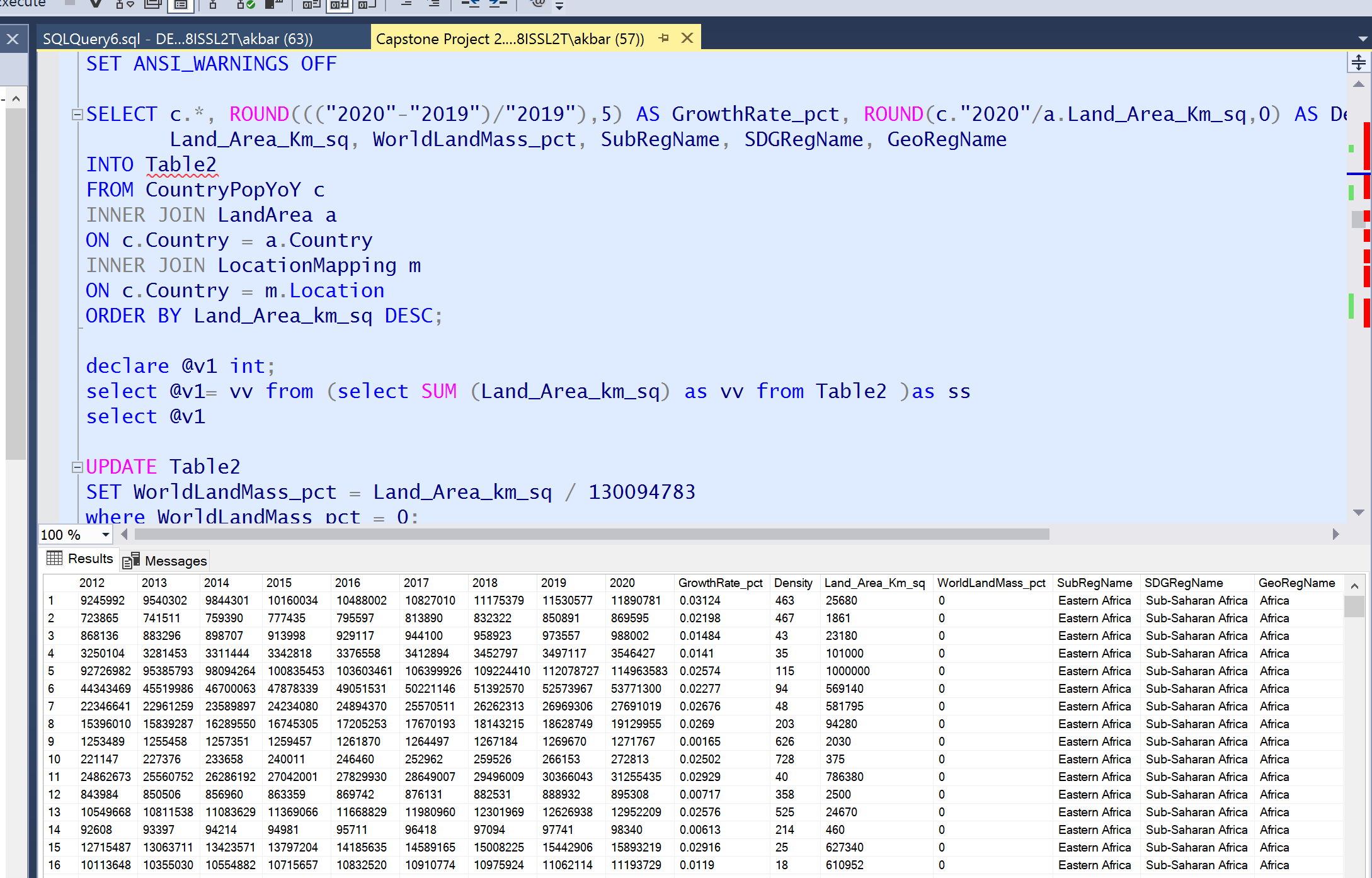
See attached for the table and the screenshot.
A Microsoft extension to the ANSI SQL language that includes procedural programming, local variables, and various support functions.
Additional SQL Server features and topics not covered by specific categories

Your table2.txt file is useless as it does not include any column headers so there is no way to link that data to your query and the output you are getting.
' cx='32' cy='32' r='32' /%3E%3Ctext x='50%25' y='55%25' dominant-baseline='middle' text-anchor='middle' fill='%23FFF' %3EEM%3C/text%3E%3C/svg%3E)
Dou you have any update?
Please also remember to accept the answers if they helped.
Your action would be helpful to other users who encounter the same issue and read this thread.
Regards
Echo
' cx='32' cy='32' r='32' /%3E%3Ctext x='50%25' y='55%25' dominant-baseline='middle' text-anchor='middle' fill='%23FFF' %3ETP%3C/text%3E%3C/svg%3E)
You are dividing an integer by an integer which results in an integer.
Please try:
UPDATE Table2
SET WorldLandMass_pct = Land_Area_km_sq / 130094783.00
where WorldLandMass_pct = 0;
select * from Table2;
Hi Tom,
I am getting this response when using your syntax to update my table. The numbers are not appearing correctly.
Hi Tom,
I am getting this response when using your syntax to update my table. The numbers are not appearing correctly.
It is best to provide the code for creating tables and data so that experts can do some tests.
I have no clue what you are asking me. The code and syntax have been provided earlier. Would request if you scroll up to my queries from the start. Thanks!
Hi @Zarena Akbarshah ,
Welcome to the Microsoft TSQL Q&A Forum!
Sorry, your description is not clear enough for me.

I did not find the code to round up the WorldLandMass_pct to "0" in your code.I saw the following two codes:
    ROUND(c."2020"/a.Land_Area_Km_sq,0) "Density"
    SET WorldLandMass_pct = Land_Area_km_sq / 130094783
So, I guess your problem should be: In the first select statement, you made a wrong setting, so you want to use the update statement to reset.
If so, you don't need to use the update statement to set, because the select statement does not change the source data in the table, it just presents the data in the format you set. You only need to reset it in the first select statement.
ROUND(c."2020"/a.Land_Area_Km_sq,0)
I don’t know if the rounding to 0 you mentioned refers to this statement.
The 0 in round means that the number of decimal places after rounding is 0.
Refer to the following example:
SELECT ROUND(123.9994, 3), ROUND(123.9994, 2),ROUND(123.9994, 0)
Output:

In addition, when you post a question, just provide us with a minimal example,this includes your table structure (CREATE TABLE …) and some sample data(INSERT INTO …)along with your expected result. So that we’ll get a right direction and make some test.
If you have any question, please feel free to let me know.
Regards
Echo
If the answer is helpful, please click "Accept Answer" and upvote it.
Note: Please follow the steps in our documentation to enable e-mail notifications if you want to receive the related email notification for this thread.