
Was facing the same issue with Windows update, what I found to help was to run the Windows update service in shared mode instead of it running its own processes, you can see it in detail in the following guide. It is the 6th method.
This browser is no longer supported.
Upgrade to Microsoft Edge to take advantage of the latest features, security updates, and technical support.
' cx='32' cy='32' r='32' /%3E%3Ctext x='50%25' y='55%25' dominant-baseline='middle' text-anchor='middle' fill='%23FFF' %3EA%3C/text%3E%3C/svg%3E)
Hi everyone,
Today, I updated winserver2016. But the system reports the following error code. Does anyone know how to solve it?

When I directly download the patch installation package and install it, the following error is prompted.
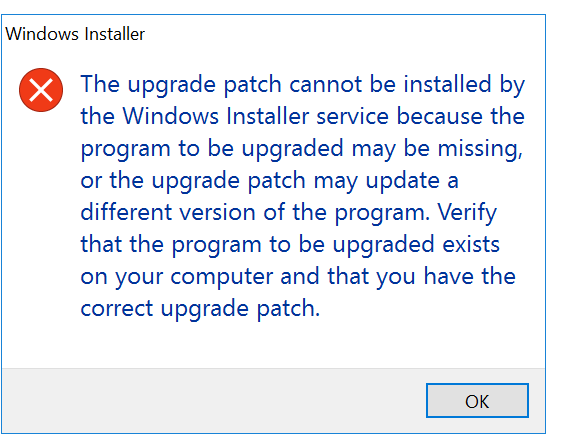

Hi,
Just checking in to see if the information provided was helpful.
If the reply helped you, please remember to accept as answer.
If no, please reply and tell us the current situation in order to provide further help.
@钧宇 朱
Hi,
We have not get information from you for several days.
If the reply is useful for you, please accept as answer. It will be helpful to other members who have same questions.
If you have any other confuse, please reply to us directly.
' cx='32' cy='32' r='32' /%3E%3Ctext x='50%25' y='55%25' dominant-baseline='middle' text-anchor='middle' fill='%23FFF' %3ESM%3C/text%3E%3C/svg%3E)
Was facing the same issue with Windows update, what I found to help was to run the Windows update service in shared mode instead of it running its own processes, you can see it in detail in the following guide. It is the 6th method.
' cx='32' cy='32' r='32' /%3E%3Ctext x='50%25' y='55%25' dominant-baseline='middle' text-anchor='middle' fill='%23FFF' %3ENE%3C/text%3E%3C/svg%3E)
I have the same issue, and the answer is:
If you use Kaspersky check this https://support.kaspersky.com/15704
' cx='32' cy='32' r='32' /%3E%3Ctext x='50%25' y='55%25' dominant-baseline='middle' text-anchor='middle' fill='%23FFF' %3EAE%3C/text%3E%3C/svg%3E)
Got the same issue with windows server 2016 and steps didn't resolve the issue
' cx='32' cy='32' r='32' /%3E%3Ctext x='50%25' y='55%25' dominant-baseline='middle' text-anchor='middle' fill='%23FFF' %3EOC%3C/text%3E%3C/svg%3E)
Hello I am having the same issue with 2 Windows Server 2016. I followed all your instructions and some others that I found and still cannot install Windows Update I keep getting the Error 0x80070006.
I have a few Windows Servers 2012 R2, Windows Server 2019 and Windows Server 2016 without issues just these 2.
Any suggestions?
Thank you
@钧宇 朱
Hi,
Possible causes for the occurrence of error 0x80070006:
Problem with Internet connection.
Anti-virus software and Firewall issue.
Windows update services not working properly.
Corrupted registry files.
In some cases the Anti-virus or Firewall program can trigger Windows Update error code 0x80070006. Disable your antivirus for some time so that you can check if Windows update error 0x80070006 still shows up when the anti-virus is off.
RESET WINDOWS UPDATE COMPONENT
Press Windows + X and select Command Prompt (Admin).
Type the following commands, press enter after each of them:
net stop wuauserv
net stop cryptSvc
net stop bits
net stop msiserver
ren C:\Windows\SoftwareDistribution SoftwareDistribution.old
ren C:\Windows\System32\catroot2 Catroot2.old
net start wuauserv
net start cryptSvc
net start bits
net start msiserver
The reboot your PC.
Hope above information can help you.
============================================
If the Answer is helpful, please click "Accept Answer" and upvote it.
Note: Please follow the steps in our documentation to enable e-mail notifications if you want to receive the related email notification for this thread.