Developer technologies | .NET | Entity Framework Core
A lightweight, extensible, open-source, and cross-platform version of the Entity Framework data access technology.
This browser is no longer supported.
Upgrade to Microsoft Edge to take advantage of the latest features, security updates, and technical support.

While installing the package Microsoft.EntityFrameworkCore.Tools for using EF in my project using Nuget, I'm persistently running into the below error. Notice I didn't get any error while installing other related packages used for EF core.

Here is the location of the file ef.exe

Basically the intention behind installing this package is to use EF command-line tools. I'm currently on Windows 10 and the .NET SDK installed on my machine is 3.1. I had previously 2 SDK's installed on my system(3.1 & 5.0). As per microsoft's documentaion, "The .NET CLI must choose an SDK version for every dotnet command. It uses the latest SDK installed on the machine by default." Therefore I went ahead and uninstalled .NET 5.0 SDK.

However, after doing so, I'm even unable to open/load any .NET framework based projects and my VS 2019 installer says that .NET 5 SDK is a required component of VS 2019 to load projects. The real question is "Is .NET 5 SDK causing this i.e. can having multiple SDKs on a single machine cause this kind of issues?"
Here are some of the solutions that I tried:
I have also tried some of the steps mentioned here on github: https://github.com/NuGet/Home/issues/1138.
Any kind of help would be really appreciated.
A lightweight, extensible, open-source, and cross-platform version of the Entity Framework data access technology.
A set of technologies in the .NET Framework for building web applications and XML web services.
.NET: Microsoft Technologies based on the .NET software framework. Runtime: An environment required to run apps that aren't compiled to machine language.
Microsoft Technologies based on the .NET software framework. Miscellaneous topics that do not fit into specific categories.
' cx='32' cy='32' r='32' /%3E%3Ctext x='50%25' y='55%25' dominant-baseline='middle' text-anchor='middle' fill='%23FFF' %3EA%3C/text%3E%3C/svg%3E)
Hi @Tahir77667 ,
Based on your description, I tried to create a new Asp.net core 3.1 application, and then install the Entity Framework Core related package, everything works well. You could try to create a new application to verify it.
Besides, you can also try to use the following methods, and then reinstall the Nuget package:
Clean option, and then rebuild the project and install the package. dotnet build-server shutdown. Is .NET 5 SDK causing this i.e. can having multiple SDKs on a single machine cause this kind of issues?
About this question, you could try to re-install the Asp.net 5 SDK and runtime on your machine and check the .NET core 3.1 application whether the issue is disappears. On my machine, it seems that the issue does not relate the .NET5 SDK.
Hey @Anonymous
Thanks for getting back. I did try to create a fresh new .NET core application with the very first thing of installing this package again but it was the same issue.
Uninstalling .NET 5 SDK doesn't help either. In fact I was unable to even load my project in Visual Studio 2019 after doing that. It seems VS 2019 is tightly integrated to .NET 5.
Hi @Tahir77667 ,
Since, the ef.exe is being used by another progress, for test purpose, you could try to restart your computer, and then recheck whether the issue is solved or not.
Yes, you are right, the latest version of VS 2019 is tightly integrated to .NET 5, if you unchecked the .NET 5 Runtime in the Visual Studio Installer's Individual components panel, the visual studio would remove the component and any items that depend on .NET 5 Runtime. Then, when you create a new application, you can see there doesn't have any asp.net core relates templates to select. So, you could try modifying your VS 2019 and selected the .NET 5 Runtime (Install .NET 5), then check if the application works well.
Hi @Anonymous
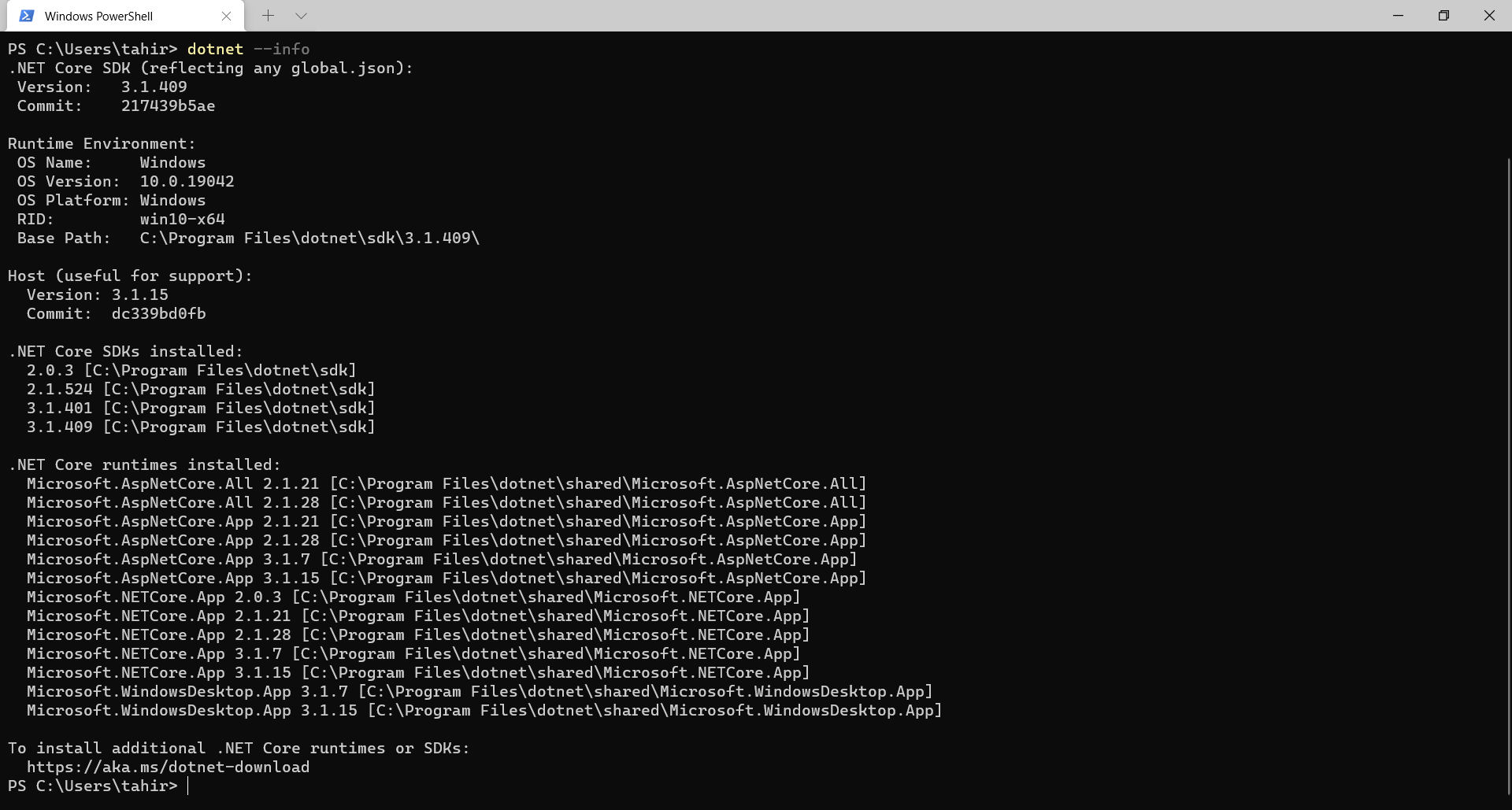
It worked!! but this time not on my previous machine but for my personal one. This is surreal. It now makes me think that it was a machine specific issue, one that not everyone might face. Below is a screenshot of the successful package installation.

However my personal machine doesn't have a .NET 5 SDK installed.
Hi @Tahir77667 ,
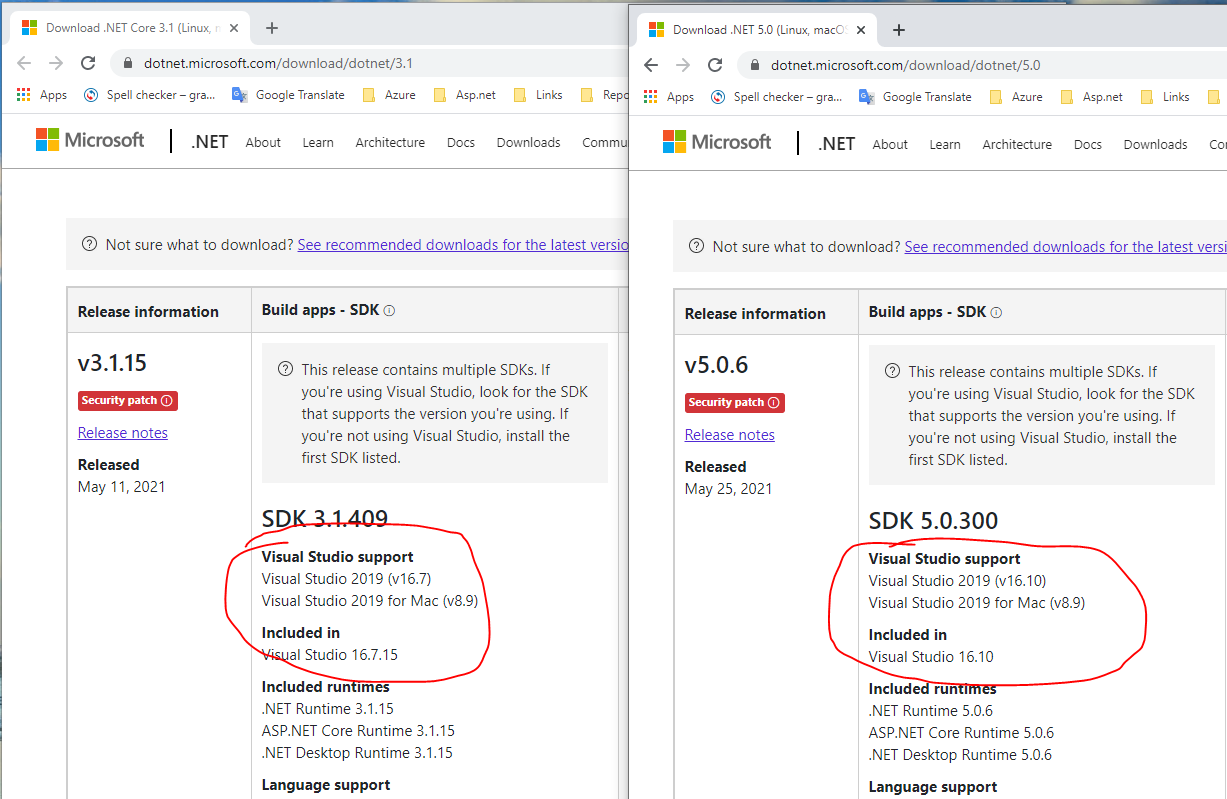
The issue might relate the detailed Visual Studio 2019 version, check the following image, the Asp.net Core 3.1.15 included in Visual Studio 2019 (v16.7) and Asp.net 5.0.6 version included in the Visual Studio 2019 (v16.10). On your personal machine, you might use a lower version of Visual Studio 2019. If that is the case, on the previous machine, you could change the Visual Studio 2019 to the lower version.

I got the same problem. I copied the app folder to another directory and then ran the Entity Framework Core installation in the new folder. So this means you will now have to run the project from this new folder and just leave the old folder.