' cx='32' cy='32' r='32' /%3E%3Ctext x='50%25' y='55%25' dominant-baseline='middle' text-anchor='middle' fill='%23FFF' %3EI%3C/text%3E%3C/svg%3E)

' cx='32' cy='32' r='32' /%3E%3Ctext x='50%25' y='55%25' dominant-baseline='middle' text-anchor='middle' fill='%23FFF' %3ERA%3C/text%3E%3C/svg%3E)
' cx='32' cy='32' r='32' /%3E%3Ctext x='50%25' y='55%25' dominant-baseline='middle' text-anchor='middle' fill='%23FFF' %3EA%3C/text%3E%3C/svg%3E)
Hi,
Welcome to Q&A platform.
Based on provided information, my understanding is your Windows Firewall cannot be turned on and Window Defender Firewall service turns gray and inoperable. If there is any misunderstanding, please correct me.
May I know if there is any error message when we start the Windows Firewall?
Please try the following method to see if our issue can be resolved.
Click Start->insert regedit.exe to open Registry Editor and then please locate to the following registry key
Computer\HKEY_LOCAL_MACHINE\SYSTEM\CurrentControlSet\Services\mpssvc
In the right window of mpssvc, find Start and double-click to open it, then please change the value to 2 as shown in the following image:
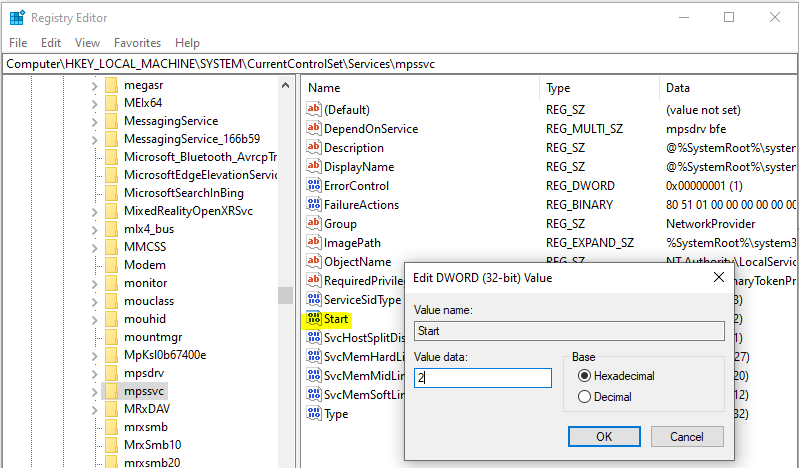
And I also find the following articles for your reference, you could check if methods in it was helpful to us:
Download Windows Firewall Troubleshooter to automatically repair Window Firewall problems:
Automatically diagnose and fix problems with Windows Firewall
Windows Firewall service does not start in Windows 10
Please Note: Since the website is not hosted by Microsoft, the link may change without notice. Microsoft does not guarantee the accuracy of this information.
Best Regards,
Sunny
----------
If the Answer is helpful, please click "Accept Answer" and upvote it.
Note: Please follow the steps in our documentation to enable e-mail notifications if you want to receive the related email notification for this thread.