Azure Database for PostgreSQL
An Azure managed PostgreSQL database service for app development and deployment.
This browser is no longer supported.
Upgrade to Microsoft Edge to take advantage of the latest features, security updates, and technical support.
' cx='32' cy='32' r='32' /%3E%3Ctext x='50%25' y='55%25' dominant-baseline='middle' text-anchor='middle' fill='%23FFF' %3EUK%3C/text%3E%3C/svg%3E)
I am creating a postgres server and postgres database using terraform.
postgres server and database part of template:
resource "azurerm_postgresql_flexible_server" "example" {
  name                   = "${azurerm_resource_group.postgres_rg.name}-${var.environment}"
  resource_group_name    = azurerm_resource_group.postgres_rg.name
  location               = azurerm_resource_group.postgres_rg.location
  version                = "13"
  delegated_subnet_id    = azurerm_subnet.example2.id
  private_dns_zone_id    = azurerm_private_dns_zone.example.id
  administrator_login    = var.administrator_login
  administrator_password = var.administrator_password
  zone                   = "3"

  storage_mb = 131072

  sku_name   = var.postgres_sku #"GP_Standard_D2s_v3"
  depends_on = [azurerm_private_dns_zone_virtual_network_link.example]

}

resource "azurerm_postgresql_database" "example" {
  name                = "martdatabase"
  resource_group_name = azurerm_resource_group.postgres_rg.name
  server_name         = azurerm_postgresql_flexible_server.example.name
  collation = "en_US.utf8"
  charset   = "utf8"
  depends_on          = [azurerm_postgresql_flexible_server.example]
}
Server got created and even I cross checked in the azure portal.
But during database creation, getting below error.
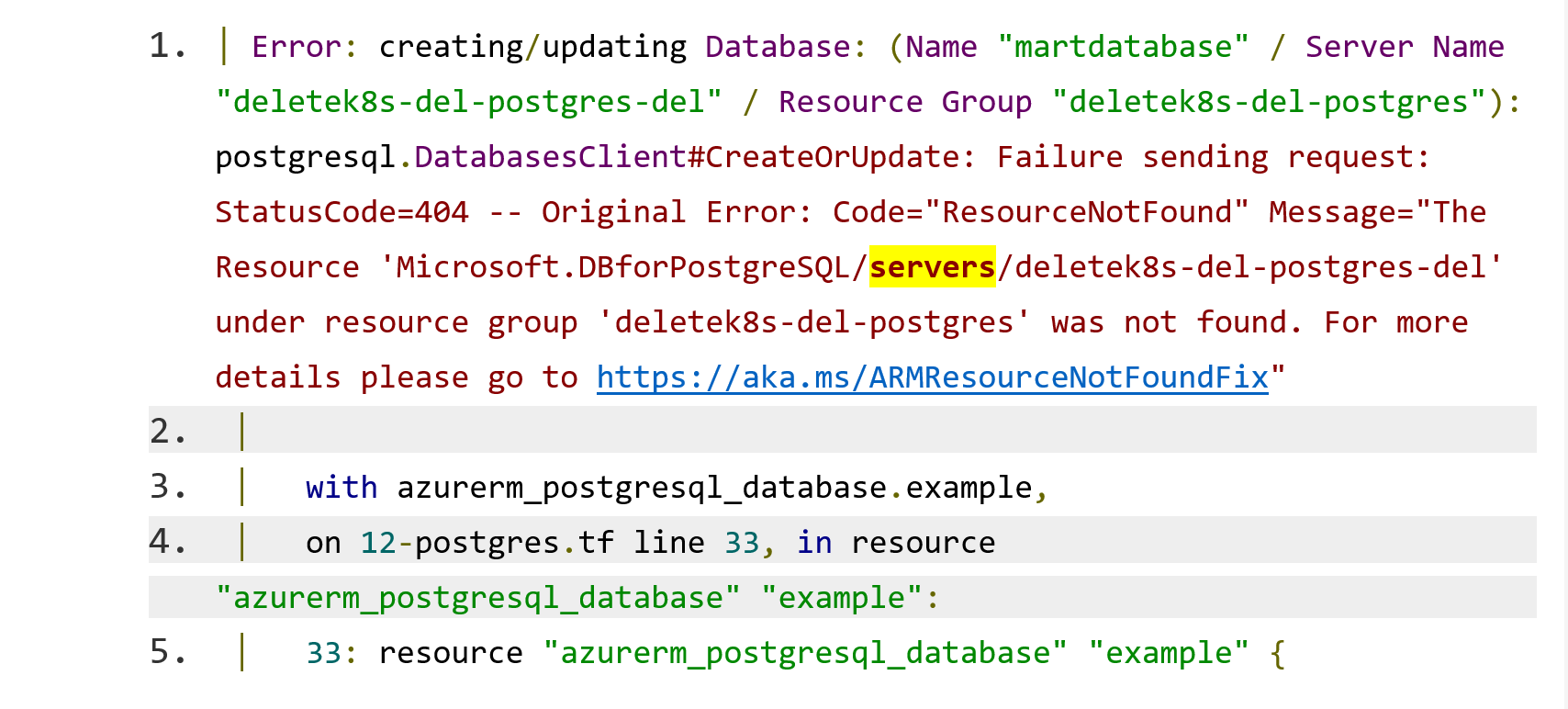
│ Error: creating/updating Database: (Name "martdatabase" / Server Name "deletek8s-del-postgres-del" / Resource Group "deletek8s-del-postgres"): postgresql.DatabasesClient#CreateOrUpdate: Failure sending request: StatusCode=404 -- Original Error: Code="ResourceNotFound" Message="The Resource 'Microsoft.DBforPostgreSQL/servers/deletek8s-del-postgres-del' under resource group 'deletek8s-del-postgres' was not found. For more details please go to https://aka.ms/ARMResourceNotFoundFix"
│
│   with azurerm_postgresql_database.example,
│   on 12-postgres.tf line 33, in resource "azurerm_postgresql_database" "example":
│   33: resource "azurerm_postgresql_database" "example" {
I even reapplied, to cross check if any delay in updation, but same errror.
An Azure managed PostgreSQL database service for app development and deployment.

Hi, @Uday Kiran Reddy Thanks for posting your query.
Looks like you have already opened an issue in the Microsoft forum where we have requested to share the support case id so we can check internally with the support team as this issue need to investigate further.
Regards
Geetha
' cx='32' cy='32' r='32' /%3E%3Ctext x='50%25' y='55%25' dominant-baseline='middle' text-anchor='middle' fill='%23FFF' %3EUK%3C/text%3E%3C/svg%3E)
there is no proper resolution from the support team, what is the use of sharing the support case ID here anyway?
And also it is generic issue with your product, not to our specific project and no resolution provided by your team also yet.
Fix your postgres servers and share the resolution here.
Hi, @Uday Kiran Reddy (ureddy) I can understand your problem the reason for asking the support ticket is to understand what resolution they have provided and what is missing. however my internal team took a look at the error you mentioned below, and it seems to be looking for a single server instance with the name deletek8s-del-postgres-del as opposed to a flexible server. Can you double check the azurerm_postgresql_database. an example is pointing to the correct resource?
Regards
Geetha
even the sample provided here also getting same issue:
you can check from your end also
' cx='32' cy='32' r='32' /%3E%3Ctext x='50%25' y='55%25' dominant-baseline='middle' text-anchor='middle' fill='%23FFF' %3EMF%3C/text%3E%3C/svg%3E)
I'm also facing a simlar Issue when creating databases on flexible postgresql server
Error: creating Database (Subscription: "subscription-id"
Resource Group Name: "example-rg-postgresql-dev"
Flexible Server Name: "example-psql-01-dev-primary-s5a43j"
Database Name: "example_db"): polling after Create: Code="InternalServerError" Message="An unexpected error occured while processing the request. Tracking ID: '90bfjad9-02b6-4575-b395-73fc42a8ad44'"
   with module.postgresql["psql-01"].azurerm_postgresql_flexible_server_database.databases["example_db"],
   on .terraform/modules/postgresql/terraform/modules/postgresql/main.tf line 46, in resource "azurerm_postgresql_flexible_server_database" "databases":
   46: resource "azurerm_postgresql_flexible_server_database" "databases" {
My Terraform code looks like the following:
resource "azurerm_postgresql_flexible_server" "psql_server" {
  name                = var.psql_server_name
  location            = var.location
  resource_group_name = var.resource_group_name

  administrator_login    = var.psql_admin
  administrator_password = var.psql_admin_password
  zone                   = "1"

  sku_name   = var.psql_sku_name
  version    = var.psql_version
  storage_mb = var.psql_storage

  backup_retention_days        = 7
  geo_redundant_backup_enabled = false

  delegated_subnet_id = var.psql_subnet_id
  private_dns_zone_id = azurerm_private_dns_zone.psql_endpoint_dns_private_zone.id

  tags = merge(
    var.additional_tags,
    {
      instance   = var.psql_server_name
      created-by = "terraform"
    },
  )
}

resource "azurerm_postgresql_flexible_server_database" "databases" {
  for_each  = var.psql_databases
  name      = each.value
  server_id = azurerm_postgresql_flexible_server.psql_server.id
  charset   = "utf8"
  collation = "utf8_unicode_ci"
}
' cx='32' cy='32' r='32' /%3E%3Ctext x='50%25' y='55%25' dominant-baseline='middle' text-anchor='middle' fill='%23FFF' %3EMS%3C/text%3E%3C/svg%3E)
Have the same problem. Cannot deploy mysql or postgresql flexible servers via terraform.
@Marcel Fuhrmann and @Michael Schäfer Please post a new question with the code snippet
Regards
Geetha
' cx='32' cy='32' r='32' /%3E%3Ctext x='50%25' y='55%25' dominant-baseline='middle' text-anchor='middle' fill='%23FFF' %3ESV%3C/text%3E%3C/svg%3E)
Hello, just replying to share my solution to, as it seems, the same error
Flexible Server Name: "psql-test-dimp"): polling after Create: Code="InternalServerError" Message="An unexpected error occured while processing the request. Tracking ID
We also try to set a 'zone' (was in our case 1).
I went to Azure portal to see if manual creation was possible under the RG we wanted to use.
And it wasn't, only 2 & 3 were available
Changed the zone in our code to 2, and the deploy was succesfull.
Greetings,
Sander
' cx='32' cy='32' r='32' /%3E%3Ctext x='50%25' y='55%25' dominant-baseline='middle' text-anchor='middle' fill='%23FFF' %3EPS%3C/text%3E%3C/svg%3E)
I have 'similar problem.
null_resource.next: Creating...
null_resource.next: Creation complete after 0s [id=715078475]
azurerm_postgresql_flexible_server.dev-postgre: Creating...
azurerm_postgresql_flexible_server.dev-postgre: Still creating... [10s elapsed]
azurerm_postgresql_flexible_server.dev-postgre: Still creating... [20s elapsed]
azurerm_postgresql_flexible_server.dev-postgre: Still creating... [30s elapsed]
azurerm_postgresql_flexible_server.dev-postgre: Still creating... [40s elapsed]
azurerm_postgresql_flexible_server.dev-postgre: Still creating... [50s elapsed]
azurerm_postgresql_flexible_server.dev-postgre: Still creating... [1m0s elapsed]
╷
│ Error: creating Flexible Server (Subscription: "f34fd8e9-b1ba-44ed-8a37-da7cc57361de"
│ Resource Group Name: "RG_300000000056685_CEC_Smart_Cities_LZ"
│ Flexible Server Name: "dev-psqlfs"): polling after Create: Code="InternalServerError" Message="An unexpected error occured while processing the request. Tracking ID: 'de947b9a-ed82-4a69-b0b1-fe8f7bc072d5'"
│
│ with azurerm_postgresql_flexible_server.dev-postgre,
│ on main.tf line 69, in resource "azurerm_postgresql_flexible_server" "dev-postgre":
│ 69: resource "azurerm_postgresql_flexible_server" "dev-postgre" {
│Would be really grateful for help please.
My code :
# This resource will destroy (potentially immediately) after null_resource.next
resource "null_resource" "previous" {}

resource "time_sleep" "wait_4_min" {
  depends_on = [null_resource.previous]

  create_duration = "4m"
}

resource "null_resource" "next" {
  depends_on = [time_sleep.wait_4_min]
}


resource "azurerm_postgresql_flexible_server" "dev-postgre" {
  name                   = "dev-psqlfs"
  resource_group_name    = azurerm_resource_group.resource_group.name
  location               = var.location
  version                = "13"
  delegated_subnet_id    = azurerm_subnet.Data.id
  private_dns_zone_id    = azurerm_private_dns_zone.dev-dns.id
  administrator_login    = "psqladmin"
  administrator_password = "SIabc360"
  zone                   = "1"
  storage_mb = 32768
  sku_name   = "GP_Standard_D4s_v3"
  #collation = "en_US.utf8"
  #charset = "utf8"
  depends_on = [azurerm_private_dns_zone_virtual_network_link.dev-dns-vnl,time_sleep.wait_4_min]
  timeouts{
    create = "4m"
    }
}
Thanks geetha, it is working with the one you shared.
resource "azurerm_postgresql_flexible_server_database" "example" {
name = var.databasename
server_id = azurerm_postgresql_flexible_server.example.id
collation = "en_US.utf8"
charset = "utf8"
depends_on = [azurerm_postgresql_flexible_server.example,time_sleep.wait_4_min]
timeouts{
create = "4m"
}
}
Hi, @Uday Kiran Reddy (ureddy) Very Happy to hear that it worked for you, Please "Accept the answer" if the information helped you. This will help us and others in the community as well.
Regards
Geetha
can you please reply to this also.
How to create a table in the database created above using terraform.
Hi, @Uday Kiran Reddy (ureddy) Terraform templates can only handle the deployment of the Azure Resources. We currently only have a database as the minimal level of resources that can be deployed through APIs. Any data level manipulation like table creation can only be done when you directly connect to the database using psql or similar.
Regards
Geetha
The database creatwd above will be a private vnet one. So it is not directly accessible with azure devops pipelines also. Please suggest alternative to create table using any automated way after database creation
Hi, @Uday Kiran Reddy we do not have any other recommendation apart from the above.
Thank you for visiting Microsoft QA forums! Have a great day! Please do not forget to "Accept the answer" wherever the information provided to your original question helped you to help others in the community.
Regards
Geetha
How to access this private vnet connected database from any automation? Even azure devops doesn't connect to it. Correct me if I am wrong
@Uday Kiran Reddy The IP addresses for Microsoft-hosted ADO agents are released weekly and could be routed into the vnet you can check Here.
Regards
Geetha
It is not related to the one i asked.
@ UdayKiranReddy-2840 you are saying that you are not able to connect to PG Flex using automation tools? correct me if my understanding is wrong, if yes, then do you need private end-point functionality? Why would you not run those tool automation inside the VNET.
Regards
Geetha
@Uday Kiran Reddy we dint hear back from you, just checking in to see if you were able to fix the issue.
Regards
Geetha
I didn't get any proper resolution for my last question. How to create table in the database created by terraform which is also in priv vnet. Any solution in azure devops atleast
@Uday Kiran Reddy As I mentioned above able creation can only be done when you directly connect to the database using psql or similar. can you clarify my above reply?
Regards
Geetha
I am asking how to do the same with azure devops or any other cicd.
Private vnet postgres DBS are not accessible directly with your azure devops also
Hi @ UdayKiranReddy-2840 I am not really clear what you mean by DevOps? Is this not a client that running in some VM and trying to connect to PG Server on the private link. So from that perspective, I am not sure why it won't work.
I would recommend closing this thread as your original query got resolved, and opening a new case with problem statements and what is missing.
Please don't forget to click on accept the answer or upvote the button whenever the information provided helps you. Original posters help the community find answers faster by identifying the correct answer.
Regards
Geetha
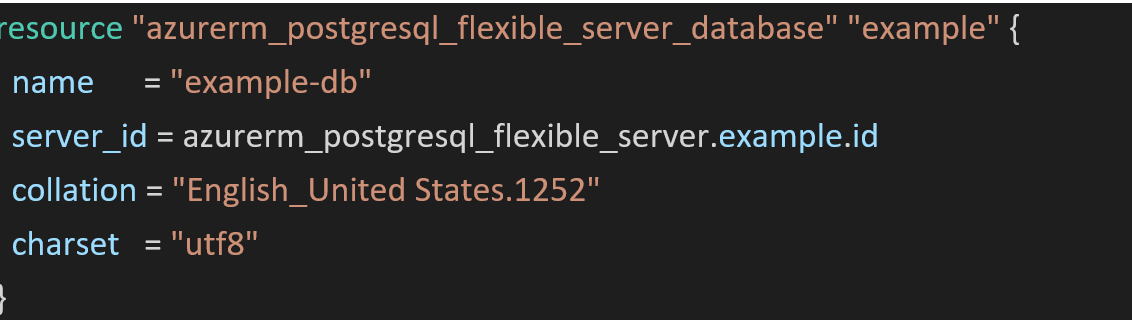
Hi, @Uday Kiran Reddy As per the product team this resource that you have commented out is wrong. I am assuming that it is commented out because it does not work. you need to use this resource instead I hope you are using the same. For example, replace the commented-out resource with the below code and give it a try.
Regards
Geetha
I comment it because it is giving error as I mentioned in the first message of this post. I don't know why you repeatedly just asking the same set of questions. May be just to waste the time or just delay it so that I would simply delete the post at the end without any resolution.
Just try with the example given in the official documentation as I shared earlier in this link.
Here also getting the same error and this is for flexible server and flexible database. If this is searching for single server then you need to fix it why it is doing that way.
Also, is there any option to create table able database creation.
Can't find that attribute.
CREATE TABLE m9CSRFTokenRepository (
    TOKEN text not NULL,
    TOKENCREATIONTIME TIMESTAMP
);
Sure let me check on this and provide you with more information.
Regards
Geetha
Hi, @Uday Kiran Reddy (ureddy) are you looking for TF scripts to create table/indexes?
Regards
Geetha
Sorry @Uday Kiran Reddy individual table/index operations are not yet supported.
Regards
Geetha
We are creating aks cluster and postgres private vnet flexible server as part of terraform template. At the end we are creating a database also as in this question. Is there anything you can suggest to do initial database configuration like table creation and also deployment of helm charts to the cluster.?
I didn't want to start the conversation from scratch again and waste the time with same set of questions and answers. Let the other community members reply atleast if you are not willing to provide solution for this.
' cx='32' cy='32' r='32' /%3E%3Ctext x='50%25' y='55%25' dominant-baseline='middle' text-anchor='middle' fill='%23FFF' %3E6%3C/text%3E%3C/svg%3E)