إشعار
يتطلب الوصول إلى هذه الصفحة تخويلاً. يمكنك محاولة تسجيل الدخول أو تغيير الدلائل.
يتطلب الوصول إلى هذه الصفحة تخويلاً. يمكنك محاولة تغيير الدلائل.
ينطبق على: المطور | أساسي | قياسي | قسط
تدعم APIM الآن الوصول المضمن المستند إلى تطبيق OAuth 2.0 إلى واجهات برمجة تطبيقات المنتج باستخدام تدفق بيانات اعتماد العميل. تسمح هذه الميزة لمديري واجهة برمجة التطبيقات بتسجيل تطبيقات معرف Microsoft Entra، وتبسيط الوصول الآمن لواجهة برمجة التطبيقات للمطورين من خلال تخويل OAuth 2.0.
Note
التطبيقات حاليا في معاينة محدودة. To sign up, fill this form.
باستخدام هذه الميزة:
- يقوم مديرو واجهة برمجة التطبيقات بتعيين خاصية منتج لتمكين الوصول المستند إلى التطبيق.
- يسجل مديرو واجهة برمجة التطبيقات تطبيقات العميل في معرف Microsoft Entra للحد من الوصول إلى منتجات معينة.
- يمكن للمطورين الوصول إلى بيانات اعتماد تطبيق العميل باستخدام مدخل مطور APIM.
- باستخدام تدفق بيانات اعتماد عميل OAuth 2.0، يحصل المطورون أو التطبيقات على الرموز المميزة التي يمكنهم تضمينها في طلبات واجهة برمجة التطبيقات
- يتم التحقق من صحة الرموز المميزة المقدمة في طلبات واجهة برمجة التطبيقات بواسطة بوابة إدارة واجهة برمجة التطبيقات لتخويل الوصول إلى واجهات برمجة التطبيقات للمنتج.
Prerequisites
An API Management instance deployed in the Premium, Standard, Basic, or Developer tier. إذا كنت بحاجة إلى نشر مثيل، فشاهد إنشاء مثيل خدمة APIM.
منتج واحد على الأقل في مثيل APIM الخاص بك، مع تعيين واجهة برمجة تطبيقات واحدة على الأقل له.
- The product should be in the Published state so that it can be accessed by developers through the developer portal.
- For testing, you can use the default Starter product and the Echo API that's added to it.
- إذا كنت تريد إنشاء منتج، فشاهد إنشاء منتج ونشره.
Sufficient permissions in your Microsoft Entra tenant to assign the Application Administrator role, which requires at least the Privileged Role Administrator role.
Optionally, add one or more users in your API Management instance.
- إذا اخترت استخدام Azure PowerShell محليا:
- تثبيت أحدث إصدار من الوحدة النمطية Az PowerShell.
- Connect to your Azure account using the Connect-AzAccount cmdlet.
- إذا اخترت استخدام Azure Cloud Shell:
- لمزيد من المعلومات، راجع نظرة عامة على Azure Cloud Shell.
تكوين الهوية المُدارة
تمكين هوية مدارة معينة من قبل النظام لإدارة واجهة برمجة التطبيقات في مثيل APIM.
Assign the identity the Application Administrator RBAC role in Microsoft Entra ID. لتعيين الدور:
- Sign in to the portal and navigate to Microsoft Entra ID.
- In the left menu, select Manage>Roles and administrators.
- Select Application administrator.
- In the left menu, select Manage>Assignments>+ Add assignments.
- In the Add assignments page, search for the API Management instance's managed identity by name (the name of the API Management instance). Select the managed identity, and then select Add.
تمكين الوصول المستند إلى التطبيق للمنتج
اتبع هذه الخطوات لتمكين الوصول المستند إلى التطبيق لمنتج. يجب تمكين هذا الإعداد للمنتج ليتم ربطه بتطبيق عميل في خطوات لاحقة.
The following example uses the Starter product, but choose any published product that has at least one API assigned to it.
- Sign in to the portal at the following custom URL for the applications feature: https://portal.azure.com/?feature.customPortal=false&Microsoft_Azure_ApiManagement=applications
- انتقل إلى مثيل APIM الخاص بك.
- In the left menu, under APIs, select Products.
- Choose the product that you want to configure, such as the Starter product.
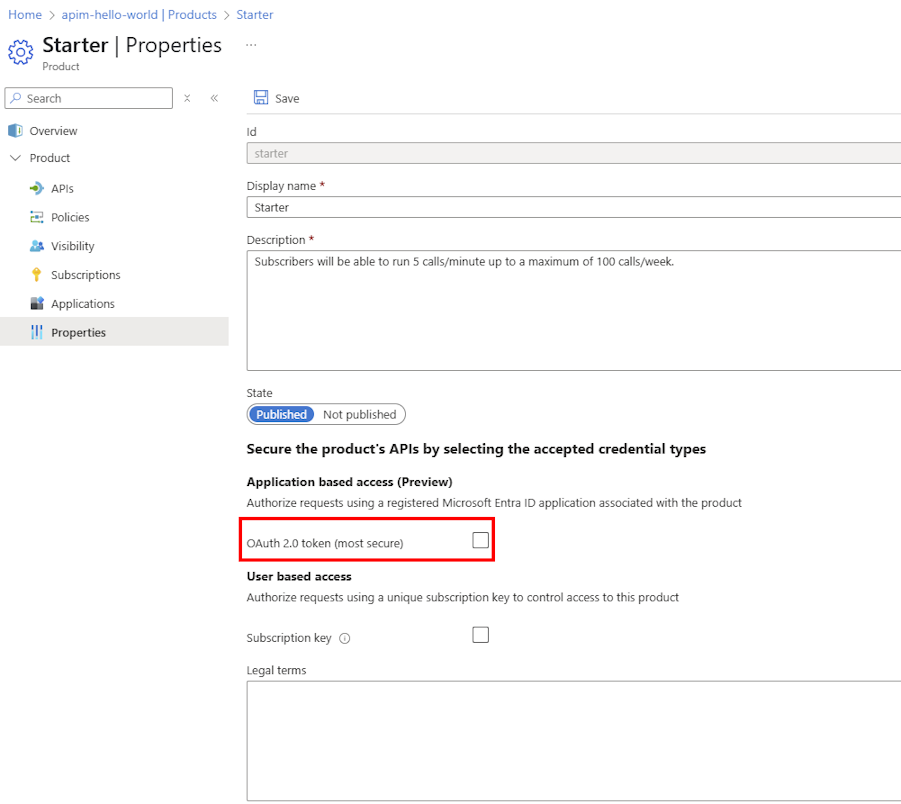
- In the left menu, under Product, select Properties.
- في قسم الوصول المستند إلى التطبيق ، قم بتمكين إعداد الرمز المميز OAuth 2.0 (الأكثر أمانا ).
- Optionally, enable the Subscription key setting. إذا قمت بتمكين كل من الوصول المستند إلى التطبيق ومتطلبات الاشتراك، يمكن أن تقبل بوابة APIM إما رمز OAuth 2.0 المميز أو مفتاح اشتراك للوصول إلى واجهات برمجة التطبيقات للمنتج.
- Select Save.
Tip
يمكنك أيضا تمكين إعداد الرمز المميز OAuth 2.0 عند إنشاء منتج جديد.
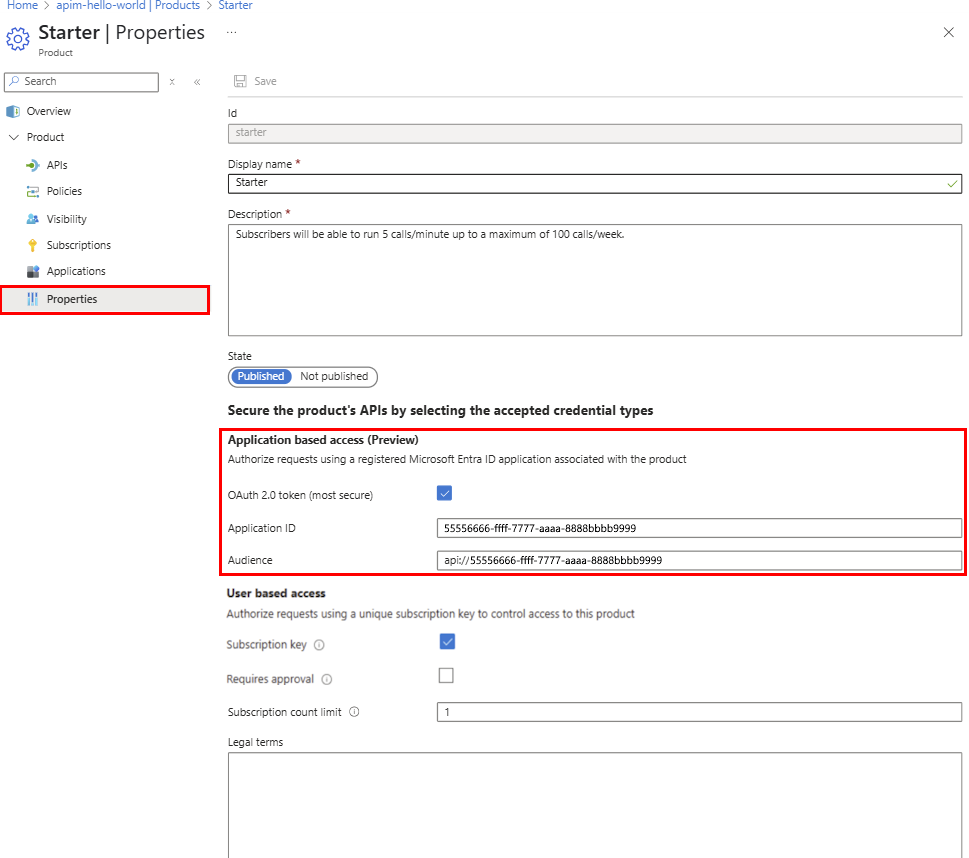
يؤدي تمكين الوصول المستند إلى التطبيق إلى إنشاء تطبيق مؤسسة خلفي في معرف Microsoft Entra لتمثيل المنتج. The backend application ID is displayed in the product's Properties page.
Note
This application ID is set as the Audience value when creating a client application to access the product. استخدم هذه القيمة أيضا عند إنشاء رمز مميز لاستدعاء واجهة برمجة تطبيقات المنتج.
(اختياري) مراجعة إعدادات تطبيق المنتج في معرف Microsoft Entra
مراجعة إعدادات تطبيق المؤسسة الخلفي الذي تم إنشاؤه في معرف Microsoft Entra بشكل اختياري لتمثيل المنتج.
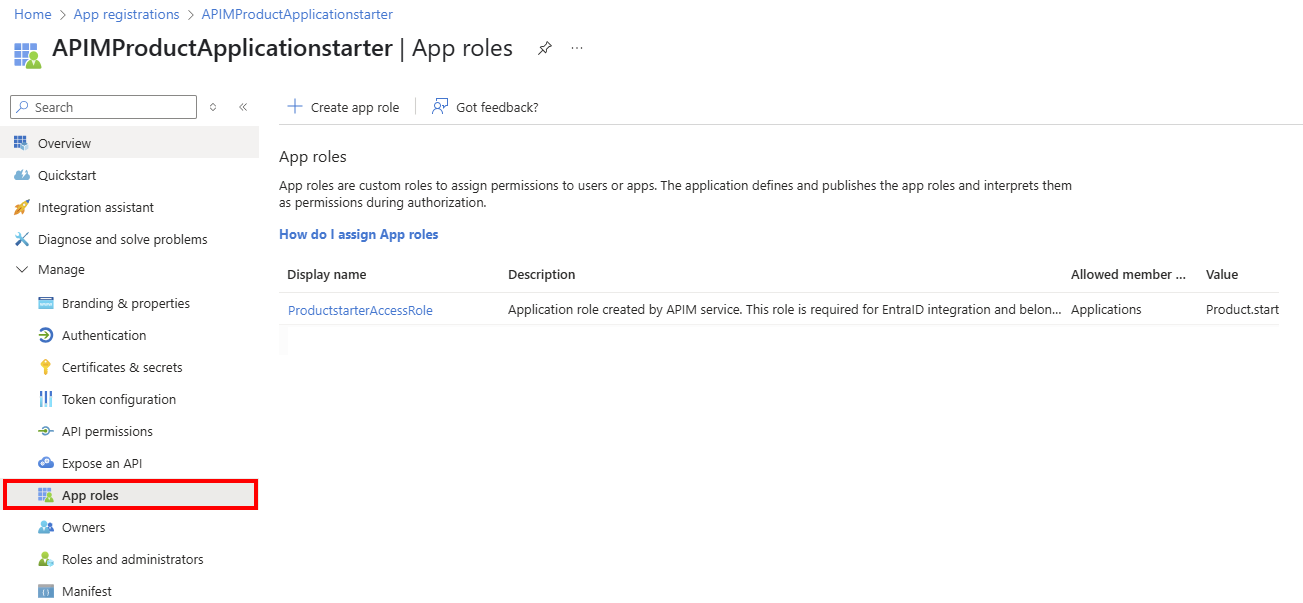
تمت تسمية التطبيق بالتنسيق التالي: اسم منتج< APIMProductApplication>. For example, if the product name is Starter, the application name is APIMProductApplicationStarter. The application has an App role defined.
To review application settings in App registrations:
- Sign in to the portal and navigate to Microsoft Entra ID>Manage>App registrations.
- Select All applications.
- ابحث عن التطبيق الذي أنشأته APIM وحدده.
- In the left menu, under Manage, select App roles.
- تأكد من دور التطبيق الذي تم تعيينه بواسطة Azure API Management، كما هو موضح في لقطة الشاشة التالية:
تسجيل تطبيق العميل للوصول إلى المنتج
الآن قم بتسجيل تطبيق عميل يحد من الوصول إلى منتج واحد أو أكثر.
- يجب تمكين الوصول المستند إلى التطبيق للمنتج ليتم ربطه بتطبيق عميل.
- يحتوي كل تطبيق عميل على مستخدم واحد (مالك) في مثيل APIM. يمكن للمالك فقط الوصول إلى واجهات برمجة التطبيقات للمنتج من خلال التطبيق.
- يمكن ربط المنتج بأكثر من تطبيق عميل واحد.
لتسجيل تطبيق عميل:
Sign in to the portal at the following custom URL for the applications feature: https://portal.azure.com/?feature.customPortal=false&Microsoft_Azure_ApiManagement=applications
انتقل إلى مثيل APIM الخاص بك.
In the left menu, under APIs, select Applications>+ Register application.
في صفحة تسجيل تطبيق ، أدخل إعدادات التطبيق التالية:
- Name: Enter a name for the application.
- Owner: Select the owner of the application from the dropdown list of users in the API Management instance.
- منح حق الوصول إلى المنتجات المحددة: حدد منتجا واحدا أو أكثر في مثيل APIM الذي تم تمكينه مسبقا للوصول المستند إلى التطبيق.
- Description: Optionally enter a description.
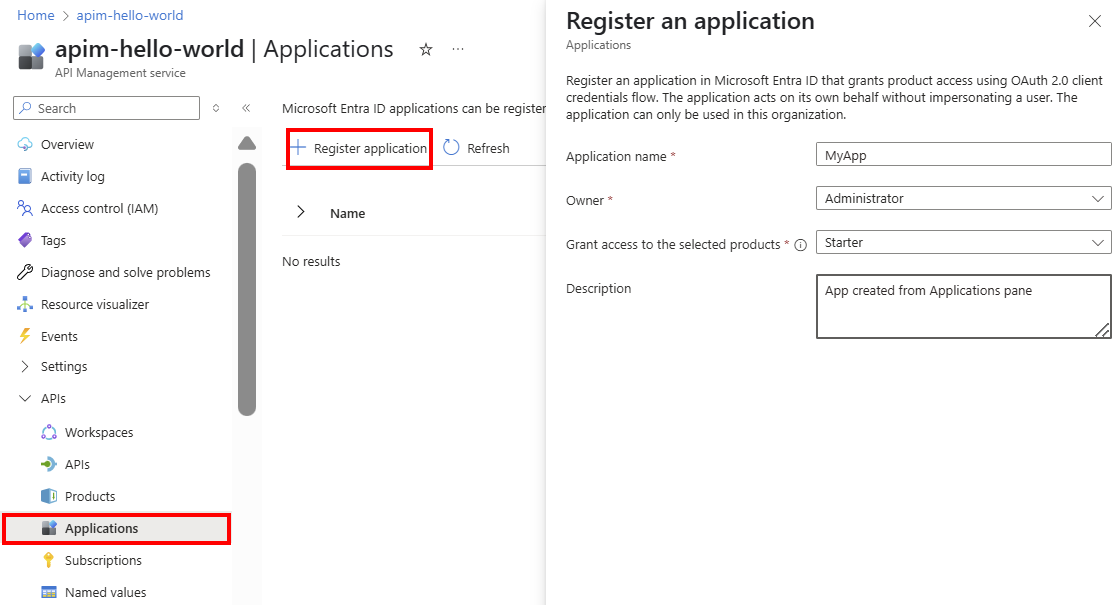
Select Register.
The application is added to the list of applications on the Applications page. Select the application to view details such as the Client ID. تحتاج إلى هذا المعرف لإنشاء رمز مميز لاستدعاء واجهة برمجة تطبيقات المنتج.
Tip
- بعد إنشاء تطبيق، قم بإقرانه اختياريا بمنتجات أخرى. Select the application on the Applications page, and then select Details>Products>+ Add product.
- You can also create or associate an application by editing a product from the Products page.
إنشاء سر العميل
يجب إنشاء سر العميل لتطبيق العميل لاستخدام تدفق بيانات اعتماد العميل OAuth 2.0. السر صالح لمدة سنة واحدة ولكن يمكن إعادة إنشائه في أي وقت.
On the Applications page, select the application that you created.
On the application's Overview page, next to Client Secret, select Add secret.
في صفحة New client secret ، حدد Generate.
A client secret is generated and displayed in the Client secret field. تأكد من نسخ القيمة السرية وتخزينها بأمان. لن تتمكن من استرداده مرة أخرى بعد إغلاق الصفحة.
Select Close.
(اختياري) مراجعة إعدادات تطبيق العميل في معرف Microsoft Entra
مراجعة إعدادات تطبيق العميل اختياريا في معرف Microsoft Entra.
تمت تسمية التطبيق بالتنسيق التالي: اسم منتج< APIMApplication>. For example, if the product name is Starter, the application name is similar to APIMApplicationStarter.
To review application settings in App registrations:
Sign in to the portal and navigate to Microsoft Entra ID>Manage>App registrations.
Select All applications.
ابحث عن تطبيق العميل الذي أنشأته APIM وحدده.
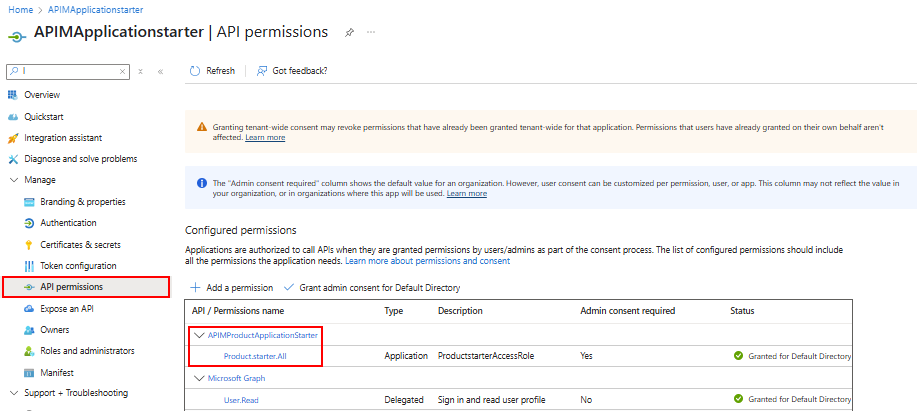
In the left menu, under Manage, select API permissions.
تأكد من أن التطبيق لديه أذونات للوصول إلى تطبيق أو تطبيقات المنتج الخلفية.
For example, if the client application grants access to the Starter product, the application has Product.Starter.All permissions to access the APIMProductApplicationStarter application.
الحصول على إعدادات التطبيق في مدخل المطور
يمكن للمستخدمين تسجيل الدخول إلى مدخل المطور لعرض تطبيقات العميل التي يمتلكونها.
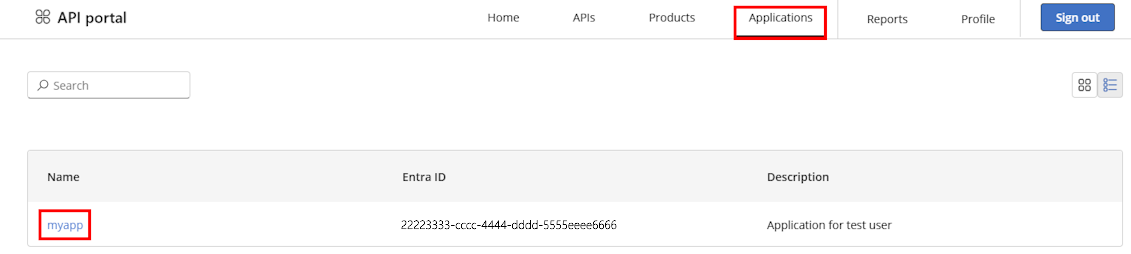
سجل الدخول إلى مدخل المطور (
https://<your-apim-instance-name>.developer.azure-api.net) باستخدام حساب مستخدم تم تعيينه كمالك لتطبيق عميل.In the top navigation menu, select Applications.
تظهر التطبيقات التي يمتلكها المستخدم في القائمة.
Select an application to view its details, such as the Client ID, Client secret, and Scope. هذه القيم مطلوبة لإنشاء رمز مميز لاستدعاء واجهات برمجة تطبيقات المنتج.
إنشاء رمز مميز واستخدامه مع استدعاء واجهة برمجة التطبيقات
بعد تمكين الوصول المستند إلى التطبيق لمنتج وتسجيل تطبيق عميل، يمكن للمطور أو التطبيق إنشاء رمز مميز لاستدعاء واجهات برمجة التطبيقات للمنتج. يجب تضمين الرمز المميز في Authorization رأس الطلب.
على سبيل المثال، يمكن للمطور أو التطبيق تشغيل البرامج النصية Azure PowerShell التالية لاستدعاء تطبيق العميل لإنشاء رمز مميز، ثم استخدام الرمز المميز لاستدعاء واجهة برمجة تطبيقات المنتج في APIM.
Caution
البرامج النصية التالية هي أمثلة لأغراض الاختبار فقط. في الإنتاج، استخدم أسلوبا آمنا لتخزين سر العميل واسترداده.
استدعاء تطبيق العميل لإنشاء رمز مميز
# Replace placeholder values with your own values.

$clientId = "00001111-aaaa-2222-bbbb-3333cccc4444" # Client (application) ID of client application
$clientSecret = "******" # Retrieve secret of client application in developer portal
$scopeOfOtherApp = "api://55556666-ffff-7777-aaaa-8888bbbb9999/.default" # Value of Audience in product properties
$tenantId = "aaaabbbb-0000-cccc-1111-dddd2222eeee" # Directory (tenant) ID in Microsoft Entra ID

$body = @{
    grant_type    = "client_credentials"
    client_id     = $clientId
    client_secret = $clientSecret
    scope         = $scopeOfOtherApp
}
$response = Invoke-RestMethod -Method Post -Uri "https://login.microsoftonline.com/$tenantId/oauth2/v2.0/token" -ContentType "application/x-www-form-urlencoded" -Body $body
$token = $response.access_token
استدعاء واجهة برمجة تطبيقات المنتج باستخدام الرمز المميز
يتم استخدام الرمز المميز الذي تم إنشاؤه في الخطوة السابقة لاستدعاء واجهة برمجة تطبيقات المنتج. The token is passed in the Authorization header of the request. يتحقق مثيل API Management من صحة الرمز المميز ويخول الوصول إلى واجهة برمجة التطبيقات.
يعرض البرنامج النصي التالي مثالا لاستدعاء واجهة برمجة تطبيقات echo.
# Gatewate endpoint to call. Update with URI of API operation you want to call.
$uri = "https://<gateway-hostname>/echo/resource?param1=sample"
$headers = @{
   "Authorization" = "Bearer $token"  # $token is the token generated in the previous script.
}
$body = @{
    "hello" = "world"
} | ConvertTo-Json -Depth 5

$getresponse = Invoke-RestMethod -Method Post -Uri $uri -ContentType "application/x-www-form-urlencoded" -Headers $headers -Body $body
Write-Host "Response:"
$getresponse | ConvertTo-Json -Depth 5
Troubleshooting
خطأ خادم داخلي عند تسجيل التطبيقات في المدخل
إذا لم تتمكن من سرد التطبيقات، أو تلقيت خطأ خادما داخليا عند تسجيل التطبيقات في المدخل، فتحقق مما يلي:
- The Application Administrator role is assigned to the API Management instance's managed identity in Microsoft Entra ID.
- You're signed in to the portal at the following custom URL for the applications feature: https://portal.azure.com/?feature.customPortal=false&Microsoft_Azure_ApiManagement=applications. عنوان URL هذا مطلوب للوصول إلى ميزة التطبيقات في APIM.