إشعار
يتطلب الوصول إلى هذه الصفحة تخويلاً. يمكنك محاولة تسجيل الدخول أو تغيير الدلائل.
يتطلب الوصول إلى هذه الصفحة تخويلاً. يمكنك محاولة تغيير الدلائل.
Azure DevOps Services
Tip
For the latest extension development guidance, including theming and migration from VSS.SDK, see the Azure DevOps Extension SDK developer portal.
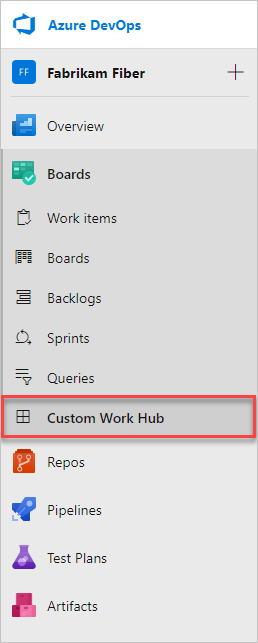
In this article, you create a hub that appears in Azure Boards after the Sprints and Queries hubs.
Prerequisites
- Node.js
- Extension packaging tool: run
npm install -g tfx-cli
Create the extension structure
Create a directory for your extension and initialize it:
mkdir my-hub-extension
cd my-hub-extension
npm init -y
npm install azure-devops-extension-sdk --save
Your directory should look like this:
|--- my-hub-extension
    |--- node_modules
        |--- azure-devops-extension-sdk
    |--- images
        |--- icon.png
    |--- hello-world.html
    |--- package.json
    |--- vss-extension.json
Create the hub page
Create hello-world.html in the root of your extension directory. This page loads the SDK, initializes it, and displays the current user's name.
<!DOCTYPE html>
<html xmlns="http://www.w3.org/1999/xhtml">
<head>
    <title>Hello World</title>
    <script src="https://cdnjs.cloudflare.com/ajax/libs/require.js/2.3.6/require.min.js"></script>
    <script>
        window.requirejs.config({
            enforceDefine: true,
            paths: {
                'SDK': './lib/SDK.min'
            }
        });
        window.requirejs(['SDK'], function (SDK) {
            SDK.init();
            SDK.ready().then(() => {
                document.getElementById("name").innerText = SDK.getUser().displayName;
            });
        });
    </script>
</head>
<body>
    <h1>Hello, <span id="name"></span></h1>
</body>
</html>
For the full list of hub groups you can target, see the Extensibility points reference.
Create the extension manifest
Create vss-extension.json in the root of your extension directory:
{
    "manifestVersion": 1,
    "id": "sample-extension",
    "version": "0.1.0",
    "name": "My first sample extension",
    "description": "A sample Azure DevOps extension.",
    "publisher": "fabrikamdev",
    "public": false,
    "categories": ["Azure Boards"],
    "targets": [
        {
            "id": "Microsoft.VisualStudio.Services"
        }
    ],
    "icons": {
        "default": "images/icon.png"
    },
    "contributions": [
        {
            "id": "hello-world-hub",
            "type": "ms.vss-web.hub",
            "description": "Adds a 'Hello' hub to the Work hub group.",
            "targets": [
                "ms.vss-work-web.work-hub-group"
            ],
            "properties": {
                "name": "Hello",
                "order": 99,
                "uri": "hello-world.html"
            }
        }
    ],
    "scopes": [
        "vso.work"
    ],
    "files": [
        {
            "path": "hello-world.html", "addressable": true
        },
        {
            "path": "node_modules/azure-devops-extension-sdk",
            "addressable": true,
            "packagePath": "lib"
        },
        {
            "path": "images/icon.png", "addressable": true
        }
    ]
}
Important
Change the publisher to your publisher name. To create a publisher, see Package, publish, and install. Keep public set to false during development.
Key manifest properties
| Property | Description |
|---|---|
| contributions | Declares the hub. The type is ms.vss-web.hub, and targets specifies which hub group to add it to. See Extensibility points for all targetable hub groups. |
| contributions.properties.name | Display name of the hub. |
| contributions.properties.order | Position of the hub within the hub group. |
| contributions.properties.uri | Path (relative to extension base URI) of the page to display as the hub. |
| scopes | Permissions the extension requires. vso.work grants read access to work items. See Scopes. |
| files | Files to include in the package. Set addressable: true for files that need a URL. |
For more information about the manifest, see Extension manifest reference.
Add a custom hub group
Instead of adding a hub to a built-in hub group, like Work or Code, create your own hub group and add hubs to it. Add both a ms.vss-web.hub-group contribution and a ms.vss-web.hub contribution that targets it:
"contributions": [
    {
        "id": "sample-hub-group",
        "type": "ms.vss-web.hub-group",
        "description": "Adds a 'Samples' hub group at the project level.",
        "targets": [
            "ms.vss-web.project-hub-groups-collection"
        ],
        "properties": {
            "name": "Samples",
            "order": 100
        }
    },
    {
        "id": "hello-hub",
        "type": "ms.vss-web.hub",
        "description": "Adds a 'Hello' hub to the Samples hub group.",
        "targets": [
            ".sample-hub-group"
        ],
        "properties": {
            "name": "Hello",
            "order": 99,
            "uri": "hello-world.html"
        }
    }
]
Key differences from adding a hub to a built-in group:
- The hub group contribution targets
ms.vss-web.project-hub-groups-collectionfor project-level orms.vss-web.collection-hub-groups-collectionfor organization-level. - The hub's
targetsarray uses a relative reference (.sample-hub-group) to point to the hub group defined in the same extension. - The
orderproperty on the hub group controls where the group appears in navigation.