إشعار
يتطلب الوصول إلى هذه الصفحة تخويلاً. يمكنك محاولة تسجيل الدخول أو تغيير الدلائل.
يتطلب الوصول إلى هذه الصفحة تخويلاً. يمكنك محاولة تغيير الدلائل.
Azure DevOps Services | Azure DevOps Server | Azure DevOps Server 2022
This article covers authentication for web extensions only. It doesn't apply to pipeline task extensions or service endpoint extensions.
Tip
For the latest extension development guidance, including theming and migration from VSS.SDK, see the Azure DevOps Extension SDK developer portal.
Call REST APIs from your extension
Most extensions call Azure DevOps REST APIs on behalf of the current user.
Using the SDK REST clients: Authentication is handled automatically. The clients request an access token from the SDK and set the
Authorizationheader.Using custom HTTP requests: Request a token from the SDK and set the header yourself:
import * as SDK from "azure-devops-extension-sdk";

SDK.init();

SDK.ready().then(async () => {
    const token = await SDK.getAccessToken();
    const authHeader = `Bearer ${token}`;

    // Use authHeader in your fetch/XMLHttpRequest calls
});
Authenticate requests to your service
When your extension calls a backend service you control, you need to verify the request came from your extension running in Azure DevOps. The SDK provides getAppToken(), which returns a JWT signed with your extension's certificate. Your service validates this token to authenticate the request.
Get your extension's key
Your extension's unique key is generated when you publish. Use it to verify the authenticity of tokens from your extension.
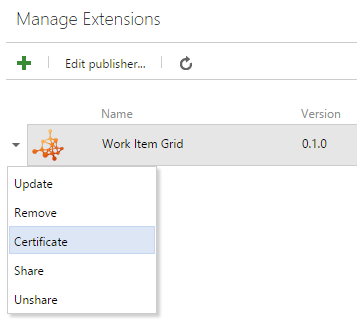
- Go to the extension management portal.
- Right-click your published extension and select Certificate.
Warning
Scope changes cause the certificate to change. Get a new key after modifying scopes.
Generate a token for your service
Use getAppToken() to get a JWT signed with your extension's certificate, then pass it to your service:
import * as SDK from "azure-devops-extension-sdk";

SDK.init();

SDK.ready().then(async () => {
    const token = await SDK.getAppToken();

    // Pass this token to your backend as a header or query parameter
    const response = await fetch("https://your-service.example.com/api/data", {
        headers: {
            "Authorization": `Bearer ${token}`
        }
    });
});
Validate the token
Your backend service validates the JWT using your extension's secret key. The following examples show how to implement validation.
Important
Never hardcode your extension secret in source code. Load it from environment variables, Azure Key Vault, or another secure configuration store.
.NET (console application)
Install the NuGet package:
dotnet add package System.IdentityModel.Tokens.Jwt
Note
Use version 7.x or later. Version 6.x and earlier are deprecated. See IdentityModel version lifecycle for details.
using System.IdentityModel.Tokens.Jwt;
using Microsoft.IdentityModel.Tokens;

string secret = Environment.GetEnvironmentVariable("EXTENSION_SECRET")
    ?? throw new InvalidOperationException("EXTENSION_SECRET not configured");
string issuedToken = ""; // Token from the extension request

var validationParameters = new TokenValidationParameters()
{
    IssuerSigningKey = new SymmetricSecurityKey(System.Text.Encoding.UTF8.GetBytes(secret)),
    ValidateIssuer = false,
    ValidateAudience = false,
    ValidateActor = false,
    RequireSignedTokens = true,
    RequireExpirationTime = true,
    ValidateLifetime = true
};

var tokenHandler = new JwtSecurityTokenHandler();
var principal = tokenHandler.ValidateToken(issuedToken, validationParameters, out SecurityToken token);
ASP.NET Core Web API
Install the NuGet package:
dotnet add package Microsoft.AspNetCore.Authentication.JwtBearer
Program.cs
using System.Text;
using Microsoft.AspNetCore.Authentication.JwtBearer;
using Microsoft.IdentityModel.Tokens;

var builder = WebApplication.CreateBuilder(args);

builder.Services.AddControllers();

string secret = builder.Configuration["ExtensionSecret"]
    ?? throw new InvalidOperationException("ExtensionSecret not configured");

builder.Services
    .AddAuthentication(JwtBearerDefaults.AuthenticationScheme)
    .AddJwtBearer(options =>
    {
        options.TokenValidationParameters = new TokenValidationParameters()
        {
            IssuerSigningKey = new SymmetricSecurityKey(Encoding.UTF8.GetBytes(secret)),
            ValidateIssuer = false,
            ValidateAudience = false,
            ValidateActor = false,
            RequireSignedTokens = true,
            RequireExpirationTime = true,
            ValidateLifetime = true
        };
    });

var app = builder.Build();

app.UseAuthentication();
app.UseRouting();
app.UseAuthorization();
app.MapControllers();

app.Run();
API Controller:
using Microsoft.AspNetCore.Authorization;
using Microsoft.AspNetCore.Mvc;

[Route("api/[controller]")]
[Authorize]
public class SampleLogicController : ControllerBase
{
   // Requests without a valid token return 401 Unauthorized
}