إشعار
يتطلب الوصول إلى هذه الصفحة تخويلاً. يمكنك محاولة تسجيل الدخول أو تغيير الدلائل.
يتطلب الوصول إلى هذه الصفحة تخويلاً. يمكنك محاولة تغيير الدلائل.
يوفر هذا البرنامج النصي التكوين لتسليم الأحداث إلى نقاط نهاية HTTPS المحمية بواسطة تطبيق Microsoft Entra باستخدام Azure Event Grid.
فيما يلي الخطوات عالية المستوى من البرنامج النصي:
- قم بإنشاء أساس خدمة لـ Microsoft.EventGrid إذا لم يكن موجودًا بالفعل.
- إنشاء دور يسمى AzureEventGridSecureWebhookSubscriber في تطبيق Microsoft Entra لخطاف الويب الخاص بك.
- قم بإنشاء أساس خدمة لتطبيق كاتب اشتراك الحدث إذا لم يكن موجودًا بالفعل.
- إضافة كيان خدمة كاتب اشتراك الحدث تطبيق Microsoft Entra إلى دور AzureEventGridSecureWebhookSubscriber
- إضافة خدمة رئيسية من Microsoft.EventGrid إلى دور AzureEventGridSecureWebhookSubscriber كذلك
الحصول على معرف تطبيق Microsoft.EventGrid
انتقل إلى مدخل Microsoft Azure.
في شريط البحث، اكتب
Microsoft.EventGrid، ثم حدد Microsoft.EventGrid (كيان الخدمة) في القائمة المنسدلة.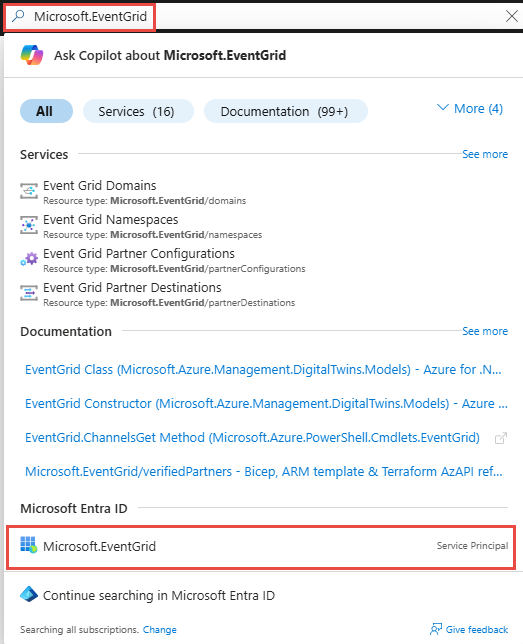
في صفحة Microsoft.EventGrid، دون معرف التطبيق أو انسخه إلى الحافظة.
في البرنامج النصي التالي، قم بتعيين
$eventGridAppIdالمتغير إلى هذه القيمة قبل تشغيله.
نموذج البرنامج النصي - مستقر
# NOTE: Before run this script ensure you are logged in Azure by using "az login" command.

$eventGridAppId = "[REPLACE_WITH_EVENT_GRID_APP_ID]"
$webhookAppObjectId = "[REPLACE_WITH_YOUR_ID]"
$eventSubscriptionWriterAppId = "[REPLACE_WITH_YOUR_ID]"


# Start execution
try {

    # Creates an application role of given name and description

    Function CreateAppRole([string] $Name, [string] $Description)
    {
        $appRole = New-Object Microsoft.Graph.PowerShell.Models.MicrosoftGraphAppRole
        $appRole.AllowedMemberTypes = New-Object System.Collections.Generic.List[string]
        $appRole.AllowedMemberTypes += "Application";
        $appRole.AllowedMemberTypes += "User";
        $appRole.DisplayName = $Name
        $appRole.Id = New-Guid
        $appRole.IsEnabled = $true
        $appRole.Description = $Description
        $appRole.Value = $Name;

        return $appRole
    }

    # Creates Azure Event Grid Microsoft Entra Application if not exists
    # You don't need to modify this id
    # But Azure Event Grid Entra Application Id is different for different clouds

    $eventGridSP = Get-MgServicePrincipal -Filter ("appId eq '" + $eventGridAppId + "'")
    if ($eventGridSP.DisplayName -match "Microsoft.EventGrid")
    {
        Write-Host "The Event Grid Microsoft Entra Application is already defined.`n"
    } else {
        Write-Host "Creating the Azure Event Grid Microsoft Entra Application"
        $eventGridSP = New-MgServicePrincipal -AppId $eventGridAppId
    }

    # Creates the Azure app role for the webhook Microsoft Entra application
    $eventGridRoleName = "AzureEventGridSecureWebhookSubscriber" # You don't need to modify this role name
    $app = Get-MgApplication -ApplicationId $webhookAppObjectId
    $appRoles = $app.AppRoles

    Write-Host "Microsoft Entra App roles before addition of the new role..."
    Write-Host $appRoles.DisplayName

    if ($appRoles.DisplayName -match $eventGridRoleName)
    {
        Write-Host "The Azure Event Grid role is already defined.`n"
    } else {
        Write-Host "Creating the Azure Event Grid role in Microsoft Entra Application: " $webhookAppObjectId
        $newRole = CreateAppRole -Name $eventGridRoleName -Description "Azure Event Grid Role"
        $appRoles += $newRole
        Update-MgApplication -ApplicationId $webhookAppObjectId -AppRoles $appRoles
    }

    Write-Host "Microsoft Entra App roles after addition of the new role..."
    Write-Host $appRoles.DisplayName

    # Creates the user role assignment for the app that will create event subscription

    $servicePrincipal = Get-MgServicePrincipal -Filter ("appId eq '" + $app.AppId + "'")
    $eventSubscriptionWriterSP = Get-MgServicePrincipal -Filter ("appId eq '" + $eventSubscriptionWriterAppId + "'")

    if ($null -eq $eventSubscriptionWriterSP)
    {
        Write-Host "Create new Microsoft Entra Application"
        $eventSubscriptionWriterSP = New-MgServicePrincipal -AppId $eventSubscriptionWriterAppId
    }

    try
    {
        Write-Host "Creating the Microsoft Entra Application role assignment: " $eventSubscriptionWriterAppId
        $eventGridAppRole = $app.AppRoles | Where-Object -Property "DisplayName" -eq -Value $eventGridRoleName
        New-MgServicePrincipalAppRoleAssignment -ServicePrincipalId $eventSubscriptionWriterSP.Id -PrincipalId $eventSubscriptionWriterSP.Id -ResourceId $servicePrincipal.Id -AppRoleId $eventGridAppRole.Id
    }
    catch
    {
        if( $_.Exception.Message -like '*Permission being assigned already exists on the object*')
        {
            Write-Host "The Microsoft Entra Application role is already defined.`n"
        }
        else
        {
            Write-Error $_.Exception.Message
        }
        Break
    }

    # Creates the service app role assignment for Event Grid Microsoft Entra Application

    $eventGridAppRole = $app.AppRoles | Where-Object -Property "DisplayName" -eq -Value $eventGridRoleName
    New-MgServicePrincipalAppRoleAssignment -ServicePrincipalId $eventGridSP.Id -PrincipalId $eventGridSP.Id -ResourceId $servicePrincipal.Id -AppRoleId $eventGridAppRole.Id

    # Print output references for backup

    Write-Host ">> Webhook's Microsoft Entra Application Id: $($app.AppId)"
    Write-Host ">> Webhook's Microsoft Entra Application ObjectId Id: $($app.ObjectId)"
}
catch {
  Write-Host ">> Exception:"
  Write-Host $_
  Write-Host ">> StackTrace:"
  Write-Host $_.ScriptStackTrace
}
شرح السيناريو
لمزيد من المعلومات، راجع تسليم WebHook الآمن باستخدام معرف Microsoft Entra في Azure Event Grid.