إشعار
يتطلب الوصول إلى هذه الصفحة تخويلاً. يمكنك محاولة تسجيل الدخول أو تغيير الدلائل.
يتطلب الوصول إلى هذه الصفحة تخويلاً. يمكنك محاولة تغيير الدلائل.
ابدأ مع Azure Virtual Network Manager باستخدام Bicep لإدارة الاتصال لجميع الشبكات الظاهرية.
في هذا التشغيل السريع، يمكنك نشر ثلاث شبكات ظاهرية واستخدام Azure Virtual Network Manager لإنشاء تخطيط شبكة شبكة اتصال. ثم تحقق من تطبيق تكوين الاتصال.
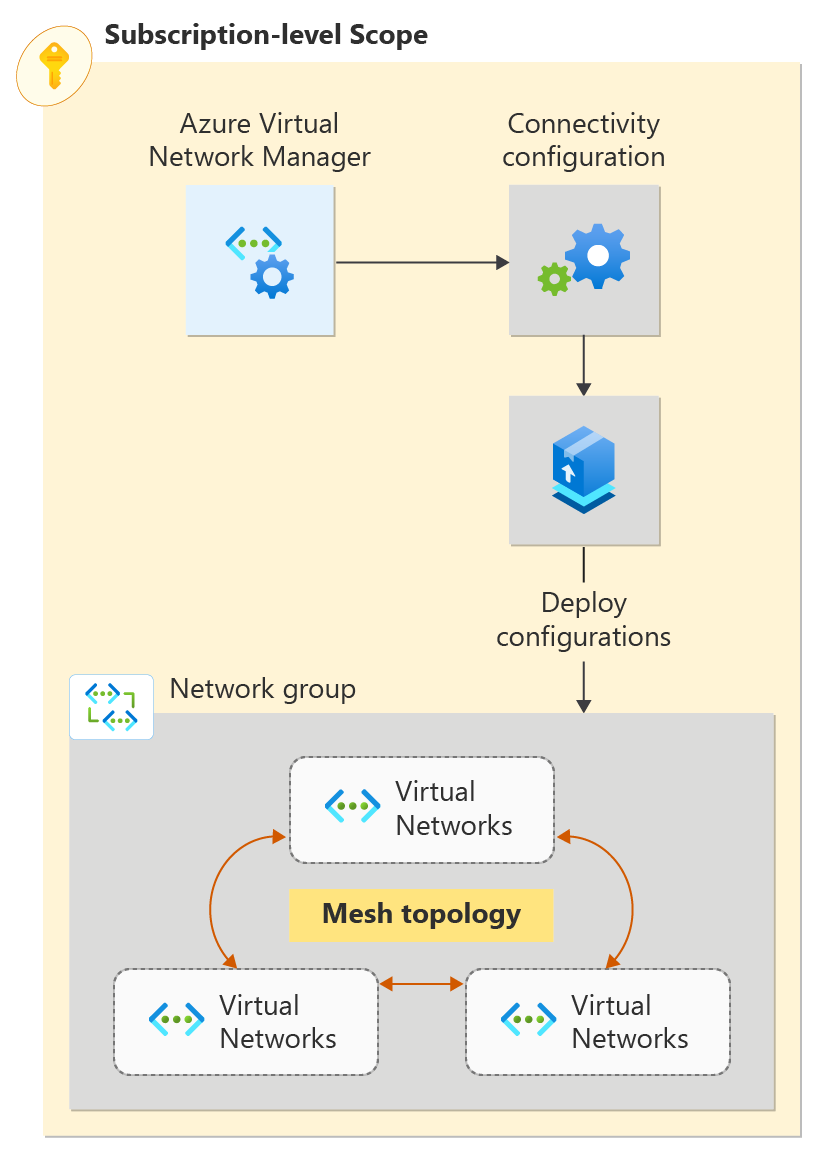
وحدات ملف Bicep
يتم تقسيم حل Bicep لهذا النموذج إلى وحدات لتمكين عمليات النشر في كل من مجموعة الموارد ونطاق الاشتراك. أقسام الملفات المفصلة أدناه هي المكونات الفريدة ل Virtual Network Manager. بالإضافة إلى الأقسام المفصلة أدناه، ينشر الحل الشبكات الظاهرية والهوية المعينة من قبل المستخدم وتعيين الدور.
إدارة الشبكة الظاهرية ومجموعات الشبكة وتكوينات الاتصال
مدير الشبكة الظاهرية
@description('This is the Azure Virtual Network Manager which will be used to implement the connected group for inter-vnet connectivity.')
resource networkManager 'Microsoft.Network/networkManagers@2022-09-01' = {
  name: 'vnm-learn-prod-${location}-001'
  location: location
  properties: {
    networkManagerScopeAccesses: [
      'Connectivity'
    ]
    networkManagerScopes: {
      subscriptions: [
        '/subscriptions/${subscription().subscriptionId}'
      ]
      managementGroups: []
    }
  }
}
مجموعات الشبكة
يدعم الحل إنشاء مجموعات شبكة عضوية ثابتة أو مجموعات شبكة عضوية ديناميكية. تحدد مجموعة شبكة العضوية الثابتة أعضائها حسب معرف الشبكة الظاهرية
مجموعة شبكة العضوية الثابتة
@description('This is the static network group for the all VNETs.')
resource networkGroupSpokesStatic 'Microsoft.Network/networkManagers/networkGroups@2022-09-01' = if (networkGroupMembershipType == 'static') {
  name: 'ng-learn-prod-${location}-static001'
  parent: networkManager
  properties: {
    description: 'Network Group - Static'
  }

  // add spoke vnets A, B, and C to the static network group
  resource staticMemberSpoke 'staticMembers@2022-09-01' = [for spokeMember in spokeNetworkGroupMembers: if (contains(groupedVNETs,last(split(spokeMember,'/')))) {
    name: 'sm-${(last(split(spokeMember, '/')))}'
    properties: {
      resourceId: spokeMember
    }
  }]

  resource staticMemberHub 'staticMembers@2022-09-01' = {
    name: 'sm-${(toLower(last(split(hubVnetId, '/'))))}'
    properties: {
      resourceId: hubVnetId
    }
  }
}
مجموعة شبكة العضوية الديناميكية
@description('This is the dynamic group for all VNETs.')
resource networkGroupSpokesDynamic 'Microsoft.Network/networkManagers/networkGroups@2022-09-01' = if (networkGroupMembershipType == 'dynamic') {
  name: 'ng-learn-prod-${location}-dynamic001'
  parent: networkManager
  properties: {
    description: 'Network Group - Dynamic'
  }
}
تكوين الاتصال
يربط تكوين الاتصال مجموعة الشبكة بطوبولوجيا الشبكة المحددة.
@description('This connectivity configuration defines the connectivity between VNETs using Direct Connection. The hub will be part of the mesh, but gateway routes from the hub will not propagate to spokes.')
resource connectivityConfigurationMesh 'Microsoft.Network/networkManagers/connectivityConfigurations@2022-09-01' = {
  name: 'cc-learn-prod-${location}-mesh001'
  parent: networkManager
  properties: {
    description: 'Mesh connectivity configuration'
    appliesToGroups: [
      {
        networkGroupId: (networkGroupMembershipType == 'static') ? networkGroupSpokesStatic.id : networkGroupSpokesDynamic.id
        isGlobal: 'False'
        useHubGateway: 'False'
        groupConnectivity: 'DirectlyConnected'
      }
    ]
    connectivityTopology: 'Mesh'
    deleteExistingPeering: 'True'
    hubs: []
    isGlobal: 'False'
  }
}
البرنامج النصي للتوزيع
لنشر التكوين إلى مجموعة الشبكة المستهدفة، يتم استخدام برنامج نصي للتوزيع لاستدعاء Deploy-AzNetworkManagerCommit أمر PowerShell. يحتاج البرنامج النصي للتوزيع إلى هوية بأذونات كافية لتنفيذ البرنامج النصي PowerShell مقابل Virtual Network Manager، لذلك ينشئ ملف Bicep هوية مدارة للمستخدم ويمنحها دور "المساهم" في مجموعة الموارد الهدف. لمزيد من المعلومات حول البرامج النصية للتوزيع والهويات المقترنة، راجع استخدام البرامج النصية للتوزيع في قوالب ARM.
@description('Create a Deployment Script resource to perform the commit/deployment of the Network Manager connectivity configuration.')
resource deploymentScript 'Microsoft.Resources/deploymentScripts@2020-10-01' = {
  name: deploymentScriptName
  location: location
  kind: 'AzurePowerShell'
  identity: {
    type: 'UserAssigned'
    userAssignedIdentities: {
      '${userAssignedIdentityId}': {}
    }
  }
  properties: {
    azPowerShellVersion: '8.3'
    retentionInterval: 'PT1H'
    timeout: 'PT1H'
    arguments: '-networkManagerName "${networkManagerName}" -targetLocations ${location} -configIds ${configurationId} -subscriptionId ${subscription().subscriptionId} -configType ${configType} -resourceGroupName ${resourceGroup().name}'
    scriptContent: '''
    param (
      # AVNM subscription id
      [parameter(mandatory=$true)][string]$subscriptionId,

      # AVNM resource name
      [parameter(mandatory=$true)][string]$networkManagerName,

      # string with comma-separated list of config ids to deploy. ids must be of the same config type
      [parameter(mandatory=$true)][string[]]$configIds,

      # string with comma-separated list of deployment target regions
      [parameter(mandatory=$true)][string[]]$targetLocations,

      # configuration type to deploy. must be either connectivity or securityadmin
      [parameter(mandatory=$true)][ValidateSet('Connectivity','SecurityAdmin')][string]$configType,

      # AVNM resource group name
      [parameter(mandatory=$true)][string]$resourceGroupName
    )

    $null = Login-AzAccount -Identity -Subscription $subscriptionId

    [System.Collections.Generic.List[string]]$configIdList = @()
    $configIdList.addRange($configIds)
    [System.Collections.Generic.List[string]]$targetLocationList = @() # target locations for deployment
    $targetLocationList.addRange($targetLocations)

    $deployment = @{
        Name = $networkManagerName
        ResourceGroupName = $resourceGroupName
        ConfigurationId = $configIdList
        TargetLocation = $targetLocationList
        CommitType = $configType
    }

    try {
      Deploy-AzNetworkManagerCommit @deployment -ErrorAction Stop
    }
    catch {
      Write-Error "Deployment failed with error: $_"
      throw "Deployment failed with error: $_"
    }
    '''
    }
}
نهج عضوية مجموعة الشبكة الديناميكية
عند تكوين النشر لاستخدام dynamic عضوية مجموعة الشبكة، ينشر الحل أيضا تعريف نهج Azure والتعيين. يتم عرض تعريف النهج أدناه.
@description('This is a Policy definition for dynamic group membership')
resource policyDefinition 'Microsoft.Authorization/policyDefinitions@2021-06-01' = {
  name: uniqueString(networkGroupId)
  properties: {
    description: 'AVNM quickstart dynamic group membership Policy'
    displayName: 'AVNM quickstart dynamic group membership Policy'
    mode: 'Microsoft.Network.Data'
    policyRule: {
      if: {
        allof: [
          {
            field: 'type'
            equals: 'Microsoft.Network/virtualNetworks'
          }
          {
            // virtual networks must have a tag where the key is '_avnm_quickstart_deployment'
            field: 'tags[_avnm_quickstart_deployment]'
            exists: true
          }
          {
            // virtual network ids must include this sample's resource group ID - limiting the chance that dynamic membership impacts other vnets in your subscriptions
            field: 'id'
            like: '${subscription().id}/resourcegroups/${resourceGroupName}/*'
          }
        ]
      }
      then: {
        // 'addToNetworkGroup' is a special effect used by AVNM network groups
        effect: 'addToNetworkGroup'
        details: {
          networkGroupId: networkGroupId
        }
      }
    }
  }
}
نشر حل Bicep
متطلبات التوزيع الأساسية
- حساب Azure مع اشتراك نشط. أنشئ حساباً مجاناً.
- أذونات لإنشاء تعريف نهج وتعيين نهج في نطاق الاشتراك الهدف (هذا مطلوب عند استخدام معلمة
networkGroupMembershipType=Dynamicالتوزيع لنشر موارد النهج المطلوبة لعضوية مجموعة الشبكة. الإعداد الافتراضي هوstatic، الذي لا يقوم بنشر نهج.
تنزيل حل Bicep
- قم بتنزيل أرشيف Zip لم repo MSPNP في هذا الارتباط
- استخراج ملف Zip الذي تم تنزيله وفي المحطة الطرفية الخاصة بك، انتقل إلى
solutions/avnm-mesh-connected-group/bicepالدليل.
بدلا من ذلك، يمكنك استخدام git لاستنساخ المستودع باستخدام git clone https://github.com/mspnp/samples.git
قم بالاتصال بـ Azure
تسجيل الدخول إلى حساب Azure وتحديد اشتراكك
لبدء التكوين، سجل الدخول إلى حساب Azure الخاص بك:
Connect-AzAccount
ثم اتصل باشتراكك:
Set-AzContext -Subscription <subscription name or id>
تثبيت الوحدة النمطية Azure PowerShell
تثبيت أحدث وحدة Az.Network Azure PowerShell باستخدام هذا الأمر:
Install-Module -Name Az.Network -RequiredVersion 5.3.0
معلمات التوزيع
- resourceGroupName: [مطلوب] تحدد هذه المعلمة اسم مجموعة الموارد حيث سيتم نشر مدير الشبكة الظاهرية وعينة الشبكات الظاهرية.
- الموقع: [مطلوب] تحدد هذه المعلمة موقع الموارد المراد نشرها.
-
networkGroupMembershipType: [اختياري] تحدد هذه المعلمة نوع عضوية مجموعة الشبكة المراد نشرها. الافتراضي هو
static، ولكن يمكن استخدام عضوية المجموعة الديناميكية عن طريق تحديدdynamic.
إشعار
يؤدي اختيار عضوية المجموعة الديناميكية إلى نشر نهج Azure لإدارة العضوية، مما يتطلب المزيد من الأذونات.
    $templateParameterObject = @{
        'location' = '<resourceLocation>'
        'resourceGroupName' = '<newOrExistingResourceGroup>'
    }
    New-AzSubscriptionDeployment -TemplateFile ./main.bicep -Location <deploymentLocation> -TemplateParameterObject $templateParameterObject
التحقق من توزيع التكوين
استخدم قسم Network Manager لكل شبكة ظاهرية للتحقق من أنك قمت بنشر التكوين الخاص بك:
انتقل إلى الشبكة الظاهرية vnet-learn-prod-{location}-spoke001 .
ضمن Settings، حدد Network Manager.
في علامة التبويب تكوينات الاتصال، تحقق من ظهور cc-learn-prod-{location}-mesh001 في القائمة.
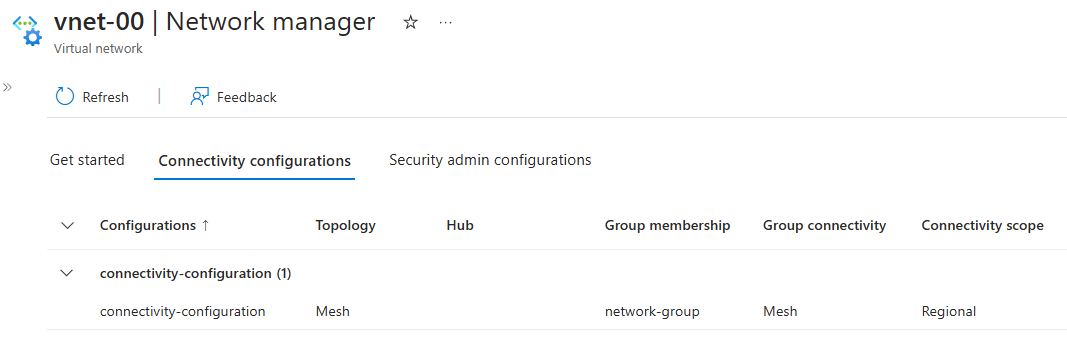
كرر الخطوات السابقة على vnet-learn-prod-{location}-spoke004--يجب أن ترى vnet-learn-prod-{location}-spoke004 مستبعد من تكوين الاتصال.
تنظيف الموارد
إذا لم تعد بحاجة إلى Azure Virtual Network Manager والشبكات الظاهرية المقترنة، يمكنك إزالتها عن طريق حذف مجموعة الموارد ومواردها.
- في مدخل Microsoft Azure، استعرض للوصول إلى مجموعة الموارد - مجموعة الموارد.
- حدد resource-group وحدد Delete resource group.
- في نافذة حذف مجموعة موارد، تأكد من رغبتك في الحذف عن طريق إدخال مجموعة الموارد في مربع النص، ثم حدد حذف.
- إذا كنت تستخدم Dynamic Network Group Membership، فاحذف تعريف نهج Azure المنشور والتعيين بالانتقال إلى الاشتراك في المدخل وتحديد النهج. في النهج، ابحث عن التعيين المسمى
AVNM quickstart dynamic group membership Policyواحذفه، ثم قم بنفس الشيء للتعريف المسمىAVNM quickstart dynamic group membership Policy.
الخطوات التالية
الآن بعد أن قمت بإنشاء مثيل Azure Virtual Network Manager، تعرف على كيفية حظر حركة مرور الشبكة باستخدام تكوين مسؤول الأمان: