إشعار
يتطلب الوصول إلى هذه الصفحة تخويلاً. يمكنك محاولة تسجيل الدخول أو تغيير الدلائل.
يتطلب الوصول إلى هذه الصفحة تخويلاً. يمكنك محاولة تغيير الدلائل.
يقوم تنسيق الدردشة الجماعية بنمذجة محادثة تعاونية بين وكلاء متعددين، يتم تنسيقها من قبل منسق يحدد تحديد السماعة وتدفق المحادثة. يعد هذا النمط مثاليا للسيناريوهات التي تتطلب تحسينا تكراريا أو حلا تعاونيا للمشكلات أو تحليلا متعدد المنظورات.
داخليا، يقوم تزامن الدردشة الجماعية بتجميع العوامل في مخطط نجمي، مع منسق في المنتصف. يمكن للمنسق تنفيذ استراتيجيات مختلفة لتحديد العامل الذي يتحدث بعد ذلك، مثل الترتيب الدوري أو التحديد المستند إلى المطالبة أو المنطق المخصص استنادا إلى سياق المحادثة، ما يجعله نمطا مرنا وقويا للتعاون متعدد العوامل.
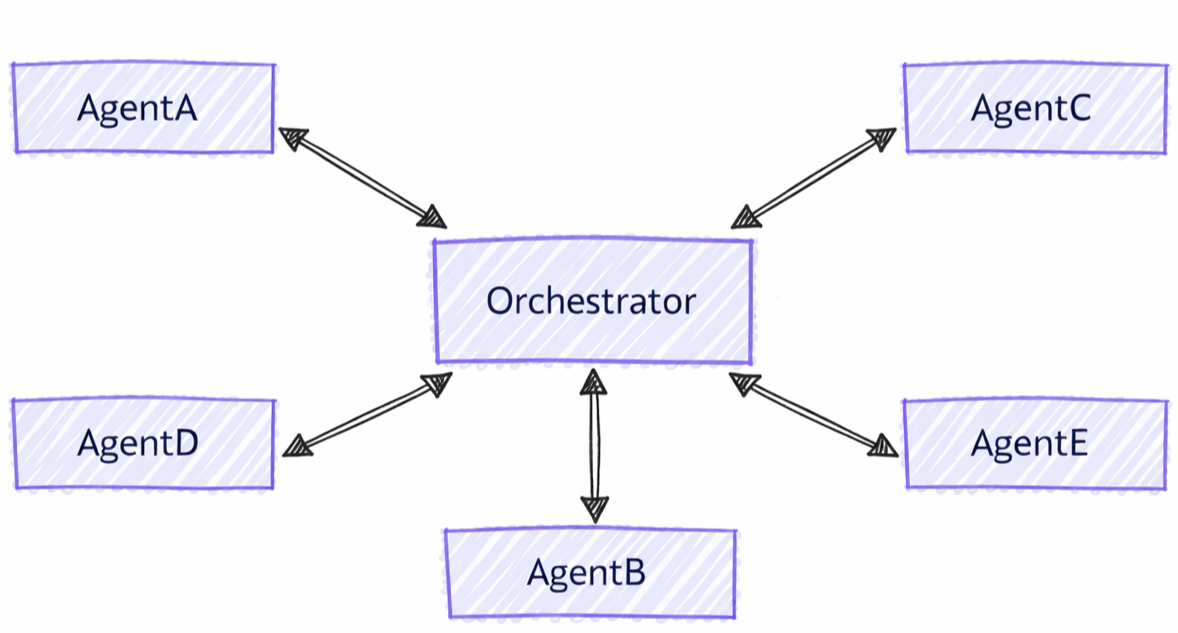
الاختلافات بين الدردشة الجماعية والأنماط الأخرى
يتميز تزامن الدردشة الجماعية بخصائص مميزة مقارنة بأنماط متعددة العوامل الأخرى:
- التنسيق المركزي: على عكس أنماط التسليم حيث يقوم الوكلاء بنقل التحكم مباشرة، تستخدم الدردشة الجماعية منسقا لتنسيق من يتحدث بعد ذلك
- التحسين التكراري: يمكن للوكلاء مراجعة استجابات بعضهم البعض والبناء عليها في جولات متعددة
- تحديد مكبر الصوت المرن: يمكن للمنسق استخدام استراتيجيات مختلفة (الترتيب الدوري، منطق مخصص يستند إلى المطالبة) لتحديد السماعات
- السياق المشترك: يرى جميع الوكلاء محفوظات المحادثات الكاملة، مما يتيح التحسين التعاوني
ما ستتعلمه
- كيفية إنشاء وكلاء متخصصين للتعاون الجماعي
- كيفية تكوين استراتيجيات تحديد المتحدث
- كيفية إنشاء مهام سير العمل مع تحسين العامل التكراري
- كيفية تخصيص تدفق المحادثة مع المنسقين المخصصين
إعداد عميل Azure OpenAI
using System;
using System.Collections.Generic;
using System.Threading.Tasks;
using Azure.AI.Projects;
using Azure.Identity;
using Microsoft.Agents.AI.Workflows;
using Microsoft.Extensions.AI;
using Microsoft.Agents.AI;

// Set up the Azure OpenAI client
var endpoint = Environment.GetEnvironmentVariable("AZURE_OPENAI_ENDPOINT") ??
    throw new InvalidOperationException("AZURE_OPENAI_ENDPOINT is not set.");
var deploymentName = Environment.GetEnvironmentVariable("AZURE_OPENAI_DEPLOYMENT_NAME") ?? "gpt-4o-mini";
var client = new AIProjectClient(new Uri(endpoint), new DefaultAzureCredential())
    .GetProjectOpenAIClient()
    .GetProjectResponsesClient()
    .AsIChatClient(deploymentName);
تحذير
DefaultAzureCredential مناسب للتنمية ولكنه يتطلب دراسة متأنية في الإنتاج. في الإنتاج، ضع في اعتبارك استخدام بيانات اعتماد محددة (على سبيل المثال، ManagedIdentityCredential) لتجنب مشكلات زمن الانتقال، وبحث بيانات الاعتماد غير المقصودة، والمخاطر الأمنية المحتملة من الآليات الاحتياطية.
تعريف وكلاءك
إنشاء وكلاء متخصصين لأدوار مختلفة في محادثة المجموعة:
// Create a copywriter agent
ChatClientAgent writer = new(client,
    "You are a creative copywriter. Generate catchy slogans and marketing copy. Be concise and impactful.",
    "CopyWriter",
    "A creative copywriter agent");

// Create a reviewer agent
ChatClientAgent reviewer = new(client,
    "You are a marketing reviewer. Evaluate slogans for clarity, impact, and brand alignment. " +
    "Provide constructive feedback or approval.",
    "Reviewer",
    "A marketing review agent");
تكوين دردشة جماعية مع منسق Round-Robin
إنشاء سير عمل الدردشة الجماعية باستخدام AgentWorkflowBuilder:
// Build group chat with round-robin speaker selection
// The manager factory receives the list of agents and returns a configured manager
var workflow = AgentWorkflowBuilder
    .CreateGroupChatBuilderWith(agents =>
        new RoundRobinGroupChatManager(agents)
        {
            MaximumIterationCount = 5  // Maximum number of turns
        })
    .AddParticipants(writer, reviewer)
    .Build();
تشغيل سير عمل دردشة المجموعة
تنفيذ سير العمل ومراقبة المحادثة التكرارية:
// Start the group chat
var messages = new List<ChatMessage> {
    new(ChatRole.User, "Create a slogan for an eco-friendly electric vehicle.")
};

await using StreamingRun run = await InProcessExecution.RunStreamingAsync(workflow, messages);
await run.TrySendMessageAsync(new TurnToken(emitEvents: true));

await foreach (WorkflowEvent evt in run.WatchStreamAsync().ConfigureAwait(false))
{
    if (evt is AgentResponseUpdateEvent update)
    {
        // Process streaming agent responses
        AgentResponse response = update.AsResponse();
        foreach (ChatMessage message in response.Messages)
        {
            Console.WriteLine($"[{update.ExecutorId}]: {message.Text}");
        }
    }
    else if (evt is WorkflowOutputEvent output)
    {
        // Workflow completed
        var conversationHistory = output.As<List<ChatMessage>>();
        Console.WriteLine("\n=== Final Conversation ===");
        foreach (var message in conversationHistory)
        {
            Console.WriteLine($"{message.AuthorName}: {message.Text}");
        }
        break;
    }
}
نموذج التفاعل
[CopyWriter]: "Green Dreams, Zero Emissions" - Drive the future with style and sustainability.

[Reviewer]: The slogan is good, but "Green Dreams" might be a bit abstract. Consider something
more direct like "Pure Power, Zero Impact" to emphasize both performance and environmental benefit.

[CopyWriter]: "Pure Power, Zero Impact" - Experience electric excellence without compromise.

[Reviewer]: Excellent! This slogan is clear, impactful, and directly communicates the key benefits.
The tagline reinforces the message perfectly. Approved for use.

[CopyWriter]: Thank you! The final slogan is: "Pure Power, Zero Impact" - Experience electric
excellence without compromise.
إعداد عميل الدردشة
import os

from agent_framework.foundry import FoundryChatClient
from azure.identity import AzureCliCredential

# Initialize the Azure OpenAI client
client = FoundryChatClient(
    project_endpoint=os.environ["FOUNDRY_PROJECT_ENDPOINT"],
    model=os.environ["FOUNDRY_MODEL"],
    credential=AzureCliCredential(),
)
تعريف وكلاءك
إنشاء وكلاء متخصصين بأدوار متميزة:
from agent_framework import Agent

# Create a researcher agent
researcher = Agent(
    client=client,
    name="Researcher",
    description="Collects relevant background information.",
    instructions="Gather concise facts that help answer the question. Be brief and factual.",
)

# Create a writer agent
writer = Agent(
    client=client,
    name="Writer",
    description="Synthesizes polished answers using gathered information.",
    instructions="Compose clear, structured answers using any notes provided. Be comprehensive.",
)
تكوين دردشة جماعية باستخدام محدد بسيط
إنشاء دردشة جماعية باستخدام منطق تحديد مكبر الصوت المخصص:
from agent_framework.orchestrations import GroupChatBuilder, GroupChatState

def round_robin_selector(state: GroupChatState) -> str:
    """A round-robin selector function that picks the next speaker based on the current round index."""

    participant_names = list(state.participants.keys())
    return participant_names[state.current_round % len(participant_names)]


# Build the group chat workflow
workflow = GroupChatBuilder(
    participants=[researcher, writer],
    termination_condition=lambda conversation: len(conversation) >= 4,
    intermediate_output_from=[researcher, writer],
    selection_func=round_robin_selector,
).build()
تكوين دردشة جماعية مع منسق Agent-Based
بدلا من ذلك، استخدم منسقا يستند إلى عامل لتحديد مكبر صوت ذكي. المنسق ممتلئ Agent بإمكانية الوصول إلى الأدوات والسياق وإمكانية الملاحظة:
# Create orchestrator agent for speaker selection
orchestrator_agent = Agent(
    name="Orchestrator",
    description="Coordinates multi-agent collaboration by selecting speakers",
    instructions="""
You coordinate a team conversation to solve the user's task.

Guidelines:
- Start with Researcher to gather information
- Then have Writer synthesize the final answer
- Only finish after both have contributed meaningfully
""",
    client=client,
)

# Build group chat with agent-based orchestrator
workflow = GroupChatBuilder(
    participants=[researcher, writer],
    # Set a hard termination condition: stop after 4 assistant messages
    # The agent orchestrator will intelligently decide when to end before this limit but just in case
    termination_condition=lambda messages: sum(1 for msg in messages if msg.role == "assistant") >= 4,
    orchestrator_agent=orchestrator_agent,
    intermediate_output_from=[researcher, writer],
).build()
تشغيل سير عمل دردشة المجموعة
تنفيذ سير العمل ومعالجة تحديثات المشاركين المتدفقين. إخراج المحطة الطرفية غير المتدفقة AgentResponseهو ؛ يتم إصدار إخراج محطة البث كقطع AgentResponseUpdate .
from agent_framework import AgentResponseUpdate, Message

task = "What are the key benefits of async/await in Python?"

print(f"Task: {task}\n")
print("=" * 80)

last_author: str | None = None
# Run the workflow with streaming enabled
stream = workflow.run(task, stream=True)
async for event in stream:
    if event.type in ("intermediate", "output") and isinstance(event.data, AgentResponseUpdate):
        # Print streaming agent updates
        author = event.data.author_name
        if author != last_author:
            if last_author is not None:
                print()
            print(f"[{author}]:", end=" ", flush=True)
            last_author = author
        print(event.data.text, end="", flush=True)
result = await stream.get_final_response()
if outputs := result.get_outputs():
    print("\n\n" + "=" * 80)
    print("Final Response:")
    print(outputs[-1])

print("\nWorkflow completed.")
نموذج التفاعل
Task: What are the key benefits of async/await in Python?

================================================================================

[Researcher]: Async/await in Python provides non-blocking I/O operations, enabling
concurrent execution without threading overhead. Key benefits include improved
performance for I/O-bound tasks, better resource utilization, and simplified
concurrent code structure using native coroutines.

[Writer]: The key benefits of async/await in Python are:

1. **Non-blocking Operations**: Allows I/O operations to run concurrently without
   blocking the main thread, significantly improving performance for network
   requests, file I/O, and database queries.

2. **Resource Efficiency**: Avoids the overhead of thread creation and context
   switching, making it more memory-efficient than traditional threading.

3. **Simplified Concurrency**: Provides a clean, synchronous-looking syntax for
   asynchronous code, making concurrent programs easier to write and maintain.

4. **Scalability**: Enables handling thousands of concurrent connections with
   minimal resource consumption, ideal for high-performance web servers and APIs.

--------------------------------------------------------------------------------

Workflow completed.
إعداد تكوين Foundry
endpoint := os.Getenv("FOUNDRY_PROJECT_ENDPOINT")
model := cmp.Or(os.Getenv("FOUNDRY_MODEL"), "gpt-4o-mini")

token, err := azidentity.NewDefaultAzureCredential(nil)
if err != nil {
    return err
}
تحذير
azidentity.NewDefaultAzureCredential مناسب للتنمية ولكنه يتطلب دراسة متأنية في الإنتاج. في الإنتاج، ضع في اعتبارك استخدام بيانات اعتماد معينة، مثل azidentity.NewManagedIdentityCredential، لتجنب مشكلات زمن الانتقال، وبحث بيانات الاعتماد غير المقصودة، والمخاطر الأمنية المحتملة من الآليات الاحتياطية.
تعريف وكلاءك
إنشاء وكلاء متخصصين بأدوار مميزة في المحادثة:
copywriter := foundryprovider.NewAgent(
    endpoint,
    token,
    foundryprovider.ModelDeployment(model),
    foundryprovider.AgentConfig{
        Instructions: "You are a creative copywriter. Generate catchy slogans and marketing copy. Be concise and impactful.",
        Config:      agent.Config{Name: "CopyWriter"},
    },
)

reviewer := foundryprovider.NewAgent(
    endpoint,
    token,
    foundryprovider.ModelDeployment(model),
    foundryprovider.AgentConfig{
        Instructions: "You are a marketing reviewer. Evaluate slogans for clarity, impact, and brand alignment. Provide constructive feedback or approval.",
        Config:      agent.Config{Name: "Reviewer"},
    },
)
تكوين دردشة جماعية مع Round-Robin Manager
إنشاء سير عمل الدردشة الجماعية باستخدام agentworkflow.NewGroupChatWorkflowBuilder. يأخذ المنشئ مصنع مدير والوكلاء المشاركين.
NewRoundRobinGroupChatManager يحدد كل عامل بدوره ويتوقف بعد تكوين الحد الأقصى لعدد المشاركين.
managerFactory := func(agents []*agent.Agent) *agentworkflow.GroupChatManager {
    return agentworkflow.NewRoundRobinGroupChatManager(
        agents,
        agentworkflow.RoundRobinGroupChatOptions{MaximumIterationCount: 5},
    )
}

wf, err := agentworkflow.NewGroupChatWorkflowBuilder(managerFactory, copywriter, reviewer).
    WithName("Marketing Review Group Chat").
    WithDescription("A copywriter and reviewer collaborate on marketing copy.").
    Build()
if err != nil {
    return err
}
تشغيل سير عمل دردشة المجموعة
تشغيل سير العمل مع رسالة مستخدم ورمز تحويل. عند تمكين انبعاث الحدث، تصل تحديثات المشاركين كأحداث إخراج وسيطة وتصل النسخة النهائية كحدث إخراج طرفي.
run, err := inproc.Default.RunStreaming(ctx, wf, []*message.Message{
    message.NewText("Create a slogan for an eco-friendly electric vehicle."),
})
if err != nil {
    return err
}
defer run.Close(ctx)

emitEvents := true
if accepted, err := run.TrySendMessage(ctx, workflow.TurnToken{EmitEvents: &emitEvents}); err != nil {
    return err
} else if !accepted {
    return fmt.Errorf("workflow doesn't accept turn tokens")
}

lastExecutorID := ""
for evt, err := range run.WatchStream(ctx) {
    if err != nil {
        return err
    }

    switch e := evt.(type) {
    case workflow.OutputEvent:
        switch value := e.Output.(type) {
        case *agent.ResponseUpdate:
            if e.ExecutorID != lastExecutorID {
                lastExecutorID = e.ExecutorID
                fmt.Printf("\n[%s]: ", e.ExecutorID)
            }
            fmt.Print(value.String())
        case []*message.Message:
            fmt.Println("\n\n=== Final Conversation ===")
            for _, msg := range value {
                author := msg.AuthorName
                if author == "" {
                    author = string(msg.Role)
                }
                fmt.Printf("%s: %s\n", author, msg.String())
            }
        }
    case workflow.ErrorEvent:
        return e.Error
    case workflow.ExecutorFailedEvent:
        return fmt.Errorf("executor %q failed: %w", e.ExecutorID, e.Error)
    }
}
نموذج التفاعل
[CopyWriter]: "Pure Power, Zero Impact" - Experience electric performance without compromise.

[Reviewer]: This is clear and memorable. It communicates performance and sustainability directly.
Approved.

[CopyWriter]: The final slogan is: "Pure Power, Zero Impact" - Experience electric performance
without compromise.

=== Final Conversation ===
user: Create a slogan for an eco-friendly electric vehicle.
CopyWriter: "Pure Power, Zero Impact" - Experience electric performance without compromise.
Reviewer: This is clear and memorable. It communicates performance and sustainability directly. Approved.
CopyWriter: The final slogan is: "Pure Power, Zero Impact" - Experience electric performance without compromise.
المفاهيم الأساسية
- الإدارة المركزية: تستخدم الدردشة الجماعية مديرا لتنسيق تحديد السماعة وتدفقها
- AgentWorkflowBuilder.CreateGroupChatBuilderWith(): إنشاء مهام سير عمل باستخدام وظيفة مصنع مدير
- RoundRobinGroupChatManager: مدير مضمن يتناوب المتحدثين بطريقة round-robin
- MaximumIterationCount: يتحكم في الحد الأقصى لعدد عوامل التشغيل قبل الإنهاء
-
Custom Managers: توسيع
RoundRobinGroupChatManagerأو تنفيذ منطق مخصص - التحسين التكراري: يراجع الوكلاء مساهمات بعضهم البعض ويحسنونها
- السياق المشترك: يرى جميع المشاركين محفوظات المحادثات الكاملة
-
استراتيجيات المنسق المرنة: اختر بين محددات بسيطة أو منسقين مستندين إلى عامل أو منطق مخصص عبر معلمات المنشئ (
selection_funcأوorchestrator_agentأو ).orchestrator - GroupChatBuilder: إنشاء مهام سير العمل مع تحديد مكبر صوت قابل للتكوين
- GroupChatState: يوفر حالة المحادثة لاتخاذ قرارات التحديد
- التعاون التكراري: يعتمد الوكلاء على مساهمات بعضهم البعض
-
AgentResponse Output: إخراج المحطة الطرفية هو رسالة
AgentResponseإكمال تحتوي على المنسق -
دفق الأحداث: معالجة
AgentResponseUpdateالأحداث في الوقت الفعلي عبرworkflow.run(task, stream=True) -
المخرجات المتوسطة: تمرير
intermediate_output_from=[participant, ...]لعرض إخراج كل مشارك مدرج كأحداث"intermediate"، بالإضافة إلى الحدث الطرفي"output"للمنسق
- GroupChatWorkflowBuilder: إنشاء سير عمل مخطط النجوم مع مضيف دردشة جماعية في المركز والوكلاء المستضافين كمشاركين
- GroupChatManager: يحدد المشارك التالي، ويمكنه تحديث محفوظات البث، ويمكنه إنهاء المحادثة
- NewRoundRobinGroupChatManager: مدير مضمن يتناوب المشاركين بترتيب الترتيب الدوري
- RoundRobinGroupChatOptions: تكوين الحد الأقصى لعدد دورات المشاركين ودالة إنهاء اختيارية
- أحداث الإخراج: بشكل افتراضي، تكون مخرجات المشاركين أحداثا متوسطة وينتج مضيف دردشة المجموعة النسخة الطرفية
-
Custom Managers: تنفيذ
SelectNextAgentعمليات رد اتصال دورة الحياة واختيارية لتحديد مكبر الصوت المخصص أو الحالة التي تم فحصها
خيارات متقدمة: تحديد مكبر صوت مخصص
يمكنك تنفيذ منطق مدير مخصص عن طريق إنشاء مدير دردشة مجموعة مخصص:
public class ApprovalBasedManager : RoundRobinGroupChatManager
{
    private readonly string _approverName;

    public ApprovalBasedManager(IReadOnlyList<AIAgent> agents, string approverName)
        : base(agents)
    {
        _approverName = approverName;
    }

    // Override to add custom termination logic
    protected override ValueTask<bool> ShouldTerminateAsync(
        IReadOnlyList<ChatMessage> history,
        CancellationToken cancellationToken = default)
    {
        var last = history.LastOrDefault();
        bool shouldTerminate = last?.AuthorName == _approverName &&
            last.Text?.Contains("approve", StringComparison.OrdinalIgnoreCase) == true;

        return ValueTask.FromResult(shouldTerminate);
    }
}

// Use custom manager in workflow
var workflow = AgentWorkflowBuilder
    .CreateGroupChatBuilderWith(agents =>
        new ApprovalBasedManager(agents, "Reviewer")
        {
            MaximumIterationCount = 10
        })
    .AddParticipants(writer, reviewer)
    .Build();
يمكنك تنفيذ منطق تحديد متطور استنادا إلى حالة المحادثة:
def smart_selector(state: GroupChatState) -> str:
    """Select speakers based on conversation content and context."""
    conversation = state.conversation

    last_message = conversation[-1] if conversation else None

    # If no messages yet, start with Researcher
    if not last_message:
        return "Researcher"

    # Check last message content
    last_text = last_message.text.lower()

    # If researcher finished gathering info, switch to writer
    if "i have finished" in last_text and last_message.author_name == "Researcher":
        return "Writer"

    # Else continue with researcher until it indicates completion
    return "Researcher"

workflow = GroupChatBuilder(
    participants=[researcher, writer],
    selection_func=smart_selector,
).build()
Important
عند استخدام تطبيق BaseGroupChatOrchestrator مخصص للسيناريوهات المتقدمة، يجب تعيين جميع الخصائص، بما في ذلك participant_registryو max_roundsو.termination_condition
max_rounds وسيتم تجاهل وتعيين termination_condition في المنشئ.
مخرجات متوسطة
بشكل افتراضي، يظهر الإخراج النهائي للمنسق فقط كحدث سير عمل "output" (محطة طرفية). مرر intermediate_output_from مع المشاركين الذين تريد تعيينهم كمصادر وسيطة لعرض مخرجاتهم الفردية كأحداث "intermediate" :
workflow = GroupChatBuilder(
    participants=[researcher, writer],
    termination_condition=lambda conversation: len(conversation) >= 4,
    selection_func=round_robin_selector,
    intermediate_output_from=[researcher, writer],
).build()
تنفيذ تحديد مكبر الصوت المخصص عن طريق إرجاع GroupChatManager من مصنع مدير المنشئ:
type approvalManager struct {
    agents []*agent.Agent
}

func newApprovalManager(agents []*agent.Agent) *agentworkflow.GroupChatManager {
    manager := &approvalManager{agents: agents}
    return &agentworkflow.GroupChatManager{
        SelectNextAgent: manager.selectNextAgent,
        ShouldTerminate: manager.shouldTerminate,
    }
}

func (m *approvalManager) selectNextAgent(_ context.Context, history []*message.Message) (*agent.Agent, error) {
    last := lastAssistantMessage(history)
    if last == nil || last.AuthorName == "Reviewer" {
        return m.agentByName("CopyWriter")
    }
    return m.agentByName("Reviewer")
}

func (m *approvalManager) shouldTerminate(_ context.Context, history []*message.Message, iterationCount int) (bool, error) {
    if iterationCount >= 10 {
        return true, nil
    }
    last := lastAssistantMessage(history)
    return last != nil &&
        last.AuthorName == "Reviewer" &&
        strings.Contains(strings.ToLower(last.String()), "approve"), nil
}

func (m *approvalManager) agentByName(name string) (*agent.Agent, error) {
    for _, currentAgent := range m.agents {
        if currentAgent.Name() == name {
            return currentAgent, nil
        }
    }
    return nil, fmt.Errorf("agent %q is not part of the group chat", name)
}

func lastAssistantMessage(history []*message.Message) *message.Message {
    for i := len(history) - 1; i >= 0; i-- {
        if history[i].Role == message.RoleAssistant {
            return history[i]
        }
    }
    return nil
}

wf, err := agentworkflow.NewGroupChatWorkflowBuilder(newApprovalManager, copywriter, reviewer).
    WithName("Approval Group Chat").
    Build()
GroupChatManagerيدعم UpdateHistoryResetOnCheckpointأيضا عمليات رد الاتصال و OnCheckpointRestored للمديرين المتقدمين الذين يرشحون رسائل البث أو يستمرون في الحالة المملوكة للمدير.
مخرجات متوسطة
بشكل افتراضي، GroupChatWorkflowBuilder يصدر مخرجات المشارك كمخرجات سير عمل وسيطة ويصدر نص المحادثة المتراكمة كإخراج طرفي. يستخدم OutputEvent.IsIntermediate() لتمييز تحديثات المشاركين عن النسخة النهائية:
if output, ok := evt.(workflow.OutputEvent); ok {
    if output.IsIntermediate() {
        fmt.Printf("intermediate from %s: %v\n", output.ExecutorID, output.Output)
        return nil
    }

    fmt.Printf("terminal output: %v\n", output.Output)
}
يؤدي الاتصال WithOutputFrom أو WithIntermediateOutputFrom على منشئ الدردشة الجماعية إلى التبديل إلى تعيين الإخراج الصريح. استخدم هذه الأساليب عندما تريد مخرجات المشارك المحدد بدلا من النسخة النهائية الافتراضية بالإضافة إلى جميع مخرجات المشارك الوسيطة.
مزامنة السياق
كما هو مذكور في بداية هذا الدليل، يرى جميع الوكلاء في دردشة جماعية محفوظات المحادثات المتزامنة.
يعتمد الوكلاء في إطار عمل العامل على جلسات العامل (AgentSession) لإدارة السياق. في تزامن الدردشة الجماعية، لا يشارك الوكلاء نفس مثيل جلسة العمل، ولكن يقوم المنسق بمزامنة جلسة كل عامل مع محفوظات المحادثات قبل كل دورة. يبث المنسق الاستجابة لجميع الوكلاء الآخرين بعد دور كل وكيل، ما يضمن حصول جميع المشاركين على أحدث سياق بدورهم التالي.
يحافظ Python على نص المستخدم والبيانات المضمنة وعناوين URL والملفات المستضافة ومخازن المتجهات المستضافة في محفوظات دردشة المجموعة المتزامنة. تحتفظ الرسائل غير الخاصة بالمستخدم بالنص فقط، وتتم تصفية استدعاءات الوظائف ونتائج الوظائف وحمولة الموافقة ومحتوى التحكم في الأدوات الأخرى قبل البث.
Tip
لتنقيح نص المشارك أو حجبه قبل إدخال المحفوظات المشتركة أو الوصول إلى مشاركين آخرين، قم بتصفيته في معالج استجابة المشارك المخصص GroupChatOrchestrator . تصفية الأحداث التي تم إرجاعها بواسطة workflow.run() متأخرة جدا لأن الاستجابة الأصلية مخزنة بالفعل وبثها.
راجع نموذج تصفية استجابة الدردشة الجماعية.
تحمي العينة حدود المحفوظات والبث المشتركة؛ لا يزيل المحتوى الأصلي من جلسة عمل العامل المرسل أو أدواته أو موفر النموذج أو بيانات تتبع الاستخدام أو أحداث دورة حياة سير العمل السابقة.
Tip
لا يشترك الوكلاء في نفس مثيل جلسة العمل لأن أنواع الوكلاء المختلفة قد يكون لها تطبيقات مختلفة للتجريد AgentSession . قد تؤدي مشاركة نفس مثيل الجلسة إلى عدم تناسق في كيفية معالجة كل عامل للسياق والحفاظ عليه.
بعد بث الاستجابة، يقرر المنسق المتحدث التالي ويرسل طلبا إلى العامل المحدد، والذي يحتوي الآن على محفوظات المحادثات المحدثة لإنشاء استجابته.
متى تستخدم الدردشة الجماعية
يعد تنسيق الدردشة الجماعية مثاليا ل:
- التحسين التكراري: جولات متعددة من المراجعة والتحسين
- التعاون في حل المشكلات: الوكلاء ذوي الخبرة التكميلية الذين يعملون معا
- إنشاء المحتوى: سير عمل Writer-reviewer لإنشاء المستند
- تحليل متعدد المنظورات: الحصول على وجهات نظر متنوعة حول نفس الإدخال
- ضمان الجودة: عمليات المراجعة والموافقة التلقائية
ضع في اعتبارك البدائل عندما:
- تحتاج إلى معالجة متسلسلة صارمة (استخدم التنسيق التسلسلي)
- يجب أن يعمل الوكلاء بشكل مستقل تماما (استخدام التزامن المتزامن)
- هناك حاجة إلى تسليمات مباشرة من عامل إلى وكيل (استخدام تزامن التسليم)
- التخطيط الديناميكي المعقد مطلوب (استخدام التنسيق الماجنتك)