إشعار
يتطلب الوصول إلى هذه الصفحة تخويلاً. يمكنك محاولة تسجيل الدخول أو تغيير الدلائل.
يتطلب الوصول إلى هذه الصفحة تخويلاً. يمكنك محاولة تغيير الدلائل.
قم بتوصيل وكلاء Microsoft Foundry بواجهات برمجة التطبيقات الخارجية باستخدام مواصفات OpenAPI 3.0 و3.1. نموذج Foundry الذي يشغل وكيلك يمكنه استدعاء الخدمات الخارجية، واسترجاع البيانات اللحظية، وتوسيع قدراته إلى ما هو أبعد من الوظائف المدمجة.
تحدد مواصفات OpenAPI طريقة معيارية لوصف واجهات برمجة تطبيقات HTTP حتى تتمكن من دمج الخدمات القائمة مع وكلائك. يدعم Microsoft Foundry ثلاث طرق للمصادقة: anonymous، API key، و managed identity. للحصول على المساعدة في اختيار طريقة مصادقة، راجع اختيار طريقة مصادقة.
نصيحة
ضع في اعتبارك إضافة هذه الأداة باستخدام مربع أدوات. باستخدام مربع أدوات، يمكنك إعادة استخدام الأداة عبر العوامل وأوقات التشغيل، بالإضافة إلى مركزية إدارة بيانات الاعتماد وتعيين الإصدار وإنفاذ النهج من خلال نقطة نهاية MCP مدارة. راجع التشغيل السريع لعلمة الأدوات.
المتطلبات الأساسية
قبل أن تبدأ، تأكد من أن لديك:
اشتراك في Azure مع الأذونات الصحيحة.
دور مستخدم Foundry في مشروع Foundry لإنشاء العوامل وتشغيلها.
مهم
تم تغيير اسم أدوار RBAC في Foundry مؤخرا. Foundry User، Foundry Owner، Foundry Account Owner، وFoundry Project Manager تم تسميتها سابقا Azure مستخدم الذكاء الاصطناعي، ومالك الذكاء الاصطناعي Azure، ومالك حساب Azure الذكاء الاصطناعي، ومدير Project الذكاء الاصطناعي Azure. قد ترى الأسماء السابقة في بعض الأماكن أثناء صدور إعادة التسمية. معرفات الأدوار والأذونات الأساسية لم تتغير عند إعادة الاسم.
دور Foundry Project Manager على project Foundry إذا قمت بإنشاء اتصال project لمفتاح API أو مصادقة الرمز المميز.
مشروع Foundry تم إنشاؤه مع تكوين نقطة نهاية.
نموذج ذكاء اصطناعي تم تطبيقه في مشروعك. تأكد من أن كل من النموذج ومنطقة المشروع يدعمان أدوات OpenAPI في دعم الأداة حسب المنطقة والنموذج.
تم تثبيت SDK للغتك المفضلة:
- بايثون:
pip install azure-ai-projects jsonref - C #:
Azure.AI.Extensions.OpenAI - TypeScript/JavaScript:
@azure/ai-projects - جاوة:
com.azure:azure-ai-agents
- بايثون:
متغيرات البيئة
| المتغير | الوصف |
|---|---|
FOUNDRY_PROJECT_ENDPOINT |
رابط نقطة نهاية مشروع Foundry الخاص بك (وليس نقطة نهاية خدمة OpenAPI الخارجية). |
FOUNDRY_MODEL_DEPLOYMENT_NAME |
اسم الطراز الذي تم نشره. |
OPENAPI_PROJECT_CONNECTION_NAME |
(للمصادقة على مفاتيح API) اسم اتصال مشروعك لخدمة OpenAPI. |
- ملف مواصفات OpenAPI 3.0 أو 3.1 الذي يستوفي هذه المتطلبات:
- يجب أن تحتوي كل دالة على (
operationIdمطلوب لأداة OpenAPI). -
operationIdيجب أن تحتوي فقط على الحروف،-و_. - استخدم الأسماء الوصفية لمساعدة النماذج على تحديد الوظيفة التي يجب استخدامها بكفاءة.
- أنواع محتوى الطلبات المدعومة:
application/json,application/json-patch+json
- يجب أن تحتوي كل دالة على (
- لمصادقة الهوية المدارة: دور الخدمة الهدف الأقل امتيازا الذي يسمح بعمليات واجهة برمجة التطبيقات المطلوبة، المعينة إلى الهوية المدارة لمشروع Foundry في نطاق المورد الهدف.
- بالنسبة لمصادقة مفتاح API/الرمز: اتصال مشروع تم تكوينه باستخدام مفتاح أو رمز API الخاص بك. انظر أضف اتصالا جديدا لمشروعك.
ملاحظة
قيمة FOUNDRY_PROJECT_ENDPOINT تشير إلى نقطة نهاية مشروع Microsoft Foundry الخاص بك، وليس إلى نقطة نهاية خدمة OpenAPI الخارجية. يمكنك العثور على هذه النقطة النهائية في بوابة Microsoft Foundry ضمن صفحة النظرة العامة لمشروعك. هذه النقطة النهائية مطلوبة لمصادقة خدمة الوكيل وهي منفصلة عن أي نقاط نهاية OpenAPI معرفة في ملف المواصفات الخاص بك.
دعم الاستخدام
الجدول التالي يوضح دعم SDK والإعدادات.
| دعم Microsoft Foundry | حزمة تطوير البرمجيات الخاصة ببايثون | مجموعة تطوير C# | حزمة تطوير جافاسكريبت | مجموعة تطوير جافا | واجهة برمجة تطبيقات REST | إعداد الوكيل الأساسي | إعداد الوكيل القياسي |
|---|---|---|---|---|---|---|---|
| ✔️ | ✔️ | ✔️ | ✔️ | ✔️ | ✔️ | ✔️ | ✔️ |
ملاحظة
بالنسبة Java، استخدم حزمة com.azure:azure-ai-agents لأدوات وكلاء OpenAPI.
com.azure:azure-ai-projects الحزمة لا تكشف حاليا عن أنواع أدوات وكلاء OpenAPI.
تشغيل تدفق النجاح الأول المجهول
ابدأ بواجهة برمجة تطبيقات الطقس المجهولة للتحقق من أن وكيلك يمكنه تحميل مواصفات OpenAPI واستدعاء عملية. لا يتطلب هذا المسار بيانات اعتماد API خارجية أو اتصال مشروع Foundry.
- تثبيت حزمة SDK للغة المحددة من المتطلبات الأساسية.
- قم بتنزيل
weather_openapi.json، واحفظه في المسار المستخدمassetsمن قبل العينة. - تعيين نقطة نهاية مشروع Foundry وقيم توزيع النموذج.
- قم بتشغيل العينة المجهولة في قسم اللغة المحدد.
- تأكد من أن الاستجابة تحتوي على الطقس الحالي ل سياتل، ثم احذف إصدار العامل الذي أنشأته العينة.
بعد نجاح المكالمة المجهولة، قم بتكوين المصادقة المطلوبة من قبل واجهة برمجة التطبيقات الهدف. احتفظ بمصادقة مفتاح APIومصادقة الرمز المميز للحاملومصادقة الهوية المدارة كمتغيرات منفصلة.
فهم القيود
- يجب أن تتضمن
operationIdمواصفات OpenAPI الخاصة بك لكل عملية، ويمكنoperationIdأن تتضمن فقط الحروف،-، و_. - أنواع محتوى جسم الطلب المدعوم:
application/json,application/json-patch+json. - للمصادقة على مفاتيح API، استخدم نظام أمان واحد لكل أداة OpenAPI. إذا كنت بحاجة إلى عدة أنظمة أمانية، أنشئ عدة أدوات OpenAPI.
- قم بتدوير مفاتيح واجهة برمجة التطبيقات والرموز المميزة للحامل بانتظام وفورا بعد التعرض المشتبه به. تحديث اتصال المشروع عند تغيير بيانات الاعتماد؛ لا تضع بيانات الاعتماد في مواصفات OpenAPI أو التعليمات البرمجية المصدر.
إضافة أدوات OpenAPI إلى مربع أدوات
استخدم هذا النمط لكشف أي واجهة برمجة تطبيقات REST موصوفة بمواصفات OpenAPI. اختر ما auth.type يتوافق مع نموذج الأمان في واجهة برمجة التطبيقات الخاصة بك.
مهم
عند استخدام مصادقة الهوية المدارة، قم بتعيين دور التحكم في الوصول استنادا إلى الدور الأقل امتيازا فقط الذي يسمح بعمليات واجهة برمجة التطبيقات المطلوبة للهوية المدارة لمشروع Foundry على الخدمة الهدف. على سبيل المثال، قم بتعيين Reader على مورد Azure الهدف فقط عندما تحتاج واجهة برمجة التطبيقات إلى الوصول Azure Resource Manager للقراءة فقط. دون التعيين المطلوب، يتلقى العامل استجابة 401 Unauthorized عند استدعاء واجهة برمجة التطبيقات. لخطوات الإعداد الكاملة، راجع التحقق باستخدام الهوية المدارة.
مصادقة مجهولة:
{
  "description": "REST API via OpenAPI spec",
  "tools": [
    {
      "type": "openapi",
      "openapi": {
        "name": "my-api",
        "spec": { "<paste OpenAPI spec object here>" },
        "auth": {
          "type": "anonymous"
        }
      }
    }
  ]
}
Project اتصال مصدق:
استخدم هذا النمط عندما تتطلب واجهة برمجة التطبيقات مفتاحا أو رمزا مخزنا في اتصال مشروع Foundry.
{
  "description": "REST API with connection-based auth",
  "tools": [
    {
      "type": "openapi",
      "openapi": {
        "name": "my-api",
        "spec": { "<paste OpenAPI spec object here>" },
        "auth": {
          "type": "connection",
          "security_scheme": {
            "project_connection_id": "<CONNECTION_NAME>"
          }
        }
      }
    }
  ]
}
إدارة الهوية المصادقة:
استخدم هذا النمط عندما يتم التحقق من صحة واجهة برمجة التطبيقات المستهدفة عبر Microsoft Entra ID. تستدعي الهوية المدارة في مشروع Foundry واجهة برمجة التطبيقات نيابة عن الوكيل. تأكد من أن الهوية المدارة لها الدور المطلوب في RBAC على الخدمة المستهدفة قبل استخدام هذا النمط.
{
  "description": "REST API with managed identity auth",
  "tools": [
    {
      "type": "openapi",
      "openapi": {
        "name": "my-api",
        "spec": { "<paste OpenAPI spec object here>" },
        "auth": {
          "type": "managed_identity",
          "security_scheme": {
            "audience": "<TARGET_SERVICE_AUDIENCE>"
          }
        }
      }
    }
  ]
}
from azure.ai.projects.models import OpenAPITool

tools = [
    OpenAPITool(
        name="my-api",
        spec={"<paste OpenAPI spec object here>"},
        auth={"type": "anonymous"},
    )
]
BinaryData specBytes = BinaryData.FromString("<OpenAPI spec JSON>");
ProjectsAgentTool tool = new OpenAPITool(
    new OpenApiFunctionDefinition(
        name: "my-api",
        spec: specBytes,
        openApiAuthentication: new OpenApiAnonymousAuthDetails()
    )
);

ToolboxVersion toolboxVersion = await toolboxClient.CreateToolboxVersionAsync(
    toolboxName: "my-toolbox",
    tools: [tool],
    description: "REST API via OpenAPI spec"
);
const tools = [
  {
    type: "openapi",
    openapi: {
      name: "my-api",
      spec: { /* paste OpenAPI spec object here */ },
      auth: {
        type: "anonymous",
      },
    },
  },
];
إنشاء مربع أدوات OpenAPI باستخدام Azure Developer CLI
أدوات OpenAPI تدمج المواصفات مباشرة تحت tools:. المصادقة القائمة على الاتصال (connection_auth) تشير إلى اتصال المشروع؛ أدوات OpenAPI المجهولة لا تحتاج إلى اتصال.
الخطوة 1. (اختياري) إنشاء اتصال المصادقة
تخطي هذه الخطوة لأدوات OpenAPI المجهولة.
# API-key auth (passed by the platform on every call)
# Set OPENAPI_AUTHORIZATION_HEADER in your shell without committing its value.
azd ai connection create my-api-conn \
  --kind remote-tool \
  --target https://api.example.com \
  --auth-type custom-keys \
  --custom-key "Authorization=$OPENAPI_AUTHORIZATION_HEADER"
تقبل --auth-type oauth2 أدوات OpenAPI أيضا الاتصالات. للحصول على المجموعة الكاملة من azd ai connection create العلامات، راجع مصادقة وتكوين مربع الأدوات MCP.
الخطوة 2. تعريف صندوق الأدوات
مواصفات OpenAPI تكون ضمن tools[].openapi.specالخطوط المكتوبة .
# my-toolbox.yaml
description: OpenAPI toolbox
tools:
  - type: openapi
    name: my-api
    openapi:
      name: my-api
      spec:
        openapi: "3.0.1"
        info:
          title: "My API"
          version: "1.0"
        servers:
          - url: https://api.example.com/v1
        paths:
          /search:
            get:
              operationId: search
              parameters:
                - name: query
                  in: query
                  required: true
                  schema:
                    type: string
              responses:
                "200":
                  description: OK
      auth:
        type: connection_auth
        connection_id: my-api-conn
بالنسبة لواجهات برمجة التطبيقات المجهولة، استبدل الكتلة auth: ب:
      auth:
        type: anonymous
        security_scheme:
          type: anonymous
الخطوة 3. أنشئ صندوق الأدوات
azd ai toolbox create my-toolbox --from-file my-toolbox.yaml
قبل تشغيل نماذج التعليمات البرمجية
- قم بتنزيل المواصفات التي تم
tripadvisor_openapi.jsonالاحتفاظ بها واحفظها في المسار الذيassetsتستخدمه عينة اللغة.
ملاحظة
- تحتاج إلى أحدث حزمة SDK. حزمة تطوير .NET حاليا قيد المعاينة. راجع البداية السريعة للتفاصيل.
- إذا كنت تستخدم مفتاح API للمصادقة، يجب أن يكون معرف الاتصال بصيغة
/subscriptions/{{subscriptionID}}/resourceGroups/{{resourceGroupName}}/providers/Microsoft.CognitiveServices/accounts/{{foundryAccountName}}/projects/{{foundryProjectName}}/connections/{{foundryConnectionName}}.
مهم
لكي تعمل مصادقة مفاتيح API، يجب أن يتضمن ملف مواصفات OpenAPI الخاص بك:
- قسم
securitySchemesيحتوي على تكوين مفتاح واجهة برمجة التطبيقات الخاصة بك، مثل اسم الرأس واسم المعاملات. -
securityقسم يشير إلى نظام الأمان. - اتصال مشروع مهيأ بنفس اسم المفتاح وقيمته.
بدون هذه التكوينات، لا يتم تضمين مفتاح API في الطلبات. للحصول على تعليمات إعداد مفصلة، راجع قسم المصادقة باستخدام مفتاح API .
يمكنك أيضا استخدام المصادقة المعتمدة على الرمز (على سبيل المثال، رمز Bearer) عن طريق تخزين الرمز في اتصال المشروع. للحصول على مصادقة رمز الحامل، أنشئ اتصال مفاتيح مخصص مع تعيين المفتاح إلى Authorization والقيمة على Bearer <token> (استبدله <token> برمزك الفعلي). يجب تضمين الكلمة Bearer التي تلي بمسافة في القيمة. للتفاصيل، انظر إعداد اتصال رمز الحامل.
عينة من استخدام الوكلاء مع أداة OpenAPI
يوضح هذا المثال كيفية استخدام الخدمات الموصوفة بمواصفة OpenAPI باستخدام وكيل. يستخدم خدمة wttr.in للحصول على حالة الطقس وملف المواصفات weather_openapi.json. اختر Prompt Agents لاستخدام حزمة تطوير المشاريع الذكية Azure لإنشاء وكيل موجه على جانب الخادم، أو Hosted Agents لاستخدام إطار عمل الوكلاء Microsoft لبناء وكيل مؤقت أثناء العملية.
وكلاء التحفيز
import os
import jsonref
from typing import Any, cast
from azure.identity import DefaultAzureCredential
from azure.ai.projects import AIProjectClient
from azure.ai.projects.models import (
    PromptAgentDefinition,
    OpenApiTool,
    OpenApiFunctionDefinition,
    OpenApiAnonymousAuthDetails,
)

# Format: "https://resource_name.ai.azure.com/api/projects/project_name"
PROJECT_ENDPOINT = "your_project_endpoint"

# Create clients to call Foundry API
project = AIProjectClient(
    endpoint=PROJECT_ENDPOINT,
    credential=DefaultAzureCredential(),
)
openai = project.get_openai_client()

weather_asset_file_path = os.path.abspath(
    os.path.join(os.path.dirname(__file__), "../assets/weather_openapi.json")
)

with open(weather_asset_file_path, "r") as f:
    openapi_weather = cast(dict[str, Any], jsonref.loads(f.read()))

# Initialize agent OpenAPI tool using the read in OpenAPI spec
weather_tool = OpenApiTool(
    openapi=OpenApiFunctionDefinition(
        name="get_weather",
        spec=openapi_weather,
        description="Retrieve weather information for a location.",
        auth=OpenApiAnonymousAuthDetails(),
    )
)

agent = project.agents.create_version(
    agent_name="MyAgent",
    definition=PromptAgentDefinition(
        model="gpt-4.1-mini",
        instructions="You are a helpful assistant.",
        tools=[weather_tool],
    ),
)
response = openai.responses.create(
    input="What's the weather in Seattle?",
    extra_body={"agent_reference": {"name": agent.name, "type": "agent_reference"}},
)
print(response.output_text)

# Clean up resources
project.agents.delete_version(agent_name=agent.name, agent_version=agent.version)
ينشئ هذا المثال عامل مطالبة باستخدام أداة OpenAPI التي تستدعي واجهة برمجة تطبيقات الطقس wttr.in باستخدام مصادقة مجهولة. يتم إرفاق الأداة مباشرة بتعريف العامل. عند تشغيل الكود:
- يقوم بتحميل مواصفة OpenAPI الخاصة بالطقس من ملف JSON محلي.
- إنشاء عامل موجه باستخدام أداة الطقس المكونة للوصول المجهول.
- يرسل استفسارا يسأل عن طقس سياتل.
- يستخدم الوكيل أداة OpenAPI لاستدعاء واجهة الطقس ويعيد النتائج المنسقة.
- ينظف عن طريق حذف نسخة الوكيل.
الوكلاء المستضافون
يستخدم FoundryChatClient هذا النموذج من إطار عمل عامل Microsoft ويتصل بنقطة نهاية MCP الخاصة بصندوق الأدوات باستخدام FoundryToolbox. تثبيت إصدارات الحزمة المتوافقة مع pip install "agent-framework-foundry==1.10.4" "azure-ai-projects>=2.3.0,<2.4.0" azure-identity jsonref، وتعيين FOUNDRY_PROJECT_ENDPOINT متغير البيئة، وتسجيل الدخول باستخدام az login.
OpenApiToolboxTool هو النموذج الخاص بعلبة الأدوات؛ استخدم OpenApiTool فقط عند إرفاق الأداة مباشرة بعامل موجه.
import asyncio
import os
import jsonref
from typing import Any, cast

from agent_framework import Agent
from agent_framework.foundry import FoundryChatClient, FoundryToolbox
from azure.identity import AzureCliCredential
from azure.ai.projects import AIProjectClient
from azure.ai.projects.models import (
    OpenApiToolboxTool,
    OpenApiFunctionDefinition,
    OpenApiAnonymousAuthDetails,
)

PROJECT_ENDPOINT = "https://<account>.services.ai.azure.com/api/projects/<project>"


async def main() -> None:
    credential = AzureCliCredential()

    # 1. Create the OpenAPI tool and add it to a toolbox. Using a toolbox is the
    #    recommended way to give agents tools: curate tools once and reuse the
    #    toolbox across agents. See /azure/foundry/agents/concepts/toolbox-overview
    project = AIProjectClient(endpoint=PROJECT_ENDPOINT, credential=credential)

    weather_asset_file_path = os.path.abspath(
        os.path.join(os.path.dirname(__file__), "../assets/weather_openapi.json")
    )
    with open(weather_asset_file_path, "r") as f:
        openapi_weather = cast(dict[str, Any], jsonref.loads(f.read()))

    weather_tool = OpenApiToolboxTool(
        openapi=OpenApiFunctionDefinition(
            name="get_weather",
            spec=openapi_weather,
            description="Retrieve weather information for a location.",
            auth=OpenApiAnonymousAuthDetails(),
        )
    )

    toolbox = project.toolboxes.create_version(
        name="openapi-toolbox",
        description="Toolbox with the OpenAPI weather tool",
        tools=[weather_tool],
    )

    # 2. The toolbox exposes an MCP-compatible endpoint.
    TOOLBOX_MCP_URL = (
        f"{PROJECT_ENDPOINT}/toolboxes/{toolbox.name}"
        f"/versions/{toolbox.version}/mcp?api-version=v1"
    )

    # 3. Attach the toolbox to the hosted agent as an MCP tool.
, timeout=120.0)
    toolbox_tool = FoundryToolbox(credential, url=TOOLBOX_MCP_URL)

agent = Agent(
        client=FoundryChatClient(credential=credential),
        instructions="You are a helpful assistant. Use the OpenAPI weather tool to answer questions.",
        tools=[toolbox_tool],
    )

    result = await agent.run("What's the weather in Seattle?")
    print(f"Agent: {result.text}")


if __name__ == "__main__":
    asyncio.run(main())
الإنتاج المتوقع
Agent: The weather in Seattle is currently cloudy with a temperature of 52°F (11°C)...
عينة من استخدام الوكلاء مع أداة OpenAPI
يوضح هذا المثال كيفية استخدام الخدمات الموصوفة بمواصفة OpenAPI باستخدام وكيل. يستخدم خدمة wttr.in للحصول على حالة الطقس وملف المواصفات weather_openapi.json. اختر Prompt Agents لاستخدام حزمة تطوير المشاريع الذكية Azure لإنشاء وكيل موجه على جانب الخادم، أو Hosted Agents لاستخدام إطار عمل الوكلاء Microsoft لبناء وكيل مؤقت أثناء العملية.
وكلاء التحفيز
يستخدم هذا المثال الطرق المتزامنة لمكتبة عملاء Azure AI Projects. لمثال يستخدم طرقا غير متزامنة، راجع sample في Azure SDK المستودع .NET على GitHub.
using System;
using System.IO;
using System.Runtime.CompilerServices;
using Azure.AI.Projects;
using Azure.AI.Extensions.OpenAI;
using Azure.Identity;

class OpenAPIDemo
{
    // Utility method to get the OpenAPI specification file from the Assets folder.
    private static string GetFile([CallerFilePath] string pth = "")
    {
        var dirName = Path.GetDirectoryName(pth) ?? "";
        return Path.Combine(dirName, "Assets", "weather_openapi.json");
    }

    public static void Main()
    {
        // Format: "https://resource_name.ai.azure.com/api/projects/project_name"
        var projectEndpoint = "your_project_endpoint";

        // Create project client to call Foundry API
        AIProjectClient projectClient = new(
            endpoint: new Uri(projectEndpoint),
            tokenProvider: new DefaultAzureCredential());

        // Create an Agent with `OpenAPIAgentTool` and anonymous authentication.
        string filePath = GetFile();
        OpenAPIFunctionDefinition toolDefinition = new(
            name: "get_weather",
            spec: BinaryData.FromBytes(File.ReadAllBytes(filePath)),
            auth: new OpenAPIAnonymousAuthenticationDetails()
        );
        toolDefinition.Description = "Retrieve weather information for a location.";
        OpenAPITool openapiTool = new(toolDefinition);

        // Create the agent definition and the agent version.
        DeclarativeAgentDefinition agentDefinition = new(model: "gpt-4.1-mini")
        {
            Instructions = "You are a helpful assistant.",
            Tools = { openapiTool }
        };
        AgentVersion agentVersion = projectClient.AgentAdministrationClient.CreateAgentVersion(
            agentName: "myAgent",
            options: new(agentDefinition));

        // Create a response object and ask the question about the weather in Seattle, WA.
        ProjectResponsesClient responseClient = projectClient.ProjectOpenAIClient.GetProjectResponsesClientForAgent(agentVersion.Name);
        ResponseResult response = responseClient.CreateResponse(
                userInputText: "Use the OpenAPI tool to print out, what is the weather in Seattle, WA today."
            );
        Console.WriteLine(response.GetOutputText());

        // Finally, delete all the resources created in this sample.
        projectClient.AgentAdministrationClient.DeleteAgentVersion(agentName: agentVersion.Name, agentVersion: agentVersion.Version);
    }
}
ماذا يفعل هذا الكود
هذا المثال في C# ينشئ وكيلا باستخدام أداة OpenAPI تسترجع معلومات الطقس من wttr.in باستخدام المصادقة المجهولة. عند تشغيل الكود:
- يقرأ مواصفة OpenAPI الخاصة بالطقس من ملف JSON محلي.
- ينشئ وكيلا مع أداة الطقس مضبوطة.
- يرسل طلبا يسأل عن طقس سياتل باستخدام أداة OpenAPI.
- يقوم الوكيل باستدعاء واجهة برمجة تطبيقات الطقس ويعيد النتائج.
- ينظف عن طريق حذف الوكيل.
المدخلات المطلوبة
- قيمة السلسلة النصية الداخلية:
projectEndpoint(نقطة نهاية مشروع Foundry الخاص بك) - الملف المحلي:
Assets/weather_openapi.json(مواصفة OpenAPI)
الإنتاج المتوقع
The weather in Seattle, WA today is cloudy with temperatures around 52°F...
الأخطاء الشائعة
-
FileNotFoundExceptionملف مواصفات OpenAPI غير موجود في مجلد الأصول: -
UnauthorizedAccessException: بيانات الاعتماد غير الصالحة أو عدم صلاحيات RBAC -
مفتاح API غير محقن: تحقق من أن مواصفات OpenAPI الخاصة بك تشمل كل من
securitySchemes(incomponents) وأقسامsecurityبأسماء أنظمة مطابقة
الوكلاء المستضافون
ينشئ هذا النموذج مربع أدوات OpenAPI مع Azure AI Projects SDK، ثم يستخدم تكامل Microsoft Agent Framework AddFoundryToolboxes لجعل الأداة متاحة للعامل المستضاف. تثبيت حزم إطار عمل العامل، وتعيين AZURE_AI_PROJECT_ENDPOINT نقطة نهاية المشروع ومتغيرات AZURE_AI_MODEL_DEPLOYMENT_NAME البيئة، وتسجيل الدخول باستخدام az login.
using System.IO;
using System.Runtime.CompilerServices;
using Azure.AI.AgentServer.Responses;
using Azure.AI.AgentServer.Responses.Models;
using Azure.AI.OpenAI;
using Azure.AI.Projects;
using Azure.AI.Extensions.OpenAI;
using Azure.Identity;
using Microsoft.Agents.AI;
using Microsoft.Agents.AI.Foundry.Hosting;
using Microsoft.Extensions.DependencyInjection;
using OpenAI.Chat;

string GetFile([CallerFilePath] string pth = "")
{
    var dirName = Path.GetDirectoryName(pth) ?? "";
    return Path.Combine(dirName, "Assets", "weather_openapi.json");
}

string projectEndpoint = Environment.GetEnvironmentVariable("AZURE_AI_PROJECT_ENDPOINT")
    ?? "https://<account>.services.ai.azure.com/api/projects/<project>";
string deploymentName = Environment.GetEnvironmentVariable("AZURE_AI_MODEL_DEPLOYMENT_NAME") ?? "gpt-5-mini";

var openAiEndpoint = new Uri(projectEndpoint).GetLeftPart(UriPartial.Authority);
DefaultAzureCredential credential = new();

// 1. Create the OpenAPI tool and add it to a toolbox. Using a toolbox is the
//    recommended way to give agents tools. See /azure/foundry/agents/concepts/toolbox-overview
AIProjectClient projectClient = new(endpoint: new Uri(projectEndpoint), tokenProvider: credential);
string filePath = GetFile();
OpenAPIFunctionDefinition toolDefinition = new(
    name: "get_weather",
    spec: BinaryData.FromBytes(File.ReadAllBytes(filePath)),
    auth: new OpenAPIAnonymousAuthenticationDetails()
);
toolDefinition.Description = "Retrieve weather information for a location.";
ProjectsAgentTool openapiTool = new OpenAPITool(toolDefinition);
ToolboxVersion toolboxVersion = projectClient.AgentAdministrationClient
    .GetAgentToolboxes().CreateToolboxVersion(
        toolboxName: "openapi-toolbox",
        tools: [openapiTool],
        description: "Toolbox with the OpenAPI weather tool");

// Create the hosted agent and register the toolbox integration.
AIAgent agent = projectClient.AsAIAgent(
    model: deploymentName,
    instructions: "You are a helpful assistant with access to the toolbox tools.",
    name: "hosted-toolbox-agent");

var builder = WebApplication.CreateBuilder(args);
builder.Services.AddFoundryResponses(agent);
builder.Services.AddFoundryToolboxes(credential, toolboxVersion.Name);

var app = builder.Build();
app.MapFoundryResponses();
app.Run();
الإنتاج المتوقع
يستدعي العامل واجهة برمجة تطبيقات الطقس من خلال أداة OpenAPI ويعيد الشروط الحالية للموقع المطلوب:
The current weather in Seattle is <temperature> with <conditions>.
للعينة الكاملة بما في ذلك أنماط واجهات برمجة التطبيقات المصادقة، انظر Agent_Step17_OpenAPITools.
مثال على استخدام الوكلاء مع أداة OpenAPI على خدمة الويب، ويتطلب المصادقة
في هذا المثال، يمكنك إضافة أداة OpenAPI مصادق عليها إلى مربع أدوات، وإرفاق مربع الأدوات كأداة MCP، واستخدام العامل في سيناريو يتطلب المصادقة. أنت تستخدم مواصفة تريب أدفايزر.
خدمة TripAdvisor تتطلب المصادقة عبر المفاتيح. لإنشاء اتصال، افتح Microsoft Foundry، وحدد Manage في التنقل العلوي الأيمن، وحدد Project details، ثم حدد علامة التبويب Connected resources. وأخيرا، قم بإنشاء اتصال جديد من نوع المفاتيح المخصصة. اذكر وأضف tripadvisor زوج قيم مفتاح. أضف المفتاح المسمى key وأدخل قيمة بمفتاح TripAdvisor الخاص بك.
class OpenAPIConnectedDemo
{
    // Utility method to get the OpenAPI specification file from the Assets folder.
    private static string GetFile([CallerFilePath] string pth = "")
    {
        var dirName = Path.GetDirectoryName(pth) ?? "";
        return Path.Combine(dirName, "Assets", "tripadvisor_openapi.json");
    }

    public static void Main()
    {
        // Format: "https://resource_name.ai.azure.com/api/projects/project_name"
        var projectEndpoint = "your_project_endpoint";

        // Create project client to call Foundry API
        AIProjectClient projectClient = new(
            endpoint: new Uri(projectEndpoint),
            tokenProvider: new DefaultAzureCredential());

        // Create an OpenAPI tool with authentication by project connection security scheme.
        string filePath = GetFile();
        AIProjectConnection tripadvisorConnection = projectClient.Connections.GetConnection("tripadvisor");
        OpenAPIFunctionDefinition toolDefinition = new(
            name: "tripadvisor",
            spec: BinaryData.FromBytes(File.ReadAllBytes(filePath)),
            auth: new OpenAPIProjectConnectionAuthenticationDetails(new OpenAPIProjectConnectionSecurityScheme(
                projectConnectionId: tripadvisorConnection.Id
            ))
        );
        toolDefinition.Description = "Trip Advisor API to get travel information.";
        ProjectsAgentTool openapiTool = new OpenAPITool(toolDefinition);

        // 1. Add the authenticated OpenAPI tool to a toolbox. Using a toolbox is the
        //    recommended way to give agents tools. See /azure/foundry/agents/concepts/toolbox-overview
        AgentToolboxes toolboxClient = projectClient.AgentAdministrationClient.GetAgentToolboxes();

        ToolboxVersion toolboxVersion = projectClient.AgentAdministrationClient
            .GetAgentToolboxes().CreateToolboxVersion(
                toolboxName: "openapi-toolbox",
                tools: [openapiTool],
                description: "Toolbox with the authenticated TripAdvisor OpenAPI tool");

        // 2. The toolbox exposes an MCP-compatible endpoint.
        var toolboxMcpUrl = new Uri(
            $"{projectEndpoint}/toolboxes/{toolboxVersion.Name}" +
            $"/versions/{toolboxVersion.Version}/mcp?api-version=v1");

        // 3. Create a remote-tool project connection that points at the toolbox endpoint.
        //    Use a user Entra token so the caller's identity is passed through
        //    (audience https://ai.azure.com). Create the connection once, for example
        //    with the Azure Developer CLI:
        //
        //    azd ai connection create openapi-toolbox-conn \
        //      --kind remote-tool \
        //      --target "<toolboxMcpUrl>" \
        //      --auth-type user-entra-token \
        //      --audience https://ai.azure.com
        var toolboxConnectionName = "openapi-toolbox-conn";

        // 4. Attach the toolbox to a prompt agent as an MCP tool.
        McpTool toolboxTool = ResponseTool.CreateMcpTool(
            serverLabel: "toolbox",
            serverUri: toolboxMcpUrl,
            toolCallApprovalPolicy: new McpToolCallApprovalPolicy(
                GlobalMcpToolCallApprovalPolicy.NeverRequireApproval));
        toolboxTool.ProjectConnectionId = toolboxConnectionName;

        // Create the agent definition and the agent version.
        DeclarativeAgentDefinition agentDefinition = new(model: "gpt-4.1-mini")
        {
            Instructions = "You are a helpful assistant.",
            Tools = { toolboxTool }
        };
        AgentVersion agentVersion = projectClient.AgentAdministrationClient.CreateAgentVersion(
            agentName: "myAgent",
            options: new(agentDefinition));

        // Create a response object and ask the question about the hotels in France.
        // Test the Web service access before you run production scenarios.
        // It can be done by setting:
        // ToolChoice = ResponseToolChoice.CreateRequiredChoice()`
        // in the ResponseCreationOptions. This setting will
        // force Agent to use tool and will trigger the error if it is not accessible.
        ProjectResponsesClient responseClient = projectClient.ProjectOpenAIClient.GetProjectResponsesClientForAgent(agentVersion.Name);
        CreateResponseOptions responseOptions = new()
        {
            ToolChoice = ResponseToolChoice.CreateRequiredChoice(),
            InputItems =
            {
                ResponseItem.CreateUserMessageItem("Recommend me 5 top hotels in paris, France."),
            }
        };
        ResponseResult response = responseClient.CreateResponse(
            options: responseOptions
        );
        Console.WriteLine(response.GetOutputText());

        // Finally, delete all the resources we have created in this sample.
        projectClient.AgentAdministrationClient.DeleteAgentVersion(agentName: agentVersion.Name, agentVersion: agentVersion.Version);
    }
}
ماذا يفعل هذا الكود
يوضح مثال C# هذا استخدام أداة OpenAPI مع مصادقة مفتاح API من خلال مربع أدوات واتصال المشروع. عند تشغيل الكود:
- يقوم بتحميل مواصفة TripAdvisor OpenAPI من ملف محلي.
- يسترجع اتصال المشروع الذي
tripadvisorيحتوي على مفتاح واجهة برمجة التطبيقات الخاصة بك. - إنشاء إصدار مربع أدوات يحتوي على أداة TripAdvisor التي تم تكوينها لاستخدام الاتصال للمصادقة.
- إرفاق مربع الأدوات بالعامل كأداة MCP.
- يرسل طلبا لتوصيات فنادق في باريس.
- يقوم الوكيل باستدعاء واجهة برمجة تطبيقات TripAdvisor باستخدام مفتاح API المخزن الخاص بك ويعيد النتائج.
- ينظف عن طريق حذف الوكيل.
المدخلات المطلوبة
- قيمة السلسلة النصية الداخلية:
projectEndpoint(نقطة نهاية مشروع Foundry الخاص بك) - الملف المحلي:
Assets/tripadvisor_openapi.json - الاتصال Project:
tripadvisorمع مفتاح API صالح
الإنتاج المتوقع
Here are 5 top hotels in Paris, France:
1. Hotel Name - Rating: 4.5/5, Location: ...
2. Hotel Name - Rating: 4.4/5, Location: ...
...
الأخطاء الشائعة
-
ConnectionNotFoundException: لم يتم العثور على أي صلة بمشروع مسمىtripadvisor. -
AuthenticationException: مفتاح API غير صالح في اتصال المشروع، أو إعداد مفقود/غير صحيحsecuritySchemesفي مواصفات OpenAPI. - الأداة غير المستخدمة: تحقق
ToolChoice = ResponseToolChoice.CreateRequiredChoice()من استخدام الأدوات القوية. -
مفتاح API غير مرر إلى API: تأكد من أن مواصفات OpenAPI محددة وأقسام
securitySchemesمحددةsecurity.
أنشئ وكيل Java مع قدرات أداة OpenAPI
يمكن أن يشير إعداد Java هذا إلى أدوات MCP، ولكن Java SDK لا يعرض بعد واجهة برمجة تطبيقات إنشاء مربع أدوات.
نصيحة
اوصت: بالنسبة لمعظم الوكلاء، أضف أداة OpenAPI من خلال مربع أدوات وأرفق مربع الأدوات بوكيلك كأداة MCP. قم بإنشاء مربع الأدوات باستخدام المثال Python أو REST API أو C# أو TypeScript أو مدخل Foundry، ثم قم بالإشارة إلى نقطة نهاية MCP الخاصة به من عامل Java الخاص بك ك McpTool.
توضح الأمثلة التالية كيفية استدعاء أداة OpenAPI باستخدام واجهة برمجة تطبيقات REST.
احصل على رمز وصول:
AGENT_TOKEN=$(az account get-access-token --scope https://ai.azure.com/.default --query accessToken -o tsv)
المصادقة المجهولة
أضف أدوات OpenAPI من خلال مربع أدوات، ثم قم بإرفاق مربع الأدوات بوكيلك كأداة MCP. لمزيد من المعلومات، راجع ما هو مربع الأدوات؟
- إنشاء مربع أدوات يحتوي على أداة الطقس OpenAPI:
curl --request POST \
  --url "$FOUNDRY_PROJECT_ENDPOINT/toolboxes/openapi-toolbox/versions?api-version=v1" \
  -H "Authorization: Bearer $AGENT_TOKEN" \
  -H "Content-Type: application/json" \
  --data '{
    "description": "Toolbox with the OpenAPI weather tool",
    "tools": [
      {
        "type": "openapi",
        "openapi": {
          "name": "weather",
          "description": "Tool to get weather data",
          "auth": { "type": "anonymous" },
          "spec": {
            "openapi": "3.1.0",
            "info": {
              "title": "get weather data",
              "description": "Retrieves current weather data for a location.",
              "version": "v1.0.0"
            },
            "servers": [{ "url": "https://wttr.in" }],
            "paths": {
              "/{location}": {
                "get": {
                  "description": "Get weather information for a specific location",
                  "operationId": "GetCurrentWeather",
                  "parameters": [
                    {
                      "name": "location",
                      "in": "path",
                      "description": "City or location to retrieve the weather for",
                      "required": true,
                      "schema": { "type": "string" }
                    },
                    {
                      "name": "format",
                      "in": "query",
                      "description": "Format in which to return data. Always use 3.",
                      "required": true,
                      "schema": { "type": "integer", "default": 3 }
                    }
                  ],
                  "responses": {
                    "200": {
                      "description": "Successful response",
                      "content": {
                        "text/plain": {
                          "schema": { "type": "string" }
                        }
                      }
                    },
                    "404": { "description": "Location not found" }
                  }
                }
              }
            }
          }
        }
      }
    ]
  }'
يعرض مربع الأدوات نقطة نهاية متوافقة مع MCP في $FOUNDRY_PROJECT_ENDPOINT/toolboxes/openapi-toolbox/versions/<version>/mcp?api-version=v1، حيث <version> يتم إرجاع الإصدار بواسطة الاستدعاء السابق.
- قم بإنشاء اتصال مشروع أداة عن بعد يشير إلى نقطة نهاية مربع الأدوات، باستخدام رمز إدخال المستخدم المميز بحيث يتم تمرير هوية المتصل من خلال (الجمهور
https://ai.azure.com).
azd ai connection create openapi-toolbox-conn \
  --kind remote-tool \
  --target "$FOUNDRY_PROJECT_ENDPOINT/toolboxes/openapi-toolbox/versions/<version>/mcp?api-version=v1" \
  --auth-type user-entra-token \
  --audience https://ai.azure.com
- إنشاء استجابة تستخدم مربع الأدوات عن طريق إرفاقها كأداة MCP.
curl --request POST \
  --url "$FOUNDRY_PROJECT_ENDPOINT/openai/v1/responses" \
  --header "Authorization: Bearer $AGENT_TOKEN" \
  --header "Content-Type: application/json" \
  --data '{
    "model": "'$FOUNDRY_MODEL_DEPLOYMENT_NAME'",
    "input": "Use the OpenAPI tool to get the weather in Seattle, WA today.",
    "tool_choice": "required",
    "tools": [
      {
        "type": "mcp",
        "server_label": "toolbox",
        "server_url": "'$FOUNDRY_PROJECT_ENDPOINT'/toolboxes/openapi-toolbox/versions/<version>/mcp?api-version=v1",
        "require_approval": "never",
        "project_connection_id": "openapi-toolbox-conn"
      }
    ]
  }'
مصادقة مفاتيح API (اتصال المشروع)
استخدم هذا المتغير فقط بعد نجاح التدفق المجهول. تكوين اتصال المشروع وإدخال OpenAPI securitySchemes كما هو موضح في المصادقة باستخدام مفتاح API.
curl --request POST \
  --url "$FOUNDRY_PROJECT_ENDPOINT/openai/v1/responses" \
  --header "Authorization: Bearer $AGENT_TOKEN" \
  --header "Content-Type: application/json" \
  --data '{
    "model": "'$FOUNDRY_MODEL_DEPLOYMENT_NAME'",
    "input": "Use the OpenAPI tool to get the weather in Seattle, WA today.",
    "tools": [
      {
        "type": "openapi",
        "openapi": {
          "name": "weather",
          "description": "Tool to get weather data",
          "auth": {
            "type": "project_connection",
            "security_scheme": {
              "project_connection_id": "'$WEATHER_APP_PROJECT_CONNECTION_ID'"
            }
          },
          "spec": {
            "openapi": "3.1.0",
            "info": {
              "title": "get weather data",
              "description": "Retrieves current weather data for a location.",
              "version": "v1.0.0"
            },
            "servers": [{ "url": "https://wttr.in" }],
            "paths": {
              "/{location}": {
                "get": {
                  "description": "Get weather information for a specific location",
                  "operationId": "GetCurrentWeather",
                  "parameters": [
                    {
                      "name": "location",
                      "in": "path",
                      "description": "City or location to retrieve the weather for",
                      "required": true,
                      "schema": { "type": "string" }
                    },
                    {
                      "name": "format",
                      "in": "query",
                      "description": "Format in which to return data. Always use 3.",
                      "required": true,
                      "schema": { "type": "integer", "default": 3 }
                    }
                  ],
                  "responses": {
                    "200": {
                      "description": "Successful response",
                      "content": {
                        "text/plain": {
                          "schema": { "type": "string" }
                        }
                      }
                    },
                    "404": { "description": "Location not found" }
                  }
                }
              }
            },
            "components": {
              "securitySchemes": {
                "apiKeyHeader": {
                  "type": "apiKey",
                  "name": "x-api-key",
                  "in": "header"
                }
              }
            },
            "security": [
              { "apiKeyHeader": [] }
            ]
          }
        }
      }
    ]
  }'
بالنسبة لواجهة برمجة تطبيقات الرمز المميز للحامل، احتفظ بنفس project_connection شكل الطلب، ولكن استخدم اتصالا تم تكوينه كما هو موضح في إعداد اتصال الرمز المميز للحامل. يجب أن تبدأ قيمة الاتصال ب Bearer متبوعة بمسافة.
المصادقة المدارة للهوية
curl --request POST \
  --url "$FOUNDRY_PROJECT_ENDPOINT/openai/v1/responses" \
  --header "Authorization: Bearer $AGENT_TOKEN" \
  --header "Content-Type: application/json" \
  --data '{
    "model": "'$FOUNDRY_MODEL_DEPLOYMENT_NAME'",
    "input": "Use the OpenAPI tool to get the weather in Seattle, WA today.",
    "tools": [
      {
        "type": "openapi",
        "openapi": {
          "name": "weather",
          "description": "Tool to get weather data",
          "auth": {
            "type": "managed_identity",
            "security_scheme": {
              "audience": "'$MANAGED_IDENTITY_AUDIENCE'"
            }
          },
          "spec": {
            "openapi": "3.1.0",
            "info": {
              "title": "get weather data",
              "description": "Retrieves current weather data for a location.",
              "version": "v1.0.0"
            },
            "servers": [{ "url": "https://wttr.in" }],
            "paths": {
              "/{location}": {
                "get": {
                  "description": "Get weather information for a specific location",
                  "operationId": "GetCurrentWeather",
                  "parameters": [
                    {
                      "name": "location",
                      "in": "path",
                      "description": "City or location to retrieve the weather for",
                      "required": true,
                      "schema": { "type": "string" }
                    },
                    {
                      "name": "format",
                      "in": "query",
                      "description": "Format in which to return data. Always use 3.",
                      "required": true,
                      "schema": { "type": "integer", "default": 3 }
                    }
                  ],
                  "responses": {
                    "200": {
                      "description": "Successful response",
                      "content": {
                        "text/plain": {
                          "schema": { "type": "string" }
                        }
                      }
                    },
                    "404": { "description": "Location not found" }
                  }
                }
              }
            }
          }
        }
      }
    ]
  }'
ماذا يفعل هذا الكود
يوضح مثال واجهة برمجة التطبيقات REST هذا كيفية استدعاء أداة OpenAPI باستخدام طرق مصادقة مختلفة. الطلب:
- للمصادقة المجهولة، ينشئ مربع أدوات يحتوي على تعريف أداة OpenAPI ومواصفات واجهة برمجة تطبيقات الطقس.
- إنشاء استجابة ترفق مربع الأدوات كأداة MCP وتسأل عن الطقس في سياتل.
- يعرض تعريفات أداة REST المباشرة الإضافية لمفتاح API عبر اتصال المشروع ومصادقة الهوية المدارة.
- يستخدم الوكيل الأداة لاستدعاء واجهة الطقس ويعيد النتائج المنسقة.
المدخلات المطلوبة
- متغيرات البيئة:
FOUNDRY_PROJECT_ENDPOINT,AGENT_TOKEN, .FOUNDRY_MODEL_DEPLOYMENT_NAME - بالنسبة لمصادقة مفتاح API:
WEATHER_APP_PROJECT_CONNECTION_ID. - للمصادقة على الهوية المدارة:
MANAGED_IDENTITY_AUDIENCE. - مواصفة OpenAPI المضمنة في جسم الطلب.
الإنتاج المتوقع
{
  "id": "resp_abc123",
  "object": "response",
  "output": [
    {
      "type": "message",
      "content": [
        {
          "type": "text",
          "text": "The weather in Seattle, WA today is cloudy with a temperature of 52°F (11°C)..."
        }
      ]
    }
  ]
}
الأخطاء الشائعة
-
401 Unauthorized: غير صالح أو مفقودAGENT_TOKEN، أو مفتاح API غير محشور لأنsecuritySchemesوsecurityمفقودان في مواصفات OpenAPI الخاصة بك -
404 Not Found: اسم نقطة نهاية أو نشر نموذج غير صحيح -
400 Bad Request: مواصفة OpenAPI مشوهة أو تكوين مصادقة غير صالح -
مفتاح API لم يرسل مع الطلب: تحقق من أن
components.securitySchemesالقسم في مواصفات OpenAPI لديك مهيأ بشكل صحيح (وليس فارغا) ويتطابق اسم مفتاح اتصال المشروع الخاص بك
أنشئ وكيلا بقدرات أداة OpenAPI
يوضح مثال التعليمات البرمجية TypeScript التالي كيفية إنشاء عامل الذكاء الاصطناعي مع إمكانات أداة OpenAPI عن طريق إضافة أداة OpenAPI إلى مربع أدوات وإرفاق مربع الأدوات كأداة MCP. يمكن للوكيل استدعاء واجهات برمجة التطبيقات الخارجية المعرفة بمواصفات OpenAPI. للحصول على نسخة جافا سكريبت من هذا المثال، راجع sample في Azure SDK مستودع جافاسكريبت على GitHub.
import { DefaultAzureCredential } from "@azure/identity";
import {
  AIProjectClient,
  OpenApiTool,
  OpenApiFunctionDefinition,
  OpenApiAnonymousAuthDetails,
} from "@azure/ai-projects";
import * as fs from "fs";
import * as path from "path";

// Format: "https://resource_name.ai.azure.com/api/projects/project_name"
const PROJECT_ENDPOINT = "your_project_endpoint";
const weatherSpecPath = path.resolve(__dirname, "../assets", "weather_openapi.json");

function loadOpenApiSpec(specPath: string): unknown {
  if (!fs.existsSync(specPath)) {
    throw new Error(`OpenAPI specification not found at: ${specPath}`);
  }

  try {
    const data = fs.readFileSync(specPath, "utf-8");
    return JSON.parse(data);
  } catch (error) {
    throw new Error(`Failed to read or parse OpenAPI specification at ${specPath}: ${error}`);
  }
}

function createWeatherTool(spec: unknown): OpenApiTool {
  const auth: OpenApiAnonymousAuthDetails = { type: "anonymous" };
  const definition: OpenApiFunctionDefinition = {
    name: "get_weather",
    description: "Retrieve weather information for a location using wttr.in",
    spec,
    auth,
  };

  return {
    type: "openapi",
    openapi: definition,
  };
}

export async function main(): Promise<void> {
  const weatherSpec = loadOpenApiSpec(weatherSpecPath);

  // Create clients to call Foundry API
  const project = new AIProjectClient(PROJECT_ENDPOINT, new DefaultAzureCredential());
  const openai = project.getOpenAIClient();

  const weatherTool = createWeatherTool(weatherSpec);

  console.log("Creating a toolbox with the OpenAPI weather tool...");

  // 1. Add the OpenAPI tool to a toolbox. Using a toolbox is the recommended
  //    way to give agents tools. See /azure/foundry/agents/concepts/toolbox-overview
  const toolbox = await project.toolboxes.createVersion(
    "openapi-toolbox",
    [weatherTool],
    { description: "Toolbox with the OpenAPI weather tool" },
  );

  // 2. The toolbox exposes an MCP-compatible endpoint.
  const toolboxMcpUrl =
    `${PROJECT_ENDPOINT}/toolboxes/${toolbox.name}` +
    `/versions/${toolbox.version}/mcp?api-version=v1`;

  // 3. Create a remote-tool project connection that points at the toolbox endpoint.
  //    Use a user Entra token so the caller's identity is passed through
  //    (audience https://ai.azure.com). Create the connection once, for example
  //    with the Azure Developer CLI:
  //
  //    azd ai connection create openapi-toolbox-conn \
  //      --kind remote-tool \
  //      --target "<toolboxMcpUrl>" \
  //      --auth-type user-entra-token \
  //      --audience https://ai.azure.com
  const toolboxConnectionName = "openapi-toolbox-conn";

  // 4. Attach the toolbox to a prompt agent as an MCP tool.
  const agent = await project.agents.createVersion("MyOpenApiAgent", {
    kind: "prompt",
    model: "gpt-4.1-mini",
    instructions:
      "You are a helpful assistant that can call external APIs defined by OpenAPI specs to answer user questions.",
    tools: [
      {
        type: "mcp",
        server_label: "toolbox",
        server_url: toolboxMcpUrl,
        require_approval: "never",
        project_connection_id: toolboxConnectionName,
      },
    ],
  });

  // Send a request and stream the response
  const streamResponse = await openai.responses.create(
    {
      input:
        "What's the weather in Seattle and how should I plan my outfit for the day based on the forecast?",
      stream: true,
    },
    {
      body: {
        agent_reference: { name: agent.name, type: "agent_reference" },
        tool_choice: "required",
      },
    },
  );

  // Process the streaming response
  for await (const event of streamResponse) {
    if (event.type === "response.output_text.delta") {
      process.stdout.write(event.delta);
    } else if (event.type === "response.output_text.done") {
      console.log("\n");
    }
  }

  // Clean up resources
  await project.agents.deleteVersion(agent.name, agent.version);
}

main().catch((err) => {
  console.error("The sample encountered an error:", err);
});
ماذا يفعل هذا الكود
ينشئ هذا المثال من TypeScript وكيلا باستخدام أداة OpenAPI لبيانات الطقس باستخدام المصادقة المجهولة. عند تشغيل الكود:
- يقوم بتحميل مواصفة OpenAPI الخاصة بالطقس من ملف JSON محلي.
- إنشاء إصدار مربع أدوات يحتوي على أداة الطقس.
- إرفاق مربع الأدوات بالعامل كأداة MCP، ثم يرسل طلب دفق يسأل عن الطقس وتخطيط الزي في سياتل.
- يعالج استجابة البث ويعرض الدلتا عند وصولها.
- يجبر استخدام الأدوات من خلال التأكد
tool_choice: "required"من استدعاء واجهة برمجة التطبيقات (API). - ينظف عن طريق حذف الوكيل.
المدخلات المطلوبة
- قيمة السلسلة النصية الداخلية:
PROJECT_ENDPOINT(نقطة نهاية مشروع Foundry الخاص بك) - الملف المحلي:
../assets/weather_openapi.json(مواصفة OpenAPI)
الإنتاج المتوقع
Loading OpenAPI specifications from assets directory...
Creating agent with OpenAPI tool...
Agent created (id: asst_abc123, name: MyOpenApiAgent, version: 1)

Sending request to OpenAPI-enabled agent with streaming...
Follow-up response created with ID: resp_xyz789
The weather in Seattle is currently...
Tool call completed: get_weather

Follow-up completed!

Cleaning up resources...
Agent deleted

OpenAPI agent sample completed!
الأخطاء الشائعة
-
Error: OpenAPI specification not found: مسار الملف غير صحيح أو الملف مفقود -
AuthenticationError: بيانات Azure غير صالحة -
مفتاح API لا يعمل: إذا كنت تنتقل من مصادقة مفتاح المجهول إلى مصادقة مفتاح API، تأكد من أن مواصفات OpenAPI لديك مهيأة
securitySchemesبشكلsecurityصحيح
أنشئ وكيلا يستخدم أدوات OpenAPI مصادقة مع اتصال مشروع
يوضح المثال التالي لكود TypeScript كيفية إنشاء وكيل ذكاء اصطناعي يستخدم أدوات OpenAPI تم التحقق منها من خلال اتصال المشروع. يقوم الوكيل بتحميل مواصفة TripAdvisor OpenAPI من الأصول المحلية ويمكنه استدعاء واجهة برمجة التطبيقات عبر اتصال المشروع المكون. للحصول على نسخة جافا سكريبت من هذا المثال، راجع sample في Azure SDK مستودع جافاسكريبت على GitHub.
import { DefaultAzureCredential } from "@azure/identity";
import {
  AIProjectClient,
  OpenApiTool,
  OpenApiFunctionDefinition,
  OpenApiProjectConnectionAuthDetails,
} from "@azure/ai-projects";
import * as fs from "fs";
import * as path from "path";

// Format: "https://resource_name.ai.azure.com/api/projects/project_name"
const PROJECT_ENDPOINT = "your_project_endpoint";
const TRIPADVISOR_CONNECTION_ID = "your-tripadvisor-connection-id";
const tripAdvisorSpecPath = path.resolve(__dirname, "../assets", "tripadvisor_openapi.json");

function loadOpenApiSpec(specPath: string): unknown {
  if (!fs.existsSync(specPath)) {
    throw new Error(`OpenAPI specification not found at: ${specPath}`);
  }

  try {
    const data = fs.readFileSync(specPath, "utf-8");
    return JSON.parse(data);
  } catch (error) {
    throw new Error(`Failed to read or parse OpenAPI specification at ${specPath}: ${error}`);
  }
}

function createTripAdvisorTool(spec: unknown): OpenApiTool {
  const auth: OpenApiProjectConnectionAuthDetails = {
    type: "project_connection",
    security_scheme: {
      project_connection_id: TRIPADVISOR_CONNECTION_ID,
    },
  };

  const definition: OpenApiFunctionDefinition = {
    name: "get_tripadvisor_location_details",
    description:
      "Fetch TripAdvisor location details, reviews, or photos using the Content API via project connection auth.",
    spec,
    auth,
  };

  return {
    type: "openapi",
    openapi: definition,
  };
}

export async function main(): Promise<void> {
  const tripAdvisorSpec = loadOpenApiSpec(tripAdvisorSpecPath);

  // Create clients to call Foundry API
  const project = new AIProjectClient(PROJECT_ENDPOINT, new DefaultAzureCredential());
  const openai = project.getOpenAIClient();

  // Create an agent with the OpenAPI project-connection tool
  const agent = await project.agents.createVersion("MyOpenApiConnectionAgent", {
    kind: "prompt",
    model: "gpt-4.1-mini",
    instructions:
      "You are a travel assistant that consults the TripAdvisor Content API via project connection to answer user questions about locations.",
    tools: [createTripAdvisorTool(tripAdvisorSpec)],
  });

  // Send a request and stream the response
  const streamResponse = await openai.responses.create(
    {
      input:
        "Provide a quick overview of the TripAdvisor location 293919 including its name, rating, and review count.",
      stream: true,
    },
    {
      body: {
        agent_reference: { name: agent.name, type: "agent_reference" },
        tool_choice: "required",
      },
    },
  );

  // Process the streaming response
  for await (const event of streamResponse) {
    if (event.type === "response.output_text.delta") {
      process.stdout.write(event.delta);
    } else if (event.type === "response.output_text.done") {
      console.log("\n");
    }
  }

  // Clean up resources
  await project.agents.deleteVersion(agent.name, agent.version);
}

main().catch((err) => {
  console.error("The sample encountered an error:", err);
});
ماذا يفعل هذا الكود
يوضح هذا المثال من TypeScript استخدام أداة OpenAPI مع مصادقة مفاتيح API من خلال اتصال المشروع. عند تشغيل الكود:
- يقوم بتحميل مواصفة TripAdvisor OpenAPI من ملف محلي.
- يقوم بتكوين المصادقة باستخدام الثابت
TRIPADVISOR_CONNECTION_ID. - ينشئ وكيلا باستخدام أداة TripAdvisor يستخدم اتصال المشروع للمصادقة على مفاتيح API.
- يرسل طلب بث لتفاصيل موقع TripAdvisor لنقل المشروع.
- يجبر استخدام الأدوات من خلال التأكد
tool_choice: "required"من استدعاء واجهة برمجة التطبيقات (API). - يعالج ويعرض استجابة البث.
- يتم التنظيف عن طريق حذف الوكيل.
المدخلات المطلوبة
- قيم السلاسل النصية الداخلية:
PROJECT_ENDPOINT،TRIPADVISOR_CONNECTION_ID - الملف المحلي:
../assets/tripadvisor_openapi.json - اتصال Project مهيأ باستخدام مفتاح واجهة برمجة التطبيقات (TripAdvisor API)
الإنتاج المتوقع
Loading TripAdvisor OpenAPI specification from assets directory...
Creating agent with OpenAPI project-connection tool...
Agent created (id: asst_abc123, name: MyOpenApiConnectionAgent, version: 1)

Sending request to TripAdvisor OpenAPI agent with streaming...
Follow-up response created with ID: resp_xyz789
Location 293919 is the Eiffel Tower in Paris, France. It has a rating of 4.5 stars with over 140,000 reviews...
Tool call completed: get_tripadvisor_location_details

Follow-up completed!

Cleaning up resources...
Agent deleted

TripAdvisor OpenAPI agent sample completed!
الأخطاء الشائعة
-
Error: OpenAPI specification not foundتحقق من مسار الملف. - لم يتم العثور على الاتصال: تحقق
TRIPADVISOR_CONNECTION_IDمن صحة الاتصال وأن الاتصال موجود. -
AuthenticationException: مفتاح API غير صالح في اتصال المشروع. -
مفتاح API غير محقن في الطلبات: يجب أن تتضمن مواصفات OpenAPI الخاصة بك (تحت
securitySchemes) وأقسامcomponentsصحيحةsecurity. يجب أن يتطابق اسم المفتاح فيsecuritySchemesالمفتاح في اتصال مشروعك. -
Content type is not supported: حاليا، يتم دعم هذين النوعين فقط من محتوى جسم الطلبات:application/jsonوapplication/json-patch+json. أنواع محتوى الردود ليست مقيدة.
اعتبارات الأمان والبيانات
عندما تربط وكيلا بأداة OpenAPI، يمكن للوكيل إرسال معلمات الطلب المشتقة من مدخلات المستخدم إلى واجهة برمجة التطبيقات المستهدفة.
- استخدم اتصالات المشاريع للأسرار (مفاتيح API والرموز). تجنب وضع الأسرار في ملف مواصفات OpenAPI أو كود المصدر.
- راجع البيانات التي تستقبلها واجهة برمجة التطبيقات وما تعيده قبل استخدام الأداة في الإنتاج.
- استخدم الوصول بأقل امتياز. بالنسبة للهوية المدارة، قم بتعيين الأدوار فقط التي تتطلبها الخدمة المستهدفة.
المصادقة باستخدام مفتاح API
استخدم هذا المتغير لواجهة برمجة تطبيقات تتوقع مفتاحا في معلمة رأس أو استعلام. يمكنك استخدام نظام أمان مفتاح API واحد فقط لكل أداة OpenAPI. إذا كانت واجهة برمجة التطبيقات تتطلب أنظمة أمان متعددة، فبادر بإنشاء أدوات OpenAPI متعددة.
قم بتحديث مخططات الأمان الخاصة بمواصفات OpenAPI الخاصة بك. له
securitySchemesقسم ومخطط واحد من النوعapiKey. على سبيل المثال:"securitySchemes": { "apiKeyHeader": { "type": "apiKey", "name": "x-api-key", "in": "header" } }عادة ما تحتاج فقط إلى تحديث
nameالحقل، الذي يتوافق مع اسم فيkeyالاتصال. إذا كانت أنظمة الأمان تتضمن عدة مخططات، احتفظ بواحدة فقط منها.قم بتحديث مواصفات OpenAPI الخاصة بك لتضمين
securityقسم:"security": [ { "apiKeyHeader": [] } ]قم بإزالة أي معلمة في مواصفات OpenAPI تحتاج إلى مفتاح API، لأن مفتاح API يخزن ويمرر عبر اتصال، كما هو موضح لاحقا في هذا المقال.
أنشئ اتصالا لتخزين مفتاح واجهة برمجة التطبيقات الخاصة بك.
اذهب إلى بوابة Foundry وافتح مشروعك.
أنشئ أو اختر اتصالا يخزن السر. انظر أضف اتصالا جديدا لمشروعك.
ملاحظة
إذا قمت بإعادة توليد مفتاح API في وقت لاحق، تحتاج إلى تحديث الاتصال بالمفتاح الجديد.
أدخل المعلومات التالية
مفتاح:
nameمجال نظام الأمان الخاص بك. في هذا المثال، يجب أن يكونx-api-key"securitySchemes": { "apiKeyHeader": { "type": "apiKey", "name": "x-api-key", "in": "header" } }القيمة: YOUR_API_KEY
بعد إنشاء الاتصال، يمكنك استخدامه عبر واجهة برمجة تطبيقات SDK أو REST. استخدم علامات التبويب في أعلى هذا المقال لرؤية أمثلة على الكود.
قم بإعداد اتصال رمز حامل
استخدم هذا المتغير لواجهة برمجة التطبيقات التي تتوقع رمزا مميزا للحامل في Authorization العنوان. يستخدم نفس project_connection نوع المصادقة مثل مصادقة مفتاح API، ولكن يختلف نظام أمان OpenAPI وقيم الاتصال.
مواصفتك في OpenAPI ستكون كالتالي:
  BearerAuth:
    type: http
    scheme: bearer
    bearerFormat: JWT
عليك أن:
قم بتحديث مواصفات
securitySchemesOpenAPI لاستخدامهاAuthorizationكاسم الرأس:"securitySchemes": { "bearerAuth": { "type": "apiKey", "name": "Authorization", "in": "header" } }أضف قسما
securityيشير إلى المخطط:"security": [ { "bearerAuth": [] } ]أنشئ اتصال مفاتيح مخصص في مشروع Foundry الخاص بك:
- اذهب إلى بوابة Foundry وافتح مشروعك.
- أنشئ أو اختر اتصالا يخزن السر. انظر أضف اتصالا جديدا لمشروعك.
- أدخل القيم التالية:
-
المفتاح:
Authorization(يجب أن يطابق الحقلnameفي )securitySchemes -
القيمة:
Bearer <token>(استبدلها<token>برمزك الفعلي)
-
المفتاح:
مهم
يجب أن تتضمن القيمة الكلمة
Bearerمتبوعة بمسافة قبل الرمز. على سبيل المثال:Bearer eyJhbGciOiJSUzI1NiIs.... إذا حذفت البادئةBearerوالمساحة التالية، تتلقى واجهة برمجة التطبيقات رمزا مميزا أوليا دون بادئة نظام التخويل المطلوبة، ويفشل الطلب.
- بعد إنشاء الاتصال، استخدمه مع نوع المصادقة
project_connectionفي كودك، بنفس الطريقة التي تفعل بها مع مصادقة مفاتيح API. معرف الاتصال يستخدم نفس الصيغة:/subscriptions/{{subscriptionID}}/resourceGroups/{{resourceGroupName}}/providers/Microsoft.CognitiveServices/accounts/{{foundryAccountName}}/projects/{{foundryProjectName}}/connections/{{foundryConnectionName}}.
تحقق من الهوية باستخدام الهوية المدارة (Microsoft Entra ID)
Microsoft Entra ID هي خدمة إدارة هوية ووصول قائمة على السحابة يمكن لموظفيك استخدامها للوصول إلى الموارد الخارجية. باستخدام Microsoft Entra ID، يمكنك إضافة أمان إضافي إلى واجهات برمجة التطبيقات دون الحاجة لاستخدام مفاتيح API. عند إعداد مصادقة الهوية المدارة، يقوم الوكيل بالمصادقة من خلال أداة Foundry التي يستخدمها.
مهم
تعمل المصادقة المدارة للهوية فقط عندما تقبل الخدمة المستهدفة رموز Microsoft Entra ID. إذا كانت واجهة المستخدم المستهدفة تستخدم نظام مصادقة مخصص لا يدعم Microsoft Entra ID، فاستخدم API key أو Bearer token بدلا من ذلك.
فهم الجمهور في URI
يخبر audience (ويسمى أحيانا resource identifier أو Application ID URI) Microsoft Entra ID أي خدمة أو واجهة برمجة تطبيقات يهدف الرمز للوصول إليها. يجب أن تتطابق قيمة الجمهور مع توقعات الخدمة المستهدفة، وإلا سيفشل المصادقة مع حدوث خطأ 401.
ملاحظة
الجمهور ليس نقطة نهاية مشروع Foundry الخاص بك. إنه معرف الموارد للخدمة المستهدفة التي تستدعيها أداة OpenAPI الخاصة بك.
الجدول التالي يسرد وحدات URIs للجمهور لخدمات Azure الشائعة:
| خدمة الهدف | URI الجمهور |
|---|---|
| تخزين Azure | https://storage.azure.com |
| Azure Key Vault | https://vault.azure.net |
| البحث باستخدام الذكاء الاصطناعي في Azure | https://search.azure.com |
| Azure Logic Apps | https://logic.azure.com |
| إدارة Azure API (مستوى الإدارة) | https://management.azure.com |
| واجهة برمجة التطبيقات محمية بتسجيل تطبيق Microsoft Entra (بما في ذلك APIM مع OAuth) |
معرف التطبيق URI من تسجيل طلبك (على سبيل المثال، api://<client-id>) |
نصيحة
إذا استخدمت إدارة Azure API لحماية واجهة برمجة تطبيقات مخصصة بسياسة تحقق OAuth 2.0، فإن الجمهور هو معرف التطبيق Application ID URI من تسجيل التطبيق الذي يحمي واجهة برمجة التطبيقات — وليس https://management.azure.com. جمهور مستوى الإدارة ينطبق فقط على عمليات Azure Resource Manager على مورد APIM نفسه.
لمزيد من المعلومات حول كيفية المصادقة الوكلاء باستخدام Microsoft Entra ID، راجع Agent Identity and authentication.
ابحث عن جمهورك وتحقق من وجوده
استخدم الخطوات التالية لتحديد والتحقق من القيمة الصحيحة للجمهور:
- لخدمات Azure: تحقق من توثيق الخدمة لمعرفة معرف المورد Microsoft Entra ID. معظم خدمات Azure تدرج URI الجمهور في وثائق المصادقة الخاصة بها.
- للواجهات المحمية بتسجيل تطبيق Microsoft Entra: في بوابة Azure، اذهب إلى Microsoft Entra ID>App registrations> اختر تطبيقك >كشف API. معرف التطبيق URI في أعلى الصفحة هو قيمة جمهورك.
-
للتحقق من جمهور الرمز: فك شفرة رمز الوصول على وتحقق https://jwt.ms من الادعاء
aud. يجب أن تتناسب القيمةaudمع الجمهور الذي تتوقعه خدمتك المستهدفة.
إعداد مصادقة هوية مدارة
لإعداد المصادقة باستخدام الهوية المدارة:
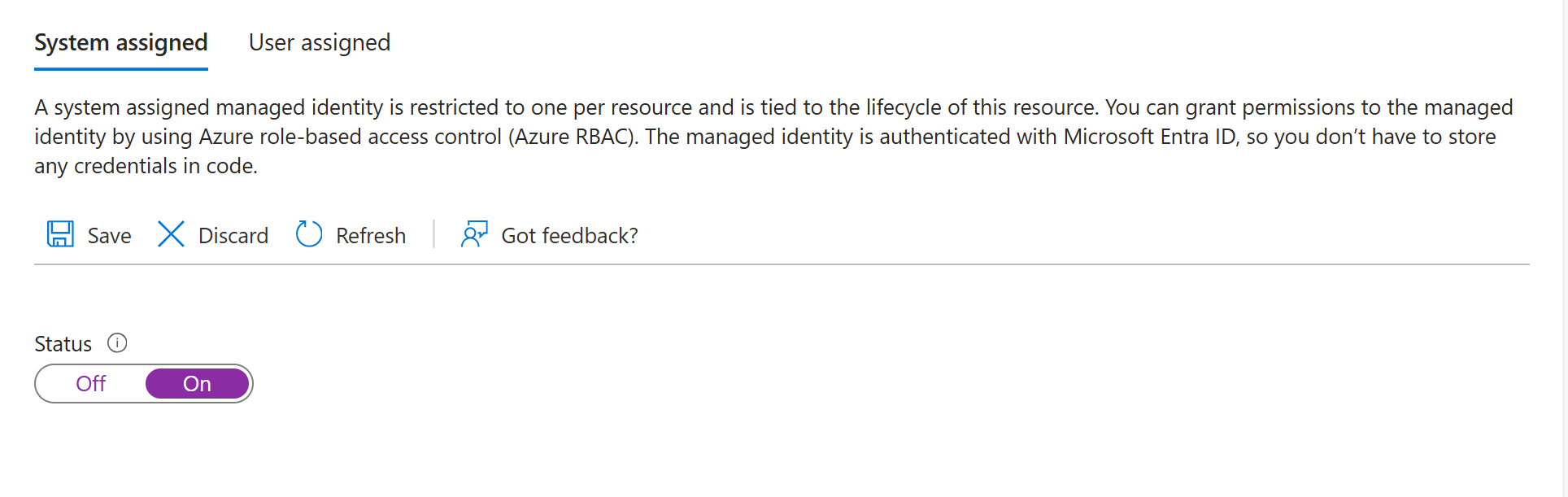
- تأكد من أن مورد Foundry الخاص بك مفعل لهوية مدارة مخصصة للنظام.
أنشئ موردا للخدمة التي تريد الاتصال بها عبر مواصفات OpenAPI.
خصص وصولا مناسبا للمورد.
اختر Access Control لمصدرك.
اختر إضافة ثم أضف تعيين الأدوار في أعلى الشاشة.
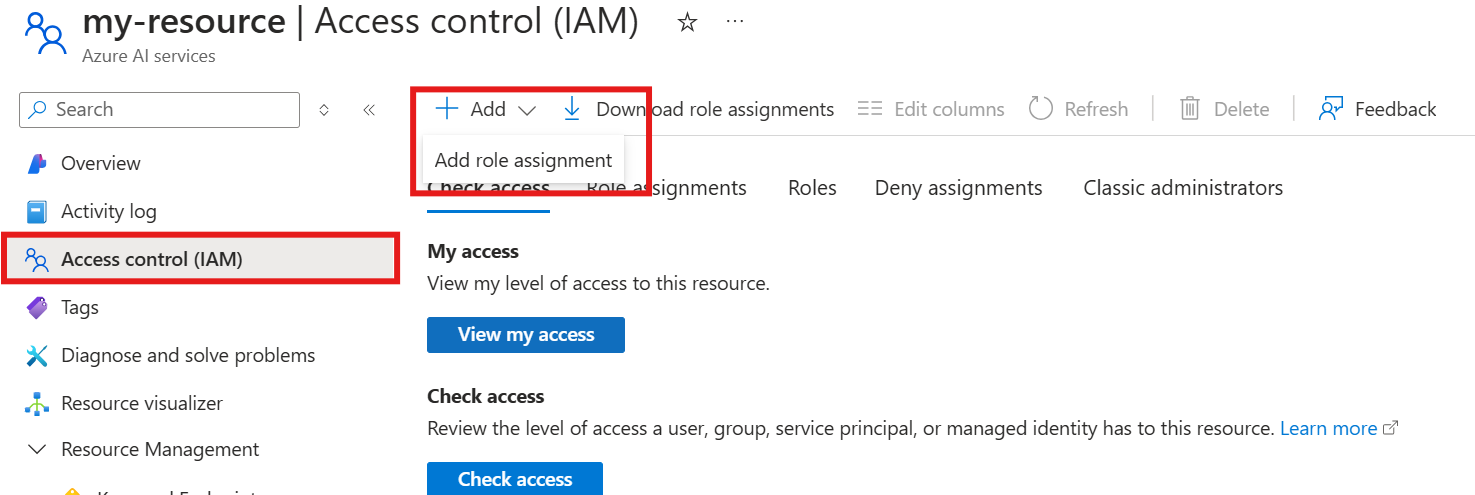
حدد دور مستوى البيانات أو التطبيق الأقل امتيازا الذي يمنح العمليات في مواصفات OpenAPI. Azure Resource Manager الوصول إلى القارئ وحده لا يمنح الوصول إلى مستوى البيانات. ثم اختر التالي.
اختر الهوية المدارة ثم اختر اختيار الأعضاء.
في قائمة الهوية المدارة، ابحث عن حساب Foundry ثم اختر حساب Foundry الخاص بوكيلك.
اختر إنهاء اللعبة.
عند الانتهاء من الإعداد، يمكنك الاستمرار باستخدام الأداة عبر بوابة Foundry أو SDK أو واجهة برمجة تطبيقات REST. استخدم علامات التبويب في أعلى هذا المقال لرؤية عينات الكود.
استكشاف الأخطاء الشائعة
| عَرَض | السبب المحتمل | الحل |
|---|---|---|
| مفتاح API غير مدرج في الطلبات. | مواصفات OpenAPI مفقودة securitySchemes أو security أقسام. |
تحقق من أن مواصفات OpenAPI الخاصة بك تتضمن كلاهما components.securitySchemes وقسم أعلى مستوى security . تأكد من تطابق النظام name مع اسم المفتاح في مشروعك. |
| الوكيل لا يستدعي أداة OpenAPI. | اختيار الأداة غير محدد أو operationId غير وصفي. |
استخدامه tool_choice="required" لإجبار استدعاء الأدوات. تأكد من operationId أن القيم وصفية حتى يتمكن النموذج من اختيار العملية الصحيحة. |
| تفشل المصادقة في تحديد الهوية المدارة. | الهوية المدارة غير مفعلة أو فقدان تعيين الأدوار. | فعل هوية مدارة معينة من النظام على مورد Foundry الخاص بك. قم بتعيين دور مستوى البيانات أو التطبيق الأقل امتيازا للخدمة الهدف للعمليات في مواصفات OpenAPI. |
| الهوية المدارة تعيد 401 حتى لو تم تعيين الدور. | رابط الجمهور لا يتطابق مع توقعات الخدمة المستهدفة. | تحقق من تطابق URI للجمهور مع معرف الموارد الخاص بالخدمة المستهدفة. بالنسبة لخدمات Azure، تحقق من وثائق الخدمة. بالنسبة لواجهات برمجة التطبيقات المحمية من Microsoft Entra، استخدم معرف التطبيق URI من تسجيل التطبيق. فك تشفير الرمز عند https://jwt.ms وتأكد من تطابق المطالبات aud . انظر فهم الجمهور في URI. |
| تم رفض رمز الهوية المدارة من قبل واجهة برمجة التطبيقات المستهدفة. | خدمة Target لا تقبل رموز Microsoft Entra ID. | تأكد من أن الخدمة المستهدفة تدعم مصادقة Microsoft Entra ID. إذا لم يكن كذلك، استخدم مفتاح API أو مصادقة رموز Bearer بدلا من ذلك. |
| فشل الطلب مع 400 طلب سيء. | مواصفات OpenAPI لا تتطابق مع واجهة برمجة التطبيقات الفعلية. | تحقق من مواصفات OpenAPI الخاصة بك مقابل واجهة البرمجة الفعلية. تحقق من أسماء المعلمات، وأنواعها، والحقول المطلوبة. |
| الطلب يفشل مع 401 غير مصرح به. | مفتاح أو رمز API غير صالح أو منتهية الصلاحية. | أعد توليد مفتاح الواجهة (API/Token) وحدث اتصال مشروعك. تحقق من صحة معرف الاتصال. |
| الأداة تعيد صيغة الاستجابة غير المتوقعة. | مخطط الاستجابة غير معرف في مواصفات OpenAPI. | أضف مخططات الاستجابة إلى مواصفات OpenAPI لفهم النموذج بشكل أفضل. |
operationId خطأ في التحقق. |
الأحرف غير الصالحة في operationId. |
استخدم فقط الحروف، -، والقيم _ بالقيم operationId . أزل الأرقام والأحرف الخاصة. |
| لم يتم العثور على الاتصال، خطأ. | اسم الاتصال أو المعرف غير مطابق. | التحقق OPENAPI_PROJECT_CONNECTION_NAME من أن Verify يتطابق مع اسم الاتصال في مشروع Foundry الخاص بك. |
| رمز الحامل لم يرسل بشكل صحيح. | تفتقد قيمة الاتصال إلى البادئة Bearer والمساحة التالية. |
اضبط قيمة الاتصال إلى Bearer <token> (مع الكلمة Bearer ومسافة قبل الرمز). تحقق من أن مواصفات securitySchemes OpenAPI تستخدم "name": "Authorization". |
اختر طريقة مصادقة
يساعدك الجدول التالي في اختيار طريقة المصادقة المناسبة لأداة OpenAPI الخاصة بك:
| طريقة المصادقة | الأفضل ل | تعقيد الإعداد |
|---|---|---|
| مجهول | واجهات برمجة التطبيقات العامة بدون مصادقة | منخفض |
| مفتاح API | واجهات برمجة التطبيقات غير التابعة ل Microsoft مع وصول قائم على المفاتيح | الوسيط |
| الهوية المدارة | خدمات Azure وواجهات برمجة التطبيقات المحمية ب Microsoft Entra ID. يتطلب من الخدمة المستهدفة قبول رموز Microsoft Entra ID ودعم التحكم في الوصول القائم على Azure RBAC أو Microsoft Entra. | Medium-High |