إشعار
يتطلب الوصول إلى هذه الصفحة تخويلاً. يمكنك محاولة تسجيل الدخول أو تغيير الدلائل.
يتطلب الوصول إلى هذه الصفحة تخويلاً. يمكنك محاولة تغيير الدلائل.
Applies to:  External tenants (learn more)
Authentication approach: Embedded native authentication.
The native authentication flow is a response-driven transaction. Microsoft Entra External ID returns the current state, required action, and allowed operations. Your application presents the interface and selects an allowed operation through user choice or application flow logic.
Authorization surrounds the journey
Important
The Native Authentication API V2 is in preview. The Native Authentication API V1 remains generally available. See the Supplemental Terms of Use for Microsoft Azure Previews for legal terms that apply to preview features.
The initial authorization challenge request contains the application ID, requested scopes, and optional claims. If authentication is required, its 401 InsufficientAuthorization response contains a continuation token and journey links. This response is an invitation to interact, not a failed password check.
Use the configured tenant-verified custom domain and tenant GUID for every service API call. This authority applies to authorization, native interactions, and token exchange. See Operations and authority.
Sign-in, sign-up, and password reset all return to authorization when the service returns state: continue. Your application posts the latest continuation token to the returned continue link. It then exchanges the resulting authorization code at the token endpoint.
After password verification, account creation, or a password update, the app handles any remaining policy requirements and resumes authorization before requesting tokens.
These authorization boundaries describe Embedded native authentication. BYO UX uses the shared native interaction operations between its browser handoff and returned finish link. Its self-hosted page doesn't start or resume /authorize-challenge; the relying application completes the original browser authorization flow. See Choose an authentication approach.
| Boundary | Request or response |
|---|---|
| Start authorization | Form-encoded client_id, scope, response_type=code, and optional claims. |
| Enter a journey | Top-level sign_in, sign_up, or reset_password URL and continuation_token from the OAuth response. |
| Interact | JSON requests and HAL responses with continuationToken, state, actions, and links. |
| Resume authorization | Form-encoded continuation_token, sent only when the current response allows continuation. |
| Request tokens | Form-encoded authorization-code exchange. |
The following sequence illustrates the authorization boundary and response-driven interaction loop. Follow the current response rather than hard-coding the diagram's order.
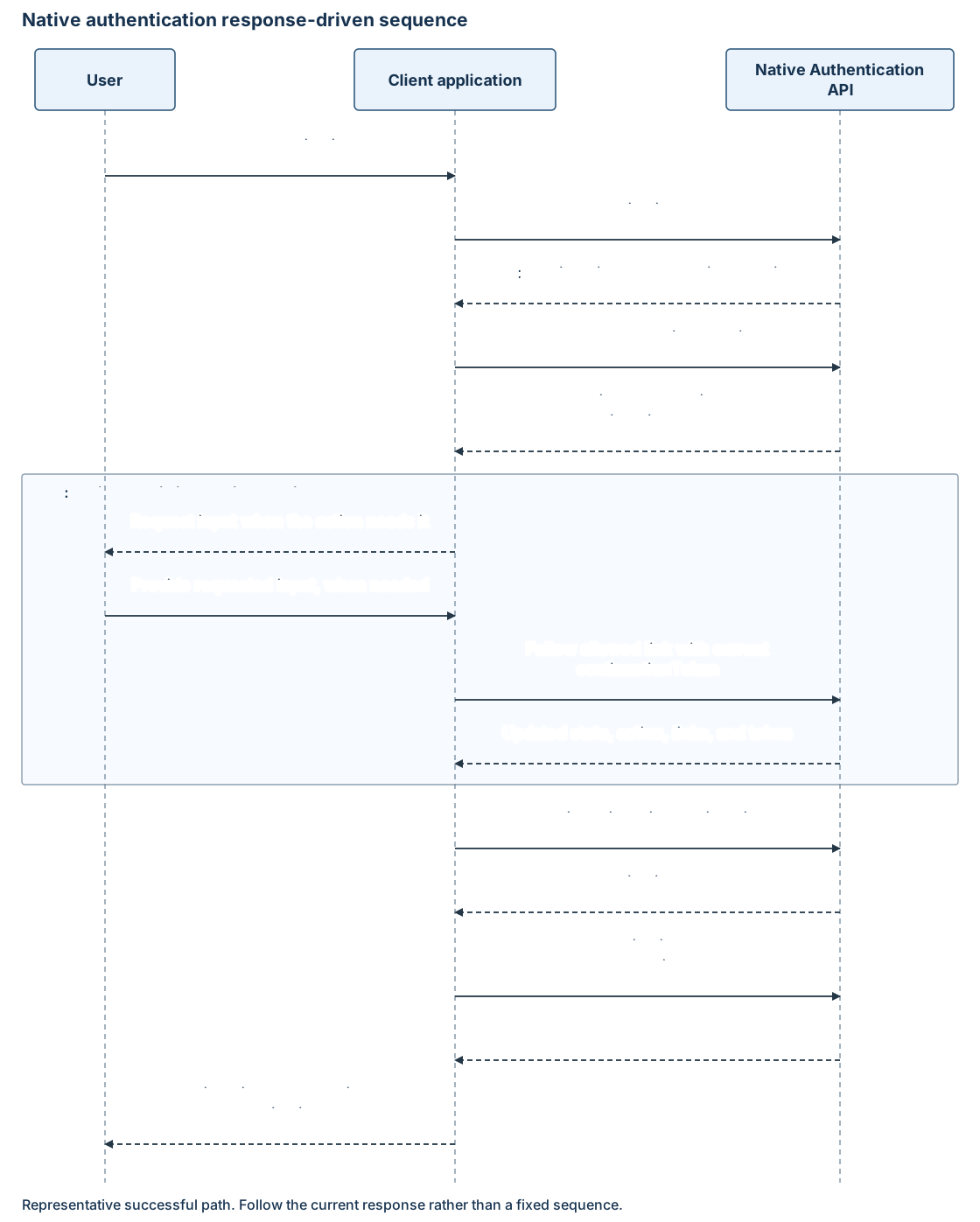
The current response is the control model
Each successful native authentication response replaces the previous interaction model. Tenant policies, the application's user flow, and transaction state can add, repeat, or reorder actions. The app selects operations from the latest response and organizes its screens around the returned requirements.
| State or action | Meaning for the client |
|---|---|
interactionRequired |
Handle action through an allowed operation, collecting user input where needed. |
continue |
Follow _links.continue to resume authorization. |
redirect |
Stop the native transaction. This response can contain only state, without a continuation token or browser URL. A configured browser sign-in starts a new attempt. |
discover |
Collect the user's sign-in identifier. |
disambiguate |
Identifies account selection under state: interactionRequired. |
collectAttributes |
Collect the requested sign-up attributes. |
challenge |
Start the selected method's challenge. |
verify |
Submit the requested password or one-time passcode. |
enroll |
Select an advertised method and submit its enrollment details. |
activate |
Submit a one-time passcode to activate the enrolled method. |
update |
Submit a replacement password. |
poll |
Check an asynchronous password update. |
For example, sign-in can return a password method, then a verification action, then email or SMS methods for multifactor authentication (MFA). The app handles the additional factor before resuming authorization.
During sign-up, submitting an email can send a passcode immediately and return verify. The app collects that passcode and uses the returned verification link.
Completing an individual operation doesn't mean that the application has tokens. In the native journeys described here, continue permits authorization to resume; the subsequent code exchange acquires tokens. The completed state indicates completion of that operation; it doesn't necessarily indicate a signed-in result or include another link.
Continuation tokens bind the next operation
A continuation token represents the transaction at a particular stage. It is bound to the tenant, client, scenario, and current action. OAuth messages name it continuation_token; native authentication messages name it continuationToken.
Keep only the latest token for the active transaction. Pair it with the links from that same response. Don't parse, alter, log, or persist it beyond the transaction, and don't use it for a different user or journey. Restart authorization after expiration rather than replaying an older token.
The documented default validity is 10 minutes for an individual continuation token. A newer token isn't a guarantee of extending the whole journey. A continuation token and a one-time passcode have separate lifetimes; handle expiration according to the service response.
Method IDs and returned URLs are opaque. The Native Authentication API examples use /api/v2.0. Follow the returned link; don't substitute a version or construct a URL from the method type. Resolve relative links against the configured authority origin and validate the destination before sending credentials.
Method discovery isn't method registration
A method resource describes an available authentication method. Its type, masked hint, optional isPreferred, and links let your app present a choice and complete a challenge. codeLength describes the passcode input when returned.
The challenge and verify links operate on available methods. Registering a method is a separate policy-driven interaction with its own action and request contract. Profile attribute collection has a separate contract too.
Inline method registration uses enroll and activate actions. Phone enrollment advertises type: phone with channels: ["sms"]; email enrollment uses type: email. Activation submits the code in the root otp field to the activate link, not a credential's verify link. Registration can satisfy an MFA requirement, so another challenge isn't guaranteed. See Authentication-method enrollment.
Policy and attribute interactions
The user flow determines the email sign-up method and requested attributes. Email-with-password sign-up collects a password attribute. Email one-time passcode sign-up creates a passwordless account and doesn't collect a password.
Attribute descriptors can contain labels, input types, validation.validationRegEx, and initial values. Use each exact attributeId as a submission key. Page-grouping metadata isn't required to render the form. Server validation remains authoritative. See Native authentication user attributes.
MFA through system policies is supported. After sign-up or password reset, MFA and Conditional Access can require more interactions before authorization completes. Your app continues handling responses instead of maintaining a separate "already signed in" path that skips these requirements.
Errors and unsupported interactions
OAuth and native authentication errors have different envelopes. Use stable codes for handling, not localized messages. Keep safe request identifiers and timestamps for diagnostics; don't record credential bodies or tokens.
Ignore unknown optional properties and link relations. In contrast, an unknown required action, missing required field, or malformed response prevents safe continuation. Stop the native operation when a required interaction can't be processed.
An OAuth error with invalid_grant and web_redirect_required, or a native response with state: redirect, signals that the native transaction can't continue. Neither response establishes a resumable browser handoff. Offer a separately configured browser sign-in or a clear failure. Keep the native continuation token within the native transaction.
Federation, TOTP, passkeys, phone first-factor authentication, later-operation step-up, and profile or credential-management interoperability aren't supported through this native contract. See the support matrices.