إشعار
يتطلب الوصول إلى هذه الصفحة تخويلاً. يمكنك محاولة تسجيل الدخول أو تغيير الدلائل.
يتطلب الوصول إلى هذه الصفحة تخويلاً. يمكنك محاولة تغيير الدلائل.
Applies to: ✅ SQL database in Microsoft Fabric
Microsoft Fabric encrypts all data at rest using Microsoft-managed keys. SQL database stores all data in remote Azure Storage accounts. To comply with encryption-at-rest requirements using Microsoft-managed keys, each Azure Storage account used by the SQL database has service-side encryption enabled.
With customer-managed keys for Fabric workspaces, you can use your Azure Key Vault keys to add another layer of protection to the data in your Microsoft Fabric workspaces, including all data in SQL database in Microsoft Fabric. A customer-managed key provides greater flexibility, allowing you to manage its rotation, control access, and audit usage. Customer-managed keys also help organizations meet data governance needs and comply with data protection and encryption standards.
- When you configure a customer-managed key for a workspace in Microsoft Fabric, transparent data encryption is automatically enabled for all SQL databases (and
tempdb) within that workspace using the specified customer-managed key. This process is seamless and requires no manual intervention.- While the encryption process begins automatically for all existing SQL databases, it isn't instantaneous. The duration depends on the size of each SQL database, with larger SQL databases requiring more time to complete encryption.
- After you configure the customer-managed key, any SQL databases you create in the workspace are also encrypted using the customer-managed key.
- If you remove the customer-managed key, decryption starts for all SQL databases in the workspace. Like encryption, decryption also depends on the size of the SQL database and can take time to complete. Once decrypted, the SQL databases revert to using Microsoft-managed keys for encryption.
How transparent data encryption works in SQL database in Microsoft Fabric
Transparent data encryption performs real-time encryption and decryption of the database, associated backups, and transaction log files at rest.
- This process occurs at the page level, meaning each page is decrypted when read into memory and re-encrypted before being written back to disk.
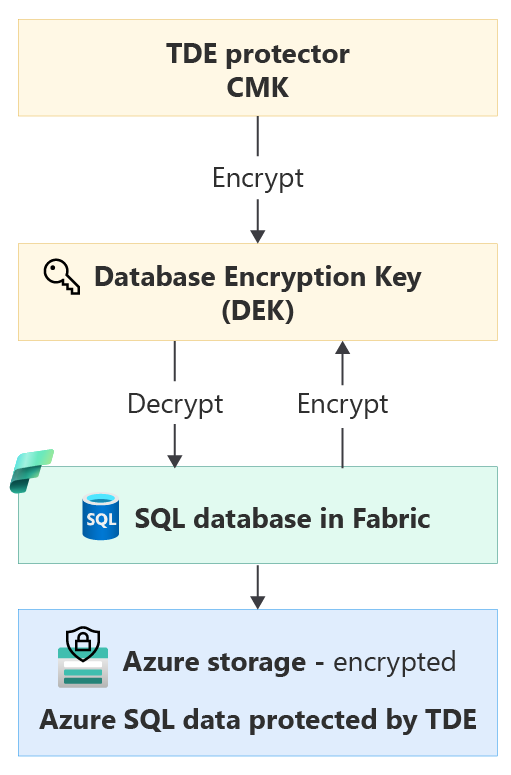
- Transparent data encryption secures the entire database using a symmetric key known as the Database Encryption Key (DEK).
- When the database starts up, the SQL Server database engine decrypts the DEK and uses it to manage encryption and decryption operations.
- The transparent data encryption protector—specifically, the customer-managed key configured at the workspace level—protects the DEK.
Backup and restore
Once a SQL database is encrypted with a customer-managed key, any newly generated backups are also encrypted with the same key.
When you change the key, old backups of the SQL database aren't updated to use the latest key. To restore a backup encrypted with a customer-managed key, make sure that the key material is available in Azure Key Vault. Keep all old versions of the customer-managed keys in Azure Key Vault so that SQL database backups can be restored.
The SQL database restore process always honors the customer-managed key workspace setting. The following table outlines various restore scenarios based on the customer-managed key settings and whether the backup is encrypted.
| The backup is... | Customer-managed key workspace setting | Encryption status post-restore |
|---|---|---|
| Not encrypted | Disabled | SQL database is not encrypted |
| Not encrypted | Enabled | SQL database is encrypted with customer-managed key |
| Encrypted with customer-managed key | Disabled | SQL database is not encrypted |
| Encrypted with customer-managed key | Enabled | SQL database is encrypted with customer-managed key |
| Encrypted with customer-managed key | Enabled but different customer-managed key | SQL database is encrypted with the new customer-managed key |
Verify successful customer-managed key
Once you enable customer-managed key encryption in the workspace, the existing database is encrypted. A new database in the workspace is also encrypted when the customer-managed key is enabled. To verify that your database is successfully encrypted, run the following T-SQL query:
SELECT DB_NAME(database_id) as DatabaseName, *
FROM sys.dm_database_encryption_keys
WHERE database_id <> 2;
- A database is encrypted if the
encryption_state_descfield displaysENCRYPTEDwithASYMMETRIC_KEYas theencryptor_type. - If the state is
ENCRYPTION_IN_PROGRESS, thepercent_completecolumn indicates the progress of the encryption state change. This value is0if no state change is in progress. - If not encrypted, a database doesn't appear in the query results of
sys.dm_database_encryption_keys.
Troubleshoot inaccessible customer-managed key
When you configure a customer-managed key for a workspace in Microsoft Fabric, the SQL database requires continuous access to the key to stay online. If the SQL database loses access to the key in Azure Key Vault, in up to 10 minutes the SQL database starts denying all connections and changes its state to Inaccessible. Users receive a corresponding error message such as "Database <database ID>.database.fabric.microsoft.com is not accessible due to Azure Key Vault critical error."
- If key access is restored within 30 minutes, the SQL database automatically heals within the next hour.
- If key access is restored after more than 30 minutes, automatic healing of the SQL database isn't possible. Restoring the SQL database requires extra steps and can take a significant amount of time depending on the size of the SQL database.
Use the following steps to re-validate the customer-managed key:
- In your workspace, right-click the SQL database or select the
...context menu. Select Settings. - Select Encryption.
- To revalidate the customer-managed key, select Revalidate customer-managed key. If the revalidation is successful, restoring access to your SQL database can take some time.
Note
When you revalidate the key for one SQL database, the key is automatically revalidated for all SQL databases within your workspace.
Limitations
Current limitations when using customer-managed key for a SQL database in Microsoft Fabric:
- 4,096-bit keys aren't supported for SQL database in Microsoft Fabric. Supported key lengths are 2,048 bits and 3,072 bits.
- The customer-managed key must be an RSA or RSA-HSM asymmetric key.