إشعار
يتطلب الوصول إلى هذه الصفحة تخويلاً. يمكنك محاولة تسجيل الدخول أو تغيير الدلائل.
يتطلب الوصول إلى هذه الصفحة تخويلاً. يمكنك محاولة تغيير الدلائل.
Organizations rely heavily on data to run their operations, but key processes such as planning, reporting, and analytics are often managed with separate tools. This strategy leads to data duplication, increased manual effort, and a risk to data consistency. Planning is frequently done in spreadsheets/specialized SaaS, reporting in separate systems, and dashboards provide only a limited view of overall business performance.
Important
This feature is in preview.
When you need to reconcile a static spreadsheet or disconnected system with a live dashboard, it can be difficult to achieve a single source of truth. By consolidating these functions into a unified platform, you move from being reactive (looking at what happened) to being active (adjusting the plan in real time, based on data).
Note
The preview of plan in Fabric IQ is now accessible to organizations worldwide in Microsoft Fabric as part of the Microsoft Fabric SKU, and new meters have been created. Meters are currently available but are not currently billed.
About plan
Plan (preview) in Fabric allows you to integrate planning, visualization, analytics, and data management on a single platform. Plan is a unified no-code platform for collaborative planning, reporting, analytics, data integration, and management. It enables organizations to work from a consistent data foundation, allowing business users to plan, analyze, and report without switching between multiple tools.
By bringing these capabilities together in a single environment, plan supports end-to-end decision workflows and helps teams move from data to insights and from insights to action more efficiently.
Plan offers a unified suite of Planning sheets, Intelligence sheets, and PowerTable sheets on Microsoft Fabric. Plan connects every stage of the data-to-decision lifecycle into a single integrated platform within Microsoft Fabric.
| Capability | Description |
|---|---|
| Plan and report | - Build collaborative budgets, plans, and forecasts - Distribute plans across teams and functions - Create and compare planning scenarios to evaluate business outcomes - Generate structured financial and operational reports - Write back plans and forecasts to preferred destinations |
| Transform and consolidate data | - Connect to plans across data platforms - Transform and write back to destinations - Integrate data from multiple sources - Build a connected planning model |
| Control and govern data | - Manage master and reference data - Schedule synchronizations and automatic data refreshes - Automate cascaded data updates across tables - Write back updates to sources and destinations - Audit, access control and approval flows for data governance |
| Explore, visualize and analyze | - Create interactive dashboards with 100+ charts, tables, and KPIs - Explore and analyze data using drill-down and dynamic filtering - Connect planning data with visualizations instantly |
| Manage and collaborate | - Collaborate directly on data with threaded comments - Assign, plan and track project and task timelines - Notify stakeholders for alignment |
Why choose plan?
Plan (preview) brings together planning, reporting, analytics, and data management into a unified ecosystem that supports the entire decision lifecycle. Organizations can work directly on governed data, reducing manual effort, improving alignment across teams, and responding faster to changing business needs. The result is a connected environment where planning, reporting, and analytics converge to support smarter business outcomes. Plan ultimately provides an end-to-end solution for modern data-driven organizations, helping you transform how they plan, analyze, and make decisions.
Benefits of an integrated platform
- Elimination of "shadow data": Moving planning out of disconnected spreadsheets/systems ensures that the logic used to set targets is the same logic used to measure them.
- Reduced latency: Traditional reporting cycles often take days or weeks of manual data cleaning. Integration allows for continuous planning, where forecasts update as soon as transaction data hits the system.
- Bidirectional data flow: Instead of only pulling data outwards for a report, a unified tool allows you to write back into the system, ensuring that revised targets are immediately visible to all stakeholders.
- Enhanced data integrity: By centralizing management, you minimize the risk of "version fatigue," where different departments report different numbers for the same KPI.
Move towards integrated planning
If you're evaluating how to bridge these gaps, it often helps to look at your organization's planning maturity.
| Phase | State | Characteristics |
|---|---|---|
| Siloed | Manual | Spreadsheets for planning, manual exports for reporting |
| Connected | Automated | Automated data pipelines (ETL) feeding into a central warehouse |
| Integrated | Unified | Planning and analytics happen in the same environment with write-back capabilities |
Plan components
Plan (preview) brings together four powerful components that support the complete business data workflow from data integration to planning, reporting, and analytical exploration. The components are: Planning sheets, PowerTable sheets, Intelligence sheets, and InfoBridge.
Each component is designed to solve a critical business need while working seamlessly within the unified plan ecosystem.
Planning sheets
Planning sheets are collaborative workspaces built for business planning, budgeting, and forecasting. Designed with a no-code, self-service architecture, Planning sheets enable business users to create and manage budgets, forecasts, and operational plans. They help you do these things without relying on spreadsheets or technical expertise, and while maintaining structured and governed planning processes.
Highlights
- Create multi-dimensional and flexible planning models
- Support top-down and bottom-up planning across teams and departments
- Enable real-time collaboration and data write-back for synchronized updates
- Build driver-based models and scenario planning to evaluate business outcomes
- Manage hierarchical planning structures across organizational units
- Generate rolling forecasts to keep plans aligned with changing business needs
PowerTable sheets
PowerTable sheets are enterprise-grade master and reference data management workspaces designed to create structured financial and operational reports on trusted business data in Microsoft Fabric. They enable teams to build scalable tabular reports, analyze hierarchical data, and manage reporting workflows within a governed and collaborative environment.
Highlights
- Create structured financial and operational reports with advanced calculations and formatting
- Analyze hierarchical data with drill-down, variance analysis, and comparisons
- Manage and update data directly to the database without writing complex queries
- Interact with tables through multi-user editing, dynamic filters, and expandable views
- Enable controlled data input and write-back for preserving data integrity
- Manage tasks and timelines using Gantt charts and workflow approvals
- Automate repetitive tasks such as scheduling and cascading table updates
- Structured data entry through forms
Intelligence sheets
Intelligence sheets in plan enable you to create interactive dashboards, analytical reports, and data visualizations through a no-code, self-service analytics experience. They empower business users to explore data, uncover insights and present findings using rich visuals, KPI tracking, and intuitive data exploration tools.
Highlights
- Explore data through ad-hoc analysis, drill-downs, and dynamic filtering
- Access rich visual components including charts, KPI cards, tables, and matrices
- Monitor performance using KPI tracking and trend analysis
- Communicate insights with storyboards, annotations, and contextual comments
- Automate delivery through report scheduling and broadcasting
InfoBridge
InfoBridge provides a unified data integration and preparation layer that connects enterprise data with planning, reporting, and analytics workflows. It enables organizations to ingest, transform, and prepare data from multiple sources, ensuring a trusted and consistent data foundation for business decision-making.
Highlights
- Connect multiple enterprise data sources into a unified data model
- Perform data ingestion, transformation, and preparation workflows
- Build scalable dataflows for planning, reporting, and analytics
- Maintain consistent and trusted datasets across business processes
- Schedule data refresh and synchronization to keep insights up to date
- Enable governed data access and integration across teams
Enable required tenant setting
This setting is required to create plan (preview) items: Users can create a Planning (preview) item(s).
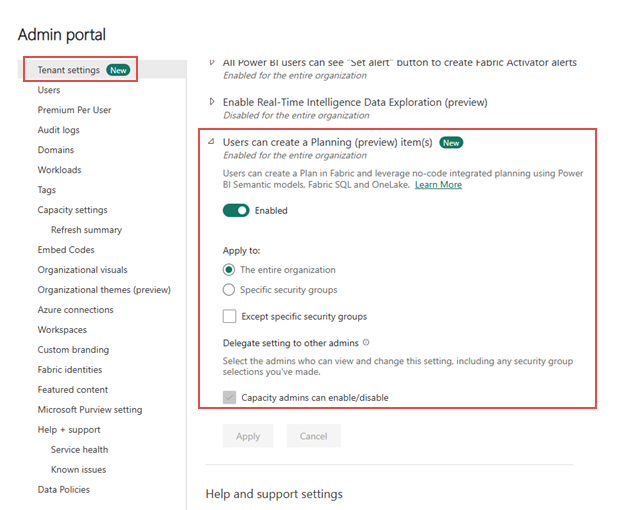
If you don't enable this setting, you get errors when creating a new plan item.
Next steps
Explore the components of plan in more detail: