إشعار
يتطلب الوصول إلى هذه الصفحة تخويلاً. يمكنك محاولة تسجيل الدخول أو تغيير الدلائل.
يتطلب الوصول إلى هذه الصفحة تخويلاً. يمكنك محاولة تغيير الدلائل.
يرشدك هذا التشغيل السريع خلال إنشاء عامل محرك مخصص يرد مرة أخرى بأي رسالة ترسلها إليه.
المتطلبات المسبقه
Python 3.9 أو أحدث.
- لتثبيت Python، انتقل إلى https://www.python.org/downloads/، واتبع الإرشادات الخاصة بنظام التشغيل الخاص بك.
- للتحقق من الإصدار، اكتب
python --versionفي نافذة طرفية.
محرر تعليمات برمجية من اختيارك. تستخدم هذه الإرشادات تعليمة Visual Studio برمجية.
إذا كنت تستخدم تعليمة Visual Studio برمجية، فقم بتثبيت ملحق Python
تهيئة المشروع وتثبيت SDK
إنشاء مشروع Python وتثبيت التبعيات المطلوبة.
فتح محطة طرفية وإنشاء مجلد جديد
mkdir echo
cd echo
افتح المجلد باستخدام تعليمة Visual Studio برمجية باستخدام هذا الأمر:
code .إنشاء بيئة ظاهرية باستخدام الأسلوب الذي تختاره وتنشيطه إما من خلال تعليمة Visual Studio برمجية أو في محطة طرفية.
عند استخدام تعليمة Visual Studio برمجية، يمكنك استخدام هذه الخطوات مع تثبيت ملحق Python.
اضغط على F1، واكتب
Python: Create environment، واضغط على Enter.حدد Venv لإنشاء بيئة ظاهرية
.venvفي مساحة العمل الحالية.حدد تثبيت بايثون لإنشاء البيئة الظاهرية.
قد تبدو القيمة كما يلي:
Python 1.13.6 ~\AppData\Local\Programs\Python\Python313\python.exe
تثبيت Agents SDK
استخدم pip لتثبيت حزمة microsoft-agents-hosting-aiohttp مع هذا الأمر:
pip install microsoft-agents-hosting-aiohttp
إنشاء تطبيق الخادم واستيراد المكتبات المطلوبة
أنشئ ملفا باسم
start_server.py، وانسخ التعليمات البرمجية التالية، والصقه في:# start_server.py from os import environ from microsoft_agents.hosting.core import AgentApplication, AgentAuthConfiguration from microsoft_agents.hosting.aiohttp import ( start_agent_process, jwt_authorization_middleware, CloudAdapter, ) from aiohttp.web import Request, Response, Application, run_app def start_server( agent_application: AgentApplication, auth_configuration: AgentAuthConfiguration ): async def entry_point(req: Request) -> Response: agent: AgentApplication = req.app["agent_app"] adapter: CloudAdapter = req.app["adapter"] return await start_agent_process( req, agent, adapter, ) APP = Application(middlewares=[jwt_authorization_middleware]) APP.router.add_post("/api/messages", entry_point) APP.router.add_get("/api/messages", lambda _: Response(status=200)) APP["agent_configuration"] = auth_configuration APP["agent_app"] = agent_application APP["adapter"] = agent_application.adapter try: run_app(APP, host="localhost", port=environ.get("PORT", 3978)) except Exception as error: raise errorتحدد هذه التعليمة البرمجية دالة
start_serverسنستخدمها في الملف التالي.في نفس الدليل، قم بإنشاء ملف باسم
app.pyمع التعليمات البرمجية التالية.# app.py from microsoft_agents.hosting.core import ( AgentApplication, TurnState, TurnContext, MemoryStorage, ) from microsoft_agents.hosting.aiohttp import CloudAdapter from start_server import start_server
إنشاء مثيل للعامل كـ AgentApplication
في app.py، أضف التعليمات البرمجية التالية لإنشاء AGENT_APP كمثيل ل AgentApplication، وتنفيذ ثلاثة مسارات للاستجابة إلى ثلاثة أحداث:
- تحديث المحادثة
- الرسالة
/help - أي نشاط آخر
AGENT_APP = AgentApplication[TurnState](
    storage=MemoryStorage(), adapter=CloudAdapter()
)

async def _help(context: TurnContext, _: TurnState):
    await context.send_activity(
        "Welcome to the Echo Agent sample 🚀. "
        "Type /help for help or send a message to see the echo feature in action."
    )

AGENT_APP.conversation_update("membersAdded")(_help)

AGENT_APP.message("/help")(_help)


@AGENT_APP.activity("message")
async def on_message(context: TurnContext, _):
    await context.send_activity(f"you said: {context.activity.text}")
بدء تشغيل خادم الويب للاستماع في localhost:3978
في نهاية app.py، ابدأ تشغيل خادم الويب باستخدام start_server.
if __name__ == "__main__":
    try:
        start_server(AGENT_APP, None)
    except Exception as error:
        raise error
تشغيل العامل محلياً فِي وضع المجهول
من المحطة الطرفية الخاصة بك، قم بتشغيل هذا الأمر:
python app.py
يجب أن ترجع المحطة الطرفية ما يلي:
======== Running on http://localhost:3978 ========
(Press CTRL+C to quit)
اختبر الوكيل محليا
من محطة طرفية أخرى (للحفاظ على تشغيل العامل) قم بتثبيت Microsoft 365 Agents Playground باستخدام هذا الأمر:
npm install -g @microsoft/teams-app-test-toolملحوظة
يستخدم هذا الأمر npm لأن Microsoft 365 Agents Playground غير متوفر باستخدام pip.
يجب أن ترجع المحطة شيئا مثل:
added 1 package, and audited 130 packages in 1s

19 packages are looking for funding
run `npm fund` for details

found 0 vulnerabilities
قم بتشغيل أداة الاختبار للتفاعل مع وكيلك باستخدام هذا الأمر:
teamsapptesterيجب أن ترجع المحطة شيئا مثل:
Telemetry: agents-playground-cli/serverStart {"cleanProperties":{"options":"{\"configFileOptions\":{\"path\":\"<REDACTED: user-file-path>\"},\"appConfig\":{},\"port\":56150,\"disableTelemetry\":false}"}}

Telemetry: agents-playground-cli/cliStart {"cleanProperties":{"isExec":"false","argv":"<REDACTED: user-file-path>,<REDACTED: user-file-path>"}}

Listening on 56150
Microsoft 365 Agents Playground is being launched for you to debug the app: http://localhost:56150
started web socket client
started web socket client
Waiting for connection of endpoint: http://127.0.0.1:3978/api/messages
waiting for 1 resources: http://127.0.0.1:3978/api/messages
wait-on(37568) complete
Telemetry: agents-playground-server/getConfig {"cleanProperties":{"internalConfig":"{\"locale\":\"en-US\",\"localTimezone\":\"America/Los_Angeles\",\"channelId\":\"msteams\"}"}}

Telemetry: agents-playground-server/sendActivity {"cleanProperties":{"activityType":"installationUpdate","conversationId":"5305bb42-59c9-4a4c-a2b6-e7a8f4162ede","headers":"{\"x-ms-agents-playground\":\"true\"}"}}

Telemetry: agents-playground-server/sendActivity {"cleanProperties":{"activityType":"conversationUpdate","conversationId":"5305bb42-59c9-4a4c-a2b6-e7a8f4162ede","headers":"{\"x-ms-agents-playground\":\"true\"}"}}
يفتح teamsapptester الأمر المستعرض الافتراضي ويتصل بعاملك.
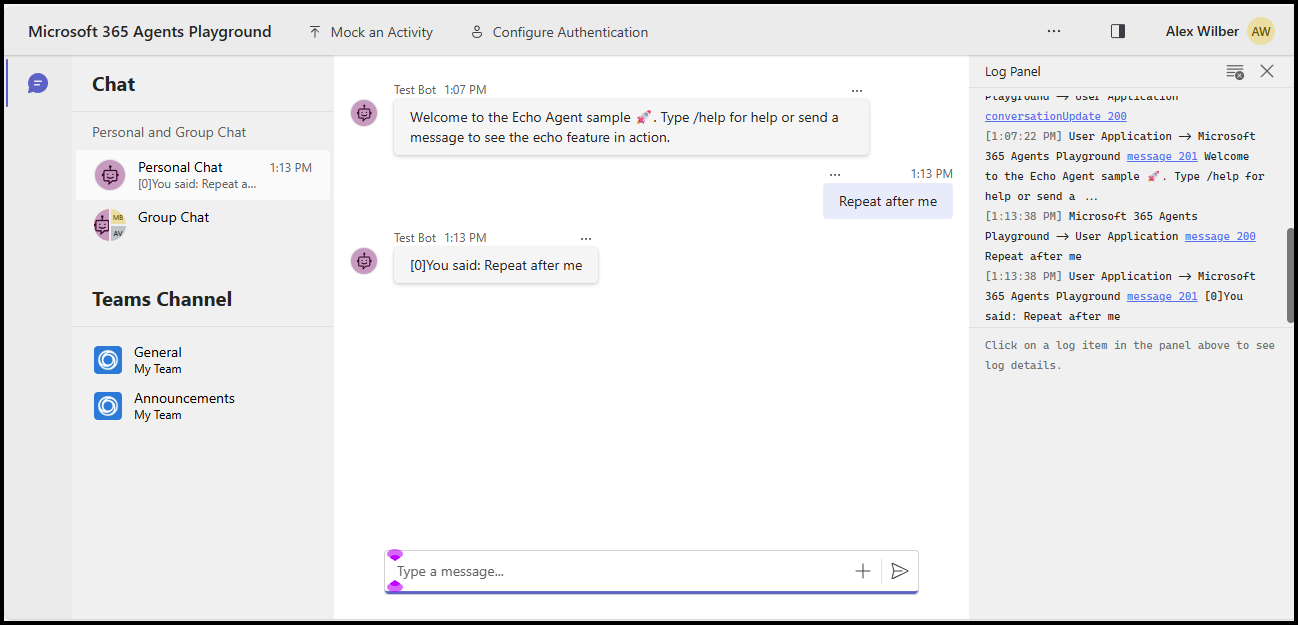
يمكنك الآن إرسال أي رسالة لمشاهدة رد الصدى، أو إرسال الرسالة /help لمعرفة كيفية توجيه هذه الرسالة إلى _help المعالج.
يرشدك هذا التشغيل السريع خلال إنشاء عامل محرك مخصص يرد مرة أخرى بأي رسالة ترسلها إليه.
المتطلبات المسبقه
Node.js الإصدار 22 أو الأحدث
- لتثبيت Node.js انتقل إلى nodejs.org، واتبع الإرشادات الخاصة بنظام التشغيل الخاص بك.
- للتحقق من الإصدار، اكتب
node --versionفي نافذة طرفية.
محرر تعليمات برمجية من اختيارك. تستخدم هذه الإرشادات تعليمة Visual Studio برمجية.
تهيئة المشروع وتثبيت SDK
يستخدم npm لتهيئة مشروع node.js عن طريق إنشاء package.json وتثبيت التبعيات المطلوبة
فتح محطة طرفية وإنشاء مجلد جديد
mkdir echo
cd echo
تهيئة المشروع node.js
npm init -yتثبيت Agents SDK
npm install @microsoft/agents-hosting-expressافتح المجلد باستخدام تعليمة Visual Studio برمجية باستخدام هذا الأمر:
code .
استيراد المكتبات المطلوبة
إنشاء الملف index.mjs واستيراد حزم NPM التالية إلى التعليمات البرمجية للتطبيق الخاص بك:
// index.mjs
import { startServer } from '@microsoft/agents-hosting-express'
import { AgentApplication, MemoryStorage } from '@microsoft/agents-hosting'
تنفيذ EchoAgent كتطبيق وكيل
في index.mjs، أضف التعليمات البرمجية التالية لإنشاء EchoAgent توسيع AgentApplication، وتنفيذ ثلاثة مسارات للاستجابة إلى ثلاثة أحداث:
- تحديث المحادثة
- الرسالة
/help - أي نشاط آخر
class EchoAgent extends AgentApplication {
  constructor (storage) {
    super({ storage })

    this.onConversationUpdate('membersAdded', this._help)
    this.onMessage('/help', this._help)
    this.onActivity('message', this._echo)
  }

  _help = async context =>
    await context.sendActivity(`Welcome to the Echo Agent sample 🚀.
      Type /help for help or send a message to see the echo feature in action.`)

  _echo = async (context, state) => {
    let counter= state.getValue('conversation.counter') || 0
    await context.sendActivity(`[${counter++}]You said: ${context.activity.text}`)
    state.setValue('conversation.counter', counter)
  }
}
بدء تشغيل خادم الويب للاستماع في localhost:3978
في نهاية index.mjs، قم ببدء تشغيل خادم الويب باستخدام startServer والذي يعتمد على express، مستخدمًا MemoryStorage لتخزين حالات الدوران.
startServer(new EchoAgent(new MemoryStorage()))
تشغيل العامل محلياً فِي وضع المجهول
من المحطة الطرفية الخاصة بك، قم بتشغيل هذا الأمر:
node index.mjs
يجب أن ترجع المحطة الطرفية ما يلي:
Server listening to port 3978 on sdk 0.6.18 for appId undefined debug undefined
اختبر الوكيل محليا
من محطة طرفية أخرى (للحفاظ على تشغيل العامل) قم بتثبيت Microsoft 365 Agents Playground باستخدام هذا الأمر:
npm install -D @microsoft/teams-app-test-toolيجب أن ترجع المحطة شيئا مثل:
added 1 package, and audited 130 packages in 1s

19 packages are looking for funding
run `npm fund` for details

found 0 vulnerabilities
قم بتشغيل أداة الاختبار للتفاعل مع وكيلك باستخدام هذا الأمر:
node_modules/.bin/teamsapptesterيجب أن ترجع المحطة شيئا مثل:
Telemetry: agents-playground-cli/serverStart {"cleanProperties":{"options":"{\"configFileOptions\":{\"path\":\"<REDACTED: user-file-path>\"},\"appConfig\":{},\"port\":56150,\"disableTelemetry\":false}"}}

Telemetry: agents-playground-cli/cliStart {"cleanProperties":{"isExec":"false","argv":"<REDACTED: user-file-path>,<REDACTED: user-file-path>"}}

Listening on 56150
Microsoft 365 Agents Playground is being launched for you to debug the app: http://localhost:56150
started web socket client
started web socket client
Waiting for connection of endpoint: http://127.0.0.1:3978/api/messages
waiting for 1 resources: http://127.0.0.1:3978/api/messages
wait-on(37568) complete
Telemetry: agents-playground-server/getConfig {"cleanProperties":{"internalConfig":"{\"locale\":\"en-US\",\"localTimezone\":\"America/Los_Angeles\",\"channelId\":\"msteams\"}"}}

Telemetry: agents-playground-server/sendActivity {"cleanProperties":{"activityType":"installationUpdate","conversationId":"5305bb42-59c9-4a4c-a2b6-e7a8f4162ede","headers":"{\"x-ms-agents-playground\":\"true\"}"}}

Telemetry: agents-playground-server/sendActivity {"cleanProperties":{"activityType":"conversationUpdate","conversationId":"5305bb42-59c9-4a4c-a2b6-e7a8f4162ede","headers":"{\"x-ms-agents-playground\":\"true\"}"}}
يفتح teamsapptester الأمر المستعرض الافتراضي ويتصل بعاملك.
يمكنك الآن إرسال أي رسالة لمشاهدة رد الصدى، أو إرسال الرسالة /help لمعرفة كيفية توجيه هذه الرسالة إلى _help المعالج.
يرشدك هذا التشغيل السريع خلال إنشاء عامل محرك مخصص يرد مرة أخرى بأي رسالة ترسلها إليه.
المتطلبات المسبقه
.NET 8.0 SDK أو أحدث
- لتثبيت .NET SDK، انتقل إلى dotnet.microsoft.com، واتبع الإرشادات الخاصة بنظام التشغيل.
- للتحقق من الإصدار، اكتب
dotnet --versionفي نافذة طرفية.
محرر تعليمات برمجية من اختيارك. تستخدم هذه الإرشادات تعليمة Visual Studio برمجية.
تهيئة المشروع وتثبيت SDK
استخدم dotnet لإنشاء مشروع ويب جديد وتثبيت التبعيات المطلوبة.
فتح محطة طرفية وإنشاء مجلد جديد
mkdir echo
cd echo
تهيئة المشروع .NET
dotnet new webتثبيت Agents SDK
dotnet add package Microsoft.Agents.Hosting.AspNetCoreافتح المجلد باستخدام تعليمة Visual Studio برمجية باستخدام هذا الأمر:
code .
استيراد المكتبات المطلوبة
في Program.cs، استبدل المحتوى الموجود وأضف العبارات التالية using لاستيراد حزم SDK إلى التعليمات البرمجية للتطبيق الخاص بك:
// Program.cs
using Microsoft.Agents.Builder;
using Microsoft.Agents.Builder.App;
using Microsoft.Agents.Builder.State;
using Microsoft.Agents.Core.Models;
using Microsoft.Agents.Hosting.AspNetCore;
using Microsoft.Agents.Storage;
using Microsoft.AspNetCore.Builder;
تنفيذ EchoAgent كتطبيق وكيل
في Program.cs، بعد using العبارات، أضف التعليمات البرمجية التالية لإنشاء EchoAgentAgentApplication الموسع، وتنفيذ المسارات للاستجابة للأحداث:
- تحديث المحادثة
- أي نشاط آخر
public class EchoAgent : AgentApplication
{
   public EchoAgent(AgentApplicationOptions options) : base(options)
   {
      OnConversationUpdate(ConversationUpdateEvents.MembersAdded, WelcomeMessageAsync);
      OnActivity(ActivityTypes.Message, OnMessageAsync, rank: RouteRank.Last);
   }

   private async Task WelcomeMessageAsync(ITurnContext turnContext, ITurnState turnState, CancellationToken cancellationToken)
   {
        foreach (ChannelAccount member in turnContext.Activity.MembersAdded)
        {
            if (member.Id != turnContext.Activity.Recipient.Id)
            {
                await turnContext.SendActivityAsync(MessageFactory.Text("Hello and Welcome!"), cancellationToken);
            }
        }
    }

   private async Task OnMessageAsync(ITurnContext turnContext, ITurnState turnState, CancellationToken cancellationToken)
   {
      await turnContext.SendActivityAsync($"You said: {turnContext.Activity.Text}", cancellationToken: cancellationToken);
   }
}
إعداد خادم الويب وتسجيل تطبيق العامل
في Program.cs، بعد using العبارات، أضف التعليمات البرمجية التالية لتكوين مضيف الويب، وتسجيل العامل، وتعيين /api/messages نقطة النهاية:
var builder = WebApplication.CreateBuilder(args);

builder.Services.AddHttpClient();
builder.AddAgentApplicationOptions();
builder.AddAgent<EchoAgent>();
builder.Services.AddSingleton<IStorage, MemoryStorage>();

var app = builder.Build();

app.MapPost("/api/messages", async (HttpRequest request, HttpResponse response, IAgentHttpAdapter adapter, IAgent agent, CancellationToken cancellationToken) =>
{
    await adapter.ProcessAsync(request, response, agent, cancellationToken);
});

app.Run();
تعيين خادم الويب للاستماع في localhost:3978
في launchSettings.json، قم applicationURL بتحديث إلى http://localhost:3978 بحيث يستمع التطبيق على المنفذ الصحيح.
تشغيل العامل محلياً فِي وضع المجهول
من المحطة الطرفية الخاصة بك، قم بتشغيل هذا الأمر:
dotnet run
يجب أن ترجع المحطة شيئا مثل:
info: Microsoft.Hosting.Lifetime[14]
      Now listening on: http://localhost:3978
اختبر الوكيل محليا
من محطة طرفية أخرى (للحفاظ على تشغيل العامل) قم بتثبيت Microsoft 365 Agents Playground باستخدام الأمر التالي:
npm install -g @microsoft/teams-app-test-toolملحوظة
يستخدم هذا الأمر npm لأنه يتم توزيع Microsoft 365 Agents Playground كحزمة npm.
يجب أن ترجع المحطة شيئا مثل:
added 1 package, and audited 130 packages in 1s

19 packages are looking for funding
run `npm fund` for details

found 0 vulnerabilities
قم بتشغيل أداة الاختبار للتفاعل مع وكيلك باستخدام هذا الأمر:
teamsapptesterيجب أن ترجع المحطة شيئا مثل:
Telemetry: agents-playground-cli/serverStart {"cleanProperties":{"options":"{\"configFileOptions\":{\"path\":\"<REDACTED: user-file-path>\"},\"appConfig\":{},\"port\":56150,\"disableTelemetry\":false}"}}

Telemetry: agents-playground-cli/cliStart {"cleanProperties":{"isExec":"false","argv":"<REDACTED: user-file-path>,<REDACTED: user-file-path>"}}

Listening on 56150
Microsoft 365 Agents Playground is being launched for you to debug the app: http://localhost:56150
started web socket client
started web socket client
Waiting for connection of endpoint: http://127.0.0.1:3978/api/messages
waiting for 1 resources: http://127.0.0.1:3978/api/messages
wait-on(37568) complete
Telemetry: agents-playground-server/getConfig {"cleanProperties":{"internalConfig":"{\"locale\":\"en-US\",\"localTimezone\":\"America/Los_Angeles\",\"channelId\":\"msteams\"}"}}

Telemetry: agents-playground-server/sendActivity {"cleanProperties":{"activityType":"installationUpdate","conversationId":"5305bb42-59c9-4a4c-a2b6-e7a8f4162ede","headers":"{\"x-ms-agents-playground\":\"true\"}"}}

Telemetry: agents-playground-server/sendActivity {"cleanProperties":{"activityType":"conversationUpdate","conversationId":"5305bb42-59c9-4a4c-a2b6-e7a8f4162ede","headers":"{\"x-ms-agents-playground\":\"true\"}"}}
يفتح teamsapptester الأمر المستعرض الافتراضي ويتصل بعاملك.
في حقل النص، أدخل أي رسالة وأرسلها لمشاهدة الرد الصدى المكرر.
الخطوات التالية
- تحقق من عينات Agents SDK على GitHub
- تعرف أكثر على بروتوكول النشاط والعمل مع الأنشطة
- راجع أحداث AgentApplication التي يمكنك الرد عليها من العميل
- راجع أحداث TurnContext التي يمكنك إرسالها مرة أخرى إلى العميل
- توفير موارد Azure للاستخدام مع مجموعة تطوير العوامل
- تكوين عامل .NET لاستخدام OAuth
يتوفر Agents Playground بشكل افتراضي إذا كنت تستخدم مجموعة أدوات Microsoft 365 Agents بالفعل. يمكنك استخدام أحد الدلائل التالية إذا كنت تريد بدء استخدام مجموعة الأدوات: