إشعار
يتطلب الوصول إلى هذه الصفحة تخويلاً. يمكنك محاولة تسجيل الدخول أو تغيير الدلائل.
يتطلب الوصول إلى هذه الصفحة تخويلاً. يمكنك محاولة تغيير الدلائل.
Note
This connector is owned and provided by EarthSoft.
Summary
| Property | Value |
|---|---|
| Connector |  EQuIS EQuIS |
| Products | Power BI (semantic models) Power Query Online |
| Release state | General availability |
| Category | Other |
| Authentication kinds | API Token Basic Microsoft Entra ID |
| Data source kind | EQuIS |
| Function Reference Documentation | EQuIS.Contents |
| Support link | Support |
Prerequisites
To use the EQuIS connector, you must have a valid user account in an EQuIS Enterprise site (version 7.0.0.19300 or later) that includes a REST API license. Your user account must be a member of the REST API role. To verify user account configuration, go to the Roles tab in your user profile and verify that you're a member of the REST API role.
Supported capabilities
- Import
Parameters
Entry point: EQuIS.Contents
Required parameter count: 1
| Parameter | Display name | Required | Type | Description | Sample values | Nullable | Additional metadata |
|---|---|---|---|---|---|---|---|
| baseUri | EQuIS Enterprise Site URL | Yes | text | Enter the URL to your EQuIS Enterprise Site (e.g. https://mysite.equisonline.com) | "https://mysite.equisonline.com" | false | {"Documentation.Category": "", "Documentation.Examples": [], "Documentation.LongDescription": "The type that represents a text URI.", "Documentation.Name": "Uri.Type", "Documentation.Description": "The type that represents a text URI."} |
Connect from Power Query Desktop
To connect to an EQuIS Enterprise site from Power BI Desktop, take the following steps:
Select the EQuIS connector in the connector list, then select Connect.
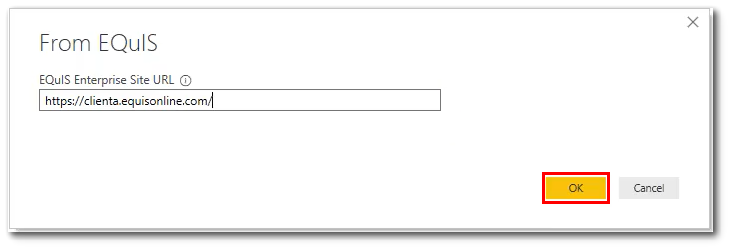
Enter the URL of the EQuIS Enterprise site you're connecting to, then select OK.
Select the appropriate type of authentication:
- Basic: Enter your EQuIS username and password for the given EQuIS Enterprise site.
- API Token: Enter an API Token that you generated in EQuIS Enterprise (visit User Profile).
- Organizational Account: If your EQuIS Enterprise site is appropriately configured, you can authenticate with Microsoft Entra ID.
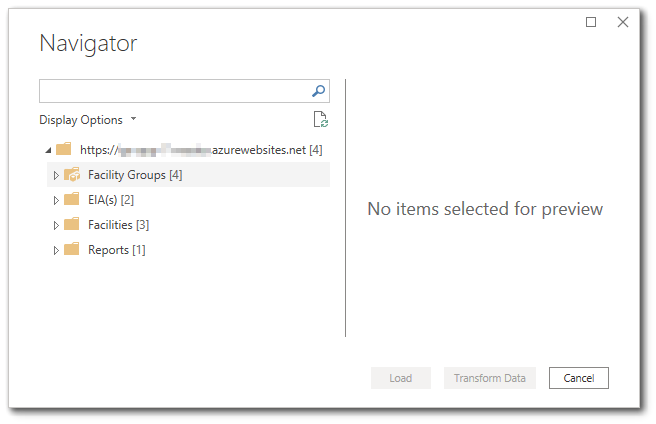
In Navigator, browse to the data set or report you want to load, then select Load or Transform Data. Visit Using EQuIS Data for more information about available data sets.
Additional information
- For best functionality and performance, EarthSoft recommends that you use the EQuIS connector with the latest build of EQuIS Enterprise.
- When you use reports in a facility group, nonadministrator users must have permission to all facilities contained in the facility group.
- Only "grid" reports are available in the Navigator.
- All data sets consumed by the EQuIS connector use camelCase for column names.
- The current version of the EQuIS connector retrieves a data set in a single API request (this logic might be optimized in a future version of the connector).