Explore directory synchronization
Directory synchronization is the synchronization of identities or objects (users, groups, contacts, and computers) between two different directories. For Microsoft 365 deployments, synchronization is typically between an organization's on-premises Active Directory environment and Microsoft Entra ID. This design doesn't limit directory synchronization to any one specific directory. In fact, it can include other directories such as HR databases and an LDAP directory, as seen in the following diagram.
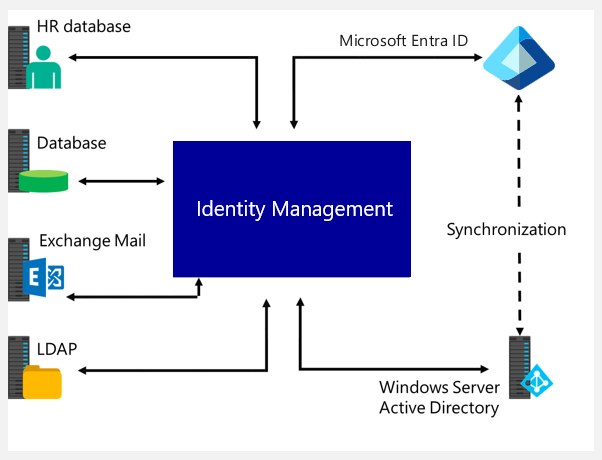
Microsoft 365 commonly uses directory synchronization to synchronize in one direction, from on-premises to Microsoft Entra ID. However, Microsoft's recommended synchronization tools, Microsoft Entra Connect Sync and Microsoft Entra Cloud Sync, can write back specific objects and attributes to the on-premises directory. This feature creates a form of two-way synchronization.
Besides writing back directory objects, directory synchronization can also provide two-way synchronization of user passwords. Microsoft Entra Connect Sync is a directory synchronization tool that provides two-way synchronization. Organizations should install Microsoft Entra Connect Sync on a dedicated computer in an organization's on-premises environment.
Integrating on-premises directories with Microsoft Entra ID helps improve user productivity. Users no longer have to type in passwords to access both cloud and on-premises resources.
With this integration, users and organizations can take advantage of the following features:
- Hybrid identity. Organizations that use an on-premises Active Directory and then connect to Microsoft Entra ID can provide users with a common hybrid identity across on-premises or cloud-based services, including consistent group membership.
- Single sign-on (SSO). SSO controls all the servers and services on-premises. As such, organizations can have confidence in knowing Microsoft 365 protects their user identities and information.
- Multifactor authentication (MFA). MFA provides enhanced authentication security with the cloud service. MFA is based on the premise that unauthorized actors don't have all the information required for access. MFA requires users to provide two or more different authentication factors to access a system, application, or service. These factors typically fall into three categories: something you know (such as a password), something you have (such as a physical token or smart card), and something you are (such as a biometric characteristic like a fingerprint or facial recognition).
- Microsoft Entra policies (Conditional Access). Administrators can use policies set through Microsoft Entra ID to provide conditional access. They can base Microsoft Entra policies on application resource, device and user identity, network location, and multifactor authentication. This design can provide conditional access without having to do extra tasks in the cloud. A later training module (Manage secure user access in Microsoft 365) in this Learning Path examines conditional access policies in greater detail.
- Use common identity. Users can apply their common identity through accounts in Microsoft Entra ID to Microsoft 365, Intune, SaaS apps, and non-Microsoft applications.
- Common identity model. Developers can build applications that use the common identity model. This design integrates applications into on-premises Active Directory when using services such as Microsoft Entra App Proxy or Azure for cloud-based applications).
Recommendations
Your identity system ensures your users' access to apps that you migrate and make available in the cloud. Microsoft recommends that organizations use or enable password hash synchronization with whichever authentication method you choose, for the following reasons:
High availability and disaster recovery. Pass-through authentication (PTA) and Federated authentication rely on an on-premises infrastructure. For PTA, the on-premises footprint includes the server hardware and networking the PTA software agents require. For Federation, the on-premises footprint is even larger. It requires servers in your perimeter network to proxy authentication requests and the internal federation servers.
To avoid single points of failure, organizations should deploy redundant servers. By doing so, available servers always service authentication requests if any component fails. Both PTA and federation also rely on domain controllers to respond to authentication requests, which can also fail. Many of these components need maintenance to stay healthy. Organizations are more likely to experience outages when they don't plan and correctly implement maintenance.
On-premises outage survival. The consequences of an on-premises outage due to a cyber-attack or disaster can be substantial. They can range from reputational brand damage to a paralyzed organization unable to deal with the attack. Organizations that are victims of malware attacks, including targeted ransomware, typically see their on-premises servers fail. When Microsoft helps customers deal with these kinds of attacks, it sees two categories of organizations:
- Organizations that turned on password hash synchronization along with federated or pass-through authentication, but later changed their primary authentication method. Now, they use password hash synchronization as their primary authentication method. Upon doing so, they were always back online in a matter of hours after experiencing an on-premises outage. By using access to email through Microsoft 365, they worked to resolve issues and access other cloud-based workloads.
- Organizations that didn't previously enable password hash synchronization had to resort to untrusted external consumer email systems for communications to resolve issues. In those cases, it took them weeks to restore their on-premises identity infrastructure, before users were able to sign in to cloud-based apps again.
Identity protection. One of the best ways to protect users in the cloud is Microsoft Entra Identity Protection with Microsoft Entra Premium P2. Microsoft continually scans the Internet for user and password lists that bad actors sell and make available on the dark web.
Important
Microsoft Entra ID can use this information to verify if an organization has any compromised usernames and passwords. Therefore, it's critical to enable password hash synchronization no matter which authentication method you use, whether it's federated or pass-through authentication.
Microsoft Entra Identity Protection presents leaked credentials in a report. Organizations can use this information to block or force users to change their passwords when they try to sign in with leaked passwords.
Additional reading. For more information, see Get started with conditional access in Microsoft Entra ID.