Configure the different page properties
When you create a new page, you must configure certain parameters called page properties.
ID and Name properties
Like every object in Business Central, a page also has an ID and Name property. The ID is a number that must be in the number range that you receive from Microsoft when you become a Dynamics 365 Business Central partner. This approach ensures that no objects will have the same ID in your Business Central database.
Along with an ID, you must also give your page a name so you will have the ability to use the Name property. Depending on the type of page, you should always follow the same structure when naming a page. For example, if you have a Card page, you'll use Customer Card and you would use Customer List for a List page. The name of the page should also be unique.
Remember, it's recommend that you use a prefix or suffix in the name of your object so that it's unique.
The definition of a table in AL is using the ID and the Name in the structure, is as follows:
page [ID] [Name]
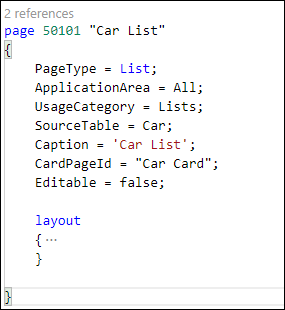
The following image shows an example of a page structure in AL.
Caption property
The Caption property is the text that is displayed in the title bar of your window.
PageType property
The PageType property is a property on the page level that defines the layout of your window. Correspondingly, a page of PageType Card will result in a different layout and actions than a page of PageType List.
CardPageId property
The CardPageId property is also a page property that is used for list pages. This property indicates the page that should be displayed when a user selects a record in a list. As a result, the system will display a page of type Card, which shows details of the selected item. When you create a page, you can specify the CardPageId by using the name of the Card page.
SourceTable and SourceTableView properties
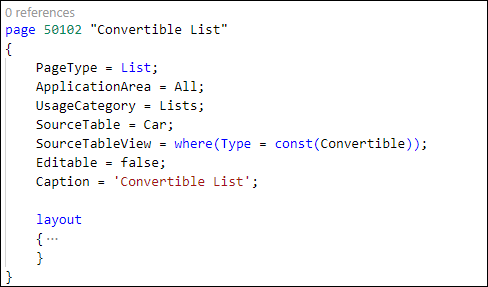
Two other important page properties are SourceTable and SourceTableView. The SourceTable property is used to define the table for which the page will display records. A Card page will only display one record, while a List page will display multiple records. A page can only display information from one table.
The SourceTableView will allow you to sort and filter the SourceTable records that are displayed. If you want to create a page that only displays cars of type Convertible, you can create this page by using the SourceTableView property.
Editable property
The Editable property is used to define whether users can make changes to records by using this page or not. By default, the Editable property is set to Yes. If this property is set to No, but the Editable property on the Control level (which will be discussed later) is set to Yes, it still won't be possible to change the data. Therefore, the page's Editable property overrules the property on the control. On the List page, the Editable property is set to No because you don't want to be able to change data by using a list.
InsertAllowed, ModifyAllowed, and DeleteAllowed properties
If you want your users to be able to modify data, but not insert or delete new data, you can use the InsertAllowed, ModifyAllowed, and DeleteAllowed properties. A typical example is a setup page in Business Central.
In a setup table, you only allow one record; thus, you don't want your users to be able to insert new records or delete the existing record. Therefore, you should set InsertAllowed and DeleteAllowed to No, and ModifyAllowed to Yes because you want your users to be able to change the setup data. The default value for these properties is Yes.
DataAccessIntent
The Page, Report, and Query objects have a new property called DataAccessIntent that can take values ReadOnly or ReadWrite. This property works as a hint for the server, which will connect to the secondary replica if possible. When a workload is executed against the replica, insert/delete/modify operations are not possible, so a new validation is introduced for ReadOnly objects. Any of these operations will throw an exception at runtime.
The DataAccessIntent property has the following possible values:
ReadOnly - Intent to access records, but not to modify them. Read-only pages are run against a replica of the database leading to improved performance, but preventing modifications to the database records.
ReadWrite - Intent to access and modify records.
For reports, API pages, and queries, the Business Central server can use read-only database replicas on Azure SQL Database and SQL Server. If replicas are enabled, use this property to reduce the load on the primary database. Using ReadOnly might also improve performance when viewing objects. ReadOnly works as a hint for the server to route the connection to a secondary (read-only) replica, if one is available. When a workload is executed against the replica, insert/delete/modify operations aren't possible. If any of these operations are executed against the replica, an exception is thrown at runtime.
From the client, the property value can be overwritten by using page 9880 Database Access Intent List page.