إشعار
يتطلب الوصول إلى هذه الصفحة تخويلاً. يمكنك محاولة تسجيل الدخول أو تغيير الدلائل.
يتطلب الوصول إلى هذه الصفحة تخويلاً. يمكنك محاولة تغيير الدلائل.
The following example demonstrates how to create a standard tooltip control for a window's entire client area.
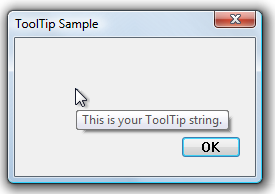
The following illustration shows the tooltip that is displayed when the mouse pointer is within the client window of a dialog box. The handle of the dialog box was passed to the function shown in the preceding example.
What you need to know
Technologies
Prerequisites
- C/C++
- Windows User Interface Programming
Instructions
Create a Tooltip for a Rectangular Area
The following example demonstrates how to create a standard tooltip control for a window's entire client area.
void CreateToolTipForRect(HWND hwndParent)
{
    // Create a tooltip.
    HWND hwndTT = CreateWindowEx(WS_EX_TOPMOST, TOOLTIPS_CLASS, NULL,
                                 WS_POPUP | TTS_NOPREFIX | TTS_ALWAYSTIP,
                                 CW_USEDEFAULT, CW_USEDEFAULT, CW_USEDEFAULT, CW_USEDEFAULT,
                                 hwndParent, NULL, g_hInst,NULL);

    SetWindowPos(hwndTT, HWND_TOPMOST, 0, 0, 0, 0,
                 SWP_NOMOVE | SWP_NOSIZE | SWP_NOACTIVATE);

    // Set up "tool" information. In this case, the "tool" is the entire parent window.

    TOOLINFO ti = { 0 };
    ti.cbSize   = sizeof(TOOLINFO);
    ti.uFlags   = TTF_SUBCLASS;
    ti.hwnd     = hwndParent;
    ti.hinst    = g_hInst;
    ti.lpszText = TEXT("This is your tooltip string.");

    GetClientRect (hwndParent, &ti.rect);

    // Associate the tooltip with the "tool" window.
    SendMessage(hwndTT, TTM_ADDTOOL, 0, (LPARAM) (LPTOOLINFO) &ti);
}
Related topics