Note
Access to this page requires authorization. You can try signing in or changing directories.
Access to this page requires authorization. You can try changing directories.
Applies to: ✔️ AKS Automatic
Azure Kubernetes Service (AKS) Automatic is a managed Kubernetes experience that automates AKS cluster setup and operations and embeds best practice configurations. AKS Automatic also includes a [pod readiness SLA][azure-sla] that guarantees 99.9% of qualifying pod readiness operations complete within 5 minutes, guaranteeing reliable, self-healing infrastructure for your applications. In this quickstart, you learn how to:
- Deploy an AKS Automatic cluster.
- Run a sample multi-container application with a group of microservices and web front ends simulating a retail scenario.
Before you begin
- This quickstart assumes a basic understanding of Kubernetes concepts. For more information, see Kubernetes core concepts for Azure Kubernetes Service (AKS).
- AKS Automatic enables Azure Policy on your AKS cluster, but you should preregister the
Microsoft.PolicyInsightsresource provider in your subscription. For more information, see Azure resource providers and types.
Use the Bash environment in Azure Cloud Shell. For more information, see Get started with Azure Cloud Shell.

If you prefer to run CLI reference commands locally, install the Azure CLI. If you're running on Windows or macOS, consider running Azure CLI in a Docker container. For more information, see How to run the Azure CLI in a Docker container.
If you're using a local installation, sign in to the Azure CLI by using the az login command. To finish the authentication process, follow the steps displayed in your terminal. For other sign-in options, see Authenticate to Azure using Azure CLI.
When you're prompted, install the Azure CLI extension on first use. For more information about extensions, see Use and manage extensions with the Azure CLI.
Run az version to find the version and dependent libraries that are installed. To upgrade to the latest version, run az upgrade.
- Azure CLI version 2.86.0 or later. To find the version, run
az --versioncommand. If you need to install or upgrade, see Install Azure CLI. - If you have multiple Azure subscriptions, select the appropriate subscription ID to bill resources to using the
az account setcommand.
- To deploy a Bicep file, you need write access on the resources you create and access to all operations on the
Microsoft.Resources/deploymentsresource type. For example, to create a virtual machine (VM), you needMicrosoft.Compute/virtualMachines/writeandMicrosoft.Resources/deployments/*permissions. For a list of roles and permissions, see Azure built-in roles.
Note
This sample creates the AKS Automatic cluster with the AzureRM provider's azurerm_kubernetes_automatic_cluster resource, which requires AzureRM provider version v4.81 or later. For an equivalent sample that uses the AzAPI provider instead, see 101-aks-automatic-azapi. Reach for AzAPI when you need direct control over the managed cluster API payload, or an API version or property that the AzureRM provider hasn't surfaced yet.
Important
Starting on AKS 1.36, new AKS Automatic clusters will by default enable Kubernetes Gateway API via the application routing add-on instead of Managed NGINX ingress with the application routing add-on due to the upstream Ingress NGINX retirement.
Existing Automatic clusters aren't affected but should begin migration to Kubernetes Gateway API via the application routing add-on.
Limitations
The following limitations apply to AKS Automatic clusters:
- AKS Automatic is generally available in the following regions:
australiacentral,australiaeast,australiasoutheast,austriaeast,belgiumcentral,brazilsouth,canadacentral,canadaeast,centralindia,centralus,chilecentral,denmarkeast,eastasia,eastus,eastus2,francecentral,germanywestcentral,indonesiacentral,israelcentral,italynorth,japaneast,japanwest,koreacentral,koreasouth,malaysiawest,mexicocentral,newzealandnorth,northcentralus,northeurope,norwayeast,polandcentral,southafricanorth,southcentralus,southeastasia,southindia,spaincentral,swedencentral,switzerlandnorth,uaenorth,uksouth,ukwest,westcentralus,westeurope,westus,westus2,westus3. - New AKS Automatic clusters by default enable managed system node pools and LocalDNS. You can't create AKS Automatic clusters without managed system node pools in any region.
- AKS Automatic cluster has node resource group lockdown preconfigured, which doesn't allow changes to the
MC_resource group, preventing virtual network links on the default Private DNS zone. For cross‑VNet or custom DNS scenarios, use custom network and private DNS by following Create a private Azure Kubernetes Service (AKS) Automatic cluster in a custom virtual network. - Azure CLI version 2.86.0 or later is required. To find the version, run
az --versioncommand. If you need to install or upgrade, see Install Azure CLI. - The following extensions aren't supported:
- Windows nodes aren't supported.
- Migration from AKS base SKU to automatic SKU isn't supported.
- Migration from an existing AKS Automatic cluster without managed system node pools to AKS Automatic with managed system node pools is supported in preview in regions where managed system node pools are generally available. Migration from AKS Automatic with managed system node pools back to AKS Automatic without managed system node pools isn't supported.
Create a resource group
An Azure resource group is a logical group in which Azure resources are deployed and managed.
Create a resource group using the az group create command. The following example creates a resource group named myResourceGroup in the canadacentral location:
az group create --name myResourceGroup --location canadacentral
The following sample output resembles successful creation of the resource group:
{
  "id": "/subscriptions/<guid>/resourceGroups/myResourceGroup",
  "location": "canadacentral",
  "managedBy": null,
  "name": "myResourceGroup",
  "properties": {
    "provisioningState": "Succeeded"
  },
  "tags": null
}
Create an AKS Automatic cluster
Create an AKS Automatic cluster using the az aks create command with the --sku parameter set to automatic. The following example creates a cluster named myAKSAutomaticCluster with Managed Prometheus and the Container Insights integration enabled:
az aks create \
    --resource-group myResourceGroup \
    --name myAKSAutomaticCluster \
    --sku automatic
    --enable-hosted-system
When the deployment finishes, the output shows a hostedSystemProfile property with the enabled property set to true. You can also run the following command to display the hostedSystemProfile properties:
az aks show \
  --resource-group myResourceGroup \
  --name myAKSAutomaticCluster \
  --query hostedSystemProfile
{
  "enabled": true,
  "nodeSubnetId": null,
  "systemNodeSubnetId": null
}
Create Automatic Kubernetes cluster
To create an AKS Automatic cluster, search for and select Kubernetes services. This takes you to the Kubernetes center (preview) page.
On the Kubernetes center (preview) page, select Create > Automatic Kubernetes cluster.

On the Basics tab, fill in all the required fields (Subscription, Resource group, Kubernetes cluster name, and Region), and then select Next.

On the Monitoring tab, select your desired monitoring configurations from Azure Monitor (Container Insights), Managed Prometheus, Grafana Dashboards, and Alerts, and then select Next.

On the Advanced tab, select your desired advanced configurations Private access, Azure Virtual Networking, Managed identity, Container Network Security (ACNS), and Managed Kubernetes Namespaces, and then select Review + create.

Review the configurations on the Review + create tab, and then select Create to deploy the AKS Automatic cluster.
Get started with configuring your first application from GitHub and set up an automated deployment pipeline.

Review the Bicep file
The following Bicep file defines an AKS Automatic cluster:
@description('The name of the managed cluster resource.')
param clusterName string = 'myAKSAutomaticCluster'

@description('The location of the managed cluster resource.')
param location string = resourceGroup().location

resource aks 'Microsoft.ContainerService/managedClusters@2026-02-01' ' = {
  name: clusterName
  location: location
  sku: {
    name: 'Automatic'
  }
  identity: {
    type: 'SystemAssigned'
  }
}
For more information about the resource defined in the Bicep file, see the Microsoft.ContainerService/managedClusters reference.
Deploy the Bicep file
Save the Bicep file as main.bicep to your local computer.
Important
The Bicep file sets the
clusterNameparam to the string myAKSAutomaticCluster. If you want to use a different cluster name, make sure to update the string to your preferred cluster name before saving the file to your computer.Deploy the Bicep file using the [
az deployment group create][az-deployment-group-create] command.az deployment group create --resource-group myResourceGroup --template-file main.bicepIt takes a few minutes to create the AKS cluster. Wait for the cluster to be successfully deployed before you move on to the next step.
Review the Terraform code
Note
The sample code for this article is located in the Azure Terraform GitHub repo. You can view the log file containing the test results from current and previous versions of Terraform.
See more articles and sample code showing how to use Terraform to manage Azure resources.
Create a directory to test the sample Terraform code and set it as the current directory.
Create a file named
providers.tfand insert the following code:terraform { required_version = ">= 1.0" required_providers { azurerm = { source = "hashicorp/azurerm" version = "~>5.0" } random = { source = "hashicorp/random" version = "~>3.0" } } } provider "azurerm" { features {} }Create a file named
main.tfand add the following code:# Create a random name for the resource group using random_pet resource "random_pet" "rg_name" { prefix = var.resource_group_name_prefix } # Create a resource group using the generated random name resource "azurerm_resource_group" "rg" { location = var.resource_group_location name = random_pet.rg_name.id } # Create a random name for the AKS Automatic cluster resource "random_pet" "cluster_name" { prefix = var.cluster_name_prefix } # Create the AKS Automatic cluster resource "azurerm_kubernetes_automatic_cluster" "aks_automatic" { name = random_pet.cluster_name.id location = azurerm_resource_group.rg.location resource_group_name = azurerm_resource_group.rg.name identity { type = "SystemAssigned" } }Create a file named
variables.tfand add the following code:variable "resource_group_location" { type = string default = "westus2" description = "Location of the resource group." } variable "resource_group_name_prefix" { type = string default = "rg" description = "Prefix of the resource group name that's combined with a random ID so name is unique in your Azure subscription." } variable "cluster_name_prefix" { type = string default = "aks-automatic" description = "Prefix of the AKS Automatic cluster name that's combined with a random ID so the name is unique in your Azure subscription." }Create a file named
outputs.tfand insert the following code:output "resource_group_name" { value = azurerm_resource_group.rg.name } output "cluster_name" { value = azurerm_kubernetes_automatic_cluster.aks_automatic.name } output "cluster_id" { value = azurerm_kubernetes_automatic_cluster.aks_automatic.id } output "node_resource_group_id" { value = azurerm_kubernetes_automatic_cluster.aks_automatic.node_resource_group_id } output "fully_qualified_domain_name" { value = azurerm_kubernetes_automatic_cluster.aks_automatic.fully_qualified_domain_name }
Initialize Terraform
Run terraform init to initialize the Terraform deployment. This command downloads the Azure providers required to manage your Azure resources.
terraform init -upgrade
Create a Terraform execution plan
Run terraform plan to create an execution plan.
terraform plan -out main.tfplan
Apply a Terraform execution plan
Run terraform apply to apply the execution plan to your cloud infrastructure.
terraform apply main.tfplan
Creating an AKS Automatic cluster takes several minutes to complete.
Verify the cluster
Get the Azure resource group name and cluster name.
resource_group_name=$(terraform output -raw resource_group_name)
cluster_name=$(terraform output -raw cluster_name)
Run az aks show to display the cluster and confirm it uses the
AutomaticSKU.az aks show --resource-group $resource_group_name --name $cluster_name --query "{name:name, sku:sku, provisioningState:provisioningState}"
Connect to the cluster
To manage a Kubernetes cluster, use the Kubernetes command-line client, kubectl. kubectl is already installed if you use Azure Cloud Shell. You can install kubectl locally using the az aks install-cli command. AKS Automatic clusters are configured with Microsoft Entra ID for Kubernetes role-based access control (RBAC).
Note
When you create a cluster using the Azure CLI, your user is assigned built-in roles for Azure Kubernetes Service RBAC Cluster Admin.
Configure
kubectlto connect to your Kubernetes cluster using theaz aks get-credentialscommand. This command downloads credentials and configures the Kubernetes CLI to use them.az aks get-credentials --resource-group myResourceGroup --name myAKSAutomaticCluster
Configure
kubectlto connect to your Kubernetes cluster by using theaz aks get-credentialscommand. This command downloads credentials and configures the Kubernetes CLI to use them.az aks get-credentials --resource-group $resource_group_name --name $cluster_name
Verify the connection to your cluster using the
kubectl getcommand. This command returns a list of the cluster nodes.kubectl get nodesThe following sample output shows how you're asked to sign in:
To sign in, use a web browser to open the page https://microsoft.com/devicelogin and enter the code AAAAAAAAA to authenticate.After you sign in, the following sample output shows the managed system node pools. Make sure the node status is Ready.
NAME                           STATUS   ROLES    AGE   VERSION
aks-hostedpool-16652789-vms1   Ready    <none>   19m   v1.34.7
aks-hostedpool-16652789-vms2   Ready    <none>   19m   v1.34.7
aks-hostedpool-16652789-vms3   Ready    <none>   19m   v1.34.7
aks-system-surge-zq4d2         Ready    <none>   19m   v1.34.7
Deploy the application
To deploy the application, you use a manifest file to create all the objects required to run the AKS Store application. A Kubernetes manifest file defines a cluster's desired state, such as which container images to run. The manifest includes the following Kubernetes deployments and services:
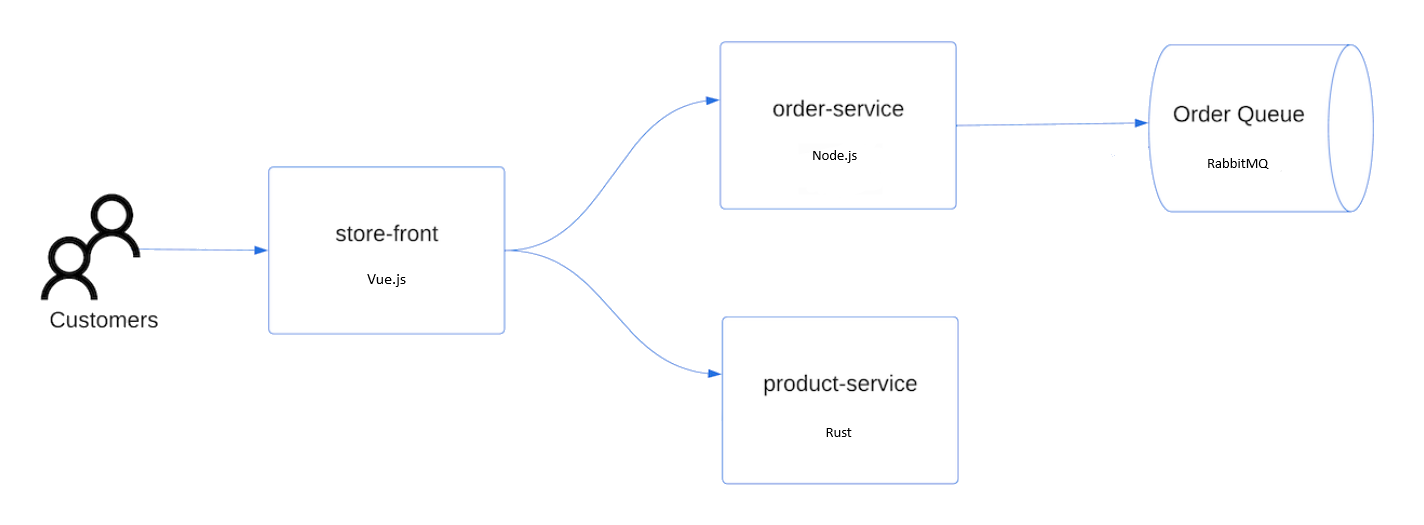
- Store front: Web application for customers to view products and place orders.
- Product service: Shows product information.
- Order service: Places orders.
- Rabbit MQ: Message queue for an order queue.
Note
We don't recommend running stateful containers, such as Rabbit MQ, without persistent storage for production. These are used here for simplicity, but we recommend using managed services, such as Azure Cosmos DB or Azure Service Bus.
Create a namespace
aks-store-demoto deploy the Kubernetes resources into.kubectl create ns aks-store-demoDeploy the application using the
kubectl applycommand into theaks-store-demonamespace. The YAML file defining the deployment is on GitHub.kubectl apply -n aks-store-demo -f https://raw.githubusercontent.com/Azure-Samples/aks-store-demo/main/aks-store-ingress-quickstart.yamlThe following sample output shows the deployments and services:
statefulset.apps/rabbitmq created
configmap/rabbitmq-enabled-plugins created
service/rabbitmq created
deployment.apps/order-service created
service/order-service created
deployment.apps/product-service created
service/product-service created
deployment.apps/store-front created
service/store-front created
ingress/store-front created
Test the application
When the application runs, a Kubernetes service exposes the application front end to the internet. This process can take a few minutes to complete.
Check the status of the deployed pods using the kubectl get pods command. Make sure all pods are
Runningbefore proceeding. If this is the first workload you deploy, it might take a few minutes for node auto provisioning to create a node pool to run the pods.kubectl get pods -n aks-store-demoCheck for a public IP address for the store-front application. Monitor progress using the kubectl get service command with the
--watchargument.kubectl get ingress store-front -n aks-store-demo --watchThe ADDRESS output for the
store-frontservice initially shows empty:NAME CLASS HOSTS ADDRESS PORTS AGE store-front webapprouting.kubernetes.azure.com * 80 12mOnce the ADDRESS changes from blank to an actual public IP address, use
CTRL-Cto stop thekubectlwatch process.The following sample output shows a valid public IP address assigned to the service:
NAME          CLASS                                HOSTS   ADDRESS        PORTS   AGE
store-front   webapprouting.kubernetes.azure.com   *       4.255.22.196   80      12m
Open a web browser to the external IP address of your ingress to see the Azure Store app in action.


Delete the cluster
If you don't plan on going through the AKS tutorial, clean up unnecessary resources to avoid Azure charges.
Remove the resource group, container service, and all related resources using the az group delete command.
az group delete --name myResourceGroup --yes --no-wait
Note
The AKS cluster was created with a system-assigned managed identity, which is the default identity option used in this quickstart. The platform manages this identity, so you don't need to manually remove it.
When you no longer need the resources you created by using Terraform, run terraform plan and specify the destroy flag.
terraform plan -destroy -out main.destroy.tfplan
Run terraform apply to apply the execution plan.
terraform apply main.destroy.tfplan
Related content
In this quickstart, you deployed a Kubernetes cluster using AKS Automatic and then deployed a simple multi-container application to it. This sample application is for demo purposes only and doesn't represent all the best practices for Kubernetes applications. For guidance on creating full solutions with AKS for production, see AKS solution guidance.
To learn more about AKS Automatic, see the Introduction to Azure Kubernetes Service (AKS) Automatic