Note
Access to this page requires authorization. You can try signing in or changing directories.
Access to this page requires authorization. You can try changing directories.
When you run applications in Azure Kubernetes Service (AKS), you can scale pods, pod resources, nodes, or event-driven workloads to match changes in demand. AKS supports manual scaling, Horizontal Pod Autoscaler (HPA), Vertical Pod Autoscaler (VPA), Cluster Autoscaler, Kubernetes Event-driven Autoscaling (KEDA), node autoprovisioning, and burst scaling with Azure Container Instances (ACI).
Choose the right scaling method
| Scaling method | Best for | Key metric | Guide |
|---|---|---|---|
| Horizontal Pod Autoscaler (HPA) | Stateless or partitionable workloads with variable demand | CPU utilization, RPS, queue depth | When should I use Horizontal Pod Autoscaling (HPA) in Kubernetes? |
| Vertical Pod Autoscaler (VPA) | Non-parallelizable workloads; right-sizing pod resource requests | CPU/memory resource usage | Use Vertical Pod Autoscaler in AKS |
| Cluster Autoscaler | Node-level capacity when pods remain Pending | Pending pods | Use Cluster Autoscaler in AKS |
| Node autoprovisioning (NAP) | Pending workloads that need right-sized VM capacity | Pending pod resource requirements | Node autoprovisioning overview |
| KEDA | Event-driven workloads; scale-to-zero required | Queue length, event backlog | KEDA add-on overview |
| ACI burst scaling | Linux workloads with burst demand that meet virtual node limitations | Burst demand | Create virtual nodes with Azure Container Instances |
When to use each scaling method
- Use HPA when your workload can run multiple identical replicas and demand fluctuates based on CPU, memory, or request rate.
- Use VPA when your workload can't scale horizontally (non-parallelizable) or you need to right-size resource requests for better scheduling.
- Use Cluster Autoscaler when you have predefined node pools and need to add or remove nodes based on pending pod demand.
- Use NAP when you want automatic VM SKU selection and node provisioning without manually configuring node pools.
- Use KEDA when scaling should respond to external events (queues, streams, messages) or you need scale-to-zero capability.
- Use ACI burst scaling when you need rapid capacity expansion for Linux workloads without waiting for VM provisioning (typically 2–5 minutes).
Quick recommendation
For most production workloads, start with AKS Automatic, which preconfigures NAP, VPA, and KEDA. In AKS Standard, you enable and configure these features explicitly.
Manually scale pods or nodes
You can manually scale pod replicas and nodes to test how your application responds to changes in available resources or to maintain a fixed amount of capacity. To scale manually, define the required replica or node count. Kubernetes then creates or removes pods, while AKS adds or removes nodes from the applicable node pool.
When you scale down nodes, AKS calls the relevant Azure Compute API for the cluster's compute type. For clusters built on Virtual Machine Scale Sets, the Virtual Machine Scale Sets API determines which nodes to remove. For more information, see the Virtual Machine Scale Sets FAQ.
To get started, see:
Horizontal Pod Autoscaler
Use HPA when your workload can run multiple identical replicas and demand fluctuates. It scales on CPU or memory, application metrics (requests per second, latency), or external queue and backlog metrics. When replicas might exceed existing node capacity, use the preconfigured NAP capability in AKS Automatic or configure Cluster Autoscaler or NAP in AKS Standard.
Don't use HPA and VPA on the same CPU or memory metrics. To use both autoscalers, use VPA in recommendation mode or configure HPA to use distinct custom metrics.
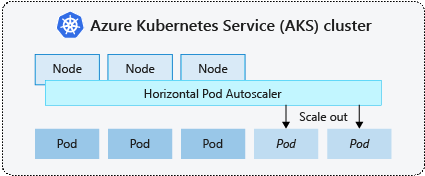
Learn more: When should I use Horizontal Pod Autoscaling (HPA) in Kubernetes?
See also: Use Vertical Pod Autoscaler in AKS to right-size pod CPU and memory requests.
Vertical Pod Autoscaler
Vertical Pod Autoscaler analyzes pod CPU and memory usage and recommends or applies appropriate resource requests. Use VPA to right-size workloads that can't scale efficiently by adding replicas or to improve scheduling and resource utilization.
Depending on its update mode, VPA can apply recommendations when pods are created or evict and recreate pods with updated resource requests. Review workload availability requirements before allowing VPA to apply changes automatically.
To get started, see Use Vertical Pod Autoscaler in AKS.
Cluster Autoscaler
Cluster Autoscaler adjusts the number of nodes in a node pool according to pod scheduling requirements. It adds nodes when pods can't be scheduled because of insufficient node capacity and removes underutilized nodes when their workloads can run elsewhere.
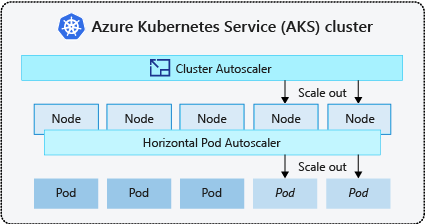
Cluster Autoscaler is commonly used with HPA. HPA adjusts the number of pod replicas based on workload demand, while Cluster Autoscaler adjusts node capacity to accommodate those pods.
To get started, see Use Cluster Autoscaler in AKS.
Scale-out events
If a node pool doesn't have sufficient compute resources for a pod, the pod remains Pending. When Cluster Autoscaler detects pods that can't be scheduled because of node pool resource constraints, it increases the number of nodes in the node pool. Kubernetes schedules the pending pods after the new nodes are provisioned and become ready.
Provisioning VM-based nodes can take several minutes. For workloads with sudden burst demand, consider using virtual nodes and Azure Container Instances.
Scale-in events
Cluster Autoscaler monitors nodes for underutilization and determines whether their pods can run on other nodes. When a node is no longer required, Kubernetes reschedules its pods and AKS removes the node from the node pool.
Scale-in operations can disrupt workloads as pods move between nodes. Run multiple pod replicas and configure appropriate availability controls to minimize disruption.
Kubernetes Event-driven Autoscaling
Kubernetes Event-driven Autoscaling (KEDA) is an open-source component that scales workloads based on events. KEDA extends Kubernetes with custom resources, including ScaledObject, that describe how a workload should respond to an event source or metric.
KEDA is useful for workloads that process queues, streams, messages, or other event backlogs. It can scale supported workloads to zero when no events are available and increase replicas as the backlog grows.
Don't combine a KEDA ScaledObject with a separate HPA for the same workload. KEDA creates and uses an HPA internally, so the autoscalers would compete with each other.
To get started, see the KEDA add-on overview.
Node autoprovisioning
Node autoprovisioning (NAP) uses the open-source Karpenter project to provision and manage nodes according to pending pod requirements. NAP selects an appropriate virtual machine SKU and node quantity to meet real-time workload demand.
NAP starts with an allowed set of VM SKUs and selects capacity for pending workloads. You can define resource limits and scheduling preferences to control how it provisions nodes and distributes workloads.
Control plane scaling and safeguards
AKS automatically scales control plane components based on cluster size and API server resource utilization. This guidance applies to AKS Automatic and AKS Standard. Use the Standard or Premium pricing tier for production or at-scale workloads.
Kubernetes has a multidimensional scale envelope in which each resource type places different demands on the control plane. For example, secrets are often watched by multiple controllers and pods that make an initial LIST call, creating more control plane load than less frequently watched resources. Scaling heavily in one dimension can reduce capacity in others. For example, running hundreds of thousands of pods can reduce the pod mutation rate that the control plane supports. For recommendations, see Kubernetes client best practices for large-scale AKS clusters.
To check whether the control plane has scaled up, inspect the large-cluster-control-plane-scaling-status ConfigMap:
kubectl describe configmap large-cluster-control-plane-scaling-status -n kube-system
The presence of this ConfigMap confirms that AKS scales up the control plane.
Control plane safeguards
If automatically scaling the API server doesn't stabilize it under high load, AKS can deploy a managed API server guard. This last-resort safeguard throttles non-system client requests to prevent the control plane from becoming unresponsive. System-critical API server calls from components such as kubelet continue to function.
To determine whether the managed API server guard has been applied, check for the aks-managed-apiserver-guard FlowSchema and PriorityLevelConfiguration:
kubectl get flowschemas
kubectl get prioritylevelconfigurations
The guard is active when aks-managed-apiserver-guard appears in both command outputs.
If these resources are present, see the API server and etcd troubleshooting guide for mitigation guidance.
Burst to Azure Container Instances (ACI)
You can integrate AKS with Azure Container Instances to handle rapid increases in demand. Pod autoscaling can create more replicas than the existing node pool can support, while provisioning additional VM-based nodes can take several minutes. ACI provides compute capacity without requiring additional VM nodes.
Virtual nodes (ACI-backed virtual Kubernetes nodes) support Linux pods and nodes and require an AKS cluster that uses Azure CNI networking. They don't support some common scenarios, including API server authorized IP ranges, persistent volumes and persistent volume claims, IPv6, and managed identities attached to virtual nodes. Review the virtual node limitations before using ACI burst scaling.
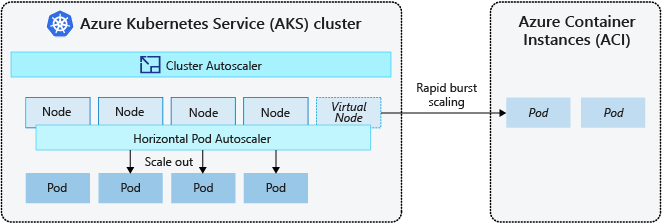
The AKS virtual nodes component is based on Virtual Kubelet and presents ACI as a virtual Kubernetes node. Kubernetes can schedule eligible pods through the virtual node to run as ACI container instances instead of directly on AKS VM nodes.
Virtual nodes use another subnet in the same virtual network as the AKS cluster. This configuration provides private network connectivity between AKS and ACI while allowing ACI to act as a logical extension of the cluster.
Related content
Use the following resources to implement the scaling method that fits your workload:
- Manually scale pods or nodes
- When should I use Horizontal Pod Autoscaling (HPA) in Kubernetes?
- Use Vertical Pod Autoscaler in AKS
- Use Cluster Autoscaler in AKS
- Use the KEDA add-on
- Use node autoprovisioning
- Create virtual nodes with Azure Container Instances
For more information about core Kubernetes and AKS concepts, see: