Note
Access to this page requires authorization. You can try signing in or changing directories.
Access to this page requires authorization. You can try changing directories.
App Service built-in MCP turns an existing REST API hosted on Azure App Service into a Model Context Protocol (MCP) server without writing or deploying any MCP code. The platform reads an OpenAPI specification you provide and generates an MCP tool for each operation. It then serves the MCP endpoint over streamable HTTP on a path you choose.
Important
App Service built-in MCP is in preview.
When to use built-in MCP
Use built-in MCP when:
- You already have a REST API running on App Service and want to expose it to an MCP-compatible AI client (GitHub Copilot Chat, Cursor, Windsurf, Claude Desktop) without code changes.
- You have an OpenAPI 3.x specification (JSON or YAML) that describes the operations you want to expose.
- You want the platform to handle MCP protocol negotiation, tool discovery, hot reload of the spec, and client cancellation.
- You want App Service Authentication to enforce identity for MCP requests, the same way it enforces identity for any other routes on your app.
Use a custom MCP server (built with an MCP SDK and deployed as your application code) instead when:
- You need MCP tool behavior that doesn't map cleanly to a single REST operation—for example, multi-step workflows, in-memory aggregation, or tools that don't have an HTTP backing endpoint.
- You need to expose MCP resources or prompts in addition to tools.
- You need to host more than one MCP server on a single app.
For a comparison of all MCP hosting options on Azure, see Choose an Azure service for your MCP server.
Prerequisites
- An App Service app on a dedicated pricing tier (Basic or higher). Built-in MCP isn't supported on Free, Shared, Consumption, or Flex Consumption plans.
- An OpenAPI 3.x specification (JSON or YAML) that describes the operations you want to expose as MCP tools. See Step 1: Provide your OpenAPI spec for generation options.
Step 1: Provide your OpenAPI spec
Built-in MCP needs an OpenAPI 3.x document (JSON or YAML). Most web frameworks can produce one for you:
- ASP.NET Core minimal APIs—use the built-in
Microsoft.AspNetCore.OpenApipackage (default in .NET 9 and later). - ASP.NET Core controllers—use Swashbuckle.
- FastAPI—autogenerated at
/openapi.json. - Express/NestJS—use
@nestjs/swaggerorexpress-openapi. - Spring Boot—use
springdoc-openapi. - Java/Quarkus—use SmallRye OpenAPI.
If your API is already running and exposes an OpenAPI endpoint, you don't need to add a new library—download the spec from that endpoint (for example, with curl) and save it locally so you can upload it when you enable built-in MCP.
A minimal spec that exposes one operation looks like:
{
  "openapi": "3.0.3",
  "info": { "title": "Zava Orders", "version": "1.0.0" },
  "paths": {
    "/orders/{id}": {
      "get": {
        "operationId": "get_order",
        "summary": "Get an order by ID",
        "parameters": [
          { "name": "id", "in": "path", "required": true,
            "schema": { "type": "string" } }
        ],
        "responses": {
          "200": { "description": "OK" }
        }
      }
    }
  }
}
Use clear, action-oriented operationId values (list_orders, create_order, cancel_order). The AI client uses them as tool names when choosing which tool to call. For details on how operations map to MCP tools, see How does built-in MCP map REST operations to MCP tools?.
Make the spec available to the platform
The platform reads the spec from a file on the app's file system. The default path is /home/data/.ai/apispec.json, configurable via ApiSpecPath. How you get the file there depends on the configuration path you use in Step 2:
- Portal—upload the JSON or YAML file when you create the MCP server. The portal writes the contents to
ApiSpecPathfor you. - Azure CLI—deploy the spec with your app (for example, include it in your deployment artifact), or upload it after the fact with
az webapp deployoraz webapp ssh. - Bicep—reference a path your deployment puts on the app.
Step 2: Enable built-in MCP
Built-in MCP is configured through the aiIntegration property on your Microsoft.Web/sites resource. The preview ships with Portal, Azure CLI (using az rest), and Bicep as supported configuration paths.
The following examples show the minimal payload to expose every operation in your spec. To filter operations, configure auth without App Service Authentication, or change where the spec lives, see Customize built-in MCP.
In the Azure portal, navigate to your App Service app.
In the left menu, under Settings, select AI (preview).
Select the MCP servers tab.
Select + Create MCP server, then fill in:
Display name—the server identifier shown to clients.
Endpoint path—the relative URL where the MCP server is served (default
/mcp). The full URL preview appears below the field.Description—optional, shown to MCP clients.
API spec path—the path on the app's file system where the spec file is stored. Defaults to
/home/data/.ai/apispec.json; edit it if you want the spec stored somewhere else.OpenAPI specification › JSON or YAML file—select Browse and upload your OpenAPI JSON or YAML file. The portal writes the contents to the location you set in API spec path. Files larger than 15 KB might be truncated unless access to the Kudu site is enabled on the app.
Authentication—optional. If App Service Authentication isn't enabled on the app, use this section to provide identity provider metadata so MCP clients can complete OAuth. The portal exposes three fields:
- Source—comma-separated OAuth scopes the MCP client should request (maps to
SiteAuth.Scopes). - Well-known OpenID configuration URL—the OpenID Connect discovery URL for your identity provider (maps to
SiteAuth.WellKnownOpenIdConfiguration). - Issuer—the token issuer URL (maps to
SiteAuth.Issuer).
Provide Source plus either Well-known OpenID configuration URL or Issuer. To set
JwksUriorAudience, use the Azure CLI or Bicep tab instead. For details, see Configure auth without App Service Authentication.- Source—comma-separated OAuth scopes the MCP client should request (maps to
Select Create MCP.

After you save, the MCP servers tab shows the configured server with its endpoint, tool count, and an enable/disable toggle. You can enable or disable individual tools as well.

Step 3: Connect an MCP client
After you save the configuration, the MCP endpoint is available at:
https://<app-name>.azurewebsites.net/<endpoint path you provided>
Configure your MCP client with that URL. For example, in GitHub Copilot Chat in Visual Studio Code, add it to .vscode/mcp.json:
{
  "servers": {
    "my-mcp-server": {
      "type": "http",
      "url": "https://<app-name>.azurewebsites.net/<endpoint path you provided>"
    }
  }
}
When the client connects, it calls initialize, then tools/list to discover the operations your OpenAPI spec exposes, then tools/call for each invocation.
Authentication
Built-in MCP doesn't issue tokens or implement an authorization server. App Service Authentication enforces identity on the same app and works with any identity provider App Service Authentication supports (Microsoft Entra, and any other configured OpenID Connect (OIDC) provider). Two configurations are supported:
- App Service Authentication is enabled (recommended). MCP requests go through the same identity checks as any other route, and the platform publishes protected resource metadata at
/.well-known/oauth-protected-resourceso MCP clients can complete OAuth automatically. Required follow-up: complete the steps in Configure built-in MCP server authorization to register the MCP audience and scopes with your identity provider. - App Service Authentication isn't enabled. Provide identity provider metadata in a
SiteAuthblock onaiIntegration. This option suits cases where you already validate tokens in your application code and don't want App Service Authentication to handle the OAuth flow on the app's behalf. See Configure auth without App Service Authentication.
In both cases, your application code is still responsible for validating the bearer token on each request. Built-in MCP doesn't enforce authorization on the underlying HTTP routes.
Caution
Avoid exposing a built-in MCP server publicly without authentication. After an MCP client connects, every operation in the published ToolList is callable.
Customize built-in MCP
The minimal payload in Step 2 accepts every default. Add only the fields that you actually need. Each snippet shows the field added on top of the minimal payload.
Change where the spec lives
By default, the platform reads the spec from /home/data/.ai/apispec.json. Set ApiSpecPath to read it from somewhere else:
"aiIntegration": {
  "ApiSpecPath": "/home/site/wwwroot/openapi/orders.yaml",
  "Mcp": { "Servers": [ { "Name": "orders", "Endpoint": "/mcp/orders" } ] }
}
Filter which operations are exposed
ToolList on each server controls which OpenAPI operations the MCP server exposes. The default is ["*"] (every operation in the spec).
["*"]—expose every operation in the spec.[]—expose no operations. Useful for temporarily disabling tool discovery without removing the server.["get_order", "list_orders"]—expose only the listedoperationIdvalues.
"Mcp": {
  "Servers": [
    {
      "Name": "orders",
      "Endpoint": "/mcp/orders",
      "ToolList": ["get_order", "list_orders"]
    }
  ]
}
Use this filter to keep destructive or admin-only operations off the MCP surface while still serving them to your existing HTTP clients.
ToolList interacts with spec updates as follows:
ToolList = ["*"]—when the spec is updated, new operations are exposed automatically.ToolList = ["op1", "op2"]—when the spec is updated, onlyop1andop2are exposed. New operations in the spec are ignored until you add them toToolList.- Operation IDs in
ToolListthat don't exist in the spec are silently dropped.
If you want spec-driven filtering only (no ARM-side allow list), keep ToolList = ["*"] and remove operations from the spec itself.
Disable a server without removing it
Set Enabled to false to take the MCP endpoint offline without deleting the configuration:
"Mcp": {
  "Servers": [
    { "Name": "orders", "Endpoint": "/mcp/orders", "Enabled": false }
  ]
}
Configure auth without App Service Authentication
When App Service Authentication isn't enabled on the app, add a SiteAuth block so the platform can publish protected resource metadata at /.well-known/oauth-protected-resource. MCP clients (such as VS Code) follow the WWW-Authenticate header returned on the first call to discover the authorization server and complete the OAuth flow.
"aiIntegration": {
  "Mcp": { "Servers": [ { "Name": "orders", "Endpoint": "/mcp/orders" } ] },
  "SiteAuth": {
    "Scopes": ["api://my-app/user_impersonation"],
    "WellKnownOpenIdConfiguration": "https://login.microsoftonline.com/{tenant}/v2.0/.well-known/openid-configuration",
    "Audience": "api://my-app-client-id"
  }
}
Required fields: Scopes, plus either WellKnownOpenIdConfiguration or Issuer. JwksUri and Audience are optional. See Reference: aiIntegration schema for the full field list.
Your application code is still responsible for validating the bearer token on each request.
Register your MCP server in Azure API Center
You can register your built-in MCP server as an asset in Azure API Center to track all of your APIs in a centralized location for discovery, reuse, and governance. Registration is optional—built-in MCP works without it—but it's the recommended way to keep MCP servers visible alongside the rest of your API estate.
The portal makes registration a one-select flow:
On the MCP servers tab, expand your server.
Next to Azure API Center, select + Connect.
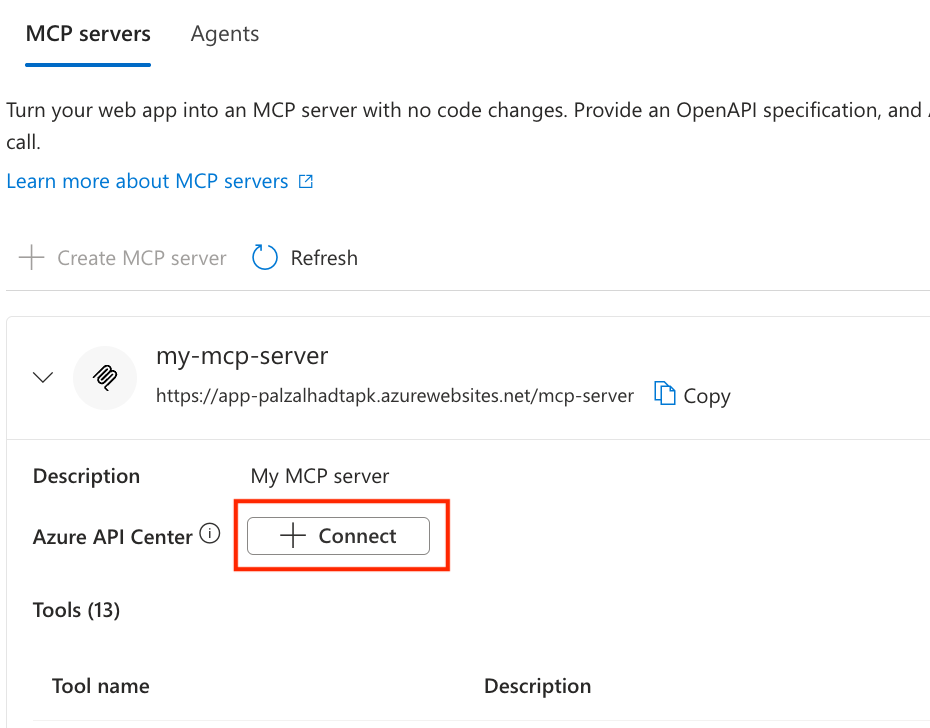
In the Connect API Center pane, choose a Subscription and an existing API Center, or select Create new to create a new one. App Service fills in default values (kind, lifecycle stage, environment, deployment) on your behalf so you don't have to set them up manually.
Select Connect. The server detail now links to the API Center asset.
To change the asset metadata (kind, lifecycle stage, version, custom properties, definitions, deployments), edit the asset directly in API Center. To register an MCP server in API Center without going through App Service—or to register one that App Service built-in MCP didn't create—see Register and discover remote MCP servers in your API inventory.
To disconnect the MCP server from API Center, delete the corresponding MCP server asset in your API Center. The link on the App Service MCP servers tab clears once the asset is removed.
Troubleshooting
The MCP client gets a 404 at the configured endpoint.
- Confirm the
Endpointvalue starts with/and doesn't collide with an existing route in your app. - Confirm the server's
Enabledfield istrue.
The MCP client connects but tools/list returns an empty array.
- Confirm a spec is configured—either uploaded through the portal or available at the path set in
ApiSpecPath. - Confirm
ToolListisn't set to[]. - Validate the spec with an OpenAPI 3.x linter—operations missing required fields (such as a response schema) are skipped.
The MCP client gets a 401 with a WWW-Authenticate challenge.
- This error is expected when App Service Authentication is enabled and the client doesn't have a valid token. The challenge points the client at the protected resource metadata endpoint, which in turn points at your identity provider. See Configure built-in MCP server authorization.
The MCP client gets a 403 from a tool call but tools/list succeeds.
- The OAuth token is valid for MCP discovery but doesn't have the scope or role your application requires for the underlying HTTP route. Check the upstream HTTP status surfaced in the
CallToolResult.
Frequently asked questions
How does built-in MCP map REST operations to MCP tools?
Each OpenAPI operation becomes one MCP tool:
Tool name—derived from the operation's
operationId. IfoperationIdis missing, the platform falls back to{method}_{path}(for example,get__orders__id_). Use explicit, action-orientedoperationIdvalues to give the AI client clearer tool names.Tool description—the operation's
summaryfirst, thendescriptionifsummaryis missing.Tool annotations—built-in MCP maps the HTTP method to MCP tool annotations:
HTTP method readOnlyHintidempotentHintdestructiveHintGET,HEADtruetruefalsePUT,PATCHfalsetruefalseDELETEfalsetruetruePOSTfalsefalsefalse
How does the platform handle spec updates?
When the spec at ApiSpecPath changes—either because you redeployed the file or you uploaded a new version through the portal—the platform:
- Detects the change.
- Reparses the spec and recomputes the tool list.
- Hashes the new tool list (SHA-256) and compares it to the previous hash.
- If the hash changed, sends a
notifications/tools/list_changedevent to every connected MCP client.
You don't need to restart the app or update the aiIntegration configuration to pick up spec changes. For how ToolList interacts with spec updates, see Filter which operations are exposed.
What does the platform serve at /.well-known/oauth-protected-resource?
The platform publishes protected resource metadata (PRM) so MCP clients can discover where to obtain an access token. The contents come from:
- App Service Authentication, when enabled on the app. The platform publishes the configured identity provider's metadata.
- The
SiteAuthblock onaiIntegration, when App Service Authentication isn't enabled. See Configure auth without App Service Authentication.
If neither is configured, the platform doesn't publish the endpoint and clients aren't challenged for OAuth.
What are the limits?
| Limit | Value |
|---|---|
| MCP servers per app | 1 (preview) |
| Description length | 256 characters |
| Tool name length | 1–128 characters (per the MCP spec) |
| Supported transport | Streamable HTTP |
Reference: aiIntegration schema
| Field | Type | Description |
|---|---|---|
ApiSpecPath |
string | Absolute path on the app's file system where the OpenAPI spec lives. Defaults to /home/data/.ai/apispec.json. |
Mcp.Servers[] |
array (maximum one entry in preview) | MCP servers defined on the app. |
Mcp.Servers[].Name |
string | Server identifier. Must be unique within the app. |
Mcp.Servers[].Description |
string | Short description (256 characters or fewer). |
Mcp.Servers[].Enabled |
bool | When false, the server isn't registered. Defaults to true. |
Mcp.Servers[].Endpoint |
string | Relative URL where the MCP endpoint is served. |
Mcp.Servers[].ToolList |
array of strings | ["*"] exposes every operation in the spec, [] exposes none, or list specific tool names to filter. |
SiteAuth |
object | Optional. Identity provider metadata used to publish protected resource metadata when App Service Authentication isn't enabled. See Configure auth without App Service Authentication. |
SiteAuth.Scopes |
array of strings | Required. OAuth scopes the MCP client should request—for example, ["api://my-app/user_impersonation"]. |
SiteAuth.WellKnownOpenIdConfiguration |
string (URL) | Required if Issuer isn't set. URL to the OpenID Connect discovery document—for example, https://login.microsoftonline.com/{tenant}/v2.0/.well-known/openid-configuration. |
SiteAuth.Issuer |
string | Required if WellKnownOpenIdConfiguration isn't set. Token issuer URL—for example, https://login.microsoftonline.com/{tenant}/v2.0. |
SiteAuth.JwksUri |
string (URL) | Optional. JWKS endpoint for token signature validation. |
SiteAuth.Audience |
string | Optional. Expected aud claim value—for example, api://my-app-client-id. |