Note
Access to this page requires authorization. You can try signing in or changing directories.
Access to this page requires authorization. You can try changing directories.
Today, you can deploy your critical workloads securely behind Application Gateway, gaining the flexibility of Layer 7 load balancing features. Access to the backend workloads is possible in two ways:
- Public IP address - your workloads are accessible over the Internet.
- Private IP address- your workloads are accessible privately via your virtual network / connected networks
Private Link for Application Gateway allows you to connect workloads over a private connection spanning across VNets and subscriptions. When configured, a private endpoint is placed into a defined virtual network's subnet, providing a private IP address for clients looking to communicate to the gateway. For a list of other PaaS services that support Private Link functionality, see What is Azure Private Link.
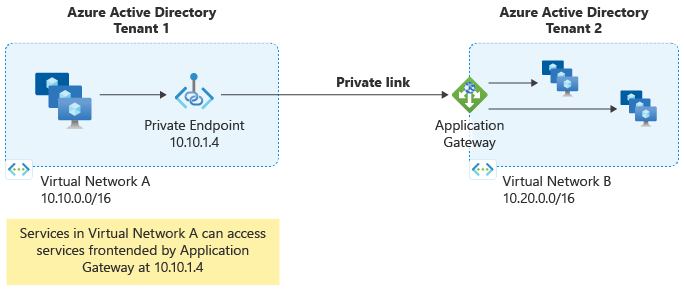
Features and capabilities
Private Link allows you to extend private connectivity to Application Gateway via a Private Endpoint in the following scenarios:
- VNet in the same or different region from Application Gateway
- VNet in the same or different subscription from Application Gateway
- VNet in the same or different subscription and the same or different Microsoft Entra tenant from Application Gateway
You may also choose to block inbound public (Internet) access to Application Gateway and allow access only via private endpoints. Inbound management traffic still needs to be allowed to application gateway. For more information, see Application Gateway infrastructure configuration
All features supported by Application Gateway are supported when accessed through a private endpoint, including support for AGIC.
Note
Private Link configuration for Application Gateway has an idle timeout of approximately 5 minutes (300 seconds). To prevent connections from being terminated due to inactivity, applications that connect to Application Gateway through private endpoints should use TCP keepalive intervals of less than 300 seconds. If the client can't initiate TCP keepalives, submit a support ticket to request enabling the required keepalive behavior on Application Gateway.
Identify traffic from a private endpoint
Note
When traffic reaches Application Gateway through a private endpoint, Private Link preserves the client's source IP address and source port. Application Gateway access logs record these values in the clientIP and clientPort fields. For HTTP and HTTPS requests, the entry that Application Gateway adds to the X-Forwarded-For header reflects the same values in IP:port format. If another proxy sends the request to the private endpoint, these values identify that proxy as the immediate client.
Consumer virtual networks can use overlapping IP address spaces, so a client IP address alone might not identify the originating consumer. Azure Private Link assigns a linkIdentifier, also called LINKID, to each private endpoint connection. For HTTP and HTTPS requests, Application Gateway exposes the decimal identifier in the following locations:
| Location | Name | Description |
|---|---|---|
| Request forwarded to the backend | X-Azure-PrivateEndpoint-ID |
Application Gateway adds this header before forwarding the request. Its value is the decimal private endpoint link identifier, for example, 123456. |
| Application Gateway access log | LinkId |
Contains the same decimal link identifier as a string value. For more information, see Access log category. |
For example, a backend receives the following header for a request that arrived through a private endpoint:
X-Azure-PrivateEndpoint-ID: 123456
Note
Despite its name, X-Azure-PrivateEndpoint-ID doesn't contain the Azure resource ID of the private endpoint. It contains the decimal value of the private endpoint connection's linkIdentifier property.
The X-Azure-PrivateEndpoint-ID HTTP header applies to Layer 7 HTTP and HTTPS traffic. It isn't added to Layer 4 TCP/TLS proxy traffic.
Compare either value with the linkIdentifier property of the corresponding private endpoint connection in Azure Resource Manager. This comparison lets you associate backend requests and access-log records with a specific private endpoint connection for auditing or access-control decisions.
Application Gateway populates the header and access-log property only for requests received through a private endpoint. For requests sent directly to an Application Gateway public or private frontend IP address, Application Gateway doesn't populate X-Azure-PrivateEndpoint-ID or LinkId. This behavior applies when the Private Link configuration is associated with either a public or a private Application Gateway frontend.
For the Azure Private Link definition of LINKID and its relationship to linkIdentifier, see Get connection information using TCP Proxy v2.
Private Link components
Four components are required to implement Private Link with Application Gateway:
Application Gateway Private Link Configuration
A Private link configuration can be associated with an Application Gateway Frontend IP address, which is then used to establish a connection using a Private Endpoint. If there's no association to an Application Gateway frontend IP address, then the Private Link feature isn't enabled.
Application Gateway Frontend IP address
The public or private IP address where the Application Gateway Private Link Configuration needs to be associated to enable the Private Link Capabilities.
Private Endpoint
An Azure network resource that allocates a private IP address in your VNet address space. It's used to connect to the Application Gateway via the private IP address similar to many other Azure Services that provide private link access; for example, Storage and KeyVault.
Private Endpoint Connection
A connection on Application Gateway originated by Private Endpoints. You can autoapprove, manually approve, or reject connections to grant or deny access.
Pricing
| Component | Service Provider/Private Link (Application Gateway resource owner) | Consumer/Private Endpoint |
|---|---|---|
| Private link service | No charges | Not applicable |
| Private endpoint | Not applicable | Billed as per Private Link |
| Data processing (Bi-directional) | No charges | Billed as per Private Link |
| Data transfers | Billed as per Bandwidth | Billed as per Bandwidth |
Limitations
- API version 2020-03-01 or later should be used to configure Private Link configurations.
- Static IP allocation method in the Private Link Configuration object isn't supported.
- The subnet used for PrivateLinkConfiguration can't be same as the Application Gateway subnet.
- Private link configuration for Application Gateway doesn't expose the "Alias" property and must be referenced via resource URI.
- Private Endpoint creation doesn't create a *.privatelink DNS record or zone. All DNS records should be entered in existing zones used for your Application Gateway.
- Private Link configuration for Application Gateway has an idle timeout of approximately 5 minutes (300 seconds). To prevent connections from being terminated due to inactivity, applications connecting to Application Gateway through private endpoints should use TCP keepalive intervals of less than 300 seconds. If the client can't initiate TCP keepalives, submit a support ticket to request enabling the required keepalive behavior on Application Gateway.