Note
Access to this page requires authorization. You can try signing in or changing directories.
Access to this page requires authorization. You can try changing directories.
Azure Backup is a native Azure service that helps you protect your data and restore it when required. It provides a centralized, policy-based solution to back up workloads across Azure and on-premises environments without the need to deploy or manage backup infrastructure.
Azure Backup delivers a simple, secure, and cost-effective way to safeguard your data and recover it from the Azure cloud, enabling you to manage backup and recovery operations efficiently at scale.
When to use Azure Backup
Use Azure Backup when you want to:
- Protect data against accidental deletion, corruption, or ransomware
- Retain data for short-term and long-term compliance needs
- Manage backups centrally across workloads and environments
- Restore individual items or entire workloads based on your business requirements
Note
Azure Backup focuses on data protection (backup and restore). For disaster recovery and failover orchestration, use Azure Site Recovery.
What can I back up?
Azure Backup supports a wide range of workloads, that include:
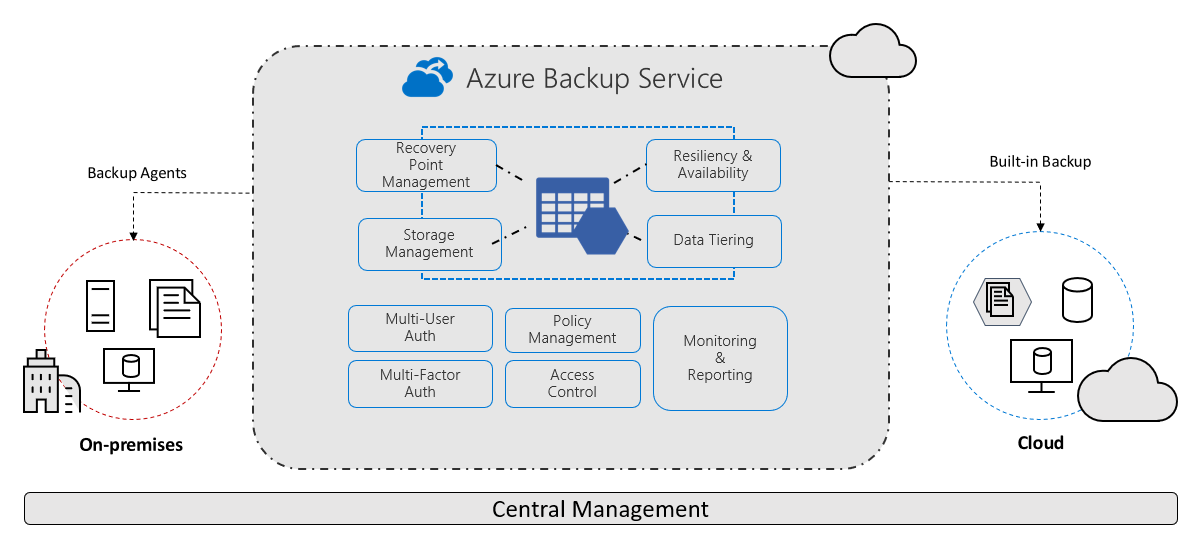
How Azure Backup works
Azure Backup uses a policy-driven workflow to protect your data:
Configures backup policy: Define the schedule, frequency, and retention based on your requirements.
Captures data: Azure Backup takes snapshots or workload-aware backups of your data.
Stores recovery points: Store backup data in a secured vault, which maintains recovery points.
Restores data: Restore data at different levels (files, disks, databases, or full workloads).
For Azure VMs, Azure Backup takes a snapshot and transfers the data to a vault without impacting production workloads.
Key components in Azure Backup
Azure Backup uses the following key components:
- Recovery Services vault or Backup vault: Stores backup data and recovery points, and acts as a security boundary.
- Backup policies: Define when backups run and how long data is retained.
- Backup extension or agent: Enables workload-aware or file-level backups.
- Resiliency: Provides centralized backup management and monitoring capabilities.
Backup types and tiers
Azure Backup supports different backup approaches based on workload and backup requirements:
- Snapshot-based backup – Fast backups and restores for supported workloads.
- Vaulted backup – Copies data to a vault for durability and isolation.
- Operational + vaulted backup (for some services) – Combines fast restore and long-term retention.
- Vault-archive tier – Stores backup data in archived state for long-term retention, enabling cost-efficient storage of infrequently accessed recovery points that are retained primarily to meet compliance requirements. Learn more.
Why use Azure Backup?
By using Azure Backup, you can protect your data, simplify backup management, and recover quickly when needed. Azure Backup delivers these key benefits:
- Offload on-premises backup: Azure Backup offers a simple solution for backing up your on-premises resources to the cloud. Get short and long-term backup without the need to deploy complex on-premises backup solutions.
- Back up Azure IaaS VMs: Azure Backup provides independent and isolated backups to guard against accidental destruction of original data. Backups are stored in a Recovery Services vault with built-in management of recovery points. Configuration and scalability are simple, backups are optimized, and you can easily restore as needed.
- Scale easily - Azure Backup uses the underlying power and unlimited scale of the Azure cloud to deliver high-availability with no maintenance or monitoring overhead.
- Get unlimited data transfer: Azure Backup doesn't limit the amount of inbound or outbound data you transfer, or charge for the data that's transferred.
- Outbound data refers to data transferred from a Recovery Services vault during a restore operation.
- If you perform an offline initial backup using the Azure Import/Export service to import large amounts of data, there's a cost associated with inbound data. Learn more.
- Keep data secure: Azure Backup provides solutions for securing data in transit and at rest.
- Centralized monitoring and management: Azure Backup provides built-in monitoring and alerting capabilities in a Recovery Services vault. These capabilities are available without any additional management infrastructure. You can also increase the scale of your monitoring and reporting by using Azure Monitor.
- Get app-consistent backups: An application-consistent backup means a recovery point has all required data to restore the backup copy. Azure Backup provides application-consistent backups, which ensure additional fixes aren't required to restore the data. Restoring application-consistent data reduces the restoration time, allowing you to quickly return to a running state.
- Retain short and long-term data: You can use Recovery Services vaults for short-term and long-term data retention.
- Automatic storage management - Hybrid environments often require heterogeneous storage - some on-premises and some in the cloud. With Azure Backup, there's no cost for using on-premises storage devices. Azure Backup automatically allocates and manages backup storage, and it uses a pay-as-you-use model. So you only pay for the storage you consume. Learn more about pricing.
- Multiple storage options - Azure Backup offers three types of replication to keep your storage/data highly available.
Locally redundant storage (LRS) replicates your data three times (it creates three copies of your data) in a storage scale unit in a datacenter. All copies of the data exist within the same region. LRS is a low-cost option for protecting your data from local hardware failures.
Geo-redundant storage (GRS) is the default and recommended replication option. GRS replicates your data to a secondary region (hundreds of miles away from the primary location of the source data). GRS costs more than LRS, but GRS provides a higher level of durability for your data, even if there's a regional outage.
Zone-redundant storage (ZRS) replicates your data in availability zones, guaranteeing data residency and resiliency in the same region. ZRS has no downtime. So your critical workloads that require data residency, and must have no downtime, can be backed up in ZRS.
Zone-redundancy for Recovery Services vault and Backup vault, as well as optional zone-redundancy for backup data. Learn about Reliability for Azure Backup.
Security and ransomware protection by Azure Backup
Azure Backup helps protect your critical business systems and backup data from ransomware attacks. It applies preventive controls and provides capabilities to address different stages of an attack lifecycle. It also secures your backup data both in transit and at rest.
In addition to its default protections, Azure Backup offers advanced security features that provide enhanced protection for your backup environment.
Azure Backup includes the following built-in security capabilities:
- Isolated vault storage: Stores backup data in a Recovery Services vault, isolated from the production environment to reduce exposure to operational and security risks.
- Soft delete: Retains deleted backup data for a defined period to protect against accidental or malicious deletion. Learn more.
- Immutable backup: Locks recovery points to prevent modification or deletion, ensuring data integrity. Learn more.
- Role-based access control (RBAC): Restricts access to backup resources using fine-grained permissions. Learn more.
Learn more about security in Azure Backup and how backups help protect against ransomware.
Design considerations for workload protection
Before you configure backups, review the following aspects to design an effective and scalable strategy:
- Workload type and protection requirements: Identify the workloads you need to protect (for example, VMs, databases, or file shares) and their specific backup requirements, such as frequency, consistency, and supported features.
- Recovery objectives (RPO and RTO): Define your Recovery Point Objective (RPO) and Recovery Time Objective (RTO) to determine how often backups run and how quickly you must restore data during a failure.
- Retention and compliance requirements: Establish retention policies based on business, regulatory, and compliance needs. Plan for both short-term and long-term data retention.
- Vault design and subscription strategy: Plan how you organize Recovery Services vaults across subscriptions, regions, and environments to support isolation, scalability, and management.