Note
Access to this page requires authorization. You can try signing in or changing directories.
Access to this page requires authorization. You can try changing directories.
Budgets help you monitor and control monthly Unity Gateway spend using filters applied to billing records. You can scope a budget specifically to the Unity Gateway product to track only Unity Gateway spending, or include Unity Gateway in an account-wide budget.
Account and workspace admins can view a summary of AI budget status and spend on the AI page in Governance Hub.
Tip
For budgets scoped to Unity Gateway, enforcement and alerts are near real-time. When spend crosses a threshold, usage blocking and alert emails go into effect within moments. Budget near-real-time monitoring is independent of system.billing.usage refresh timing.
For details on creating and monitoring budgets, see Create and monitor budgets. To delegate who can view and manage a budget, see Manage budget permissions.
Requirements
- Unity Gateway enabled for your account.
What do budgets for Unity Gateway cover?
Unity Gateway budgets cover spend that flows through Unity Gateway:
- pay-per-token usage
ai_query- Genie. See Manage budgets and cost controls for Genie.
- (Optional) external model providers (model provider services).
These budgets don't cover the following:
- Provisioned throughput
- Traffic sent directly to standalone Model Serving endpoints that doesn't flow through Unity Gateway
How budgets work with Unity Gateway
When creating a budget, select Unity Gateway as the resource type to track only Unity Gateway spending.
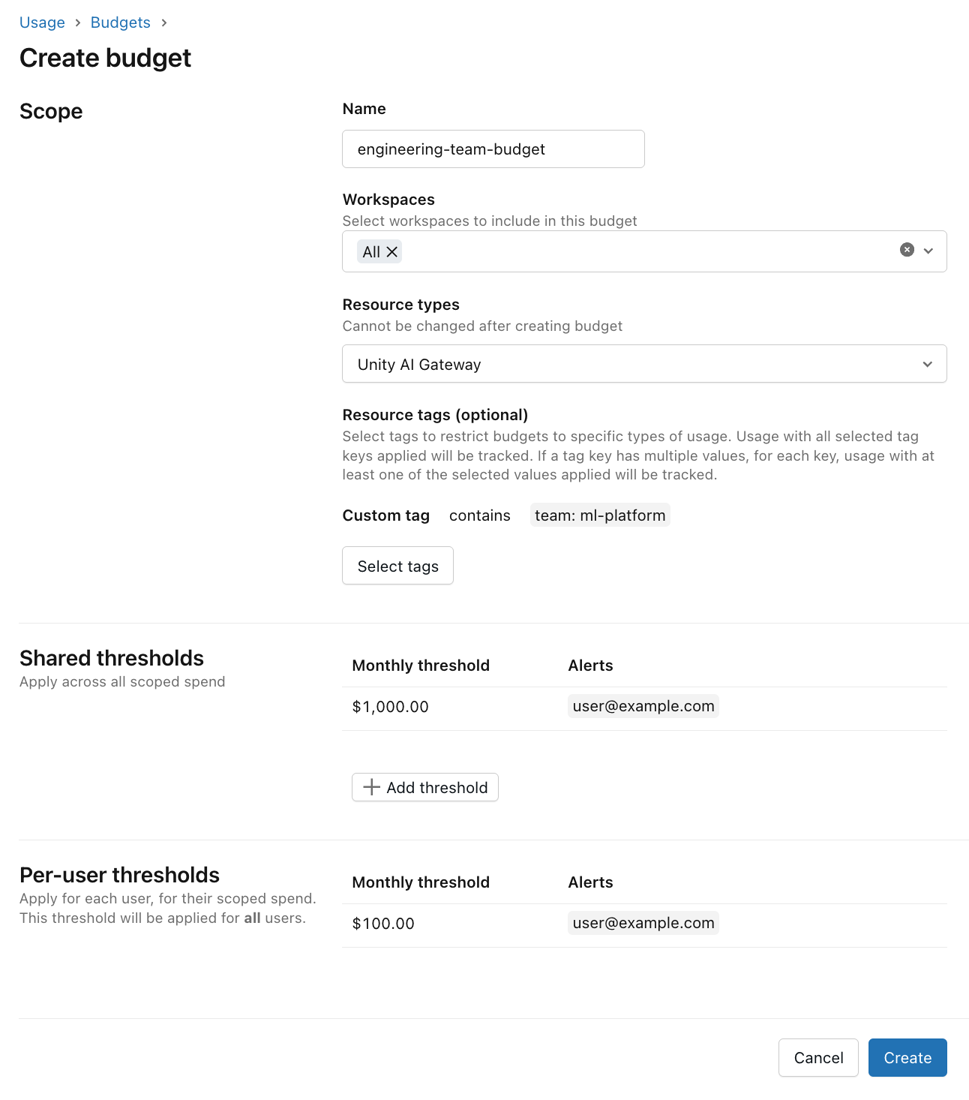
Threshold types: For budgets scoped to Unity Gateway, you can configure:
- Shared thresholds: A collective spending limit for all users within the budget scope.
- Per-user thresholds: A monthly limit that applies to each individual user.
- Per-user overrides: Grant specific users or groups a higher spending limit than the default per-user threshold. Users covered by an override can spend up to the override amount rather than the default per-user limit. If a user belongs to multiple override groups, the highest threshold applies.
For shared and per-user thresholds, you can configure one or both of the following actions when a threshold is reached:
- Send alert: Sends an email notification to configured addresses. Users retain access to Unity Gateway.
- Block usage: Prevents the user from making further requests through Unity Gateway. The user sees a message that their budget is exhausted. Access resumes after the budget resets or an admin increases the threshold.
Account admins can view near real-time estimated spend on the budget details page.

Include external model usage
Important
This feature is in Beta. Account admins can manage access to this feature from the account console Previews page. See Manage account-level previews.
When you create a Unity Gateway budget, select Include external model usage to include estimated spend from requests routed to external models through model provider services.
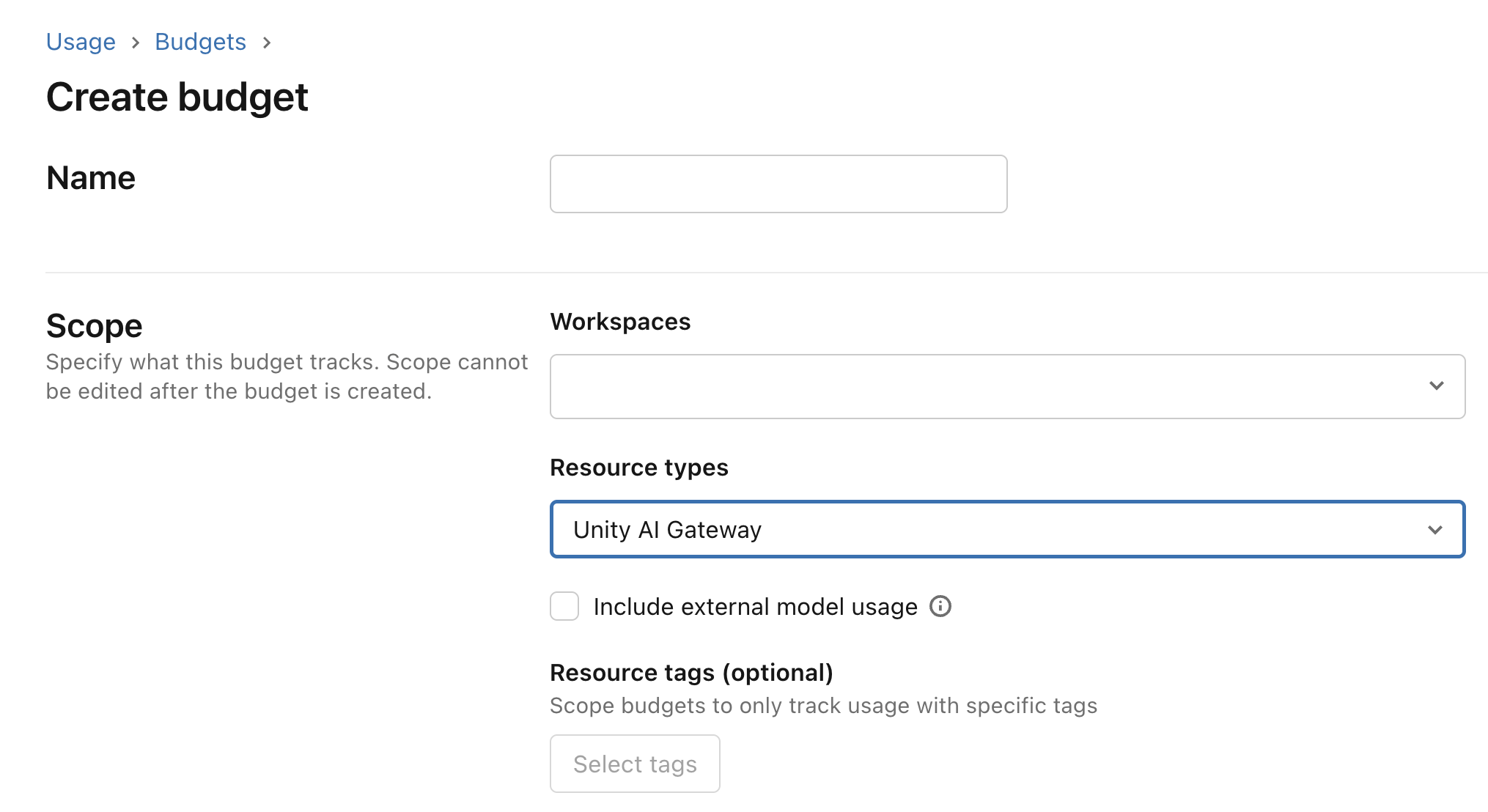
When enabled, external model spend counts toward the budget's shared and per-user thresholds. The configured alert and block usage actions apply when the combined spend reaches a threshold. If you don't select this option, the budget excludes external model spend but continues to include Azure Databricks-hosted model usage.
Azure Databricks estimates external model spend from token usage and the external provider's published prices. These estimates might differ from your final provider invoice. For historical analysis of external model spend, query the system.ai_gateway.external_model_spend system table. See External models. External model spend included in the budget reflects any price multiplier configured on the model provider service.
Budget tag filters apply to model service tags. Request tags are available in the external model spend system table, but don't affect budget matching.
Limitations
Important
Budgets for Unity Gateway provide a near real-time estimate of the spend tracked against the configured thresholds, and actual costs incurred may differ from configured thresholds. This feature is intended to help with near real-time cost control. Do not use this feature as a way to ensure an absolute spend cap on final billed amounts. Azure Databricks is not responsible for costs incurred in excess of configured budget thresholds.
Provisioned throughput inference is not currently tracked.
Each budget supports a maximum of four shared thresholds and 20 per-user overrides.
Your account can have a maximum of 1,000 budgets.
Block usage thresholds are enforced approximately. Enforcement uses a near-real-time estimate of cost, so actual spend may vary above or below the configured threshold. This means:
- A user may be blocked before their actual spend reaches the threshold.
- An amount of spend over the threshold may occur before enforcement takes effect. Active requests in progress when the threshold is reached are not interrupted.
system.billing.usageremains the source of truth for actual Databricks-billed usage. For discrepancies between usage tracked against a budget and actual costs, Azure Databricks may retroactively adjust budget estimates to reconcile them. For external model usage, the external provider invoice is the source of truth for actual provider charges.Spend amounts in budget alert emails, the budget details page,
system.billing.usage, andsystem.ai_gateway.external_model_spendmay differ when compared at the same point in time. This is expected, because each source updates at a different rate:- Budget alert emails: Reflect spend at the moment the alert was triggered.
- Budget details page: Updates frequently but may show a lower amount than a recent alert email when viewed shortly after.
system.billing.usage: Updates every few hours. Querying system tables shortly after receiving an alert may return a lower spend figure than the budget details page or alert emails.system.ai_gateway.external_model_spend: Updates hourly with estimated external model spend. The estimates might differ from your final provider invoice.
Budget enforcement, including usage blocking and alert thresholds, is based on near real-time spend tracking and is not affected by system table refresh timing.