Note
Access to this page requires authorization. You can try signing in or changing directories.
Access to this page requires authorization. You can try changing directories.
Important
Genie Code and Genie One tracing is in Beta. It is part of the unified trace table, which is also in Beta. To turn it on, see Turn on Genie tracing for a workspace.
The trace table's owner, and anyone given access to the table, can view every Genie Code and Genie One turn in the Unity Gateway unified trace table as OpenTelemetry spans. Each turn records who asked, the prompt, the user-visible reasoning and response, the cited data assets, the outcome, and the duration. It also records the actions Genie took, such as running SQL, creating or editing dashboards, and calling MCP tools, with their arguments.
Because the traces live in a Unity Catalog table that you own, you can ask Genie Code or Genie One to analyze them, or query them with SQL, to:
- Triage a wrong answer: Find a turn that a user reported or rated with a thumbs down, and review the prompt, reasoning, actions, and response end to end.
- Monitor quality: Track errors, failed tool calls, and slow turns.
- Track adoption: Count active users and turns by product, workspace, and channel.
- Govern what Genie creates and changes: See who created, edited, published, or deleted dashboards, Genie Agents, skills, and scheduled tasks.
- Support compliance reviews: Search prompts and responses for a user, time range, or keyword.
Requirements
All of the following must be true before Genie traces are exported. If any requirement is missing, no Genie traces are written.
- Unity Gateway is enabled for your account.
- An account admin has turned on the Enhanced Unity Gateway beta features from the account console Previews page. See Manage account-level previews.
- A metastore admin has set up the unified trace table for the metastore that your workspace is attached to. See Enable the unified trace table.
- A workspace admin has turned on the Genie One Tracing preview, the Genie Code Tracing preview, or both, for the workspace. See Turn on Genie tracing for a workspace.
To query the traces, you need SELECT on the trace table, USE SCHEMA on its schema, and USE CATALOG on its catalog. See Control who can read Genie traces.
Turn on Genie tracing for a workspace
Genie tracing is off by default. A workspace admin turns on each product's preview separately for each workspace. Turn on Genie One Tracing to trace Genie One conversations, and Genie Code Tracing to trace Genie Code conversations.
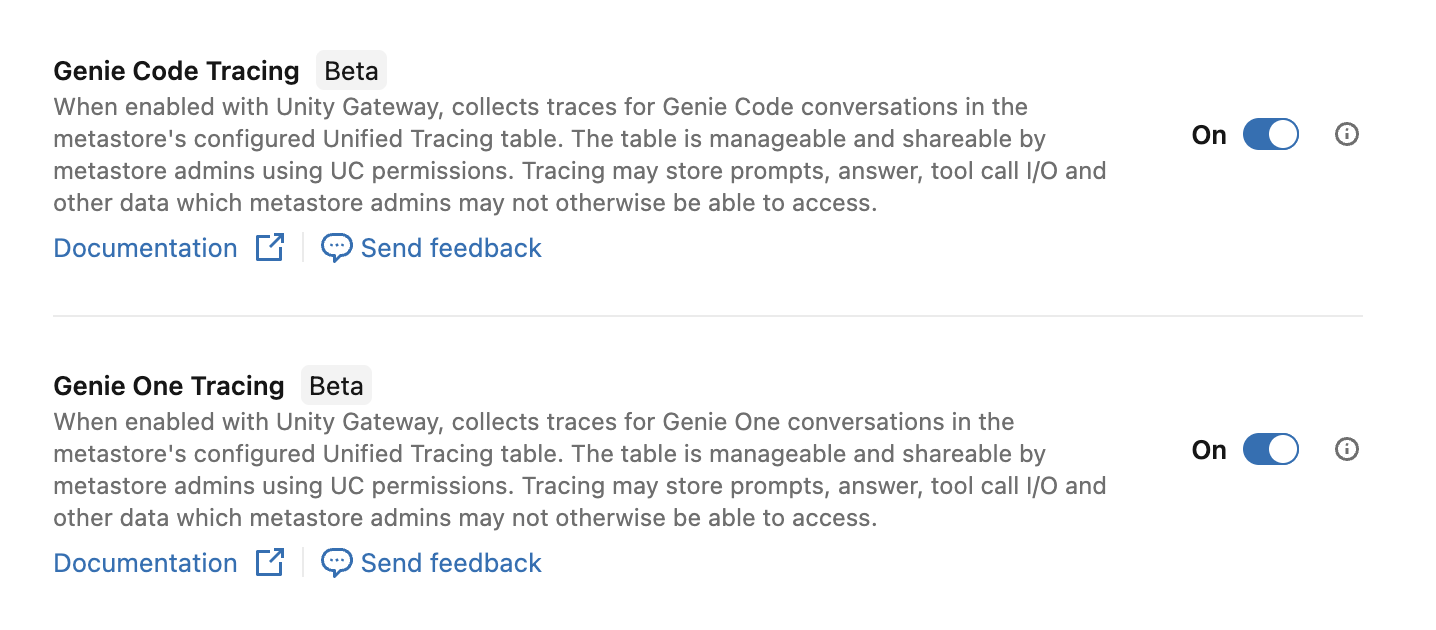
- As a workspace admin, click your username in the top bar of the workspace, then click Previews.
- Find the preview for each product you want to trace, and turn it on. See Manage workspace-level previews.
After you turn on a preview, new turns for that product in the workspace are exported to the unified trace table. Earlier turns are not backfilled.
To stop collecting traces for a product, turn its preview off. New turns stop being exported. Traces that were already written stay in the table until your retention policy removes them.
Important
Genie traces contain the full text of user prompts, Genie responses, and tool arguments and results. The trace table's owner, and anyone given access to the table, can read this content, even for conversations and data they can't otherwise access. Metastore admins can give themselves access. Because traces can include sensitive data, review who can read the trace table and set a retention policy before you turn on Genie tracing. See Control who can read Genie traces and Limitations.
Find Genie traces in the table
Genie traces share the unified trace table with other Unity Gateway traffic. Use service_name to select them:
| Product | Filter |
|---|---|
| Genie One | service_name = 'Genie One' |
| Genie Code | service_name = 'genie-code-agent' |
Conversations with Genie Agents are not included. See Limitations.
In the Unity Gateway Traces tab, you can also filter Service type to Genie to see only Genie Code and Genie One traces. See View traces in the UI.
Analyze traces with Genie
To analyze Genie traces without writing SQL, ask Genie Code or Genie One about them in plain language. To write queries with Genie Code from the trace table page, see Write queries with Genie Code.
Example prompts:
- "Investigate Genie traces and find which tools failed most often in Genie Code last week."
- "Investigate Genie traces and list the users who created or edited dashboards with Genie One in the last 30 days."
- "Investigate Genie traces and summarize the most common questions people asked Genie One yesterday."
If Genie doesn't find the trace table, include its name, such as <catalog>.<schema>.<table_name>, in your question. You can analyze only the traces that you have SELECT access to. See Control who can read Genie traces.
To query the traces with SQL instead, see Sample queries.
What a Genie trace contains
Each Genie turn is one trace, and every row in the trace has the same trace_id. A trace has these kinds of rows:
| Row type | name value |
What it covers |
|---|---|---|
| Root span | Genie One: invoke_agent OneChatGenie Code: invoke_agent genieCodeAgent or invoke_agent GenieCodeFullChat |
The whole turn: the prompt, the response, the outcome, and the duration. parent_span_id is empty. |
| Tool span | Genie One: execute_tool <tool_name>, such as execute_tool create_dashboardGenie Code: tool.execute:<tool_name> |
One tool call in the turn. parent_span_id points to the root span. |
| Approval or question span | Genie One only: request_approval <tool_name> or request_answers ask_user_questions |
A point where Genie One asked the user to approve a tool call or answer a question. See Genie One spans. |
| Model call span | Genie Code only: chat |
One model call in the turn, with its duration. |
Traces include only what the user saw in the Genie chat, plus timing and outcome. They don't include system prompts, hidden reasoning, or cost. To analyze Genie cost, see Monitor and understand your Genie cost.
Steps that don't appear in a trace
To find and reason over the right assets, Genie also runs internal retrieval and planning steps, such as searching for tables and dashboards, reading asset metadata, and reading or updating Genie memory. These steps don't take a direct action in your workspace, so a trace doesn't include them or their inputs and results. A step that isn't in the trace leaves no span and no placeholder. To see every step Genie showed the user, open the conversation in Genie and review its reasoning.
Which tool calls are exported
Traces include tool calls that take an action in your workspace or hand work to another service. For example:
- Running SQL or code.
- Creating, editing, publishing, or deleting assets, such as dashboards, notebooks, Genie Agents, skills, and scheduled tasks.
- Changing compute, pipelines, or jobs.
- Asking a Genie Agent or another agent a question, searching the web, or calling an MCP tool.
- Asking the user a question or for approval, and sending notifications.
To see which tools appear in your traces, use the query in See which tools Genie uses. The set of tool calls that traces include can change.
Attributes on every span
Unity Gateway adds these attributes to every Genie span when it writes the span to the table:
| Attribute | Description |
|---|---|
workspace_id |
ID of the workspace where the turn ran. |
enduser.id |
User name of the user who sent the prompt, such as someone@example.com, or the application ID of a service principal. |
databricks.principal_id |
ID of the user or service principal who sent the prompt. |
Use the bracket syntax to read attributes whose names contain dots, such as attributes:['enduser.id']. Backtick syntax, such as attributes:`enduser.id` , returns NULL for these attributes.
Genie One spans
The root span is named invoke_agent OneChat. It has these attributes:
| Attribute | Description |
|---|---|
databricks.genie.surface |
Set to genie_one. |
gen_ai.conversation.id |
ID of the chat. All turns in the same chat share this value. |
databricks.genie.response_id |
ID of this response. |
gen_ai.input.messages |
The user's prompt, as a JSON string. |
gen_ai.output.messages |
The user-visible reasoning and final response, as a JSON string. |
databricks.genie.citations |
Data assets cited in the response. |
databricks.genie.status |
Final status of the response. |
databricks.genie.error_code |
Error code shown to the user, if the turn failed. |
databricks.genie.requester_id |
ID of the user who sent the prompt. |
databricks.genie.account_id |
Account ID. |
databricks.genie.metastore_id |
Metastore ID. |
databricks.genie.channel |
Where the user asked the question, such as webapp, databricks_mobile, slack, teams, databricks_cli, public_api, or managed_mcp_server. |
databricks.genie.scheduled_task_id |
ID of the scheduled task that ran this turn, if a scheduled task triggered it. |
Each exported tool call is a child span named execute_tool <tool_name> with these attributes:
| Attribute | Description |
|---|---|
gen_ai.tool.name |
Name of the tool or MCP tool called. |
gen_ai.tool.call.id |
ID of the tool call. |
gen_ai.tool.call.arguments |
Arguments sent to the tool, as JSON. Not recorded for send_notification_email. For canvases, only the canvas title or ID is recorded. |
gen_ai.tool.call.result |
Result returned by the tool. For execute_sql_query, this includes a row count and the query results as a Markdown table. For tools that create or change an asset, this is the asset ID or a status, such as Created notebooks/<id> or Failed. Not recorded for send_notification_email or web_search. |
A tool span has status STATUS_CODE_ERROR if the tool call did not complete.
When Genie One asks the user to approve a tool call or answer a question, the trace has a child span named request_approval <tool_name> or request_answers ask_user_questions. The turn that continues after the user responds is a separate trace, and its root span links to the request span.
Genie Code spans
The root span is named invoke_agent genieCodeAgent or invoke_agent GenieCodeFullChat. Child spans include chat spans for model calls and tool.execute:<tool_name> spans for exported tool calls. Common attributes include:
| Attribute | Description |
|---|---|
gen_ai.agent.name |
Name of the agent, on the root span. |
gen_ai.conversation.id |
ID of the conversation or notebook, on the root span. Unique within a workspace. |
gen_ai.input.messages |
The user's prompt, as a JSON string. |
gen_ai.output.messages |
The final response and visible reasoning, as a JSON string. |
databricks.genie_code.run.outcome |
Outcome of the turn, on the root span: success, refusal, error, cancelled, aborted, or handoff. |
gen_ai.tool.name |
Name of the tool, on tool spans. |
gen_ai.tool.call.id |
ID of the tool call, on tool spans. |
gen_ai.tool.call.arguments |
Arguments sent to the tool, as JSON, on tool spans. |
gen_ai.tool.call.result |
Result returned by the tool, such as a status, row count, or asset ID, on tool spans. |
databricks.genie_code.tool.outcome |
Outcome of the tool call, on tool spans, such as SUCCESS, CALLER_ERROR, BAD_ARGUMENTS, PERMISSION_DENIED, TIMEOUT, or USER_REJECTED. |
databricks.genie_code.content_omitted |
Set when content was left out of the span. |
A turn with outcome error has status STATUS_CODE_ERROR, and so does a failed tool call. Turns with outcome cancelled or aborted, and tool calls that the user rejects, keep status STATUS_CODE_OK or STATUS_CODE_UNSET.
For the full table schema, see Unified trace table schema reference.
Control who can read Genie traces
By default, only the trace table's owner, the metastore admin who set up the trace table, can query it. Other metastore admins can give themselves or anyone else access. To give other users access, such as workspace admins or data owners, grant USE CATALOG, USE SCHEMA, and SELECT. See Permissions and access control.
Without a row filter, anyone with SELECT can see all traces in the table, including Genie prompts and responses from every workspace attached to the metastore. Databricks recommends that you scope access with an attribute-based access control (ABAC) row filter policy. For example, you can filter rows on attributes:workspace_id so that each workspace's admins see only their own workspace's Genie traces. Every span has workspace_id, so the filter keeps a turn's root and tool spans together. See Permissions and access control.
Sample queries
Replace <catalog>.<schema>.<table_name> with your trace table path. Include a time filter for best performance. See Query with SQL or a notebook.
Most of these queries read from the genie_turns view, so create the view first. Columns such as product, requester, and prompt exist only in the view, not in the trace table. Queries that read the trace table directly say so.
Create a view of Genie turns
This view returns one row per Genie turn with the common fields extracted. The channel, scheduled_task_id, and error_code columns apply only to Genie One, and run_outcome applies only to Genie Code.
Important
A view reads the trace table with its owner's privileges, so anyone you grant SELECT on the view can read the Genie traces it returns. Grant SELECT on the view only to users who are allowed to read those traces.
CREATE OR REPLACE VIEW <catalog>.<schema>.genie_turns AS
SELECT
  trace_id,
  time,
  date,
  CASE
    WHEN service_name = 'genie-code-agent' THEN 'Genie Code'
    ELSE 'Genie One'
  END AS product,
  attributes:['enduser.id']::string AS requester,
  attributes:workspace_id::string AS workspace_id,
  attributes:['gen_ai.conversation.id']::string AS conversation_id,
  attributes:['gen_ai.input.messages']::string AS prompt,
  attributes:['gen_ai.output.messages']::string AS response,
  attributes:['databricks.genie.channel']::string AS channel,
  attributes:['databricks.genie.scheduled_task_id']::string AS scheduled_task_id,
  attributes:['databricks.genie.error_code']::string AS error_code,
  attributes:['databricks.genie_code.run.outcome']::string AS run_outcome,
  status.code AS status_code,
  (end_time_unix_nano - start_time_unix_nano) / 1e6 AS duration_ms
FROM <catalog>.<schema>.<table_name>
WHERE (parent_span_id IS NULL OR parent_span_id = '')
  AND service_name IN ('genie-code-agent', 'Genie One');
Track adoption
Count turns and active users per day for each product over the last 30 days:
SELECT
  date,
  product,
  COUNT(*) AS turns,
  COUNT(DISTINCT requester) AS active_users
FROM <catalog>.<schema>.genie_turns
WHERE time >= current_timestamp() - INTERVAL 30 DAYS
GROUP BY date, product
ORDER BY date DESC, product;
Break down Genie One usage by workspace and channel:
SELECT
  workspace_id,
  channel,
  COUNT(*) AS turns,
  COUNT(DISTINCT requester) AS active_users
FROM <catalog>.<schema>.genie_turns
WHERE product = 'Genie One'
  AND time >= current_timestamp() - INTERVAL 30 DAYS
GROUP BY workspace_id, channel
ORDER BY turns DESC;
Triage a reported answer
Find a user's recent turns that mention a keyword:
SELECT trace_id, time, product, conversation_id, prompt, response
FROM <catalog>.<schema>.genie_turns
WHERE requester = '<user_name>'
  AND prompt ILIKE '%gross margin%'
  AND time >= current_timestamp() - INTERVAL 7 DAYS
ORDER BY time DESC;
Then list every span in that turn, including each exported tool call with its arguments and result. This query reads the trace table directly:
SELECT
  name,
  status.code AS status_code,
  (end_time_unix_nano - start_time_unix_nano) / 1e6 AS duration_ms,
  attributes:['gen_ai.tool.name']::string AS tool_name,
  attributes:['gen_ai.tool.call.arguments']::string AS tool_arguments,
  attributes:['gen_ai.tool.call.result']::string AS tool_result
FROM <catalog>.<schema>.<table_name>
WHERE trace_id = '<trace_id>'
ORDER BY start_time_unix_nano;
To replay a whole chat in order, filter on the conversation ID. Genie Code conversation IDs are unique only within a workspace, so also filter on the workspace:
SELECT time, prompt, response
FROM <catalog>.<schema>.genie_turns
WHERE conversation_id = '<conversation_id>'
  AND workspace_id = '<workspace_id>'
ORDER BY time;
Monitor errors and latency
Count failed turns by error code or outcome in the last 7 days:
SELECT
  product,
  COALESCE(error_code, run_outcome) AS failure_reason,
  COUNT(*) AS failed_turns
FROM <catalog>.<schema>.genie_turns
WHERE status_code = 'STATUS_CODE_ERROR'
  AND time >= current_timestamp() - INTERVAL 7 DAYS
GROUP BY product, failure_reason
ORDER BY failed_turns DESC;
Report latency percentiles per product per day:
SELECT
  date,
  product,
  percentile_approx(duration_ms, 0.5) AS p50_ms,
  percentile_approx(duration_ms, 0.95) AS p95_ms
FROM <catalog>.<schema>.genie_turns
WHERE time >= current_timestamp() - INTERVAL 14 DAYS
GROUP BY date, product
ORDER BY date DESC, product;
See which tools Genie uses
Rank the exported tools that Genie Code and Genie One called most often, with their failure rate. This query reads the trace table directly:
SELECT
  CASE
    WHEN service_name = 'genie-code-agent' THEN 'Genie Code'
    ELSE 'Genie One'
  END AS product,
  attributes:['gen_ai.tool.name']::string AS tool_name,
  COUNT(*) AS calls,
  COUNT_IF(status.code = 'STATUS_CODE_ERROR') AS failed_calls,
  ROUND(100 * COUNT_IF(status.code = 'STATUS_CODE_ERROR') / COUNT(*), 1) AS failure_pct
FROM <catalog>.<schema>.<table_name>
WHERE (
    (service_name = 'Genie One' AND name LIKE 'execute_tool %')
    OR (service_name = 'genie-code-agent' AND name LIKE 'tool.execute:%')
  )
  AND time >= current_timestamp() - INTERVAL 30 DAYS
GROUP BY product, tool_name
ORDER BY calls DESC;
Review assets Genie One created or changed
List the dashboards, Genie Agents, skills, and scheduled tasks that Genie One created, edited, published, or deleted in the last 30 days, and who asked for each change. This query reads the trace table directly:
SELECT
  time,
  attributes:['enduser.id']::string AS requester,
  attributes:workspace_id::string AS workspace_id,
  attributes:['gen_ai.tool.name']::string AS tool_name,
  attributes:['gen_ai.tool.call.arguments']::string AS tool_arguments,
  attributes:['gen_ai.tool.call.result']::string AS tool_result
FROM <catalog>.<schema>.<table_name>
WHERE service_name = 'Genie One'
  AND name LIKE 'execute_tool %'
  AND regexp_like(
    attributes:['gen_ai.tool.name']::string,
    '^(create|edit|publish|delete|update|remove)_'
  )
  AND time >= current_timestamp() - INTERVAL 30 DAYS
ORDER BY time DESC;
Review scheduled tasks
List the scheduled tasks that ran Genie One turns, who owns the turns, and how often they failed:
SELECT
  scheduled_task_id,
  requester,
  COUNT(*) AS runs,
  COUNT_IF(status_code = 'STATUS_CODE_ERROR') AS failed_runs
FROM <catalog>.<schema>.genie_turns
WHERE scheduled_task_id IS NOT NULL
  AND time >= current_timestamp() - INTERVAL 30 DAYS
GROUP BY scheduled_task_id, requester
ORDER BY runs DESC;
Review thumbs-up and thumbs-down feedback
When a user rates a Genie Code or Genie One answer with a thumbs up or thumbs down, the rating is saved in the annotations table next to the trace table. The annotations table is in the same catalog and schema as the trace table, and has the same name with _otel_annotations in place of _otel_spans. For example, if your trace table is main.ai_gateway.unity_gateway_otel_spans, the annotations table is main.ai_gateway.unity_gateway_otel_annotations. Each rating has name = 'user_feedback', a value of true for a thumbs up or false for a thumbs down, and a target_id that matches the trace_id of the turn.
The annotations table records every change to a rating, so use the most recent row for each annotation_id. To list the turns that users rated with a thumbs down in the last 30 days, run:
WITH feedback AS (
  SELECT
    target_id AS trace_id,
    value::boolean AS thumbs_up,
    annotation_change_type,
    ROW_NUMBER() OVER (PARTITION BY annotation_id ORDER BY updated_at DESC) AS rn
  FROM <catalog>.<schema>.<annotations_table_name>
  WHERE name = 'user_feedback'
    AND target_type = 'TRACE'
)
SELECT t.time, t.product, t.requester, t.prompt, t.response
FROM feedback f
JOIN <catalog>.<schema>.genie_turns t ON t.trace_id = f.trace_id
WHERE f.rn = 1
  AND f.annotation_change_type <> 'delete'
  AND NOT f.thumbs_up
  AND t.time >= current_timestamp() - INTERVAL 30 DAYS
ORDER BY t.time DESC;
To see what Genie did in one of these turns, use the trace_id with the span query in Triage a reported answer.
Classify questions with AI functions
Use AI functions to group prompts by topic, for example to find the most common question types:
SELECT
  ai_classify(prompt, ARRAY('finance', 'sales', 'operations', 'hr', 'other')) AS topic,
  COUNT(*) AS turns
FROM <catalog>.<schema>.genie_turns
WHERE product = 'Genie One'
  AND time >= current_timestamp() - INTERVAL 7 DAYS
GROUP BY topic
ORDER BY turns DESC;
Limitations
- Genie tracing is in Beta. Trace delivery is best-effort, so use audit logs as the system of record for compliance.
- Genie One traces don't include model call spans.
- Conversations with Genie Agents aren't traced. When Genie One or Genie Code sends a question to a Genie Agent, the trace includes the
ask_genie_spaceoraskGenieSpacetool call, but not the steps the Genie Agent took to answer it. To monitor Genie Agent usage, see Monitor Genie Agent usage with audit logs and alerts. - Each Genie One attribute is limited to 180 KiB, which is lower than the 3 MiB attribute limit for the unified trace table, and a Genie One turn exports at most 128 tool spans. When a payload is truncated, the span has the
databricks.trace.payload_truncatedattribute. - Deleting a Genie conversation does not delete its traces. Traces are removed only by your table retention policy.
- All limitations of the unified trace table also apply. See Limitations.