Note
Access to this page requires authorization. You can try signing in or changing directories.
Access to this page requires authorization. You can try changing directories.
Important
This feature is in Beta. Workspace admins can control access to this feature from the Previews page. See Manage Azure Databricks previews.
Reranker finetuning trains a custom reranker on your own index data, then serves it so a model tuned to your corpus reranks your queries. Databricks handles training data generation, model training, registration to Unity Catalog, and deployment to a Model Serving endpoint for you.
This feature supports managed indexes only. Managed indexes are Delta Sync indexes where Databricks computes the embeddings.
Requirements
- A Delta Sync AI Search index with Databricks-managed embeddings. Direct-access indexes and indexes with self-managed embeddings are not supported. See Create AI Search endpoints and indexes.
- The feature must be enabled for your workspace. Workspace admins can control access to this feature from the Previews page. See Manage Azure Databricks previews.
- This feature is only available in the following regions:
centraluseastuseastus2northcentraluswestcentraluswestuswestus3
Permissions
The finetuning job runs as you and creates several Unity Catalog objects on your behalf, so you must hold all of the following Unity Catalog privileges before you start a job:
SELECTon the index, to read its documents for training.CREATE VOLUMEandCREATE TABLEon the index's catalog and schema, for the training data volume and intermediate tables.CREATE MODELon the schema where the finetuned model is registered. This is the schema of your model name if you set one, otherwise the index's own schema.
If you are missing any of these privileges, Databricks rejects the request with a permission error instead of starting a job that later fails.
How reranker finetuning works
Reranker finetuning runs the following pipeline on your data:
- Generate training data. You start a finetuning job on an index. Databricks samples queries from your payload logs, a table you provide, or queries synthesized from your data. It then retrieves candidates and uses an LLM to judge relevance and build training data.
- Train the reranker. Databricks trains a reranker on that data, starting from a base reranker model.
- Register and deploy. The result is registered as a model in Unity Catalog and deployed to a Model Serving endpoint, both created automatically.
- Query the index. You query the index with the finetuned reranker through the Python SDK or the REST API.
Start a finetuning job
Reranker finetuning is available on the vector index details page in Catalog Explorer.
In Catalog Explorer, go to your vector index and open its Overview tab. Scroll to the Reranker finetuning section.

Click Run reranker finetuning. If you have run finetuning before, this button reads Run new finetuning and is enabled after the previous run completes.
In the Configure reranker finetuning dialog, review and complete the following fields:
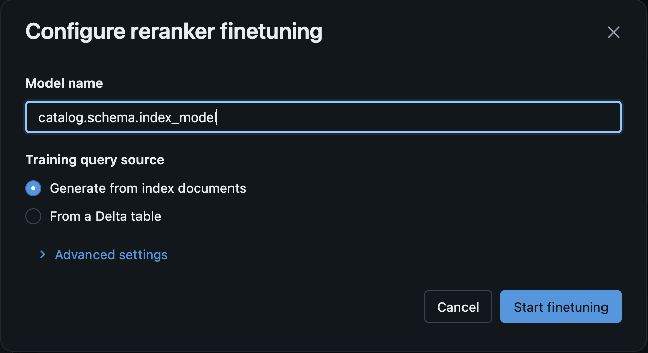
- Model name: The Unity Catalog name for the finetuned model. This is pre-filled as
catalog.schema.reranker_<index>. Edit it if you want a different name. - Training query source: Where the training queries come from:
- Use payload logs table: Uses your index's captured query logs. Databricks selects this by default when a payload logs table exists.
- Generate from index documents: Databricks synthesizes queries from your index data.
- From a Delta table: Click Select table to select a Delta table of queries, then optionally select the Query column. The query column defaults to
query_text.
- Advanced settings (optional): Expand to set Max queries, the cap on how many queries to use for training. This defaults to 5000. If your query table has fewer queries than the cap, Databricks generates more to reach it.
- Model name: The Unity Catalog name for the finetuned model. This is pre-filled as
Click Start finetuning. The dialog closes and a Reranker finetuning started confirmation appears.
Track finetuning progress
After you start a job, the Reranker finetuning section shows a Status:
| Status | Description |
|---|---|
| Starting… | The job is queued. |
| Running finetuning… | Training is in progress. |
| Completed | The finetuned reranker is registered and deployed, ready to query. |
| Failed | Training did not complete. An error message is shown. |

The status refreshes automatically. When the job completes, a View model link appears so you can open the deployed reranker model.

Query with the finetuned reranker
After training succeeds, query your index with the finetuned reranker using the Python SDK or the REST API. For general query guidance, see Query an AI Search index.
Query with the Python SDK
Query your index with the databricks-ai-search Python SDK.
from databricks.ai_search.client import AISearchClient
from databricks.ai_search.reranker import ExperimentalDatabricksFinetunedReranker

client = AISearchClient()
index = client.get_index(
    endpoint_name="my-endpoint",
    index_name="catalog.schema.my_index",
)

results = index.similarity_search(
    query_text="How do I create an AI Search index?",
    columns=["id", "text"],
    num_results=10,
    reranker=ExperimentalDatabricksFinetunedReranker(
        columns_to_rerank=["text"],  # must be exactly the embedding source column
    ),
)
columns_to_rerank: Must be exactly the index's embedding source column, as a single-element list.- The model serving endpoint is resolved automatically from your index. To target a specific endpoint, pass
endpoint_name="...".
To confirm the reranker ran, pass debug_level=1 and inspect the result:
results = index.similarity_search(..., debug_level=1)

dbg = results.get("debug_info", {})
if "warnings" in dbg:
    print("Reranker fell back:", dbg["warnings"])
else:
    print(f"Reranker ran, took {dbg['reranker_time']}ms")
Query with the REST API
You can also query with the finetuned reranker over REST. Send a POST to the index's query endpoint with a reranker block. In the block, set model to the finetuned Model Serving endpoint name, model_type to MODEL_TYPE_FINETUNED, and parameters.columns_to_rerank to the embedding source column:
curl -X POST \
  https://<workspace-host>/api/2.0/vector-search/indexes/catalog.schema.my_index/query \
  -H "Authorization: Bearer $DATABRICKS_TOKEN" \
  -H "Content-Type: application/json" \
  -d '{
    "query_text": "How do I create an AI Search index?",
    "columns": ["id", "text"],
    "num_results": 10,
    "debug_level": 1,
    "reranker": {
      "model": "<finetuned-endpoint-name>",
      "model_type": "MODEL_TYPE_FINETUNED",
      "parameters": {
        "columns_to_rerank": ["text"]
      }
    }
  }'
model: The name of the Model Serving endpoint hosting the finetuned reranker, created by the finetuning job. Unlike the Python SDK, the REST API does not derive this for you.parameters.columns_to_rerank: Must be exactly the index's embedding source column, the same rule as the SDK.debug_level: 1surfacesdebug_info.reranker_time, ordebug_info.warningson fallback, in the response.
Limitations
- Reranker finetuning supports only Delta Sync indexes with Databricks-managed embeddings. You cannot finetune direct-access and self-managed-embedding indexes.
- The serving endpoint scales to zero, so the first query after a period of inactivity pays a cold-start delay. You can turn off scale to zero.
- Reranking is fixed to the embedding source column. When you query with a finetuned reranker,
columns_to_rerankmust be exactly the index's embedding source column, the column the reranker was trained on. Databricks rejects reranking any other column or set of columns.