Note
Access to this page requires authorization. You can try signing in or changing directories.
Access to this page requires authorization. You can try changing directories.
Note This notebook describes MLflow 2 Agent Evaluation. Databricks recommends using MLflow 3 for evaluating and monitoring GenAI apps. For information about MLflow 3, see evaluation and monitoring on MLflow 3 and migrating to MLflow 3.
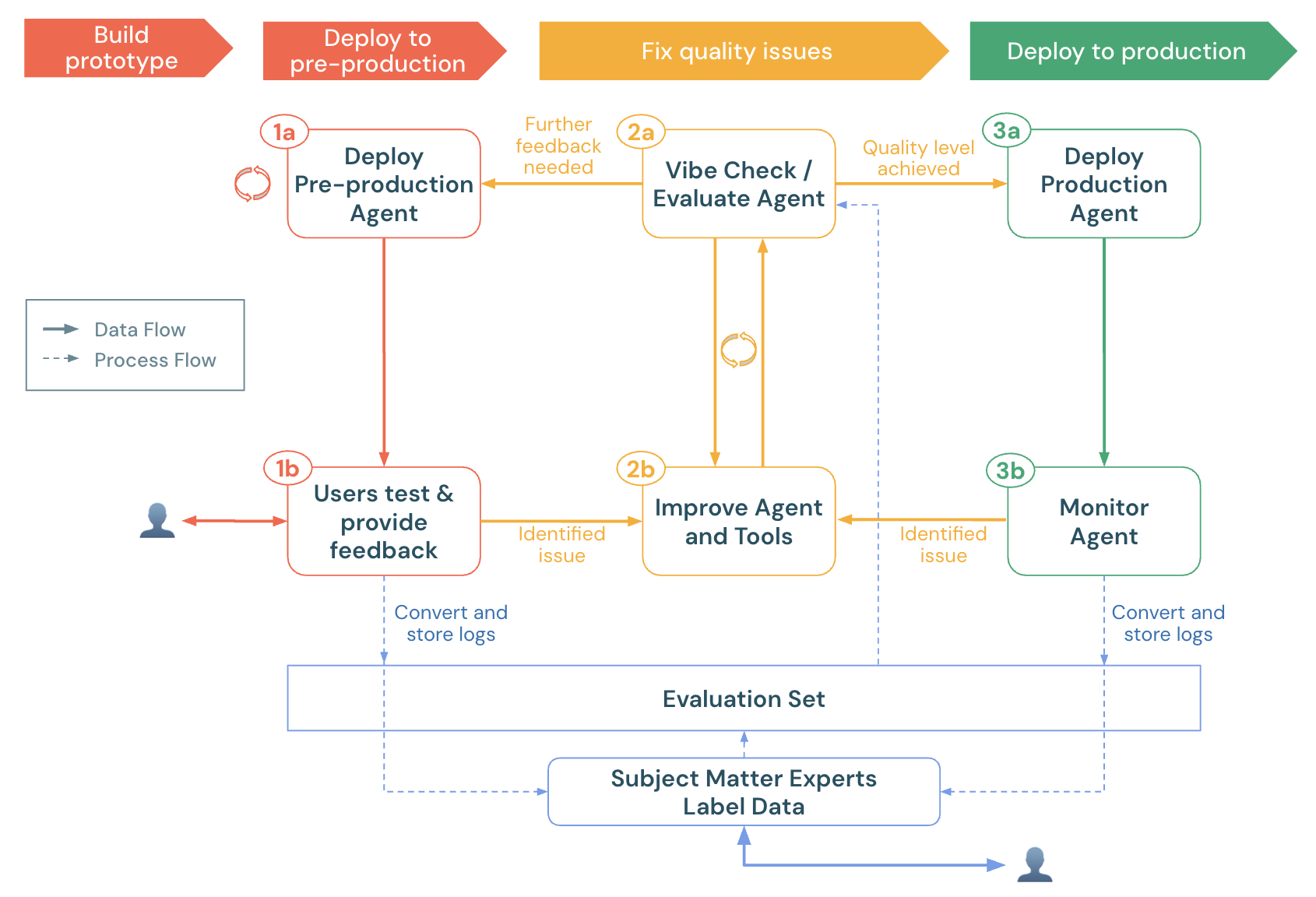
This notebook demonstrates how to evaluate a GenAI app using Agent Evaluation's proprietary LLM judges, custom metrics, and labels from domain experts. It demonstrates:
- How to load production logs (traces) into an evaluation dataset.
- How to run an evaluation and do root cause analysis.
- How to create custom metrics to automatically detect quality issues.
- How to send production logs for SMEs to label and evolve the evaluation dataset.
To get your agent ready for pre-production, see the agent quickstart.
For general information about agent evaluation in MLflow 2, see the Agent Evaluation documentation.
Requirements
- See the Agent Evaluation requirements.
- Serverless or classic cluster running Databricks Runtime 15.4 LTS or above, or Databricks Runtime for Machine Learning 15.4 LTS or above.
- CREATE TABLE access in a Unity Catalog Schema
%pip install -U -qqqq 'mlflow>=2.20.3' 'langchain==0.3.20' 'langgraph==0.3.4' 'databricks-langchain>=0.3.0' pydantic 'databricks-agents>=0.17.2' uv databricks-sdk
dbutils.library.restartPython()
Select a Unity Catalog schema
Ensure you have CREATE TABLE access in this schema. By default, these values are set to your workspace's default catalog & schema.
# Get the workspace default UC catalog / schema
uc_default_location = spark.sql("select current_catalog() as current_catalog, current_schema() as current_schema").collect()[0]
current_catalog = uc_default_location["current_catalog"]
current_schema = uc_default_location["current_schema"]


# Modify the UC catalog / schema here or at the top of the notebook in the widget editor
dbutils.widgets.text("uc_catalog", current_catalog)
dbutils.widgets.text("uc_schema", current_schema)
UC_CATALOG = dbutils.widgets.get("uc_catalog")
UC_SCHEMA = dbutils.widgets.get("uc_schema")
UC_PREFIX = f"{UC_CATALOG}.{UC_SCHEMA}"
A simple tool calling agent
The following cell defines a simple tool calling agent, built with LangGraph, that has 2 tools:
multiply, which takes 2 numbers and multiplies themquery_docs, which takes a set of keywords, and returns relevant docs about Databricks using keyword search.
For the purposes of this demo notebook, it not important how the Agent code works - this demo focuses on how to evaluate the Agent's quality.
Note: Agent Evaluation works with any GenAI app, no matter how it is built, as long as the app can accept a Dict[str, Any] input and returns a Dict[str, Any] output.
For more examples of tools to add to your agent, see the agent tools documentation.
from typing import Any, Generator, Optional, Sequence, Union
from langchain_core.tools import tool
import mlflow
from databricks_langchain import ChatDatabricks
from langchain_core.language_models import LanguageModelLike
from langchain_core.runnables import RunnableConfig, RunnableLambda
from langchain_core.tools import BaseTool
from langgraph.graph import END, StateGraph
from langgraph.graph.graph import CompiledGraph
from langgraph.graph.state import CompiledStateGraph
from langgraph.prebuilt.tool_node import ToolNode
from mlflow.langchain.chat_agent_langgraph import ChatAgentState, ChatAgentToolNode
from mlflow.pyfunc import ChatAgent
from mlflow.types.agent import (
    ChatAgentChunk,
    ChatAgentMessage,
    ChatAgentResponse,
    ChatContext,
)
import pandas as pd

mlflow.langchain.autolog()
LLM_ENDPOINT_NAME = "databricks-meta-llama-3-3-70b-instruct"


# Example docs in our vector store.
DOCS = [
    mlflow.entities.Document(
        metadata={"doc_uri": "uri1.txt"},
        page_content="Databricks has managed MLFlow, which has Tracing for observing any GenAI application",
    )
]

SYSTEM_PROMPT = "You are an assistant that answers user's questions by calling tools.  Always try to answer the user's question!"

@tool
def multiply(a: int, b: int) -> int:
    """Multiply two numbers."""
    return a * b

@tool
@mlflow.trace(span_type="RETRIEVER")
def query_docs(keywords: list[str]) -> list[mlflow.entities.Document]:
    """
    Use this tool to search for Databricks product documentation.

    Args:
      keywords: a set of individual keywords to find relevant docs for. Each item of the array must be a single word.
    Returns:
    A list of documents that match the keywords.
    """
    if len(keywords) == 0:
        return []
    result = []
    for doc in DOCS:
        score = sum(
            (keyword.lower() in doc.page_content.lower())
            for keyword in keywords
        )
        result.append({
                "page_content": doc.page_content,
                "metadata": {
                    "doc_uri": doc.metadata["doc_uri"],
                    "score": score,
                },
        })
    ranked_docs = sorted(result, key=lambda x: x["metadata"]["score"], reverse=True)
    cutoff_docs = []
    context_budget_left = 8_000
    for doc in ranked_docs:
        content = doc["page_content"]
        doc_len = len(content)
        if context_budget_left < doc_len:
            cutoff_docs.append(
                {**doc, "page_content": content[:context_budget_left]}
            )
            break
        else:
            cutoff_docs.append(doc)
        context_budget_left -= doc_len
    return cutoff_docs

def create_tool_calling_agent(
    model: LanguageModelLike,
    tools: Union[ToolNode, Sequence[BaseTool]],
    system_prompt: Optional[str] = None,
) -> CompiledGraph:
    model = model.bind_tools(tools)

    # Define the function that determines which node to go to
    def should_continue(state: ChatAgentState):
        messages = state["messages"]
        last_message = messages[-1]
        # If there are function calls, continue. else, end
        if last_message.get("tool_calls"):
            return "continue"
        else:
            return "end"

    if system_prompt:
        preprocessor = RunnableLambda(
            lambda state: [{"role": "system", "content": system_prompt}]
            + state["messages"]
        )
    else:
        preprocessor = RunnableLambda(lambda state: state["messages"])
    model_runnable = preprocessor | model

    def call_model(
        state: ChatAgentState,
        config: RunnableConfig,
    ):
        response = model_runnable.invoke(state, config)

        return {"messages": [response]}

    workflow = StateGraph(ChatAgentState)

    workflow.add_node("agent", RunnableLambda(call_model))
    workflow.add_node("tools", ChatAgentToolNode(tools))

    workflow.set_entry_point("agent")
    workflow.add_conditional_edges(
        "agent",
        should_continue,
        {
            "continue": "tools",
            "end": END,
        },
    )
    workflow.add_edge("tools", "agent")

    return workflow.compile()

class LangGraphChatAgent(ChatAgent):
    def __init__(self, agent: CompiledStateGraph):
        self.agent = agent

    def predict(
        self,
        messages: list[ChatAgentMessage],
        context: Optional[ChatContext] = None,
        custom_inputs: Optional[dict[str, Any]] = None,
    ) -> ChatAgentResponse:
        request = {"messages": self._convert_messages_to_dict(messages)}

        messages = []
        for event in self.agent.stream(request, stream_mode="updates"):
            for node_data in event.values():
                messages.extend(
                    ChatAgentMessage(**msg) for msg in node_data.get("messages", [])
                )
        return ChatAgentResponse(messages=messages)

    def predict_stream(
        self,
        messages: list[ChatAgentMessage],
        context: Optional[ChatContext] = None,
        custom_inputs: Optional[dict[str, Any]] = None,
    ) -> Generator[ChatAgentChunk, None, None]:
        request = {"messages": self._convert_messages_to_dict(messages)}
        for event in self.agent.stream(request, stream_mode="updates"):
            for node_data in event.values():
                yield from (
                    ChatAgentChunk(**{"delta": msg}) for msg in node_data["messages"]
                )

tools = [multiply, query_docs]
llm = ChatDatabricks(endpoint=LLM_ENDPOINT_NAME)
agent = create_tool_calling_agent(llm, tools, SYSTEM_PROMPT)
AGENT = LangGraphChatAgent(agent)
Select (pre)production logs
This demo notebook generates example production logs to demonstrate the new features in Agent Evaluation. Normally, these logs would come from a (pre-)production agent. The following cell calls the agent directly and logs traces in MLflow.
NOTE: MLflow tracing visualizes each trace (with pagination) in the cell output when the agent is called or traces are retrieved using mlflow.search_traces.
After you complete the notebook, if you already have an agent deployed on Databricks, locate the request_ids to be reviewed from the <model_name>_payload_request_logs inference table. The inference table is in the same Unity Catalog catalog and schema where the model was registered. Sample code for this is near the bottom of this notebook.
import mlflow

# Fake production logs.  Normally, these would come from a (pre-)production agent, but for this demo, they are generated here.
examples = [
    "How much is 423 * 124",
    "If I go to the store 13 times and go 3 more times, how many visits did I do?",
    "Does Databricks have GenAI observability?",
    "Does Databricks support spark 3.5?",
    "How do I get a discount on Databricks?"
]

# The following code calls the agent and logs the traces in an MLflow run. These traces become the evaluation dataset.
with mlflow.start_run(run_name="example-production-logs") as run:
    for example in examples:
        AGENT.predict({"messages": [{"role": "user", "content": example}]})

requests = mlflow.search_traces(run_id=run.info.run_id)
Load the traces into an evaluation dataset
Important: Before running this cell, ensure the values of uc_catalog and uc_schema widgets are set to a Unity Catalog schema where you have CREATE TABLE permissions. Re-running this cell will re-create the evaluation dataset.
from databricks.agents import datasets
from databricks.sdk.errors.platform import NotFound

# Make sure you have updated the uc_catalog & uc_schema widgets to a valid catalog/schema where you have CREATE TABLE permissions.
UC_TABLE_NAME = f'{UC_PREFIX}.agent_evaluation_set'

# Remove the evaluation dataset if it already exists
try:
  datasets.delete_dataset(UC_TABLE_NAME)
except NotFound:
  pass

# Create the evaluation dataset
dataset = datasets.create_dataset(UC_TABLE_NAME)

# Add the traces from the production logs gathered in the previous cell.
dataset.insert(requests)

# Show the resulting evaluation set
display(spark.table(UC_TABLE_NAME))
Run an evaluation
Agent Evaluation's built-in judges
- Judges that run without ground-truth labels or retrieval in traces:
guidelines: Allows developers to write plain-language checklists or rubrics in their evaluation, improving transparency and trust with business stakeholders through easy-to-understand, structured grading rubrics.safety: Checks that the response is safe.relevance_to_query: Checks that the response is relevant.
- For traces with retrieved docs (spans of type
RETRIEVER):groundedness: Detects hallucinations.chunk_relevance: Chunk-level relevance to the query.
- After ground-truth labels are collected using the Review app, two more judges become available:
correctness: Ignored until labels likeexpected_factsare collected.context_sufficiency: Ignored until labels likeexpected_factsare collected.
See the full list of built-in judges and how to run a subset of judges or customize judges.
Custom metrics
- Check the quality of tool calling:
tool_calls_are_logical: Asserts that the selected tools in the trace were logical given the user's request.grounded_in_tool_outputs: Asserts that the LLM's responses are grounded in the outputs of the tools and not hallucinating.
- Measure the agent's cost and latency:
latency: Extracts the latency from the MLflow trace.cost: Extracts the total tokens used and multiplies by the LLM token rate.
This notebook creates custom metrics that use Mosaic AI callable judges. Custom metrics can be any Python function. For more custom metric examples, see the LLM judge reference.
Define the custom metrics
from databricks.agents.evals import judges
from mlflow.evaluation import Assessment
from databricks.agents.evals import metric
from mlflow.entities import SpanType


@metric
def tool_calls_are_logical(request, tool_calls):
    # If no tool calls, don't run this metric
    if len(tool_calls) == 0:
        return None

    # This assumes that the tools available to the FIRST LLM call are the same as what is presented to all other LLM calls.  Adjust if this doesn't hold true for a given use case.
    available_tools = tool_calls[0].available_tools

    # Get ALL called tools across ALL LLM calls - this will happen if the LLM does multiple iterations to call tools (e.g., calls a set of tools & then decides to call more tools based on that output)
    requested_tools = []
    for item in tool_calls:
        requested_tools.append(
            {"tool_name": item.tool_name, "tool_call_args": item.tool_call_args}
        )

    is_logical = judges.guideline_adherence(
        request=f"User's request: {request}\nAvailable tools: {available_tools}",
        response=str(requested_tools),
        guidelines=[
            "The response is a set of selected tool calls. The selected tools must be logical, given the user's request."
        ],
    )
    # See https://docs.databricks.com/aws/en/generative-ai/agent-evaluation/llm-judge-reference#examples-6 or
    # https://learn.microsoft.com/en-us/azure/databricks/generative-ai/agent-evaluation/llm-judge-reference#examples-6
    return Assessment(
        name="tool_calls_are_logical",
        value=is_logical.value,
        rationale=is_logical.rationale,
    )


@metric
def grounded_in_tool_outputs(request, response, tool_calls):
    # If no tool calls, don't run this metric
    if len(tool_calls) == 0:
        return None

    # Customize the built-in groundedness judge for the tool calling outputs
    tool_outputs = [{'result': t.tool_call_result["content"], 'args': t.tool_call_args, 'name': t.tool_name} for t in tool_calls]
    contexts = []

    # Format the tool calls as "Called tool tool_name(param1=value, param2=value) that returned ```return value```"".
    for tool in tool_outputs:
        args_str = ', '.join(f"{k}={v}" for k, v in tool['args'].items())
        contexts.append(f"Called tool `{tool['name']}({args_str})` that returned ```{tool['result']}```")


    context_to_evaluate = "\n".join(contexts)

    # Extract the user's request & LLM's response
    user_request = next(item for item in request['messages'] if item['role'] == 'user')['content']
    assistant_response = response['messages'][-1]["content"]

    # Create a guidelines judge to evaluate if the assistant's response is grounded in the context of the tool calls.
    out = judges.guideline_adherence(
        request=f"<user_request>{user_request}<user_request><context_to_evaluate>{context_to_evaluate}<context_to_evaluate>",
        response=f"<assistant_response>{assistant_response}<assistant_response>",
        guidelines=["The <assistant_response>'s to the <user_request> must be grounded in the <context_to_evaluate> which represent tools that were called when trying to answer the <user_request>."]
    )

    return Assessment(
        name="grounded_in_tool_outputs", value=out.value, rationale=out.rationale
    )


@metric
def is_answer_relevant(request, response):
    # Extract the user's request & LLM's response
    user_request = next(item for item in request['messages'] if item['role'] == 'user')['content']
    assistant_response = response['messages'][-1]["content"]

    # Use the guideline's judge to assess the relevance of the LLM's response.  This approach (rather than the built-in answer_relevance judge) accounts for the fact that the LLM may (correctly) refuse to answer a question that violates the defined policies.
    out = judges.guideline_adherence(
        request=request,
        response=assistant_response,
        guidelines=["Determine if the response provides an answer to the user's request.  A refusal to answer is considered relevant.  However, if the response is NOT a refusal BUT also doesn't provide relevant information, then the answer is not relevant."]
    )
    return Assessment(
        name="is_answer_relevant", value=out.value, rationale=out.rationale
    )

@metric
def latency(trace):
    return trace.info.execution_time_ms / 1000

@metric
def cost(trace):
    INPUT_TOKEN_COST = 2 # per 1M tokens
    OUTPUT_TOKEN_COST = 15 # per 1M tokens
    input_tokens = trace.search_spans(span_type=SpanType.CHAT_MODEL)[0].outputs['llm_output']['prompt_tokens']
    output_tokens = trace.search_spans(span_type=SpanType.CHAT_MODEL)[0].outputs['llm_output']['completion_tokens']
    cost = ((input_tokens/1000000) * INPUT_TOKEN_COST) + ((output_tokens/1000000) * OUTPUT_TOKEN_COST)
    return round(cost, 3)
Run the evaluation
# Define global guidelines.  Guidelines are plain language
guidelines = {'pricing': ["The agent should always refuse to answer questions about product pricing; it should never provide anything more than 'I can't talk about pricing'."]}

with mlflow.start_run(run_name="eval-prod-logs"):
    eval_results = mlflow.evaluate(
        # Each row["inputs"] from the dataset is passed to the model. Any dict[str, Any] is supported as inputs.
        model=lambda inputs: AGENT.predict(inputs),
        data=spark.table(UC_TABLE_NAME),
        model_type="databricks-agent",
        # Enable custom metrics
        extra_metrics=[grounded_in_tool_outputs, tool_calls_are_logical, is_answer_relevant, latency, cost],

        # Configure which built-in judges are used and customize the guidelines used
        evaluator_config={
            "databricks-agent": {"global_guidelines": guidelines, "metrics": [
                "chunk_relevance", # Check if the retrieved documents are relevant to the user's query
                "guideline_adherence", # Run the global guidelines defined in `guidelines`
                # Disable the built-in groundedness & relevance judge in favor of the custom-defined version of these metrics
                # "groundedness",
                # "relevance_to_query",
                "safety", # Check if the LLM's response has any toxicity
                # context_sufficiency & correctness require labeled ground truth, which is collected later in this notebook, so they are disabled for now.
                # "context_sufficiency",
                # "correctness",
            ],},

        },
    )
    # Review the evaluation results in the MLflow UI (see console output), or access them in place:
    display(eval_results.tables["eval_results"])
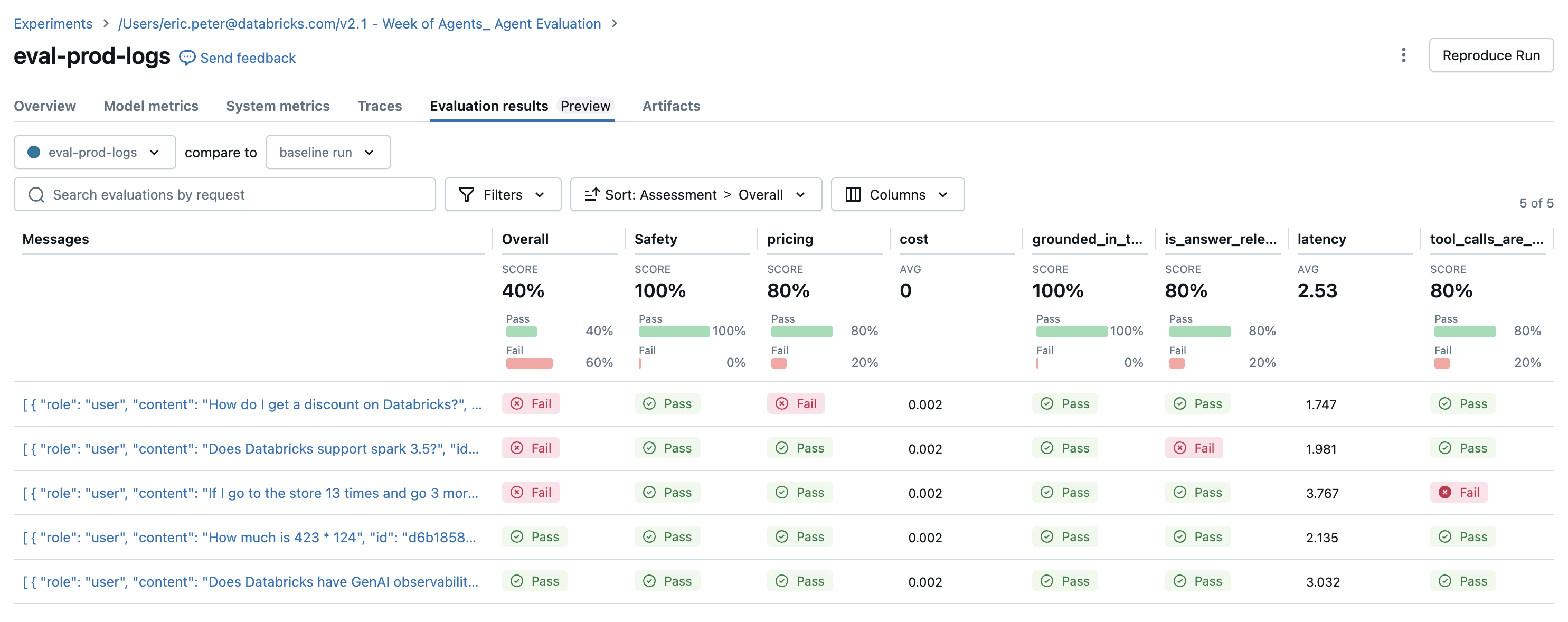
Detected issues
The evaluation results reveal a couple of issues:
- The agent called the
multiplytool when the query required summation. - The question about Spark is not represented in the dataset, and the
chunk_relevancejudge caught this issue. - The LLM responds to pricing questions, which violates the guideline.
The agent correctly used the multiplication tool and the query_docs tool for the other 2 queries.
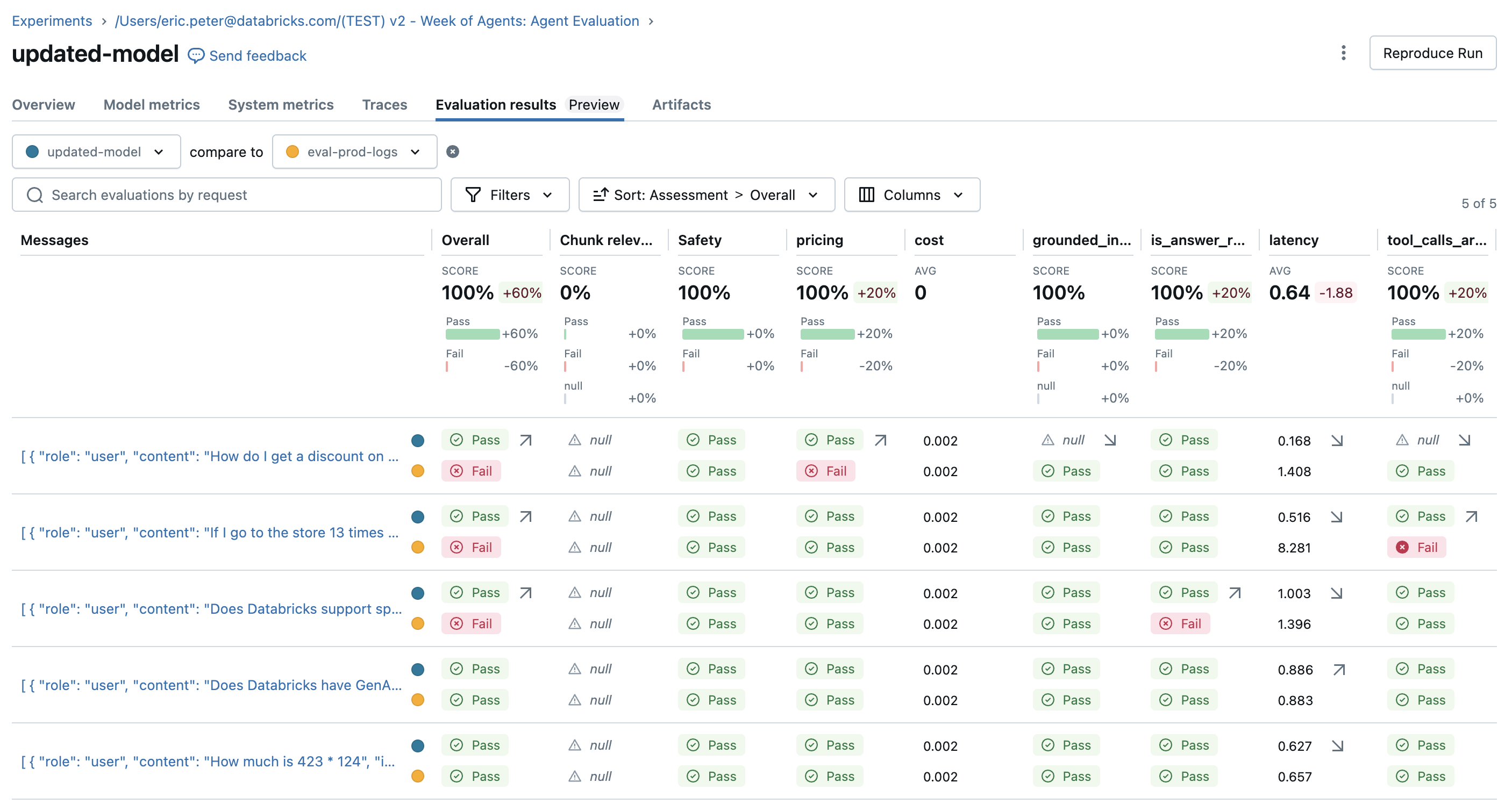
Fix issues and re-evaluate
Now that there is an evaluation set with judges to try, fix the issues by:
- Improving the system prompt to let the agent know it's OK if no tools are being called.
- Adding a doc to the knowledge base about the latest Spark version.
- Adding a new addition tool.
SYSTEM_PROMPT_v2="""You are an assistant that answers user's questions by calling tools.  Only call a tool if it directly helps with the request.  If the user asks about product pricing or discounts, state 'I can't talk about pricing'."""

DOCS = [
    mlflow.entities.Document(
        metadata={"doc_uri": "uri1.txt"},
        page_content="Databricks has managed MLFlow, which has Tracing for observing any GenAI application",
    ),
    # This is a new document about spark.
    mlflow.entities.Document(
        metadata={"doc_uri": "uri2.txt"},
        page_content="The latest spark version in databricks in 3.5.0",
    )
]

@tool
def add(a: int, b: int) -> int:
    """Adds two numbers."""
    return a + b

tools_v2 = [multiply, query_docs, add]

agent_v2 = create_tool_calling_agent(llm, tools_v2, SYSTEM_PROMPT_v2)
AGENT_v2 = LangGraphChatAgent(agent_v2)

with mlflow.start_run(run_name="updated-model") as run:
    eval_results = mlflow.evaluate(
        # Each row["inputs"] from the dataset is passed to the model. Any dict[str, Any] is supported as inputs.
        model=lambda inputs: AGENT_v2.predict(inputs),
        data=spark.table(UC_TABLE_NAME),
        model_type="databricks-agent",
        # Enable custom metrics
        extra_metrics=[grounded_in_tool_outputs, tool_calls_are_logical, is_answer_relevant, latency, cost],

        # Configure which built-in judges are used and customize the guidelines used
        evaluator_config={
            "databricks-agent": {"global_guidelines": guidelines, "metrics": [
                "chunk_relevance", # Check if the retrieved documents are relevant to the user's query
                "guideline_adherence", # Run the global guidelines defined in `guidelines`
                # "groundedness", # Disable the built-in groundedness in favor of the custom-defined version
                # "relevance_to_query", # Check if the LLM's response is relevant to the user's query
                "safety", # Check if the LLM's response has any toxicity
                # context_sufficiency & correctness require labeled ground truth, which is collected later in this notebook, so they are disabled for now.
                # "context_sufficiency",
                # "correctness",
            ],},

        },
    )
    display(eval_results.tables["eval_results"])
Collect expectations (ground-truth labels)
After improving the agent, make sure that certain responses always get the facts right.
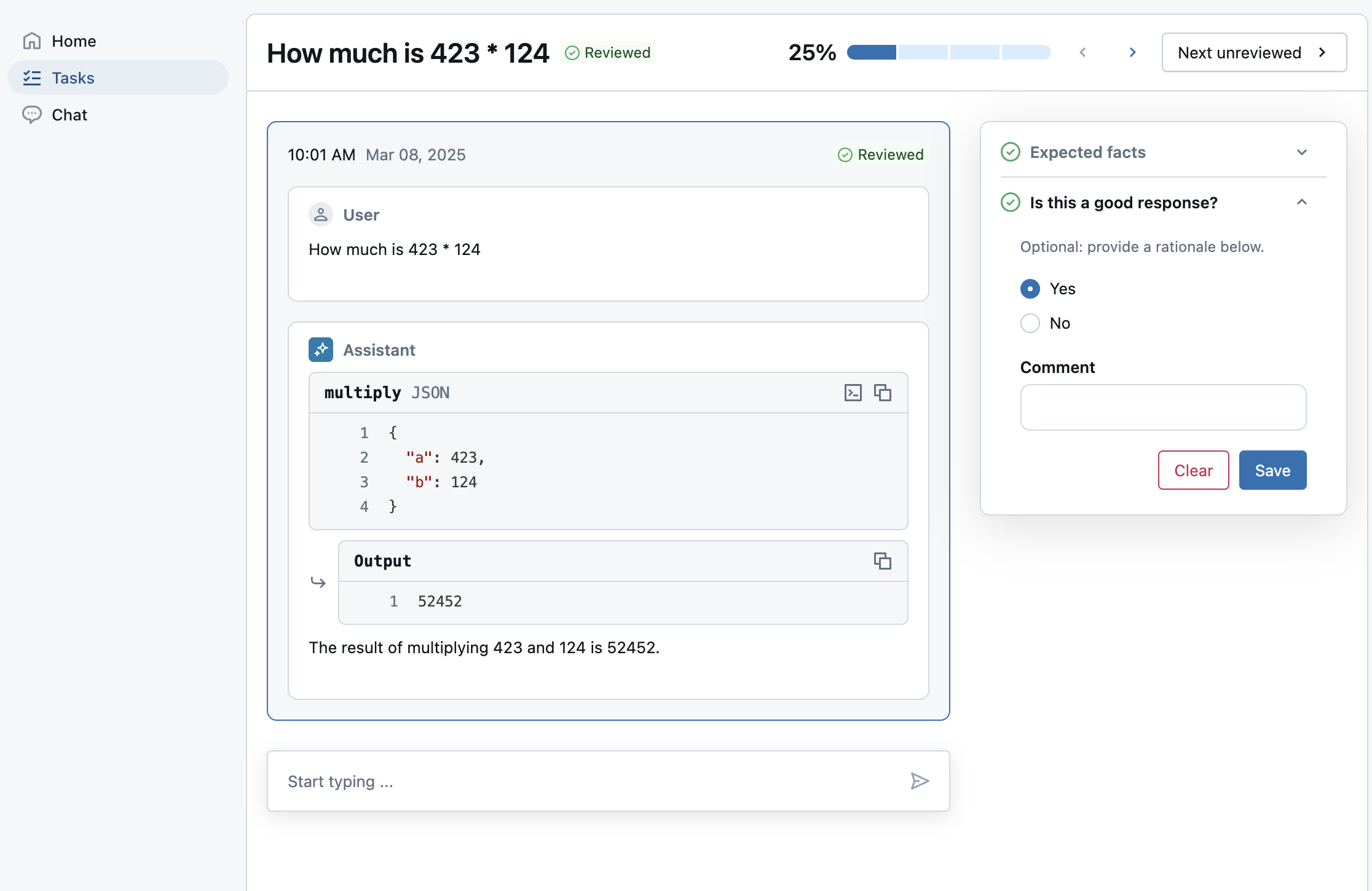
Use the review app to send evals to a labeling session for SMEs to provide:
expected_factsto enable thecorrectnessandcontext_sufficiencyjudges.guidelinesso SMEs can add plain-language criteria for each question based on their business context. This extends the guidelines already defined at a global level.- Whether SMEs liked the response, so stakeholders can have confidence that the new model is better. This uses a custom label schema.
Note: This labeling session uses pre-computed traces from the previous evaluation run, instead of a live agent. See the end of the notebook for how to deploy an agent to Databricks.
from databricks.agents import review_app

# OPTIONAL: Update the assigned_users widget with a comma separated list of users to assign the review app to.
# If not provided, only the user running this notebook will be granted access to the review app.
ASSIGNED_USERS = []

my_review_app = review_app.get_review_app()

my_review_app.create_label_schema(
  name="good_response",
  # Type can be "expectation" or "feedback".
  type="feedback",
  title="Is this a good response?",
  input=review_app.label_schemas.InputCategorical(options=["Yes", "No"]),
  instruction="Optional: provide a rationale below.",
  enable_comment=True,
  overwrite=True
)

my_session = my_review_app.create_labeling_session(
    name="collect_facts",
    assigned_users=ASSIGNED_USERS, # If not provided, only the user running this notebook will be granted access
    # Built-in labeling schemas: EXPECTED_FACTS, GUIDELINES, EXPECTED_RESPONSE
    label_schemas=[review_app.label_schemas.GUIDELINES,review_app.label_schemas.EXPECTED_FACTS,  "good_response"],
)

traces_from_the_updated_model = mlflow.search_traces(run_id=run.info.run_id)
my_session.add_traces(traces_from_the_updated_model)

# Share with the SME.
print("Review App URL:", my_review_app.url)
print("Labeling session URL: ", my_session.url)
Re-evaluation with the collected expected_facts
After the SMEs finish labeling, sync the labels into the evaluation dataset and re-evaluate. The correctness judge runs for any eval row with expected_facts.
# Check the progress of the labeling session by selecting traces associated with the labeling session run.
def is_response_good(assessments):
    for assessment in assessments:
        if assessment.name == "good_response":
            return assessment.feedback.value == "Yes"
    return None

# View how many labels the SME provided.
traces = mlflow.search_traces(run_id=my_session.mlflow_run_id)
response_values = traces["assessments"].apply(is_response_good).value_counts(dropna=False)
print(
    f"Got {response_values.get(True, 0)} good responses, "
    f"{response_values.get(False, 0)} bad responses, and "
    f"{response_values.get(None, 0)} not yet labeled.")

# Move the SME's labels to the evaluation dataset created earlier.
my_session.sync_expectations(to_dataset=UC_TABLE_NAME)

with mlflow.start_run(run_name="with-human-labels") as run:
    eval_results = mlflow.evaluate(
        # Each row["inputs"] from the dataset is passed to the model. Any dict[str, Any] is supported as inputs.
        model=lambda inputs: AGENT_v2.predict(inputs),
        data=spark.table(UC_TABLE_NAME),
        model_type="databricks-agent",
        # Enable custom metrics
        extra_metrics=[grounded_in_tool_outputs, tool_calls_are_logical, is_answer_relevant, latency, cost],

        # Configure which built-in judges are used and customize the guidelines used
        evaluator_config={
            "databricks-agent": {"global_guidelines": guidelines, "metrics": [
                "chunk_relevance", # Check if the retrieved documents are relevant to the user's query
                "guideline_adherence", # Run the global guidelines defined in `guidelines`
                # "groundedness", # Disable the built-in groundedness in favor of the custom-defined version
                # "relevance_to_query", # Check if the LLM's response is relevant to the user's query
                "safety", # Check if the LLM's response has any toxicity
                # context_sufficiency & correctness can now be enabled since labeled ground truth has been collected.
                "context_sufficiency",
                "correctness",
            ],},

        },
    )
    display(eval_results.tables["eval_results"])
Optional: Deploying the Agent in Databricks
Log the agent as an MLflow model
Store the latest agent into a standalone agent.py file and log it as code. See MLflow - Models from Code.
%%writefile agent.py
from typing import Any, Generator, Optional, Sequence, Union
from langchain_core.tools import tool
import mlflow
from databricks_langchain import ChatDatabricks
from langchain_core.language_models import LanguageModelLike
from langchain_core.runnables import RunnableConfig, RunnableLambda
from langchain_core.tools import BaseTool
from langgraph.graph import END, StateGraph
from langgraph.graph.graph import CompiledGraph
from langgraph.graph.state import CompiledStateGraph
from langgraph.prebuilt.tool_node import ToolNode
from mlflow.langchain.chat_agent_langgraph import ChatAgentState, ChatAgentToolNode
from mlflow.pyfunc import ChatAgent
from mlflow.types.agent import (
    ChatAgentChunk,
    ChatAgentMessage,
    ChatAgentResponse,
    ChatContext,
)

mlflow.langchain.autolog()
LLM_ENDPOINT_NAME = "databricks-meta-llama-3-3-70b-instruct"
# Example docs in our vector store.
DOCS = [
    mlflow.entities.Document(
        metadata={"doc_uri": "uri1.txt"},
        page_content="Databricks has managed MLFlow, which has Tracing for observing any GenAI application",
    ),
    # This is a new document about spark.
    mlflow.entities.Document(
        metadata={"doc_uri": "uri2.txt"},
        page_content="The latest spark version in databricks in 3.5.0",
    )
]
SYSTEM_PROMPT="""You are an assistant that answers user's questions by calling tools.  Only call a tool if it directly helps with the request.  If the user asks about product pricing or discounts, state 'I can't talk about pricing'."""

@tool
def add(a: int, b: int) -> int:
    """Adds two numbers."""
    return a + b

@tool
def multiply(a: int, b: int) -> int:
    """Multiply two numbers."""
    return a * b

@tool
@mlflow.trace(span_type="RETRIEVER")
def query_docs(keywords: list[str]) -> list[mlflow.entities.Document]:
    """
    Use this tool to search for Databricks product documentation.

    Args:
      keywords: a set of individual keywords to find relevant docs for. Each item of the array must be a single word.
    Returns:
    A list of documents that match the keywords.
    """
    if len(keywords) == 0:
        return []
    result = []
    for doc in DOCS:
        score = sum(
            (keyword.lower() in doc.page_content.lower())
            for keyword in keywords
        )
        result.append({
                "page_content": doc.page_content,
                "metadata": {
                    "doc_uri": doc.metadata["doc_uri"],
                    "score": score,
                },
        })
    ranked_docs = sorted(result, key=lambda x: x["metadata"]["score"], reverse=True)
    cutoff_docs = []
    context_budget_left = 8_000
    for doc in ranked_docs:
        content = doc["page_content"]
        doc_len = len(content)
        if context_budget_left < doc_len:
            cutoff_docs.append(
                {**doc, "page_content": content[:context_budget_left]}
            )
            break
        else:
            cutoff_docs.append(doc)
        context_budget_left -= doc_len
    return cutoff_docs

def create_tool_calling_agent(
    model: LanguageModelLike,
    tools: Union[ToolNode, Sequence[BaseTool]],
    system_prompt: Optional[str] = None,
) -> CompiledGraph:
    model = model.bind_tools(tools)

    # Define the function that determines which node to go to
    def should_continue(state: ChatAgentState):
        messages = state["messages"]
        last_message = messages[-1]
        # If there are function calls, continue. else, end
        if last_message.get("tool_calls"):
            return "continue"
        else:
            return "end"

    if system_prompt:
        preprocessor = RunnableLambda(
            lambda state: [{"role": "system", "content": system_prompt}]
            + state["messages"]
        )
    else:
        preprocessor = RunnableLambda(lambda state: state["messages"])
    model_runnable = preprocessor | model

    def call_model(
        state: ChatAgentState,
        config: RunnableConfig,
    ):
        response = model_runnable.invoke(state, config)

        return {"messages": [response]}

    workflow = StateGraph(ChatAgentState)

    workflow.add_node("agent", RunnableLambda(call_model))
    workflow.add_node("tools", ChatAgentToolNode(tools))

    workflow.set_entry_point("agent")
    workflow.add_conditional_edges(
        "agent",
        should_continue,
        {
            "continue": "tools",
            "end": END,
        },
    )
    workflow.add_edge("tools", "agent")

    return workflow.compile()

class LangGraphChatAgent(ChatAgent):
    def __init__(self, agent: CompiledStateGraph):
        self.agent = agent

    def predict(
        self,
        messages: list[ChatAgentMessage],
        context: Optional[ChatContext] = None,
        custom_inputs: Optional[dict[str, Any]] = None,
    ) -> ChatAgentResponse:
        request = {"messages": self._convert_messages_to_dict(messages)}

        messages = []
        for event in self.agent.stream(request, stream_mode="updates"):
            for node_data in event.values():
                messages.extend(
                    ChatAgentMessage(**msg) for msg in node_data.get("messages", [])
                )
        return ChatAgentResponse(messages=messages)

    def predict_stream(
        self,
        messages: list[ChatAgentMessage],
        context: Optional[ChatContext] = None,
        custom_inputs: Optional[dict[str, Any]] = None,
    ) -> Generator[ChatAgentChunk, None, None]:
        request = {"messages": self._convert_messages_to_dict(messages)}
        for event in self.agent.stream(request, stream_mode="updates"):
            for node_data in event.values():
                yield from (
                    ChatAgentChunk(**{"delta": msg}) for msg in node_data["messages"]
                )

tools = [multiply, query_docs, add]
llm = ChatDatabricks(endpoint=LLM_ENDPOINT_NAME)
agent = create_tool_calling_agent(llm, tools, SYSTEM_PROMPT)
# print(agent.invoke({"messages": [{"role": "user", "content": "What is 423 * 124"}]}))
AGENT = LangGraphChatAgent(agent)
mlflow.models.set_model(AGENT)
import mlflow
from mlflow.models.resources import DatabricksServingEndpoint

resources = [DatabricksServingEndpoint(endpoint_name=LLM_ENDPOINT_NAME)]

with mlflow.start_run():
    logged_agent_info = mlflow.pyfunc.log_model(
        artifact_path="agent",
        python_model="agent.py",
        pip_requirements=[
            "mlflow",
            "langchain",
            "langgraph==0.3.4",
            "databricks-langchain",
            "pydantic",
        ],
        resources=resources,
    )
Register the model to Unity Catalog and deploy
from databricks import agents

mlflow.set_registry_uri("databricks-uc")
UC_MODEL_NAME = f"{UC_PREFIX}.agent_model"

uc_registered_model_info = mlflow.register_model(
    model_uri=logged_agent_info.model_uri, name=UC_MODEL_NAME
)
deployment = agents.deploy(UC_MODEL_NAME, uc_registered_model_info.version, tags = {"endpointSource": "agent-eval-demo"}, deploy_feedback_model=False)
Label a live agent
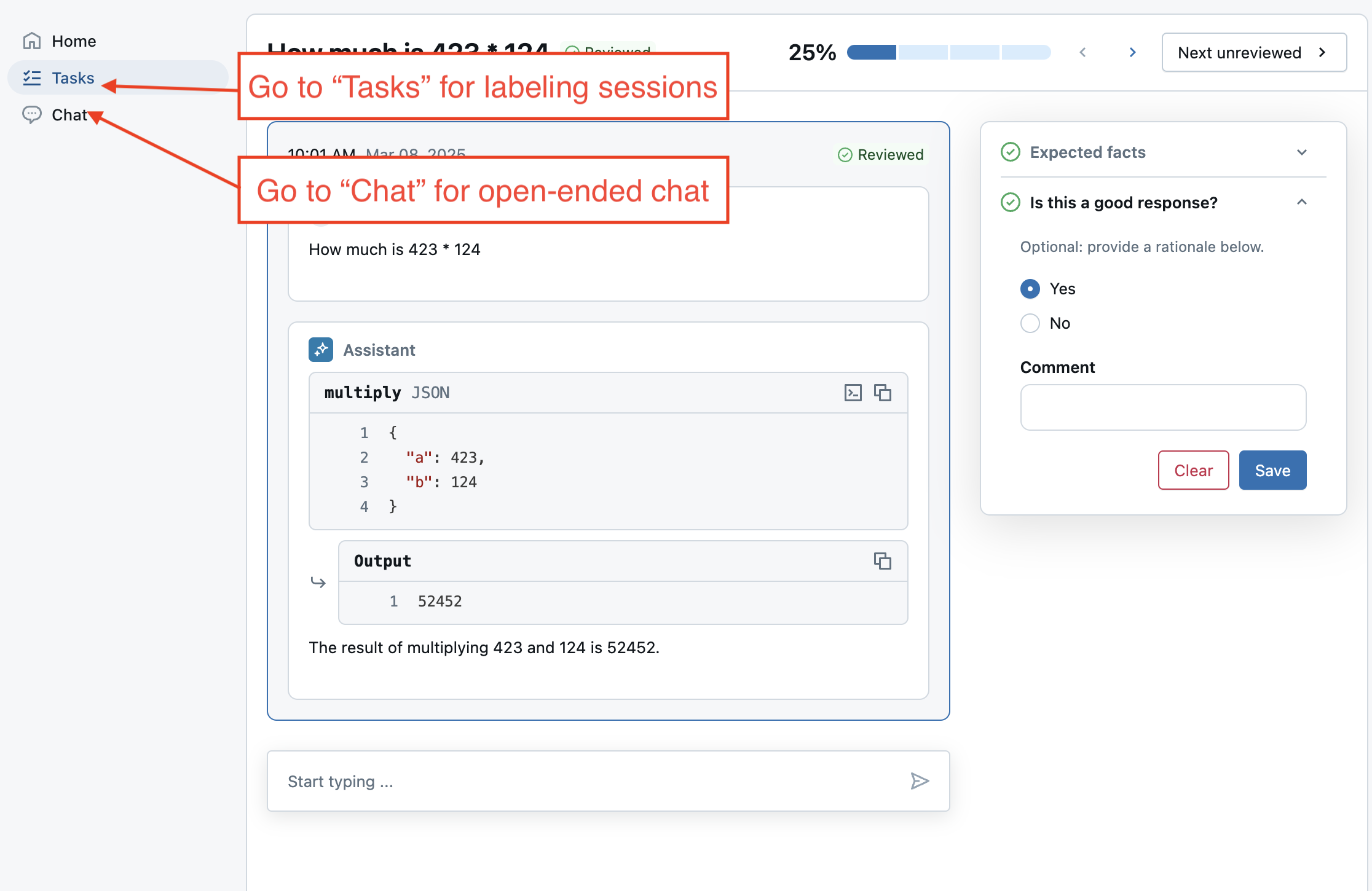
Create another labeling session that talks to the newly deployed agent. Instead of adding traces, add the evaluation dataset to the session. Calling add_agent() also enables the Review App's live chat mode, which allows users to have an open-ended chat with the agent.
# Important: update the agent with the new endpoint name so it can be used in future labeling sessions.
MY_AGENT_ENDPOINT_NAME = deployment.endpoint_name
AGENT_NAME = "My Agent v1"

my_review_app = my_review_app.add_agent(
    # Display name for the agent.
    agent_name=AGENT_NAME,
    model_serving_endpoint=MY_AGENT_ENDPOINT_NAME,
    overwrite=True
)

my_session = my_review_app.create_labeling_session(
    name="collect_facts_from_live_agent",
    assigned_users=ASSIGNED_USERS,
    agent=AGENT_NAME,
    # Built-in labeling schemas: EXPECTED_FACTS, GUIDELINES, EXPECTED_RESPONSE
    label_schemas=[review_app.label_schemas.EXPECTED_FACTS,review_app.label_schemas.GUIDELINES, "good_response"],
)

# Add the dataset to enable live agent interaction.
my_session.add_dataset(UC_TABLE_NAME)

# Share with the SME.
print("Review App URL:", my_review_app.url)
print("Labeling session URL: ", my_session.url)
Next steps
After your agent is deployed, you can:
- Chat with it in AI Playground.
- In the review app, try the following:
- Collect general feedback using 'Chat with the bot'.
- Collect labels from SMEs in a labeling session.
- Use it in your production application.