Note
Access to this page requires authorization. You can try signing in or changing directories.
Access to this page requires authorization. You can try changing directories.
Databricks recommends that you use Unity Catalog to manage access to all of the data that you store in Azure Data Lake Storage. Unity Catalog governs access to a storage path with two securable objects, a storage credential and an external location, so that you control who can read and write data from one place and can audit access to it.
Without these objects, teams store cloud credentials in notebooks or compute configurations, which bypasses Unity Catalog access control and auditing.
How Unity Catalog governs access to cloud storage
The following diagram shows how a storage credential and an external location control access from compute to a storage path:
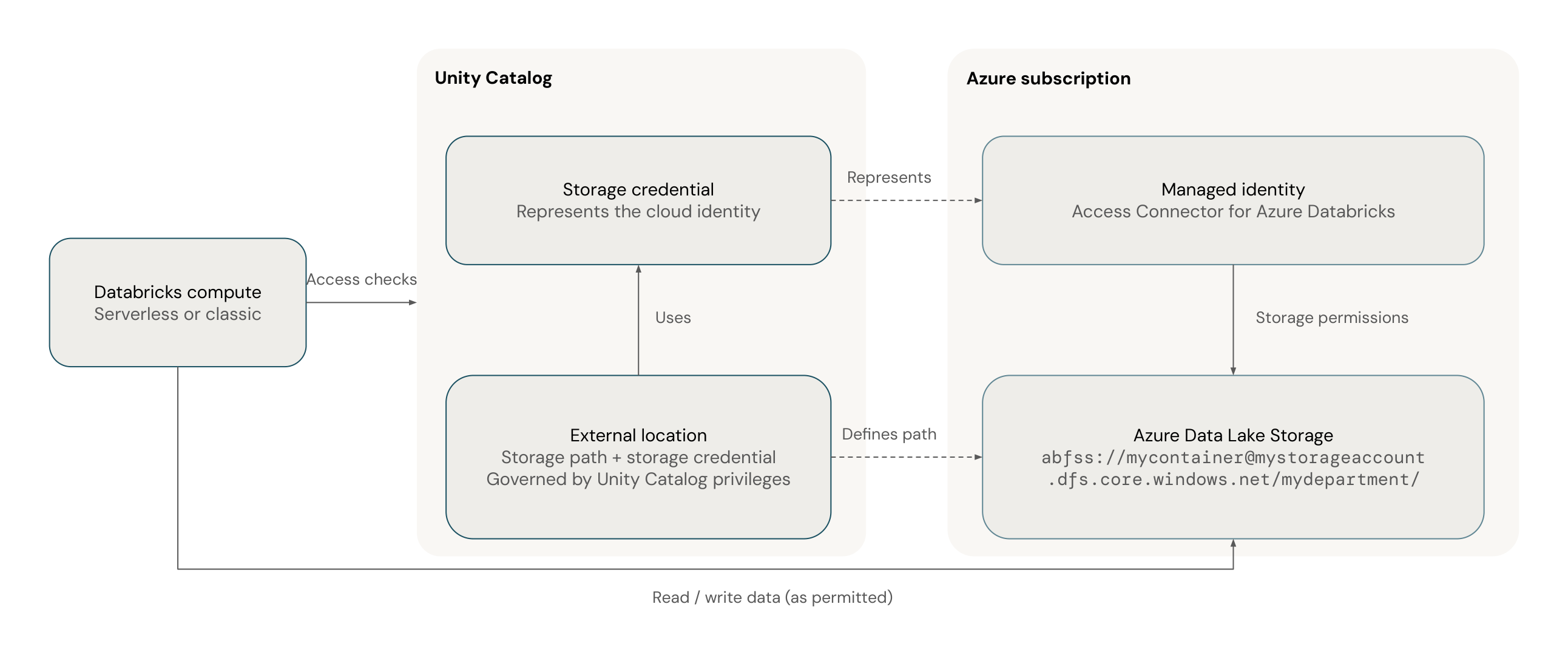
The dashed connectors show how the Unity Catalog objects reference the cloud identity and storage path. The solid arrow shows data access between compute and Azure Data Lake Storage, which Unity Catalog governs.
Unity Catalog uses the following securable objects to govern access to cloud storage:
- Storage credential: Represents a long-term cloud credential that can access a storage path. The type of credential depends on your cloud provider. Privileges on the storage credential control who can create external locations that use it.
- External location: Combines a cloud storage path with a storage credential that authorizes access to it. Privileges on the external location, such as
READ FILES, control who can read files directly at that path, and who can create tables, volumes, and managed storage locations there. Multiple external locations can use the same storage credential.
For example, an external location for the path abfss://mycontainer@mystorageaccount.dfs.core.windows.net/mydepartment/ uses a storage credential that represents a managed identity with access to the mystorageaccount storage account.
See Connect to cloud object storage using Unity Catalog.
External location best practices
Databricks recommends the following practices for external locations:
- Limit direct access to storage: Limit the number of users and service principals that can access the storage behind an external location directly. Direct access bypasses Unity Catalog access control, auditing, and lineage.
- Limit who can create external locations: Grant the
CREATE EXTERNAL LOCATIONprivilege only to administrators who set up connections to cloud storage, or to trusted data engineers. - Grant access through tables and volumes: Register external tables and volumes on paths in an external location, and grant users access to those tables and volumes. Don't grant
READ FILESorWRITE FILESon external locations to most users. - Use subdirectories: Don't create external tables or volumes at the root of an external location. Create them in a subdirectory.
- Keep file events enabled: New external locations have file events enabled by default. File events improve the performance and reliability of features such as Auto Loader and file arrival triggers. See Set up file events for an external location.
See External locations.
Next steps
| Resource | Description |
|---|---|
| Connect Azure Data Lake Storage to Unity Catalog | Create a storage credential and an external location for Azure Data Lake Storage |
| Connect to an Azure Data Lake Storage Gen2 (ADLS Gen2) external location | Learn about all of the options for connecting to Azure Data Lake Storage with Unity Catalog |