Note
Access to this page requires authorization. You can try signing in or changing directories.
Access to this page requires authorization. You can try changing directories.
Databricks Feature Serving makes data in the Databricks platform available to models or applications deployed outside of Azure Databricks. You can sync data to an Online Feature Store using either Feature Views or feature tables, then bundle features into a FeatureSpec that you can serve through a feature serving endpoint.
The same infrastructure powers both feature serving and model serving endpoints, so they share capabilities such as autoscaling, high availability, observability, and route optimization.
Databricks provides three options for serving features:
- Model serving endpoints come with automatic feature lookup built in for models logged via the Feature Engineering client. When you train and log the model, Databricks captures the feature lineage and performs the lookup automatically as part of the model serving request.
- Feature serving endpoints are best when you consume features outside of Databricks, such as in an externally hosted model or a rules engine. The endpoint returns features directly and can combine feature lookups with on-demand feature computation in a single request.
- Direct Lakebase queries may be the right choice for latency-sensitive feature lookups where every millisecond matters and you consume features outside Databricks model serving. Create your online store and set up the correct sync (materialization for Feature Views, publishing for feature tables), then query Lakebase like any other database. This pattern does not support Sawtooth Feature Views, On Demand Features, or feature names beyond 64 characters.
Automatic feature lookup
When you train a model using Databricks Feature Store and serve it with Databricks Model Serving, the model automatically looks up feature values from a Databricks Online Feature Store or a third-party online store. This happens automatically with no setup required.
When a scoring request comes in to the model, Model Serving automatically retrieves the published feature values needed by the model. In this way, the most recent feature values are always used for predictions. For details and example notebooks, see Model Serving with automatic feature lookup.
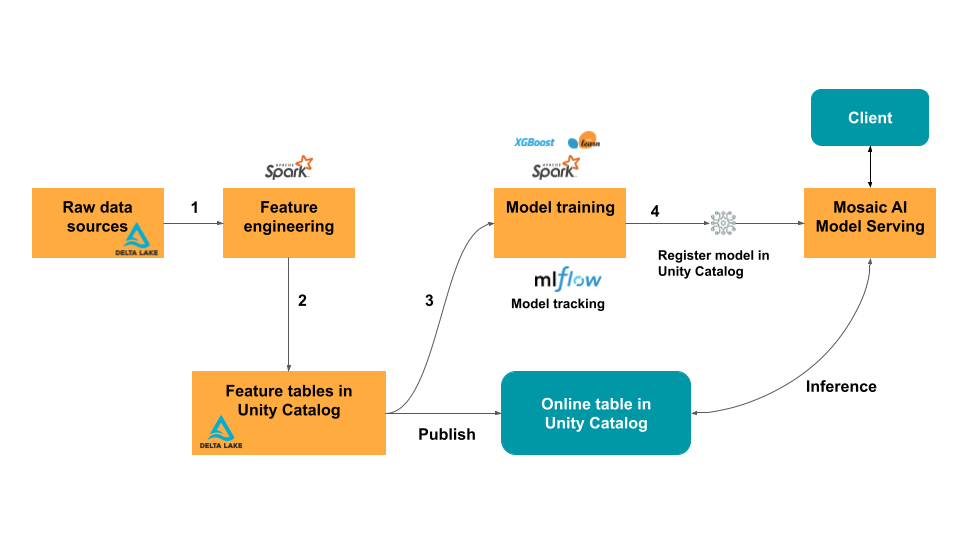
The following diagram illustrates the relationship between the platform components for real-time serving.
Feature serving endpoints
For customers who run models outside of Databricks, serving feature data provides a single interface that serves pre-materialized feature data from your Lakehouse alongside on-demand features. It also includes the following benefits:
- Simplicity. Databricks handles the infrastructure. With a single API call, Databricks creates a production-ready serving environment.
- High availability and scalability. Feature Serving endpoints automatically scale up and down to adjust to the volume of serving requests.
- Security. Endpoints are deployed in a secure network boundary and use dedicated compute that terminates when the endpoint is deleted or scaled to zero.
On-demand features
Machine learning models for real-time applications often require the most recent feature values. In the example shown in the diagram, one feature for a restaurant recommendation model is the user's current distance from a restaurant. This feature must be calculated “on demand”, that is, at the time of the scoring request. Upon receiving a scoring request, the model looks up the restaurant's location, and then applies a pre-defined function to calculate the distance between the user's current location and the restaurant. That distance is passed as an input to the model, along with other precomputed features from the feature store.
For more information, see Compute features on-demand.
