Note
Access to this page requires authorization. You can try signing in or changing directories.
Access to this page requires authorization. You can try changing directories.
Storing traces in Unity Catalog doubles as a compliance layer. Traces land as governed Delta tables, so they inherit the same RBAC, column masking, row filters, retention policies, and audit logging you apply to any other Unity Catalog data asset — with no additional tooling. Two approaches then let you handle PII specifically:
- Redact before export (client-side): filter span inputs and outputs in your agent before MLflow ships them to the backend. Raw PII never leaves your environment.
- Redact stored traces (server-side): apply
ai_maskthrough a Lakeflow pipeline to OTel spans already stored in Unity Catalog, then restrict access to the raw tables. No changes to your agent code required.
Use client-side redaction when you need to guarantee sensitive values are never transmitted or persisted. Use the server-side pipeline approach when traces are already stored in Unity Catalog and you prefer not to modify your agent.
Note
MLflow redaction only affects what's recorded in the trace — the agent itself still receives and returns the original, unredacted content. To block PII from reaching a Unity Catalog-registered AI service or to enforce a central policy across your organization, use service policies.
Redact PII before export
Span processors implement client-side redaction. Each processor receives a span, mutates it in place, and returns nothing. Register one or more processors with mlflow.tracing.configure, and MLflow applies them to every span before exporting.
from mlflow.entities.span import Span

def filter_function(span: Span) -> None:
    # Read span.inputs / span.outputs, redact, then write back.
    span.set_inputs(...)
    span.set_outputs(...)

mlflow.tracing.configure(span_processors=[filter_function])
Key behavior:
- Filtering happens client-side — the trace backend never receives unredacted data.
- Multiple processors run in the order you register them, each receiving the span after the previous processor mutated it.
- Processors apply to every span in a trace, including those created by framework integrations such as LangChain and LangGraph.
- Use
span.span_typeto apply different logic to different span kinds:LLM,TOOL, orAGENT.
Prerequisites
MLflow Tracing configured for your agent. See Tracing overview.
If you store traces in Unity Catalog, create the experiment with a Unity Catalog trace location first. See Setup: Create an experiment with a Unity Catalog trace location.
Install the required packages:
pip install --upgrade "mlflow-skinny[databricks]>=3.14" databricks-sdk "databricks-langchain>=0.19.0" "langgraph>=1.1.0"For lightweight production tracing,
mlflow-tracingis the recommended install. These examples usemlflow-skinny[databricks]because they also exercise the Unity Catalog SDK and the LangChain and LangGraph integrations.For the Microsoft Presidio example, also install:
pip install presidio_analyzer presidio_anonymizer
python -m spacy download en_core_web_lg
Redact with a regex
The following example matches email addresses in span inputs with a regular expression and replaces them with [REDACTED].
import re
import mlflow
from mlflow.entities.span import Span

# mlflow.set_experiment(experiment_id=experiment_id)

@mlflow.trace
def predict(text: str):
    return "Answer"

EMAIL_PATTERN = r"[A-Za-z0-9._%+-]+@[A-Za-z0-9.-]+\.[A-Za-z]{2,}"

def redact_email(span: Span) -> None:
    raw_input = span.inputs.get("text")
    redacted_input = re.sub(EMAIL_PATTERN, "[REDACTED]", raw_input)
    span.set_inputs({"text": redacted_input})

mlflow.tracing.configure(span_processors=[redact_email])

predict("My e-mail address is test@example.com")
Filter by span type
Use span.span_type to apply different redaction logic to different kinds of spans — LLM, TOOL, AGENT, and so on. This lets you target the span where a sensitive value originates rather than scanning every payload shape a framework might produce.
The following example redacts bank account numbers from a LangGraph agent. The account number comes from a tool, so the processor replaces TOOL span outputs entirely and applies a regex to the inputs and outputs of every other span as a backstop.
Set up the agent:
import mlflow
from langchain_core.tools import tool
from databricks_langchain import ChatDatabricks
from langchain.agents import create_agent

# autolog() registers a LangChain callback so MLflow automatically captures spans
# for every LLM call, tool invocation, and agent step.
mlflow.langchain.autolog()

@tool
def get_bank_account_number(user_name: str):
    """Return the bank account number for the given user name."""
    return "1234567890"

llm = ChatDatabricks(model="databricks-llama-4-maverick", use_ai_gateway=True)
graph = create_agent(llm, [get_bank_account_number])
Define the span processor:
import re
from mlflow.entities.span import Span, SpanType

ACCOUNT_NUMBER_PATTERN = re.compile(r"\d{10}")

def filter_bank_account_number(span: Span) -> None:
    # The tool returns the account number directly — redact its output entirely.
    if span.span_type == SpanType.TOOL:
        span.set_outputs("[REDACTED]")
        return

    # For all other spans, mask any account-number pattern in the inputs and outputs.
    if span.inputs is not None:
        span.set_inputs(ACCOUNT_NUMBER_PATTERN.sub("[REDACTED]", str(span.inputs)))
    if span.outputs is not None:
        span.set_outputs(ACCOUNT_NUMBER_PATTERN.sub("[REDACTED]", str(span.outputs)))
Register the processor and invoke the agent:
mlflow.tracing.configure(span_processors=[filter_bank_account_number])

result = graph.invoke(
    {"messages": [{"role": "user", "content": "What is the bank account number for John Doe?"}]}
)
Redact with Microsoft Presidio
For more accurate PII detection beyond regex, use Microsoft Presidio. An AnalyzerEngine detects entities such as names, credit cards, and email addresses, and an AnonymizerEngine rewrites them.
import mlflow
from mlflow.entities.span import Span, SpanType

@mlflow.trace(span_type=SpanType.AGENT)
def customer_support_agent(request: str):
    return "Yes"
Initialize Presidio and define the span processor:
from presidio_analyzer import AnalyzerEngine
from presidio_anonymizer import AnonymizerEngine

analyzer = AnalyzerEngine()
anonymizer = AnonymizerEngine()

def filter_pii(span: Span) -> None:
    text = span.inputs.get("request")
    results = analyzer.analyze(
        text=text,
        entities=["PERSON", "CREDIT_CARD", "EMAIL_ADDRESS", "LOCATION", "DATE_TIME"],
        language="en",
    )
    anonymized_text = anonymizer.anonymize(text=text, analyzer_results=results)
    span.set_inputs({"request": anonymized_text.text})
Register the processor and run the agent:
mlflow.tracing.configure(span_processors=[filter_pii])

customer_support_agent(
    "Please cancel my credit card effective September 19th. My name is John Doe and my credit "
    "card number is 4095-2609-9393-4932. My email is john.doe@example.com and I live in Amsterdam."
)
Reset span processors
To stop redacting spans, pass an empty list to clear all registered processors:
mlflow.tracing.configure(span_processors=[])
Or use reset to clear the entire tracing configuration:
mlflow.tracing.reset()
Redact PII from stored OTel traces
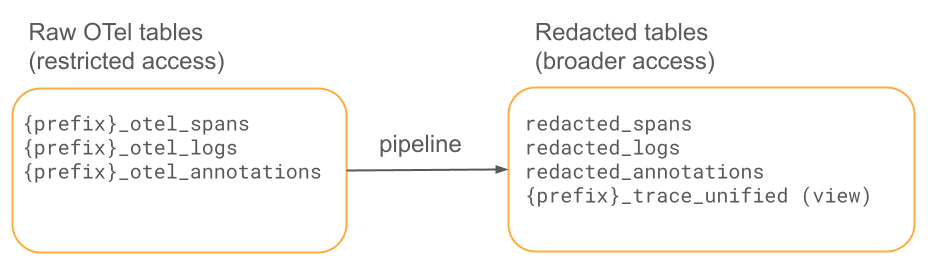
This approach redacts PII in OTel trace spans already stored in Unity Catalog, without modifying your agent. A Lakeflow pipeline reads new OTel spans incrementally, applies ai_mask to mask PII, and writes the results to a separate schema with broader access. A scheduled job handles optional retention cleanup on the raw tables.
This approach works with any OTel traces in Unity Catalog, including traces written by MLflow. See Store OpenTelemetry traces in Unity Catalog.
Prerequisites
- A Unity Catalog-enabled workspace.
- AI Functions available through a serverless SQL warehouse or serverless pipeline.
- The Databricks CLI authenticated to your workspace.
- OTel trace data in Unity Catalog tables. See Store OpenTelemetry traces in Unity Catalog.
Download the assets
Download these files and import them into your workspace:
| File | Description |
|---|---|
| deploy_notebook.py | Guided deployment notebook — interactive alternative to deploy.sh. |
| deploy.sh | CLI deployment script. |
| pii_redaction_pipeline.sql | The pipeline — streaming tables with ai_mask. |
| unified_view.sql | Unified trace view joining spans and annotations. |
| setup_schema_and_grants.sql | Schema creation and access control grants. |
| pipeline_config.json | Example pipeline configuration (reference). |
| send_pii_traces.py | Test utility that sends PII test data as OTel spans. |
| pii_test_data.jsonl | 50 lines of synthetic PII test data. |
Deploy the solution
Guided notebook (recommended)
For a step-by-step deployment directly in your workspace:
- Import deploy_notebook.py into your workspace along with the other downloaded assets. See Azure Databricks Git folders.
- Open
deploy_notebook.pyin your workspace. - Fill in the widget parameters at the top: catalog, source schema, target schema, and table prefix.
- Click Run all. Each step validates before proceeding.
This approach uses the Databricks Python SDK (no CLI required), is safe to re-run, and provides interactive feedback at each step.
CLI
Run the deployment script with your workspace details:
./deploy.sh <WORKSPACE_HOST> <CATALOG> <SOURCE_SCHEMA> <TARGET_SCHEMA> <TABLE_PREFIX>
For example:
./deploy.sh https://my-workspace.cloud.databricks.com my_catalog traces_raw traces_redacted my_app
The script uploads the pipeline SQL, creates the target schema, creates and triggers the pipeline, and configures auto-TTL on the raw tables if retention_days is set. After the pipeline completes, run unified_view.sql to create the unified trace view.
Manual
- Create the target schema. Run the statements in
setup_schema_and_grants.sql. - Upload the pipeline SQL. Import
pii_redaction_pipeline.sqlinto your workspace. - Create the pipeline. Use
pipeline_config.jsonas a template and replace the<PLACEHOLDER>values. - Trigger a pipeline run. Use the UI or run
databricks pipelines start-update <PIPELINE_ID>. - Create the unified view. Run
unified_view.sqlafter the first pipeline run. - Configure retention. Enable auto time-to-live on the raw tables.
Deployment parameters
Pass each parameter as a widget value in deploy_notebook.py or as an argument to deploy.sh.
| Parameter | Description | Default |
|---|---|---|
catalog |
Unity Catalog catalog for both the raw and redacted tables. | (required) |
source_schema |
Schema containing the raw OTel tables. | (required) |
target_schema |
Schema for the redacted output tables. | (required) |
table_prefix |
Prefix for the OTel table names. | (required) |
pii_categories |
PII types to redact, comma-separated and single-quoted. | 'email','phone','ssn','credit_card','name','address' |
pipeline_name |
Name for the pipeline. | otel-pii-redaction |
retention_days |
Days to retain raw data before deletion. A blank value, 0, or none disables deletion. |
90 |
redaction_pipeline_mode |
Pipeline execution mode: triggered or continuous. |
triggered |
redaction_trigger_frequency |
How often the pipeline runs (triggered mode only): hourly, every 6 hours, daily, or weekly. |
daily |
Source tables follow the naming pattern {catalog}.{source_schema}.{table_prefix}_otel_spans, {catalog}.{source_schema}.{table_prefix}_otel_logs, and {catalog}.{source_schema}.{table_prefix}_otel_annotations.
Pipeline modes:
- triggered: Creates a scheduled job that runs the pipeline at the configured frequency. The pipeline processes new data each run, then stops.
- continuous: The pipeline runs continuously, processing new data as it arrives. Higher compute cost than triggered mode because the pipeline is always on.
PII redaction parameters
These parameters control which PII is redacted and how. Pass pii_categories as a deployment parameter; edit pii_redaction_pipeline.sql directly to override the others.
| Parameter | Description | Example |
|---|---|---|
pii_categories |
List of PII types to detect and redact. Supported values: email, phone, name, address, ssn, credit_card, ip_address, date_of_birth. |
["email","phone","ssn","credit_card","name","address"] |
redaction_mode |
How to mask PII: mask, hash, or remove. |
mask |
mask_character |
Character used when redaction_mode is mask. |
* |
fields_to_redact |
OTel fields to apply redaction to. | ["attributes", "resource.attributes", "events"] |
allowlisted_keys |
Attribute keys to skip redaction — for example, technical metadata that does not carry PII. | ["service.name", "http.method", "http.status_code"] |
custom_patterns |
Regex patterns for domain-specific PII not covered by ai_mask. |
{"employee_id": "EMP-\\d{6}", "internal_account": "ACCT-[A-Z0-9]+"} |
For custom patterns such as employee IDs (EMP-XXXXXX), apply regexp_replace before ai_mask in the pipeline SQL.
What gets redacted
The pipeline applies ai_mask to the following fields:
| Table | Fields redacted |
|---|---|
| Spans | attributes, events, resource.attributes |
| Logs | body, attributes, resource.attributes |
| Annotations | Passthrough — no PII expected |
Non-PII fields are preserved unchanged: trace IDs, span IDs, timestamps, service names, and status codes.
ai_mask is LLM-backed and handles varied PII formats without requiring a separate pattern per variation — for example, phone numbers in (555) 123-4567, 555.123.4567, or +1 555-123-4567 are all recognized.
Retention and access control
Raw data retention: the deployment configures auto time-to-live on the raw OTel tables to delete trace data older than a configurable number of days (default: 90). This supports GDPR and similar data protection regulations. Set retention_days to 0 or none to manage retention separately.
Note
Exact auto-TTL deletion timing is not guaranteed. There can be a buffer of up to 6 days between row expiration and permanent deletion, plus the data retention duration (default 7 days). If your compliance requirements demand strict deletion timelines, use a scheduled job with manual DELETE and VACUUM instead.
Access control: the raw OTel tables contain unredacted PII and should have restricted access. Grant access to the raw source schema only to the pipeline service principal and administrators who need it for debugging or incident response. All routine analytics and observability workflows should query the redacted tables. The setup_schema_and_grants.sql file includes example grants. For Unity Catalog privilege details, see Manage privileges in Unity Catalog.
Test the redaction
Generate test spans with known PII to validate the output:
pip install opentelemetry-exporter-otlp-proto-http

python send_pii_traces.py <WORKSPACE_HOST> <CATALOG.SCHEMA.PREFIX_otel_spans>
This sends 50 test traces with emails, phones, SSNs, credit cards, names, and addresses.
After running the pipeline, compare the raw and redacted spans:
SELECT
  s.span_id,
  CAST(s.attributes AS STRING) AS raw,
  CAST(r.attributes AS STRING) AS redacted
FROM <source_catalog>.<source_schema>.<prefix>_otel_spans s
JOIN <target_catalog>.<target_schema>.redacted_spans r
  ON s.trace_id = r.trace_id AND s.span_id = r.span_id
WHERE s.name = 'pii-test-interaction'
LIMIT 5;
Reference architecture
Two flows are available. Use Flow 1 (batch pipeline) for most production deployments — it pre-materializes redacted tables for fast queries and supports auto-TTL retention. Use Flow 2 (view-based) as a lightweight option when storage cost is a primary concern and queries are infrequent.
| Dimension | Flow 1: batch pipeline | Flow 2: view-based |
|---|---|---|
| Storage cost | 2x (time-windowed; ~1x if auto-TTL applies) | 1x — no duplication |
| Compute cost | One-time per record | Per query |
| Query performance | Fast (pre-materialized) | Slow (recomputes on each query) |
| Latency to availability | Minutes (pipeline interval) | Immediate |
| Rule change rollout | Pipeline refresh | Instant |
| GDPR compliance | Auto-TTL or scheduled cleanup on raw tables | Auto-TTL or scheduled cleanup on raw tables |
| Best for | Primary production use | Low-query-volume or interim use |
Flow 1: Batch pipeline (recommended)
A Lakeflow pipeline materializes redacted streaming tables from the raw OTel tables. OTel spans are append-only, which makes them ideal for incremental streaming ingestion.
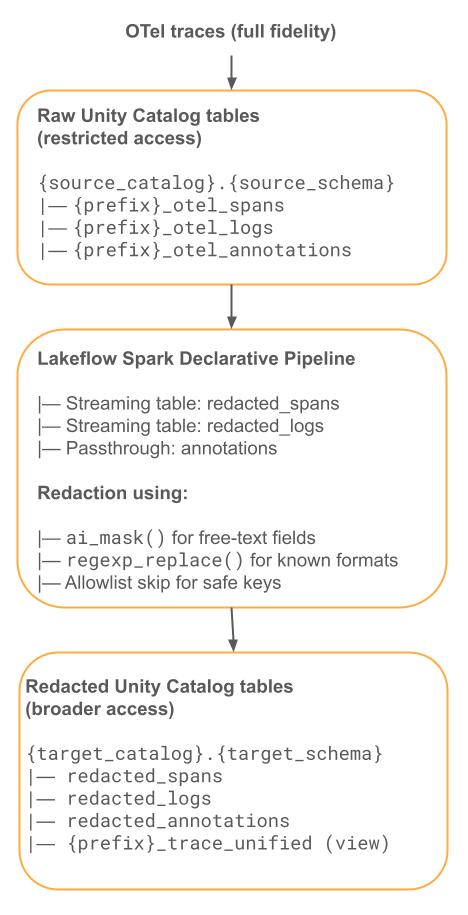
The following SQL defines the redacted streaming tables (pii_redaction_pipeline.sql):
-- Streaming Table: Redacted Spans
CREATE OR REFRESH STREAMING TABLE redacted_spans
COMMENT 'PII-redacted OTel spans'
TBLPROPERTIES (
  'quality' = 'gold',
  'pipelines.autoOptimize.zOrderCols' = 'trace_id,date'
)
AS
SELECT
  trace_id, span_id, parent_span_id, name, kind, start_time, end_time,
  status, date, record_id, service_name, time, instrumentation_scope,

  -- Redact span attributes
  CASE
    WHEN attributes IS NOT NULL THEN
      ai_mask(CAST(attributes AS STRING), array(${pii_categories}))
    ELSE attributes
  END AS attributes,

  -- Redact resource attributes
  CASE
    WHEN resource:attributes IS NOT NULL THEN
      named_struct(
        'attributes',
        ai_mask(CAST(resource:attributes AS STRING), array(${pii_categories})),
        'dropped_attributes_count', resource:dropped_attributes_count
      )
    ELSE resource
  END AS resource,

  -- Redact events (may contain exception messages with PII)
  CASE
    WHEN events IS NOT NULL THEN
      ai_mask(CAST(events AS STRING), array(${pii_categories}))
    ELSE events
  END AS events,

  -- Pass through links unchanged (typically just trace/span IDs)
  links

FROM STREAM(${source_catalog}.${source_schema}.${table_prefix}_otel_spans);


-- Streaming Table: Redacted Logs
CREATE OR REFRESH STREAMING TABLE redacted_logs
COMMENT 'PII-redacted OTel logs'
AS
SELECT
  trace_id, span_id, severity_number, severity_text, date, record_id,
  service_name, time, instrumentation_scope,

  CASE
    WHEN body IS NOT NULL THEN
      ai_mask(CAST(body AS STRING), array(${pii_categories}))
    ELSE body
  END AS body,

  CASE
    WHEN attributes IS NOT NULL THEN
      ai_mask(CAST(attributes AS STRING), array(${pii_categories}))
    ELSE attributes
  END AS attributes,

  CASE
    WHEN resource:attributes IS NOT NULL THEN
      named_struct(
        'attributes',
        ai_mask(CAST(resource:attributes AS STRING), array(${pii_categories})),
        'dropped_attributes_count', resource:dropped_attributes_count
      )
    ELSE resource
  END AS resource

FROM STREAM(${source_catalog}.${source_schema}.${table_prefix}_otel_logs);


-- Streaming Table: Annotations (passthrough — no PII expected)
CREATE OR REFRESH STREAMING TABLE redacted_annotations
COMMENT 'OTel annotations (passthrough, no PII redaction applied)'
AS SELECT * FROM STREAM(${source_catalog}.${source_schema}.${table_prefix}_otel_annotations);
Restrict access to the raw tables and grant access to the redacted tables:
-- Lock down raw tables: grant only to the pipeline service principal
GRANT USE CATALOG ON CATALOG ${source_catalog} TO `pii_pipeline_sp`;
GRANT USE SCHEMA ON SCHEMA ${source_catalog}.${source_schema} TO `pii_pipeline_sp`;
GRANT SELECT ON TABLE ${source_catalog}.${source_schema}.${table_prefix}_otel_spans TO `pii_pipeline_sp`;
GRANT SELECT ON TABLE ${source_catalog}.${source_schema}.${table_prefix}_otel_logs TO `pii_pipeline_sp`;
REVOKE SELECT ON TABLE ${source_catalog}.${source_schema}.${table_prefix}_otel_spans FROM `data_team`;

-- Broad access to redacted tables only
GRANT USE CATALOG ON CATALOG ${target_catalog} TO `data_team`;
GRANT USE SCHEMA ON SCHEMA ${target_catalog}.${target_schema} TO `data_team`;
GRANT SELECT ON SCHEMA ${target_catalog}.${target_schema} TO `data_team`;
Set up auto-TTL retention on the raw tables for GDPR compliance:
ALTER TABLE ${source_catalog}.${source_schema}.${table_prefix}_otel_spans
  DELETE ROWS ${retention_days} DAYS AFTER time;

ALTER TABLE ${source_catalog}.${source_schema}.${table_prefix}_otel_logs
  DELETE ROWS ${retention_days} DAYS AFTER time;
Create the unified trace view pointing at the redacted tables:
CREATE OR REPLACE VIEW ${target_catalog}.${target_schema}.${table_prefix}_trace_unified AS
SELECT
  s.trace_id,
  s.date,
  min(s.start_time) AS request_time,
  max(s.end_time) - min(s.start_time) AS execution_duration,
  collect_list(
    named_struct(
      'span_id', s.span_id,
      'parent_span_id', s.parent_span_id,
      'name', s.name,
      'kind', s.kind,
      'start_time', s.start_time,
      'end_time', s.end_time,
      'status', s.status,
      'attributes', s.attributes,
      'events', s.events
    )
  ) AS spans,
  a.tags,
  a.assessments
FROM ${target_catalog}.${target_schema}.redacted_spans s
LEFT JOIN ${target_catalog}.${target_schema}.redacted_annotations a
  ON s.trace_id = a.target_id
GROUP BY s.trace_id, s.date, a.tags, a.assessments;
Pipeline configuration template (pipeline_config.json):
{
  "name": "otel-pii-redaction",
  "catalog": "${target_catalog}",
  "schema": "${target_schema}",
  "serverless": true,
  "continuous": false,
  "channel": "CURRENT",
  "configuration": {
    "source_catalog": "<value>",
    "source_schema": "<value>",
    "table_prefix": "<value>",
    "pii_categories": "'email','phone','ssn','credit_card','name','address'"
  },
  "libraries": [{ "file": { "path": "/Workspace/path/to/pii_redaction_pipeline.sql" } }]
}
Flow 2: View-based redaction
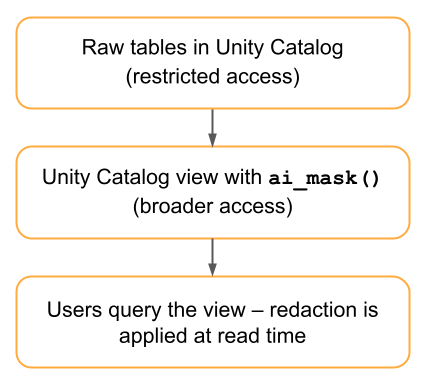
This flow applies ai_mask in a Unity Catalog view so redaction happens at read time — no redacted copy is stored, and no pipeline job is required.
When to use:
- Storage cost is a primary concern and a second copy of trace data is not acceptable.
- Redacted data is queried infrequently, so the per-query compute cost of running
ai_maskis acceptable. - You want redaction rules to take effect instantly without a pipeline refresh.
CREATE OR REPLACE VIEW ${target_catalog}.${target_schema}.${table_prefix}_otel_spans_redacted
AS
SELECT
  trace_id, span_id, parent_span_id, name, kind, start_time, end_time,
  status, date, service_name, time, instrumentation_scope, links,

  ai_mask(CAST(attributes AS STRING), array(${pii_categories})) AS attributes,
  ai_mask(CAST(events AS STRING), array(${pii_categories})) AS events,

  named_struct(
    'attributes',
    ai_mask(CAST(resource:attributes AS STRING), array(${pii_categories})),
    'dropped_attributes_count', resource:dropped_attributes_count
  ) AS resource

FROM ${source_catalog}.${source_schema}.${table_prefix}_otel_spans;
Trade-offs:
| Aspect | Advantages | Disadvantages |
|---|---|---|
| Storage | No duplication. | — |
| Compute | — | ai_mask runs on every query, which is expensive at scale. |
| Latency | Immediately reflects new data. | Slower query response. |
| Flexibility | Redaction rules update instantly without a pipeline refresh. | — |
Implementation checklist
Before deploying to production:
- Validate
ai_maskbehavior on VARIANT columns with sample OTel span data. - Benchmark
ai_maskthroughput to size the pipeline schedule interval. - Define the allowlisted attribute keys that should skip redaction.
- Set up access control groups: raw access vs. redacted access.
- Configure auto-TTL for raw table retention, or a scheduled
DELETEandVACUUMjob for strict deletion timelines. - Build a monitoring dashboard for pipeline health and redaction coverage.
Additional resources
- Store OpenTelemetry traces in Unity Catalog
- Observe and find issues
- Transform unstructured data using AI Functions
- Service policies for AI securables
- MLflow — Redacting Sensitive Data from Traces
Next step: Export MLflow traces to OpenTelemetry