Note
Access to this page requires authorization. You can try signing in or changing directories.
Access to this page requires authorization. You can try changing directories.
This guide shows how to connect external applications to Lakebase using direct REST API calls. Use this approach when a Databricks SDK is not available for your language (Node.js, Ruby, PHP, Elixir, Rust, etc.).
If your language has SDK support (Python, Java, or Go), use Connect external app to Lakebase using SDK instead for simpler token management.
You make two API calls to obtain database credentials with OAuth token rotation. Examples are provided for curl and Node.js.
Note
Two-step authentication: This approach requires two API calls for each database credential: (1) exchange Service Principal secret for workspace OAuth token, (2) exchange OAuth token for database credential. Both tokens expire after 60 minutes. The SDK handles step 1 automatically.
Prerequisites
You need the same setup as the SDK approach: service principal, Postgres role, and connection details.
| Prerequisite | Key detail | More information |
|---|---|---|
| Service principal | OAuth secret with 730-day max lifetime; enable Workspace access. Note the client ID (UUID) for the Postgres role and env vars. | Create service principal |
| Postgres role | Create OAuth role in Lakebase SQL Editor: databricks_create_role('{client-id}', 'SERVICE_PRINCIPAL') and grant CONNECT, USAGE, SELECT/INSERT/UPDATE/DELETE. Use the client ID from step 1. |
Create Postgres role |
| Connection details | From Lakebase Console Connect: endpoint name (projects/.../branches/.../endpoints/...), host, database (usually databricks_postgres). |
Get connection details |
How it works
The manual API approach requires two token exchanges:
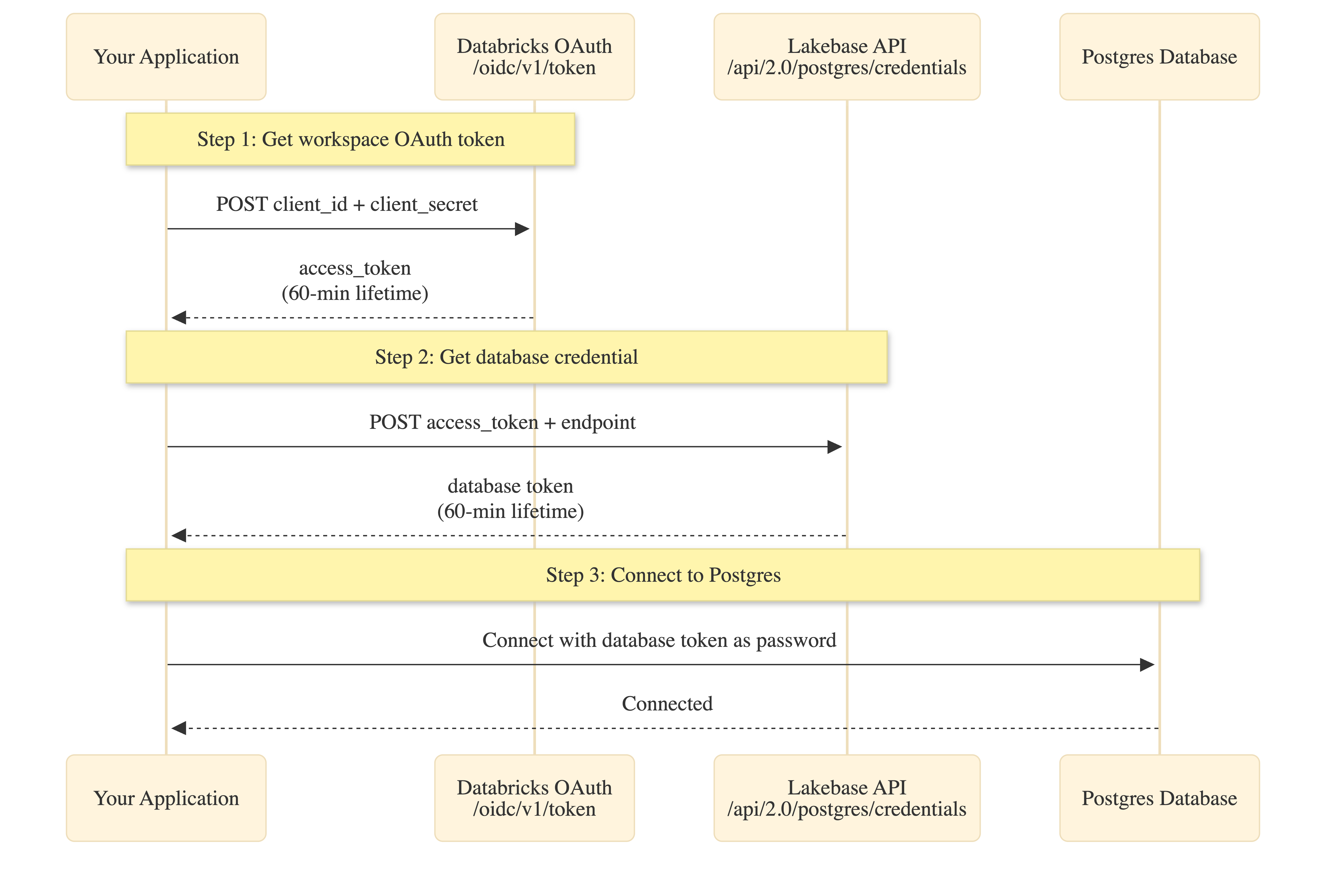
Token lifetimes:
- Service Principal secret: Up to 730 days (set during creation)
- Workspace OAuth token: 60 minutes (step 1)
- Database credential: 60 minutes (step 2)
Token scoping: Database credentials are workspace-scoped. While the endpoint parameter is required, the returned token can access any database or project in the workspace that the service principal has permissions for.
Set environment variables
Set these environment variables before running your application:
# Databricks workspace authentication
export DATABRICKS_HOST="https://your-workspace.databricks.com"
export DATABRICKS_CLIENT_ID="<service-principal-client-id>"
export DATABRICKS_CLIENT_SECRET="<your-oauth-secret>"

# Lakebase connection details (from prerequisites)
export ENDPOINT_NAME="projects/<project-id>/branches/<branch-id>/endpoints/<endpoint-id>"
export PGHOST="<endpoint-id>.database.<region>.cloud.databricks.com"
export PGDATABASE="databricks_postgres"
export PGUSER="<service-principal-client-id>"   # Same UUID as client ID
export PGPORT="5432"
Add connection code
curl
This example shows the raw API calls. For production applications, implement token caching and refresh logic.
# Step 1: Get workspace OAuth token
OAUTH_TOKEN=$(curl -s -X POST "${DATABRICKS_HOST}/oidc/v1/token" \
  -u "${DATABRICKS_CLIENT_ID}:${DATABRICKS_CLIENT_SECRET}" \
  -H "Content-Type: application/x-www-form-urlencoded" \
  -d "grant_type=client_credentials&scope=all-apis" \
  | jq -r '.access_token')

echo "Got workspace OAuth token (60-min lifetime)"

# Step 2: Get database credential
PG_TOKEN=$(curl -s -X POST "${DATABRICKS_HOST}/api/2.0/postgres/credentials" \
  -H "Authorization: Bearer ${OAUTH_TOKEN}" \
  -H "Content-Type: application/json" \
  -d "{\"endpoint\": \"${ENDPOINT_NAME}\"}" \
  | jq -r '.token')

echo "Got database credential (60-min lifetime)"

# Step 3: Connect to Postgres
PGPASSWORD="${PG_TOKEN}" psql \
  -h "${PGHOST}" \
  -p "${PGPORT}" \
  -U "${PGUSER}" \
  -d "${PGDATABASE}" \
  -c "SELECT current_user, current_database()"
Node.js
This example uses node-postgres with an async password function that handles token fetching and caching.
import pg from 'pg';

// Step 1: Fetch workspace OAuth token
async function getWorkspaceToken(host, clientId, clientSecret) {
  const auth = Buffer.from(`${clientId}:${clientSecret}`).toString('base64');
  const response = await fetch(`${host}/oidc/v1/token`, {
    method: 'POST',
    headers: {
      'Content-Type': 'application/x-www-form-urlencoded',
      Authorization: `Basic ${auth}`,
    },
    body: 'grant_type=client_credentials&scope=all-apis',
  });

  if (!response.ok) {
    throw new Error(`OAuth failed: ${response.status}`);
  }

  const data = await response.json();
  return {
    token: data.access_token,
    expires: Date.now() + data.expires_in * 1000,
  };
}

// Step 2: Fetch database credential
async function getPostgresCredential(host, workspaceToken, endpoint) {
  const response = await fetch(`${host}/api/2.0/postgres/credentials`, {
    method: 'POST',
    headers: {
      'Content-Type': 'application/json',
      Authorization: `Bearer ${workspaceToken}`,
    },
    body: JSON.stringify({ endpoint }),
  });

  if (!response.ok) {
    throw new Error(`Database credential failed: ${response.status}`);
  }

  const data = await response.json();
  return {
    token: data.token,
    expires: new Date(data.expire_time).getTime(),
  };
}

// Simple caching wrapper (production: use more sophisticated caching)
function cached(fetchFn) {
  let cache = null;
  return async (...args) => {
    const now = Date.now();
    if (!cache || now >= cache.expires - 5 * 60 * 1000) {
      // Refresh 5 min early
      const result = await fetchFn(...args);
      cache = result;
    }
    return cache.token;
  };
}

// Create connection pool with async password function
function createPool() {
  const host = process.env.DATABRICKS_HOST;
  const clientId = process.env.DATABRICKS_CLIENT_ID;
  const clientSecret = process.env.DATABRICKS_CLIENT_SECRET;
  const endpoint = process.env.ENDPOINT_NAME;

  const cachedWorkspaceToken = cached(() => getWorkspaceToken(host, clientId, clientSecret));
  const cachedPostgresToken = cached(async () => {
    const workspaceToken = await cachedWorkspaceToken();
    return getPostgresCredential(host, workspaceToken, endpoint);
  });

  return new pg.Pool({
    host: process.env.PGHOST,
    port: process.env.PGPORT,
    database: process.env.PGDATABASE,
    user: process.env.PGUSER,
    password: cachedPostgresToken, // Async function: () => Promise<string>
    ssl: { rejectUnauthorized: true },
    min: 1,
    max: 10,
    idleTimeoutMillis: 900000, // Example: 15 minutes
    connectionTimeoutMillis: 60000, // Example: 60 seconds
  });
}

// Use the pool
const pool = createPool();
const result = await pool.query('SELECT current_user, current_database()');
console.log('Connected as:', result.rows[0].current_user);
Dependencies: pg (node-postgres)
Note: Node-postgres (pg) accepts an async function as the password. The function is called each time a new connection is created, ensuring fresh tokens.
Run and verify the connection
curl
Run the bash script with environment variables loaded:
export $(cat .env | xargs)
bash connect.sh
Expected output:
Got workspace OAuth token (60-min lifetime)
Got database credential (60-min lifetime)
     current_user      | current_database
-----------------------+------------------
 c00f575e-d706-4f6b... | databricks_postgres
If current_user matches your service principal client ID, OAuth is working correctly.
Node.js
Install dependencies:
npm install pg
Run:
node app.js
Expected output:
Connected as: c00f575e-d706-4f6b-b62c-e7a14850571b
Note: First connection after idle may take longer as Lakebase starts compute from zero.
Troubleshooting
| Error | Fix |
|---|---|
| "invalid_client" or "Missing client authentication" | Check DATABRICKS_CLIENT_ID and DATABRICKS_CLIENT_SECRET are correct. Use Basic auth (base64 encoded). |
| "API is disabled for users without workspace-access entitlement" | Enable "Workspace access" for the service principal (prerequisites). |
| "INVALID_PARAMETER_VALUE" / "Field 'endpoint' is required" | Ensure endpoint parameter is included in step 2 POST body with format projects/<id>/branches/<id>/endpoints/<id>. |
| "Role does not exist" or auth fails | Create OAuth role via SQL (prerequisites). |
| "Connection refused" or timeout | First connection after scale-to-zero may take longer. Implement retry logic. |
| Token expired / "password authentication failed" | Workspace and database tokens both expire after 60 minutes. Implement caching with expiry checks. |