Note
Access to this page requires authorization. You can try signing in or changing directories.
Access to this page requires authorization. You can try changing directories.
Important
Azure DevOps doesn't support Alternate Credentials authentication. If you're still using Alternate Credentials, switch to a more secure authentication method.
Important
Public projects in Azure DevOps are retired. Starting in 2027, existing public projects convert to private. For more information, see Public projects retirement and Migrate from a public project to GitHub.
This article shows how to manage your organization's security policies that determine how users and applications can access services and resources in your organization. You can access most of these policies in Organization settings.
Prerequisites
| Category | Requirements |
|---|---|
| Permissions |
|
Manage a policy
To update application connection, security, or user policies for your organization, follow these steps:
Sign in to your organization at
https://dev.azure.com/{Your_Organization}.Select
 Organization settings.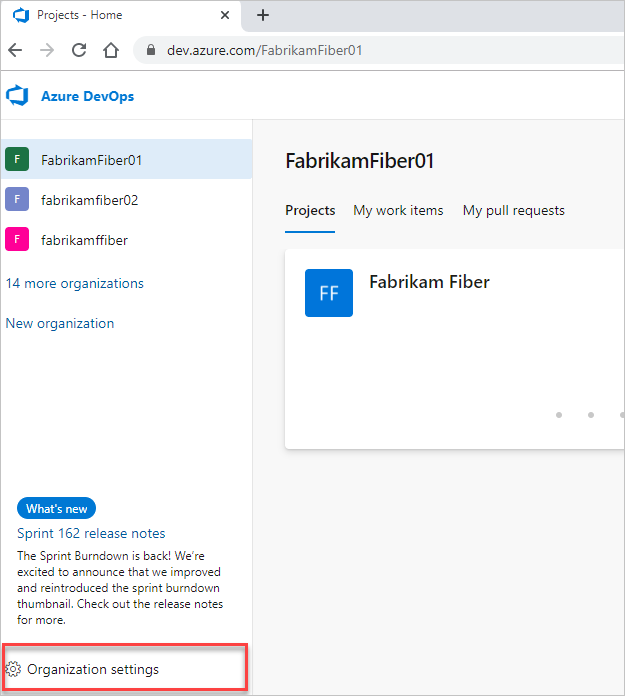
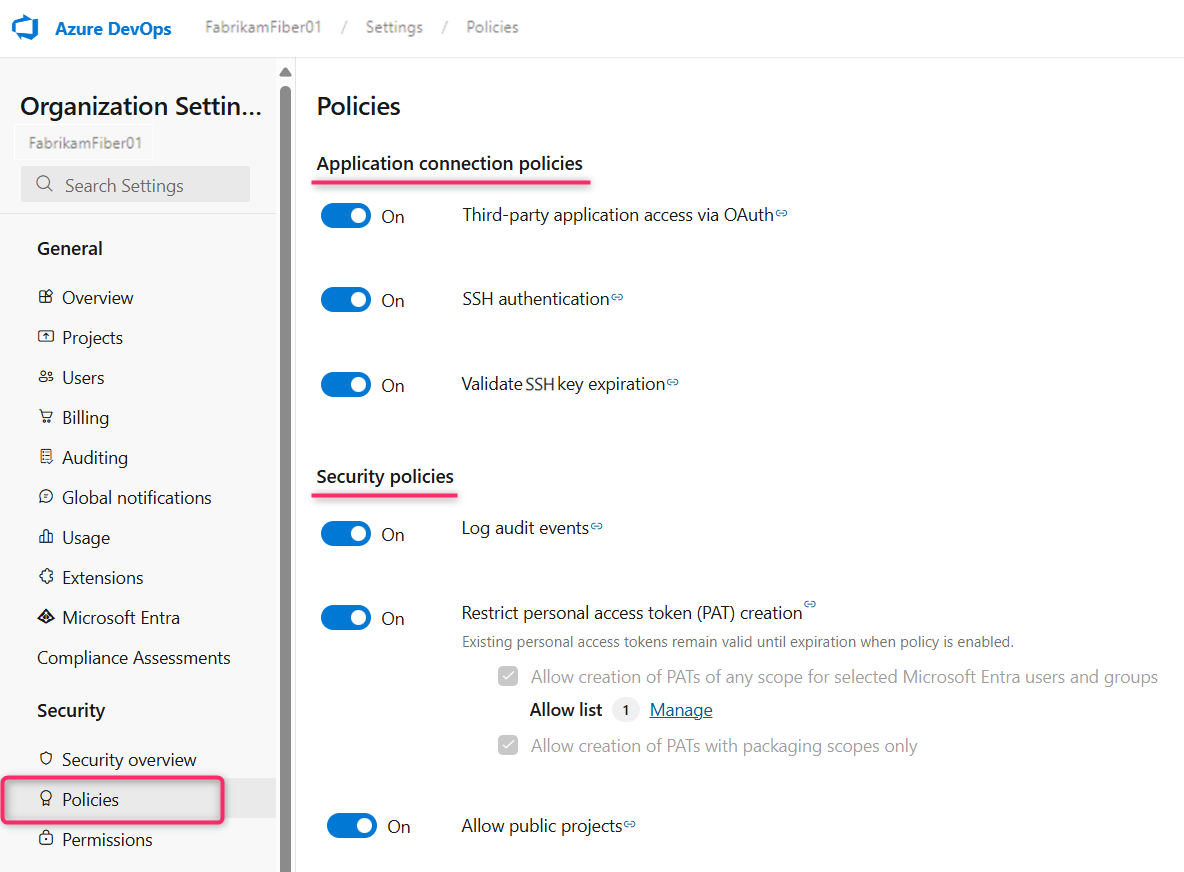
Select Policies, then toggle the desired policy on or off.
Restrict authentication methods
To allow seamless access to your organization without repeatedly prompting for user credentials, applications can use authentication methods, like OAuth, SSH, and personal access token (PATs). By default, all existing organizations allow access for all authentication methods.
You can limit access to these authentication methods by disabling the following application connection policies:
- Third-party application access through OAuth: Enable Azure DevOps OAuth apps to access resources in your organization through OAuth. This policy is defaulted to off for all new organizations. If you want access to Azure DevOps OAuth apps, enable this policy to ensure these apps can access resources in your organization. This policy doesn't affect Microsoft Entra ID OAuth app access.
- SSH authentication: Enable applications to connect to your organization's Git repos through SSH.
- Tenant admins can restrict global personal access token creation, restrict full-scoped personal access token creation, and enforce maximum personal access token lifespan through tenant-level policies on the Microsoft Entra settings page. Add Microsoft Entra users or groups to exempt them from these policies.
- Organization admins can restrict personal access token creation in their respective organizations. Subpolicies allow admins to permit the creation of packaging-only PATs or any-scope PATs for allowlisted Microsoft Entra users or groups. When admins disable PAT creation, Azure DevOps also prevents Git Credential Manager (GCM) from generating new PATs for Git operations unless the user is allowlisted. GCM defaults to PAT-based authentication, but users can authenticate with OAuth instead. For more information, see the GCM documentation.
When you deny access to an authentication method, no application can access your organization through that method. Any application that previously had access encounter authentication errors and lose access.
Conditional Access policy support on Azure DevOps
Conditional Access (CA) in Azure DevOps is enforced through Microsoft Entra ID and supports both interactive (web) and non-interactive (client credential) flows, validating policies like MFA, IP restrictions, and device compliance during sign-in and periodically through token checks.
SSH key policies
SSH authentication
The SSH authentication policy controls whether or not an organization allows the use of SSH keys.
Validate SSH key expiration
To avoid losing access due to an expired SSH key, create and upload a new key before the current one expires. The system sends automated notifications 7 days before expiration and again after expiration to help you stay ahead. For more information, see Step 1: Create your SSH keys.
The Validate SSH key expiration policy is enabled by default. When active, it enforces the expiration date—expired keys immediately become invalid.
If you disable the policy, the system no longer checks expiration dates, and expired keys remain usable.