Note
Access to this page requires authorization. You can try signing in or changing directories.
Access to this page requires authorization. You can try changing directories.
Features
Sparse checkout for Azure Repos
The git sparse-checkout command is now supported in the YAML checkout task, alongside the partial clone filter, to improve repository checkout performance. You can use the properties sparseCheckoutDirectories and sparseCheckoutPatterns.
Setting sparseCheckoutDirectories enables cone mode, where the checkout process uses directory matching. Alternatively, you can set sparseCheckoutPatterns which triggers non-cone mode, allowing more complex pattern matching.
If both properties are set, the agent initializes cone mode with directory matching. If neither property is specified in the checkout task, the sparse checkout process is disabled. Any issues encountered during command execution results in the checkout task failing.
YAML example for sparse checkout cone mode:
  - checkout: repo
    sparseCheckoutDirectories: src
YAML example for sparse checkout non-cone mode:
 - checkout: repo
   sparseCheckoutPatterns: /* !/img
Important
The sparse checkout feature requires agent v3.248.0 (v4.248.0 for .NET 8) or later versions.
You can find the agent on the releases page.
Make cross-repo policies case-sensitive
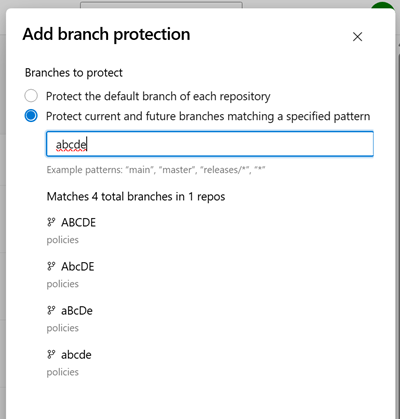
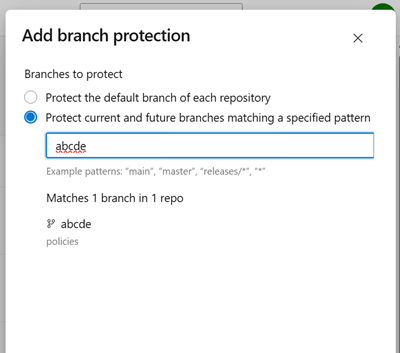
Previously, the branch candidate preview for cross-repo policies displayed results in a case-insensitive manner, despite branch matching being case-sensitive. This inconsistency created potential misalignment, as it could appear that certain branches were protected when they weren't. To resolve this issue, we have updated the branch pattern preview to align with the case-sensitive behavior of policy application.
Previously:
After:
Next steps
Note
These features will roll out over the next two to three weeks.
Head over to Azure DevOps and take a look.
How to provide feedback
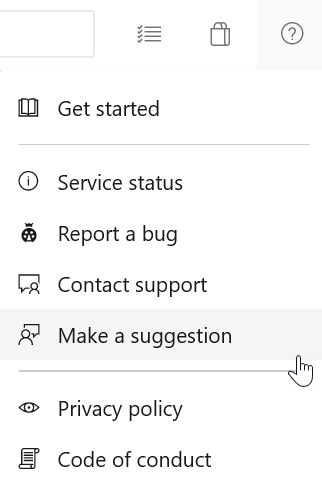
We would love to hear what you think about these features. Use the help menu to report a problem or provide a suggestion.
You can also get advice and your questions answered by the community on Stack Overflow.