Note
Access to this page requires authorization. You can try signing in or changing directories.
Access to this page requires authorization. You can try changing directories.
Features
- CodeQL default setup now in private preview
- CodeQL build task updated to Node.js v24
- CodeQL autobuild task deprecated
- Service hooks event for secret validation status
- Secrets tab is now the default in repository view
- Work item linking API for alerts
CodeQL default setup now in private preview
CodeQL default setup (one-click enablement) is now available in private preview. This feature streamlines code scanning enablement by automatically configuring CodeQL scans for your repository without manual pipeline setup and runs on your behalf.
If you're interested in trying this feature out in private preview, fill out your details at https://aka.ms/codeql-private-preview.
CodeQL build task updated to Node.js v24
The Advanced Security CodeQL tasks AdvancedSecurity-CodeQL-Init@1 and AdvancedSecurity-Codeql-Analyze@1 now require Node.js v24, aligning with Azure Pipelines agent updates. If you're using self-hosted agents, ensure Node.js v24 is installed on your agent machines to continue running CodeQL scans. Microsoft-hosted agents are already updated with Node.js v24 support.
CodeQL autobuild task deprecated
The AdvancedSecurity-Codeql-Autobuild task is now deprecated in favor of buildless scanning with buildtype: none. Buildless scanning simplifies pipeline configuration by eliminating the need for explicit build steps while maintaining analysis coverage for supported languages. If you're currently using the Autobuild task, update your pipelines to use buildtype: none in the AdvancedSecurity-CodeQL-Init@1 task instead. The Autobuild task will stop working and will be completely removed by March 1, 2026. For migration guidance, see Configure code scanning.
Service hooks event for secret validation status
A new service hooks event is now available for secret scanning alerts: Advanced Security alerts validity status updated. This event triggers when a detected secret is validated. You can configure this event in your service hooks subscriptions to integrate secret validation workflows with external systems, enabling automated responses to validated credential leaks. For more information, see Configure service hooks.
Secrets tab is now the default in repository view
The Advanced Security tab order in repository settings has been updated. The Secrets tab now appears first, followed by Dependencies and Code. This change reflects usage patterns where secret scanning alerts are typically the highest priority for immediate remediation, improving navigation for security teams reviewing repository findings.
Work item linking API for alerts
A new REST API endpoint enables linking work items to Advanced Security alerts programmatically. Previously available only through the UI, this capability allows teams to build custom workflows for tracking alert remediation in Azure Boards. Use this API to automatically create work items for high-severity alerts or bulk-link existing alerts to sprint planning items. For API details, see Advanced Security Alert Metadata API documentation.
Next steps
Note
These features will roll out over the next two to three weeks.
Head over to Azure DevOps and take a look.
How to provide feedback
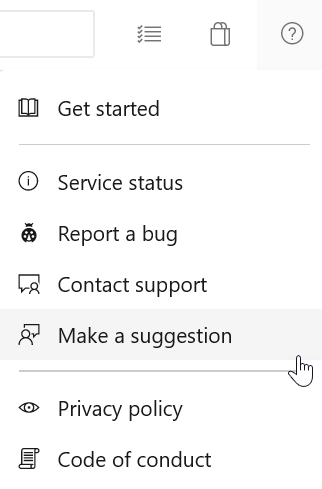
We would love to hear what you think about these features. Use the help menu to report a problem or provide a suggestion.
You can also get advice and your questions answered by the community on Stack Overflow.