Note
Access to this page requires authorization. You can try signing in or changing directories.
Access to this page requires authorization. You can try changing directories.
Use these methods to export historical data from Splunk in CSV format before migrating it to Azure. After you export your data, you can select a target Azure platform for your exported historical data, and then select a data ingestion tool for migrating historical data.
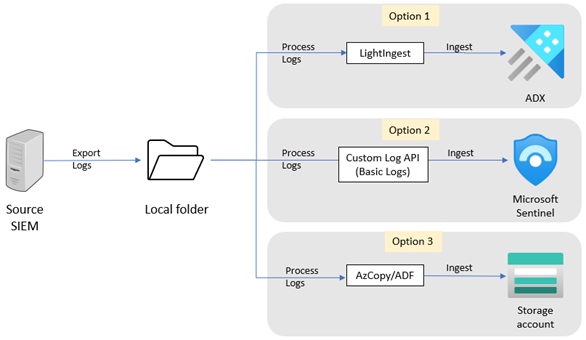
You can export data from Splunk in several ways. Your selection of an export method depends on the data volumes involved and your level of interactivity. For example, exporting a single, on-demand search via Splunk Web might be appropriate for a low-volume export. Alternatively, if you want to set up a higher-volume, scheduled export, the SDK and REST options work best.
For large exports, the most stable method for data retrieval is dump or the Command Line Interface (CLI). You can export the logs to a local folder on the Splunk server or to another server accessible by Splunk.
To export your historical data from Splunk, use one of the Splunk export methods. The output format should be CSV.
CLI example
This CLI example searches for events from the _internal index that occur during the time window specified in the search command. The example then specifies to output the events in a CSV format to the data.csv file.You can export a maximum of 100 events by default. To increase this number, set the -maxout argument. For example, if you set -maxout to 0, you can export an unlimited number of events.
This CLI command exports data recorded between 23:59 and 01:00 on September 14, 2021 to a CSV file:
splunk search "index=_internal earliest=09/14/2021:23:59:00 latest=09/16/2021:01:00:00 " -output csv > c:/data.csv
dump example
This dump command exports all events from the bigdata index to the YYYYmmdd/HH/host location under the $SPLUNK_HOME/var/run/splunk/dispatch/<sid>/dump/ directory on a local disk. The command uses MyExport as the prefix for export filenames, and outputs the results to a CSV file. The command partitions the exported data using the eval function before the dump command.
index=bigdata | eval _dstpath=strftime(_time, "%Y%m%d/%H") + "/" + host | dump basefilename=MyExport format=csv