Note
Access to this page requires authorization. You can try signing in or changing directories.
Access to this page requires authorization. You can try changing directories.
Immutable storage for Azure Blob Storage lets you store business-critical data in a WORM (Write Once, Read Many) state. While in a WORM state, data can't be modified or deleted for a user-specified interval. By configuring immutability policies for blob data, you can protect your data from overwrites and deletes.
Immutable storage for Azure Blob Storage supports two types of immutability policies:
Time-based retention policies: With a time-based retention policy, users can set policies to store data for a specified interval. When a time-based retention policy is set, objects can be created and read, but not modified or deleted. After the retention period has expired, objects can be deleted but not overwritten.
Legal hold policies: A legal hold stores immutable data until the legal hold is explicitly cleared. When a legal hold is set, objects can be created and read, but not modified or deleted.
You can set these policies together. For example, you can have both a time-based retention policy and a legal hold set at the same level and at the same time. For a write to succeed, you must either have versioning enabled or have neither a legal hold nor a time-based retention policy on the data. For a delete to succeed, there must not be a legal hold or time-based retention policy on the data.
The following diagram shows how time-based retention policies and legal holds prevent write and delete operations while they're in effect.
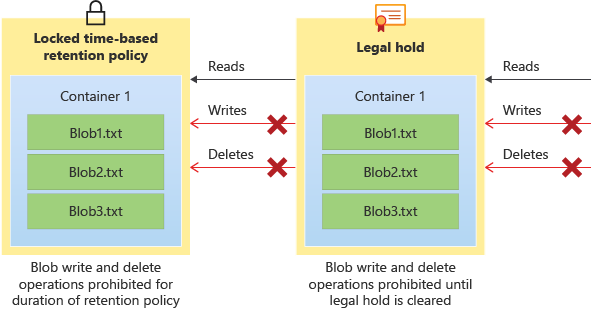
There are two features under the immutable storage umbrella: container-level WORM and version-level WORM. Container-level WORM allows you to set policies at the container level only, while version-level WORM allows you to set policies at the account, container, or version level.
About immutable storage for blobs
Immutable storage helps healthcare organizations, financial institutions, and related industries (particularly broker-dealer organizations) store data securely. Immutable storage can be used in any scenario to protect critical data against modification or deletion.
Typical applications include:
Regulatory compliance: Immutable storage for Azure Blob Storage helps organizations address SEC 17a-4(f), CFTC 1.31(d), FINRA, and other regulations.
Secure document retention: Immutable storage for blobs ensures that data can't be modified or deleted by any user, not even by users with account administrative privileges.
Legal hold: Immutable storage for blobs lets you store sensitive information that is critical to litigation or business use in a tamper-proof state for the desired duration until the hold is removed. This feature isn't limited only to legal use cases but can also be thought of as an event-based hold or an enterprise lock, where the need to protect data based on event triggers or corporate policy is required.
Regulatory compliance
Microsoft retained a leading independent assessment firm that specializes in records management and information governance, Cohasset Associates, to evaluate immutable storage for blobs and its compliance with requirements specific to the financial services industry. Cohasset validated that immutable storage, when used to retain blobs in a WORM state, meets the relevant storage requirements of CFTC Rule 1.31(c)-(d), FINRA Rule 4511, and SEC Rule 17a-4(f). Microsoft targeted this set of rules because they represent the most prescriptive guidance globally for records retention for financial institutions.
The Cohasset report is available in the Microsoft Service Trust Center. The Azure Trust Center contains detailed information about Microsoft's compliance certifications. To request a letter of attestation from Microsoft regarding WORM immutability compliance, contact Azure Support.
Time-based retention policies
A time-based retention policy stores blob data in a WORM format for a specified interval. When you set a time-based retention policy, clients can create and read blobs, but can't modify or delete them. After the retention interval expires, blobs can be deleted but not overwritten.
Scope
You can configure a time-based retention policy at the following scopes:
- Version-level WORM policy: Configure a time-based retention policy at the account, container, or version level (versioning must be enabled on the account). If you configure it at the account or container level, all blobs in the respective account or container inherit the policy. If there's a legal hold on a container, you can't create version-level WORM for the same container. This restriction exists because the legal hold prevents generating the versions.
- Container-level WORM policy: A time-based retention policy configured at the container level applies to all blobs in that container. You can't configure individual blobs with their own immutability policies.
Retention interval for a time-based policy
The minimum retention interval for a time-based retention policy is one day, and the maximum is 146,000 days (400 years). When you configure a time-based retention policy, the affected objects stay in the immutable state during the effective retention period. The effective retention period for objects is equal to the difference between the blob's creation time and the user-specified retention interval. Because a policy's retention interval can be extended, immutable storage uses the most recent value of the user-specified retention interval to calculate the effective retention period.
For example, suppose that a user creates a time-based retention policy with a retention interval of five years. An existing blob in that container, testblob1, was created one year ago, so the effective retention period for testblob1 is four years. When a new blob, testblob2, is uploaded to the container, the effective retention period for testblob2 is five years from the time of its creation.
Locked versus unlocked policies
When you first configure a time-based retention policy, the policy is unlocked for testing purposes. When you finish testing, you can lock the policy so that it's fully compliant with SEC 17a-4(f) and other regulatory compliance.
Both locked and unlocked policies protect against deletes and overwrites. However, you can modify an unlocked policy by shortening or extending the retention period. You can also delete an unlocked policy. You can't delete a locked time-based retention policy. You can extend the retention period, but you can't decrease it. A maximum of five increases to the effective retention period is allowed over the lifetime of a locked policy that is defined at the container level. For a policy configured for a blob version, there's no limit to the number of increases to the effective period.
Important
A time-based retention policy must be locked for the blob to be in a compliant immutable (write and delete protected) state for SEC 17a-4(f) and other regulatory compliance. Microsoft recommends that you lock the policy in a reasonable amount of time, typically less than 24 hours. While the unlocked state provides immutability protection, we don't recommend using the unlocked state for anything other than short-term testing.
Retention policy audit logging
Each container with a time-based retention policy enabled provides a policy audit log. The audit log includes up to seven time-based retention commands for locked time-based retention policies. Logging typically starts once you have locked the policy. Log entries include the user ID, command type, time stamps, and retention interval. The audit log is retained for the policy's lifetime in accordance with the SEC 17a-4(f) regulatory guidelines.
The Azure Activity log provides a more comprehensive log of all management service activities. Azure resource logs retain information about data operations. You are responsible for storing those logs persistently, as might be required for regulatory or other purposes.
Changes to time-based retention policies at the version level aren't audited.
Legal holds
A legal hold is a temporary immutability policy that can be applied for legal investigation purposes or general protection policies. A legal hold stores blob data in a Write Once, Read Many (WORM) format until the hold is explicitly cleared. When a legal hold is in effect, blobs can be created and read, but not modified or deleted. Use a legal hold when the period of time that the data must be kept in a WORM state is unknown.
Scope
A legal hold policy can be configured at either of the following scopes:
Version-level WORM policy: A legal hold can be configured on an individual blob version level for granular management of sensitive data (versioning must be enabled on the account).
Container-level WORM policy: A legal hold that is configured at the container level applies to all blobs in that container. Individual blobs can't be configured with their own immutability policies.
Tags
You must associate a container-level legal hold with one or more user-defined alphanumeric tags that serve as identifier strings. For example, a tag might include a case ID or event name.
Audit logging
Each container with a legal hold in effect provides a policy audit log. The log contains the user ID, command type, time stamps, and legal hold tags. The audit log is retained for the policy's lifetime in accordance with the SEC 17a-4(f) regulatory guidelines.
The Azure Activity log provides a more comprehensive log of all management service activities. Azure resource logs retain information about data operations. You are responsible for storing those logs persistently, as might be required for regulatory or other purposes.
Changes to legal holds at the version level aren't audited.
Immutable storage feature options
The following table shows a breakdown of the differences between container-level WORM and version-level WORM:
| Category | Container-level WORM | Version-level WORM |
|---|---|---|
| Policy granularity level | Configure policies only at the container level. Each object that you upload into the container inherits the immutable policy set. | Configure policies at the account, container, or blob level. If you set a policy at the account level, all blobs that you upload into that account inherit the policy. The same logic follows with containers. If you set a policy at multiple levels, the order of precedence is always Blob -> Container -> Account. |
| Types of policies available | Set two different types of policies at the container level: Time-based retention policies and legal holds. | At the account and container level, set only time-based retention policies. At the blob level, set both time-based retention policies and legal holds. |
| Feature dependencies | No other features are a prerequisite or requirement for this feature to function. | Versioning is a prerequisite for this feature to be used. |
| Enablement for existing accounts and containers | Enable this feature at any time for existing containers. | Depending on the level of granularity, this feature might not be enabled for all existing accounts and containers. |
| Account/container deletion | After you lock a time-based retention policy on a container, you can delete containers only if they're empty. | After you enable version-level WORM on an account or container level, you can delete them only if they're empty. |
| Support for Azure Data Lake Storage (storage accounts that have a hierarchical namespace enabled) | Support container-level WORM policies in accounts that have a hierarchical namespace. | Version-level WORM policies aren't yet supported in accounts that have a hierarchical namespace. |
To learn more about container-level WORM, see Container-level WORM policies. To learn more about version-level WORM, see version-level WORM policies.
Container-level vs. version-level WORM
The following table helps you decide which type of WORM policy to use.
| Criteria | Container-level WORM Usage | Version-level WORM Usage |
|---|---|---|
| Organization of data | You want to set policies for specific data sets, which you can categorize by container. All the data in that container needs to be kept in a WORM state for the same amount of time. | You can't group objects by retention periods. All blobs must be stored with an individual retention time based on that blob’s scenarios, or you have a mixed workload so that some groups of data can be clustered into containers while other blobs can't. You might also want to set container-level policies and blob-level policies within the same account. |
| Amount of data that requires an immutable policy | You don't need to set policies on more than 10,000 containers per account. | You want to set policies on all data or large amounts of data that you can delineate by account. You know that if you use container-level WORM, you'll have to exceed the 10,000-container limit. |
| Interest in enabling versioning | You don't want to deal with enabling versioning either because of the cost, or because the workload would create numerous extra versions to deal with. | You either want to use versioning, or don't mind using it. You know that if you don't enable versioning, you can't keep edits or overwrites to immutable blobs as separate versions. |
| Storage location (Blob Storage vs Data Lake Storage) | Your workload is entirely focused on Azure Data Lake Storage. You have no immediate interest or plan to switch to using an account that doesn't have the hierarchical namespace feature enabled. | Your workload is either on Blob Storage in an account that doesn't have the hierarchical namespace feature enabled, and can use version-level WORM now, or you're willing to wait for versioning to be available for accounts that do have a hierarchical namespace enabled (Azure Data Lake Storage). |
Access tiers
All blob access tiers support immutable storage. You can change the access tier of a blob with the Set Blob Tier operation. For more information, see Access tiers for blob data.
Redundancy configurations
All redundancy configurations support immutable storage. For more information about redundancy configurations, see Azure Storage redundancy.
Recommended blob types
Microsoft recommends that you configure immutability policies mainly for block blobs and append blobs. Configuring an immutability policy for a page blob that stores a VHD disk for an active virtual machine is discouraged as writes to the disk are blocked, or if versioning is enabled, each write is stored as a new version. Microsoft recommends that you thoroughly review the documentation and test your scenarios before locking any time-based policies.
Immutable storage with blob soft delete
When you configure blob soft delete for a storage account, it applies to all blobs within the account regardless of whether a legal hold or time-based retention policy is in effect. Microsoft recommends enabling soft delete for extra protection before any immutability policies are applied.
If you enable blob soft delete and then configure an immutability policy, any blobs that you already soft deleted are permanently deleted once the soft delete retention policy expires. You can restore soft-deleted blobs during the soft delete retention period. A blob or version that you didn't yet soft delete is protected by the immutability policy and can't be soft deleted until after the time-based retention policy expires or the legal hold is removed.
Use blob inventory to track immutability policies
Azure Storage blob inventory provides an overview of the containers in your storage accounts and the blobs, snapshots, and blob versions within them. You can use the blob inventory report to understand the attributes of blobs and containers, including whether a resource has an immutability policy configured.
When you enable blob inventory, Azure Storage generates an inventory report daily. The report provides an overview of your data for business and compliance requirements.
For more information about blob inventory, see Azure Storage blob inventory.
Note
You can't configure an inventory policy in an account if support for version-level immutability is enabled on that account, or if support for version-level immutability is enabled on the destination container that you define in the inventory policy.
Configuring policies at scale
You can use a storage task to configure immutability policies at scale across multiple storage accounts based on a set of conditions that you define. A storage task is a resource available in Azure Storage Actions; a serverless framework that you can use to perform common data operations on millions of objects across multiple storage accounts. To learn more, see What is Azure Storage Actions?
Pricing
There's no extra capacity charge for using immutable storage. Immutable data is priced in the same way as mutable data. If you're using version-level WORM, the bill might be higher because you enabled versioning, and there's a cost associated with extra versions being stored. Review the versioning pricing policy for more information. For pricing details on Azure Blob Storage, see the Azure Storage pricing page.
Creating or deleting a time-based retention policy or legal hold on a blob version results in a write transaction charge. Modifying a time-based retention policy (either locking it or extending it) results in an Other operations charge. For more information about transaction charges, see Operations and Data Transfer.
If you fail to pay your bill and your account has an active time-based retention policy in effect, normal data retention policies apply as stipulated in the terms and conditions of your contract with Microsoft. For general information, see Data management at Microsoft.
Feature support
Important
This feature is incompatible with point-in-time restore and last access tracking.
This feature is compatible with customer-managed unplanned failover. However, any changes that you make to the immutable policy after the last sync time (such as locking a time-based retention policy or extending it) don't sync to the secondary region. After failover is complete, you can redo the changes to the secondary region to ensure it is up-to-date with your immutability requirements. Immutability policies aren't supported in accounts that have Network File System (NFS) 3.0 protocol or the SSH File Transfer Protocol (SFTP) enabled on them.
Some workloads, such as SQL Backup to URL, create a blob and then add to it. If a container has an active time-based retention policy or legal hold in place, this pattern doesn't succeed. For more information, see Allow protected append blob writes.
For more information, see Blob Storage feature support in Azure Storage accounts.