Бележка
Достъпът до тази страница изисква удостоверяване. Можете да опитате да влезете или да промените директориите.
Достъпът до тази страница изисква удостоверяване. Можете да опитате да промените директориите.
Applies to:  SQL Server
Azure SQL Database
Azure SQL Managed Instance
SQL database in Microsoft Fabric
SQL Server
Azure SQL Database
Azure SQL Managed Instance
SQL database in Microsoft Fabric
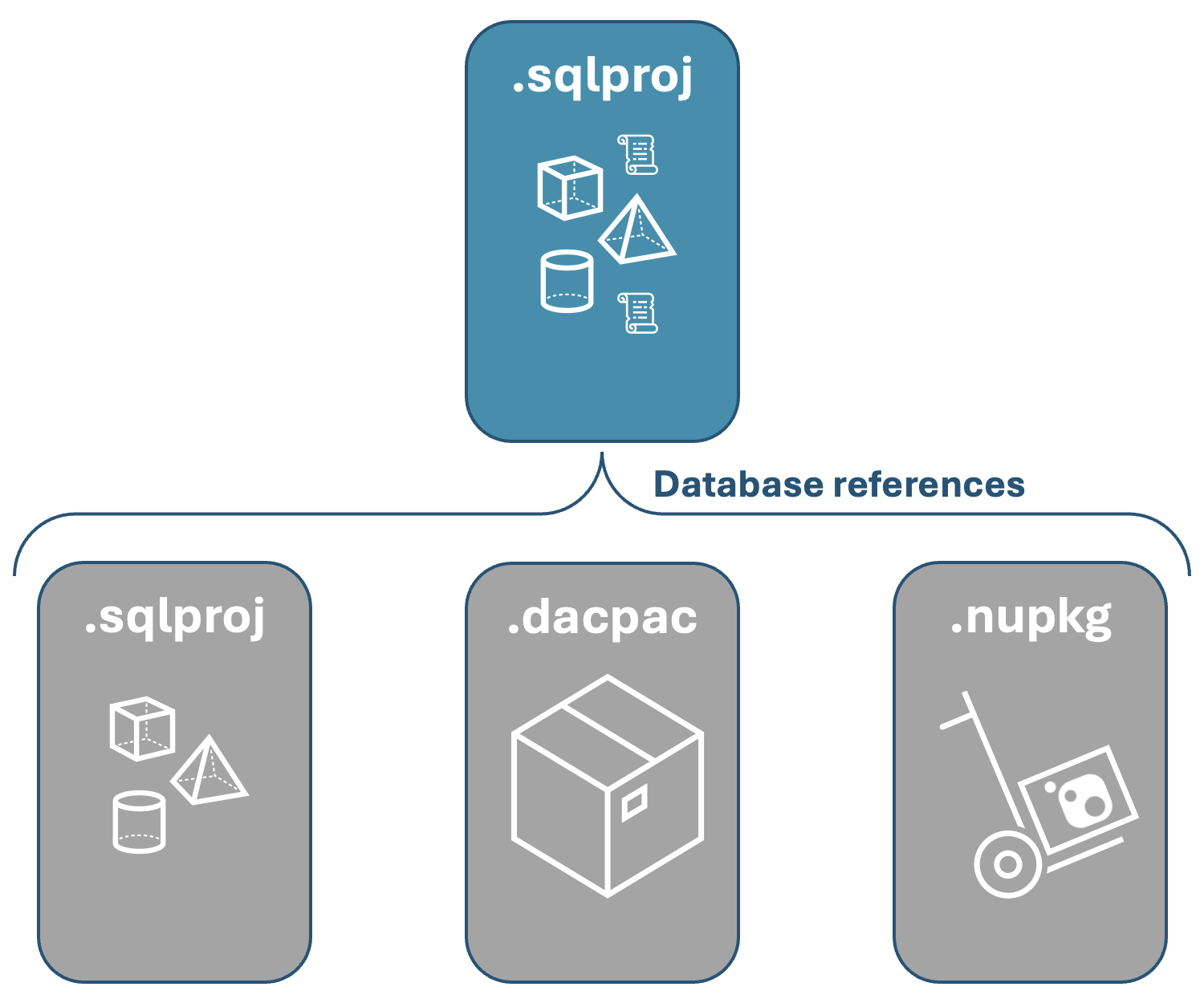
Database references in SQL projects enable you to incorporate objects that aren't included in a project by linking to another project, .dacpac file, or published NuGet package. The database objects you add to a project can be part of the same database, a different database on the same server, or a different database on a different server. For SQL Server development, use database references to link to another database on the same server for three-part naming, or to link to a different database on a different server for cross-database queries. For databases with a large number of objects in distinct groups, use database references to break up a database into smaller, more manageable projects. Smaller project size can help improve performance and reduce the time required to build a project during iterative local development.
Note
Use project references and NuGet package references for database references in new development. Original SQL projects don't support referencing NuGet packages.
SQL project file sample and syntax
Include database references in a project through entries in the .sqlproj file, similar to C# projects. Use SQLCMD syntax to reference the database name in SQL project objects. When a database reference points to a different database on the same server, include a <DatabaseSqlCmdVariable> element in the project reference. When a database reference points to a different database on a different server, also include a <ServerSqlCmdVariable> element in the project reference. Database references to the same database don't include <ServerSqlCmdVariable> or <DatabaseSqlCmdVariable> elements.
To include a specific reference to the database reference in the SQL scripts, use SQLCMD variables named in the project file to specify the database name. For example, the following SQL script references a table in the Warehouse database:
SELECT ProductId,
       StorageLocation,
       BinNumber
FROM [$(Warehouse)].[Production].[ProductInventory];
The project file includes a database reference corresponding to the $(Warehouse) SQLCMD variable and contains <DatabaseSqlCmdVariable>Warehouse</DatabaseSqlCmdVariable>.
Same-database three-part naming
When an object in a SQL project references another object in the same database, three-part naming isn't necessary even if the objects are included through a database reference. However, SQL projects incorporate an automatic SQLCMD variable for the database name, which you can use in SQL scripts to reference the project's database without hardcoding the name. If three-part naming is necessary, use $(DatabaseName) in your SQL scripts to reference the database. For example, the following SQL script references a table in the project's database:
UPDATE [$(DatabaseName)].[SalesLT].[Customer]
SET [SalesPerson] = 'John Doe',
    [ModifiedDate] = GETDATE()
WHERE [CustomerId] = @CustomerId;
Database literal values
In some cases, you might need to use a literal (non-variable) value for the name of database from a database reference in your SQL objects. You can configure the .sqlproj file to specify a literal value for a database name instead of using a SQLCMD variable. The element used to specify a literal value is <DatabaseLiteralValue>. If you use this element, don't use the <DatabaseSqlCmdVariable> element. Inside the <DatabaseLiteralValue> element, you specify the literal value for the database name. For example, a database reference with <DatabaseVariableLiteralValue>WarehouseDB</DatabaseVariableLiteralValue> is used in a SQL script as follows:
SELECT ProductId,
       StorageLocation,
       BinNumber
FROM [WarehouseDB].[Production].[ProductInventory];
Project references
In this example, you add a project reference to a SQL project named AdventureWorksSalesLT.sqlproj that is part of the same database.
  <ItemGroup>
    <ProjectReference Include="..\AdventureWorks\AdventureWorksSalesLT.sqlproj">
      <Name>AdventureWorksSalesLT</Name>
      <Project>{d703fc7a-bc47-4aef-9dc5-cf01094ddb37}</Project>
      <Private>True</Private>
      <SuppressMissingDependenciesErrors>False</SuppressMissingDependenciesErrors>
    </ProjectReference>
  </ItemGroup>
Dacpac package references
For more information about package references in SQL projects, see SQL projects package references.
The following example shows a package reference to the master system database for SQL Server 2022:
  <ItemGroup>
    <PackageReference Include="Microsoft.SqlServer.Dacpacs.Master" Version="160.2.1" />
  </ItemGroup>
Dacpac artifact references
Don't use direct references to a .dacpac artifact file for new development in SDK-style projects. Instead, use NuGet package references.
In original SQL projects, you specify .dacpac file references in the .sqlproj file by using an <ArtifactReference> item. The following example shows a .dacpac artifact reference to a .dacpac file in a different project on the same server:
  <ItemGroup>
    <ArtifactReference Include="..\AdventureWorks\Warehouse\bin\Release\Warehouse.dacpac">
      <HintPath>..\AdventureWorks\Warehouse\bin\Release\Warehouse.dacpac</HintPath>
      <SuppressMissingDependenciesErrors>False</SuppressMissingDependenciesErrors>
      <DatabaseSqlCmdVariable>Warehouse</DatabaseSqlCmdVariable>
    </ArtifactReference>
  </ItemGroup>
Add and use project references
Add a project reference
To add a project reference to a SQL project in Visual Studio, right-click the References node under the project in Solution Explorer and select Add Database Reference.
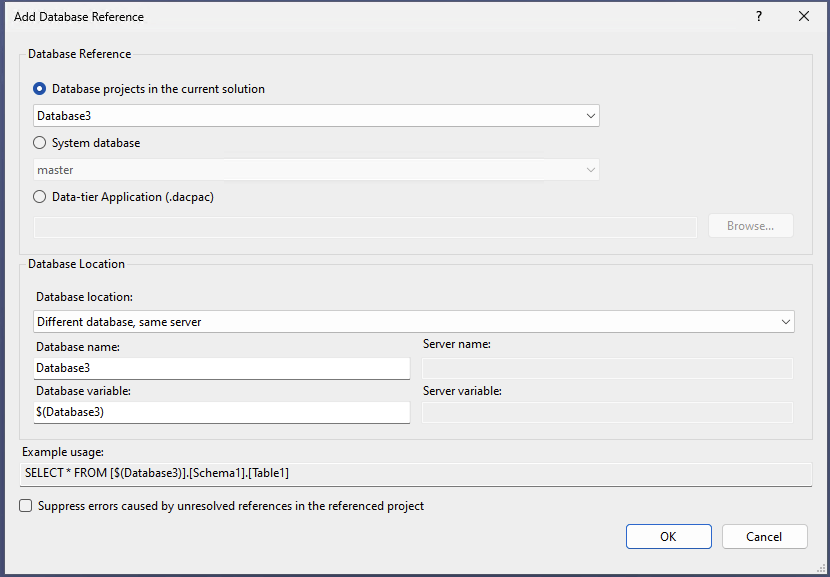
The Add Database Reference dialog presents options for adding a reference to:
- a SQL project from the same solution
- a system database (from
.dacpacfiles automatically included with Visual Studio) - any data-tier application (
.dacpac) file on the local file system
The dialog also provides a dropdown list to select from the following reference locations:
- same database
- different database, same server
- different database, different server
To add a project reference to a SQL project, add an <ItemGroup> item to the .sqlproj file with an appropriate reference item for each database reference. For example, the following project reference is added to a SQL project to reference the WorldWideImporters project in a different database on a different server:
  <ItemGroup>
    <ProjectReference Include="..\Contoso\WorldWideImporters.sqlproj">
      <Name>WorldWideImporters</Name>
      <Project>{d703fc7a-bc47-4aef-9dc5-cf01094ddb37}</Project>
      <SuppressMissingDependenciesErrors>False</SuppressMissingDependenciesErrors>
      <ServerSqlCmdVariable>WWIServer</ServerSqlCmdVariable>
      <DatabaseSqlCmdVariable>WorldWideImporters</DatabaseSqlCmdVariable>
    </ProjectReference>
  </ItemGroup>
The project reference is used in a sample view definition in the SQL project:
CREATE VIEW dbo.WorldWide_Products
AS
SELECT ProductID, ProductName, SupplierID
FROM [$(WWIServer)].[$(WorldWideImporters)].[Purchasing].[Suppliers]
To add a database reference to a SQL project in the SQL Database Projects extension, right-click the Database References node under the project in the Database Projects view and select Add Database Reference.
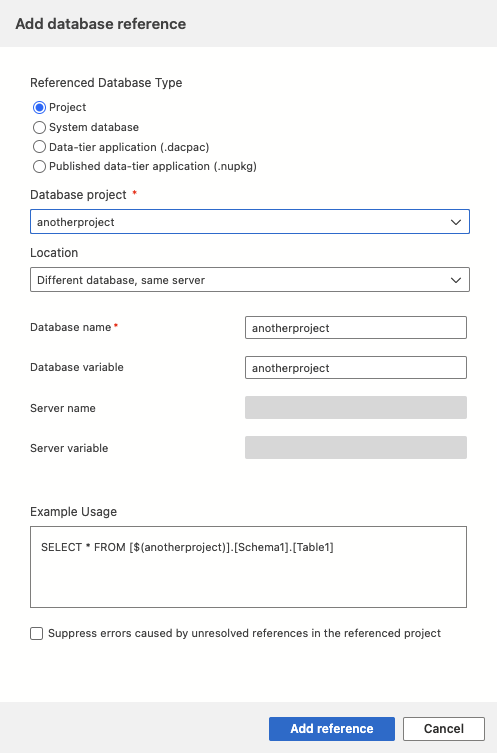
The available reference types are:
- system database
- data-tier application (
.dacpac) - published data-tier application (
.nupkg) - project
The extension also prompts to select from the following reference locations:
- same database
- different database, same server
- different database, different server
To add a project reference to a SQL project, add an <ItemGroup> item to the .sqlproj file with an appropriate reference item for each database reference. For example, the following project reference is added to a SQL project to reference the WorldWideImporters project in a different database on a different server:
  <ItemGroup>
    <ProjectReference Include="..\Contoso\WorldWideImporters.sqlproj">
      <Name>WorldWideImporters</Name>
      <Project>{d703fc7a-bc47-4aef-9dc5-cf01094ddb37}</Project>
      <SuppressMissingDependenciesErrors>False</SuppressMissingDependenciesErrors>
      <ServerSqlCmdVariable>WWIServer</ServerSqlCmdVariable>
      <DatabaseSqlCmdVariable>WorldWideImporters</DatabaseSqlCmdVariable>
    </ProjectReference>
  </ItemGroup>
The project reference is used in a sample view definition in the SQL project:
CREATE VIEW dbo.WorldWide_Products
AS
SELECT ProductID, ProductName, SupplierID
FROM [$(WWIServer)].[$(WorldWideImporters)].[Purchasing].[Suppliers]
To add a project reference to a SQL project, add an <ItemGroup> item to the .sqlproj file with an appropriate reference item for each database reference. For example, the following project reference is added to a SQL project to reference the WorldWideImporters project in a different database on a different server:
  <ItemGroup>
    <ProjectReference Include="..\Contoso\WorldWideImporters.sqlproj">
      <Name>WorldWideImporters</Name>
      <Project>{d703fc7a-bc47-4aef-9dc5-cf01094ddb37}</Project>
      <SuppressMissingDependenciesErrors>False</SuppressMissingDependenciesErrors>
      <ServerSqlCmdVariable>WWIServer</ServerSqlCmdVariable>
      <DatabaseSqlCmdVariable>WorldWideImporters</DatabaseSqlCmdVariable>
    </ProjectReference>
  </ItemGroup>
The project reference is used in a sample view definition in the SQL project:
CREATE VIEW dbo.WorldWide_Products
AS
SELECT ProductID, ProductName, SupplierID
FROM [$(WWIServer)].[$(WorldWideImporters)].[Purchasing].[Suppliers]
Build with project references
Building a SQL project with database references might require extra configuration to ensure that the referenced objects are available during the build process. For example, if you're building a project in a continuous integration (CI) pipeline, you need to set up the build agent environment similarly to the local development environment.
.dacpacreferences in the SQL project require that the.dacpacbe present on the build agent at the same relative file path as specified in the project file.- Project references in the SQL project require that the referenced project be present on the build agent at the same relative file path as specified in the project file and be able to build successfully on the build agent.
- System database references created in original SQL projects in Visual Studio require that the build agent have Visual Studio installed.
- NuGet package references in the SQL project require the package be published to a NuGet feed that is also set as a package source for the build agent.
Publish with project references
Publishing a .dacpac built from a project with database references requires no extra steps. The .dacpac file contains the referenced objects and the SQLCMD variables specified in the project file.
For database references to objects in the same database, the objects from the referenced project are included in the .dacpac file but aren't included in the deployment by default. To include the objects in the deployment, use the /p:IncludeCompositeObjects=true option in the SqlPackage command line tool. For example, the following command deploys the AdventureWorks project with the /p:IncludeCompositeObjects=true option to include the objects from database references to AdventureWorks:
sqlpackage /Action:Publish /SourceFile:AdventureWorks.dacpac /TargetConnectionString:{connection_string_here} /p:IncludeCompositeObjects=true
When you deploy a .dacpac file with database references to different database (on same or different server), set the SQLCMD variables specified in the project file to the correct values for the target environment. Set the SQLCMD variable values during deployment by using the /v option in the SqlPackage command line tool. For example, the following command sets the WorldWideImporters variable to WorldWideImporters and the WWIServer variable to localhost:
sqlpackage /Action:Publish /SourceFile:AdventureWorks.dacpac /TargetConnectionString:{connection_string_here} /v:WorldWideImporters=WorldWideImporters /v:WWIServer=localhost