Anmerkung
Der Zugriff auf diese Seite erfordert eine Genehmigung. Du kannst versuchen, dich anzumelden oder die Verzeichnisse zu wechseln.
Der Zugriff auf diese Seite erfordert eine Genehmigung. Du kannst versuchen , die Verzeichnisse zu wechseln.
Die folgende Abbildung zeigt einen Windows Communication Foundation (WCF)-Dienst und Client, gesichert mit Sicherheit auf Nachrichtenebene. Der Dienst wird mit einem X.509-Zertifikat authentifiziert. Der Client authentifiziert sich mit einem Benutzernamen und Kennwort.
Eine Beispielanwendung finden Sie unter Message Security User Name.
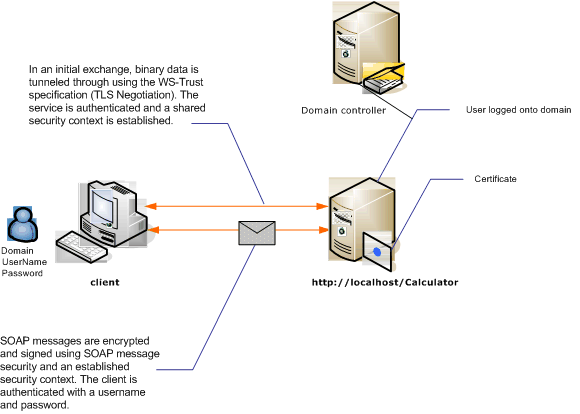
| Charakteristisch | BESCHREIBUNG |
|---|---|
| Sicherheitsmodus | Nachricht |
| Interoperabilität | Nur Windows Communication Foundation (WCF) |
| Authentifizierung (Server) | Für die anfängliche Aushandlung ist die Serverauthentifizierung erforderlich. |
| Authentifizierung (Client) | Benutzername/Kennwort |
| Integrität | Ja, Verwendung des geteilten Sicherheitskontexts |
| Vertraulichkeit | Ja, Verwendung des geteilten Sicherheitskontexts |
| Transport | HTTP |
| Verbindlich | WSHttpBinding |
Dienstleistung
Der folgende Code und die folgende Konfiguration sollen unabhängig ausgeführt werden. Führen Sie eine der folgenden Aktionen aus:
Erstellen Sie einen eigenständigen Dienst, der den Code ohne Konfiguration verwendet.
Erstellen Sie einen Dienst mithilfe der bereitgestellten Konfiguration, definieren Sie jedoch keine Endpunkte.
Programmcode
Der folgende Code zeigt, wie Sie einen Dienstendpunkt erstellen, der die Nachrichtensicherheit verwendet.
// Create the binding.
WSHttpBinding binding = new WSHttpBinding();
binding.Security.Mode = SecurityMode.Message;
binding.Security.Message.ClientCredentialType =
     MessageCredentialType.UserName;

// Create the URI for the endpoint.
Uri httpUri = new Uri("http://localhost/Calculator");

// Create the service host.
ServiceHost myServiceHost =
    new ServiceHost(typeof(Calculator), httpUri);
myServiceHost.AddServiceEndpoint(typeof(ICalculator), binding, "");

// Specify a certificate to authenticate the service.
myServiceHost.Credentials.ServiceCertificate.
    SetCertificate(StoreLocation.LocalMachine,
    StoreName.My,
    X509FindType.FindBySubjectName,
    "Contoso.com");

myServiceHost.Open();
Console.WriteLine("Listening...");
Console.ReadLine();

// Close the service.
myServiceHost.Close();
' Create the binding.
Dim binding As New WSHttpBinding()
binding.Security.Mode = SecurityMode.Message
binding.Security.Message.ClientCredentialType = MessageCredentialType.UserName

' Create the URI for the endpoint.
Dim httpUri As New Uri("http://localhost/Calculator")

' Create the service host.
Dim myServiceHost As New ServiceHost(GetType(ServiceModel.Calculator), httpUri)
myServiceHost.AddServiceEndpoint(GetType(ICalculator), binding, "")

' Specify a certificate to authenticate the service.
myServiceHost.Credentials.ServiceCertificate.SetCertificate(StoreLocation.LocalMachine, _
StoreName.My, X509FindType.FindBySubjectName, "Contoso.com")

myServiceHost.Open()
Console.WriteLine("Listening...")
Console.ReadLine()

' Close the service.
myServiceHost.Close()
Konfiguration
Die folgende Konfiguration kann anstelle des Codes verwendet werden:
<?xml version="1.0" encoding="utf-8"?>
<configuration>
  <system.serviceModel>
    <behaviors>
      <serviceBehaviors>
        <behavior name="ServiceCredentialsBehavior">
          <serviceCredentials>
            <serviceCertificate findValue="Contoso.com"
                                storeLocation="LocalMachine"
                                storeName="My"
                                x509FindType="FindBySubjectName" />
          </serviceCredentials>
        </behavior>
      </serviceBehaviors>
    </behaviors>
    <services>
      <service behaviorConfiguration="ServiceCredentialsBehavior"
               name="ServiceModel.Calculator">
        <endpoint address="http://localhost/Calculator"
                  binding="wsHttpBinding"
                  bindingConfiguration="MessageAndUserName"
                  name="SecuredByTransportEndpoint"
                  contract="ServiceModel.ICalculator" />
      </service>
    </services>
    <bindings>
      <wsHttpBinding>
        <binding name="MessageAndUserName">
          <security mode="Message">
            <message clientCredentialType="UserName" />
          </security>
        </binding>
      </wsHttpBinding>
    </bindings>
    <client />
  </system.serviceModel>
</configuration>
Kunde
Programmcode
Der folgende Code erstellt den Client. Die Bindung erfolgt an die Nachrichtenmodus-Sicherheit, und der Clientanmeldeinformationstyp ist auf UserName gesetzt. Der Benutzername und das Kennwort können nur mithilfe von Code angegeben werden (er kann nicht konfiguriert werden). Der Code, der den Benutzernamen und das Kennwort zurückgibt, wird hier nicht angezeigt, da er auf Anwendungsebene erfolgen muss. Verwenden Sie beispielsweise ein Windows Forms-Dialogfeld, um den Benutzer nach den Daten abzufragen.
// Create the binding.
WSHttpBinding myBinding = new WSHttpBinding();
myBinding.Security.Mode = SecurityMode.Message;
myBinding.Security.Message.ClientCredentialType =
    MessageCredentialType.UserName;

// Create the endpoint address.
EndpointAddress ea = new
    EndpointAddress("http://machineName/Calculator");

// Create the client.
CalculatorClient cc =
    new CalculatorClient(myBinding, ea);

// Set the user name and password. The code to
// return the user name and password is not shown here. Use
// an interface to query the user for the information.
cc.ClientCredentials.UserName.UserName = ReturnUsername();
cc.ClientCredentials.UserName.Password = ReturnPassword();

// Begin using the client.
try
{
    cc.Open();
    Console.WriteLine(cc.Add(200, 1111));
    Console.ReadLine();

    // Close the client.
    cc.Close();
}
' Create the binding.
Dim myBinding As New WSHttpBinding()
myBinding.Security.Mode = SecurityMode.Message
myBinding.Security.Message.ClientCredentialType = _
   MessageCredentialType.UserName

' Create the endpoint address.
Dim ea As New EndpointAddress("http://machineName/Calculator")

' Create the client.
Dim cc As New CalculatorClient(myBinding, ea)

' Set the user name and password. The code to
' return the user name and password is not shown here. Use
' an interface to query the user for the information.
cc.ClientCredentials.UserName.UserName = ReturnUsername()
cc.ClientCredentials.UserName.Password = ReturnPassword()

' Begin using the client.
Try
    cc.Open()

    Console.WriteLine(cc.Add(100, 11))
    Console.ReadLine()

    ' Close the client.
    cc.Close()
Catch tex As TimeoutException
    Console.WriteLine(tex.Message)
    cc.Abort()
Catch cex As CommunicationException
    Console.WriteLine(cex.Message)
    cc.Abort()
Finally
    Console.WriteLine("Closed the client")
    Console.ReadLine()
End Try
Konfiguration
Der folgende Code konfiguriert den Client. Die Bindung erfolgt an die Nachrichtenmodus-Sicherheit, und der Clientanmeldeinformationstyp ist auf UserName gesetzt. Der Benutzername und das Kennwort können nur mithilfe von Code angegeben werden (er kann nicht konfiguriert werden).
<?xml version="1.0" encoding="utf-8"?>
<configuration>
  <system.serviceModel>
    <bindings>
      <wsHttpBinding>
        <binding name="WSHttpBinding_ICalculator" >
          <security mode="Message">
            <message clientCredentialType="UserName" />
          </security>
        </binding>
      </wsHttpBinding>
    </bindings>
    <client>
      <endpoint address="http://machineName/Calculator"
                binding="wsHttpBinding"
                bindingConfiguration="WSHttpBinding_ICalculator"
                contract="ICalculator"
                name="WSHttpBinding_ICalculator">
        <identity>
          <dns value ="Contoso.com" />
        </identity>
      </endpoint>
    </client>
  </system.serviceModel>
</configuration>