Bei Windows ML werden bestimmte Ausführungsanbieter (EPs) über die Windows ML-APIs ExecutionProviderCatalog dynamisch heruntergeladen, installiert, gemeinsam genutzt und automatisch aktualisiert. Informationen dazu, welche EPs verfügbar sind, finden Sie unter "Unterstützte Ausführungsanbieter".
Auf dieser Seite wird beschrieben, wie EPs auf dem Gerät eines Benutzers installiert werden. Nach der Installation müssen Sie Ausführungsanbieter bei ONNX-Runtime registrieren, bevor Sie sie verwenden.
Installieren aller kompatiblen EPs
Für die Erstentwicklung kann es sinnvoll sein, einfach EnsureAndRegisterCertifiedAsync() aufzurufen, wodurch alle für das Gerät des Benutzers verfügbaren EPs heruntergeladen und installiert werden, und dann alle EPs mit der ONNX Runtime in einem einzigen Aufruf registriert werden. Beachten Sie, dass diese Methode bei der ersten Ausführung je nach Netzwerkgeschwindigkeit und EPs, die heruntergeladen werden müssen, mehrere Sekunden oder sogar Minuten dauern kann.
// Get the default ExecutionProviderCatalog
var catalog = ExecutionProviderCatalog.GetDefault();

// Ensure execution providers compatible with device are present (downloads if necessary)
// and then registers all present execution providers with ONNX Runtime
await catalog.EnsureAndRegisterCertifiedAsync();
// Get the default ExecutionProviderCatalog
winrt::Microsoft::Windows::AI::MachineLearning::ExecutionProviderCatalog catalog =
    winrt::Microsoft::Windows::AI::MachineLearning::ExecutionProviderCatalog::GetDefault();

// Ensure execution providers compatible with device are present (downloads if necessary)
// and then registers all present execution providers with ONNX Runtime
catalog.EnsureAndRegisterCertifiedAsync().get();
Die C-APIs unterstützen keinen einzelnen EnsureAndRegisterCertifiedAsync() Aufruf. Folgen Sie stattdessen den Anweisungen weiter unten, um ein bestimmtes EP herunterzuladen und zu registrieren.
# Please DO NOT use this API. It won't register EPs to the python ort env.
Suchen aller kompatiblen EPs
Sie können sehen, welche EPs (einschließlich nicht installierter EPs) für das Gerät des Benutzers verfügbar sind, indem Sie die FindAllProviders() Methode aufrufen.
ExecutionProviderCatalog catalog = ExecutionProviderCatalog.GetDefault();

// Find all available EPs (including non-installed EPs)
ExecutionProvider[] providers = catalog.FindAllProviders();

foreach (var provider in providers)
{
    Console.WriteLine($"{provider.Name}: {provider.ReadyState}");
}
auto catalog = ExecutionProviderCatalog::GetDefault();

// Find all available EPs (including non-installed EPs)
auto providers = catalog.FindAllProviders();

for (auto const& provider : providers)
{
    std::wcout << provider.Name() << L": " << static_cast<int>(provider.ReadyState()) << std::endl;
}
#include <WinMLEpCatalog.h>

// Context structure to track enumeration state
struct EnumContext
{
    bool needsDownload;
};

// Callback to check if any providers need downloading
BOOL CALLBACK CheckDownloadNeededCallback(
    WinMLEpHandle ep,
    const WinMLEpInfo* info,
    void* context)
{
    if (info == nullptr) return TRUE; // Skip invalid entries
    EnumContext* ctx = static_cast<EnumContext*>(context);
    if (info->readyState == WinMLEpReadyState_NotPresent)
    {
        ctx->needsDownload = true;
        return FALSE; // Stop enumeration early
    }
    return TRUE; // Continue enumeration
}

void DiscoverProviders()
{
    WinMLEpCatalogHandle catalog = nullptr;
    HRESULT hr = WinMLEpCatalogCreate(&catalog);
    if (FAILED(hr)) return;

    EnumContext ctx = { false };

    // Check if any providers need to be downloaded
    WinMLEpCatalogEnumProviders(catalog, CheckDownloadNeededCallback, &ctx);

    if (ctx.needsDownload)
    {
        // There are new EPs available; decide how your app wants to handle that.
        // See "Install a specific EP" below for download and registration.
    }

    WinMLEpCatalogRelease(catalog);
}
# winml: winui3.microsoft.windows.ai.machinelearning
catalog = winml.ExecutionProviderCatalog.get_default()

# Find all available EPs (including non-installed EPs)
providers = catalog.find_all_providers()

for provider in providers:
    print(f"{provider.name}: {provider.ready_state}")
Die zurückgegebenen Ausführungsanbieter variieren je nach Gerät des Benutzers und verfügbaren Ausführungsanbietern. Auf einem kompatiblen Qualcomm-Gerät ohne derzeit installierte Ausführungsanbieter gibt der obige Code Folgendes aus...
QNNExecutionProvider: NotPresent
Jeder ExecutionProvider verfügt über eine ReadyState-Eigenschaft , die den aktuellen Status auf dem Gerät angibt. Wenn Sie diese Zustände verstehen, können Sie ermitteln, welche Aktionen Ihre App ausführen muss.
| ReadyState |
Definition |
Nächste Schritte |
NotPresent |
Das EP ist nicht auf dem Clientgerät installiert. |
Rufen Sie EnsureReadyAsync() auf, um das EP herunterzuladen und zu installieren, und fügen Sie es dem Laufzeitabhängigkeitsdiagramm Ihrer App hinzu. |
NotReady |
Das EP wird auf dem Clientgerät installiert, wurde jedoch nicht zum Laufzeitabhängigkeitsdiagramm der App hinzugefügt. |
Rufen Sie EnsureReadyAsync() auf, um das EP zum Laufzeitabhängigkeitsdiagramm Ihrer App hinzuzufügen. |
Ready |
Das EP wird auf dem Clientgerät installiert und dem Laufzeitabhängigkeitsdiagramm Ihrer App hinzugefügt. |
Rufen Sie TryRegister() auf, um die EP bei ONNX Runtime zu registrieren. |
Installieren einer bestimmten EP
Wenn es einen bestimmten ExecutionProvider gibt, den Ihre App verwenden möchte, und deren ReadyState lautet NotPresent, können Sie ihn herunterladen und installieren, indem Sie ihn aufrufen EnsureReadyAsync().
Sie werden zuerst verwendenFindAllProviders(), um alle kompatiblen EPs abzurufen, und dann können Sie einen bestimmten EnsureReadyAsync() aufrufen, um den spezifischen Ausführungsanbieter herunterzuladen und den bestimmten Ausführungsanbieter aufzurufenTryRegister(), um den spezifischen Ausführungsanbieter zu registrieren.
// Download and install a NotPresent EP
var result = await provider.EnsureReadyAsync();

// Check that the download and install was successful
bool installed = result.Status == ExecutionProviderReadyResultState.Success;
Sie werden zuerst verwendenFindAllProviders(), um alle kompatiblen EPs abzurufen, und dann können Sie einen bestimmten EnsureReadyAsync() aufrufen, um den spezifischen Ausführungsanbieter herunterzuladen und den bestimmten Ausführungsanbieter aufzurufenTryRegister(), um den spezifischen Ausführungsanbieter zu registrieren.
// Download and install a NotPresent EP
auto result = provider.EnsureReadyAsync().get();

// Check that the download and install was successful
bool installed = result.Status() == ExecutionProviderReadyResultState::Success;
Sie verwenden die WinMLEpCatalogFindProvider Methode, um einen spezifischen Ausführungsanbieter anzufordern, und dann können Sie WinMLEpEnsureReady aufrufen, wobei Sie WinMLEpHandle übergeben, um den spezifischen Ausführungsanbieter herunterzuladen. Verwenden Sie dann WinMLEpGetLibraryPathSize und WinMLEpGetLibraryPath , um den Pfad zum Ausführungsanbieter zu erhalten und ihn mit ONNX Runtime mithilfe von RegisterExecutionProviderLibrary zu registrieren.
#include <WinMLEpCatalog.h>
#include <onnxruntime_cxx_api.h>
#include <filesystem>
#include <string>

// Assumes an Ort::Env has already been created
// Ort::Env env(ORT_LOGGING_LEVEL_ERROR, "MyApp");

WinMLEpCatalogHandle catalog = nullptr;
HRESULT hr = WinMLEpCatalogCreate(&catalog);
if (FAILED(hr)) return;

// Find the QNN provider
WinMLEpHandle qnnProvider = nullptr;
hr = WinMLEpCatalogFindProvider(catalog, "QNN", nullptr, &qnnProvider);

if (SUCCEEDED(hr) && qnnProvider != nullptr)
{
    // Ensure it's ready (download if necessary)
    hr = WinMLEpEnsureReady(qnnProvider);

    if (SUCCEEDED(hr))
    {
        // Get the library path for registration
        size_t pathSize = 0;
        WinMLEpGetLibraryPathSize(qnnProvider, &pathSize);

        std::string libraryPathUtf8(pathSize, '\0');
        WinMLEpGetLibraryPath(qnnProvider, pathSize, libraryPathUtf8.data(), nullptr);

        // Register with ONNX Runtime
        std::filesystem::path libraryPath(libraryPathUtf8);
        env.RegisterExecutionProviderLibrary("QNN", libraryPath.wstring());
    }
}

WinMLEpCatalogRelease(catalog);
Sie werden zuerst verwendenfind_all_providers(), um alle kompatiblen EPs abzurufen, und dann können Sie einen bestimmten ensure_ready_async() aufrufen, um den spezifischen Ausführungsanbieter herunterzuladen, und die ONNX-Runtime verwenden, um den spezifischen Ausführungsanbieter register_execution_provider_library zu registrieren.
# Download and install a NotPresent EP
result = provider.ensure_ready_async().get()

# Check that the download and install was successful
installed = result.status == winml.ExecutionProviderReadyResultState.SUCCESS
Installation mit Fortschrittsanzeige
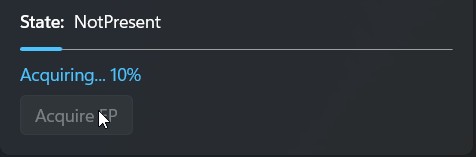
Die APIs zum Herunterladen und Installieren von EPs umfassen Rückrufe, die Statusupdates bereitstellen, sodass Sie Statusanzeigen anzeigen können, um Ihre Benutzer auf dem Laufenden zu halten.
// Start the download and install of a NotPresent EP
var operation = provider.EnsureReadyAsync();

// Listen to progress callback
operation.Progress = (asyncInfo, progressInfo) =>
{
    // Dispatch to UI thread (varies based on UI platform)
    _dispatcherQueue.TryEnqueue(() =>
    {
        // progressInfo is out of 100, convert to 0-1 range
        double normalizedProgress = progressInfo / 100.0;

        // Display the progress to the user
        Progress = normalizedProgress;
    };
};

// Await for the download and install to complete
var result = await operation;

// Check that the download and install was successful
bool installed = result.Status == ExecutionProviderReadyResultState.Success;
// Start the download and install of a NotPresent EP
auto operation = provider.EnsureReadyAsync();

// Listen to progress callback
operation.Progress([this](auto const& asyncInfo, double progressInfo)
{
    // Dispatch to UI thread (varies based on UI platform)
    dispatcherQueue.TryEnqueue([this, progressInfo]()
    {
        // progressInfo is out of 100, convert to 0-1 range
        double normalizedProgress = progressInfo / 100.0;

        // Display the progress to the user
        Progress(normalizedProgress);
    });
});

// Await for the download and install to complete
auto result = operation.get();

// Check that the download and install was successful
bool installed = result.Status() == ExecutionProviderReadyResultState::Success;
#include <WinMLEpCatalog.h>
#include <WinMLAsync.h>
#include <iostream>
#include <format>

// Progress callback — called periodically during download
void CALLBACK OnProgress(WinMLAsyncBlock* async, double progress)
{
    // progress is out of 100, convert to 0-1 range
    double normalizedProgress = progress / 100.0;

    // Display the progress to the user
    std::cout << std::format("Progress: {:.0f}%\n", normalizedProgress * 100);
}

// Completion callback — called when the download finishes
void CALLBACK OnComplete(WinMLAsyncBlock* async)
{
    HRESULT hr = WinMLAsyncGetStatus(async, FALSE);
    if (SUCCEEDED(hr))
    {
        std::cout << "Download complete!\n";
    }
    else
    {
        std::cout << std::format("Download failed: 0x{:08X}\n", static_cast<uint32_t>(hr));
    }
}

// Start the async download with progress
WinMLAsyncBlock async = {};
async.callback = OnComplete;
async.progress = OnProgress;

HRESULT hr = WinMLEpEnsureReadyAsync(ep, &async);
if (SUCCEEDED(hr))
{
    // Wait for the async operation to complete
    WinMLAsyncGetStatus(&async, TRUE);
}

WinMLAsyncClose(&async);
# Start the download and install of a NotPresent EP
operation = provider.ensure_ready_async()

# Listen to progress callback
def on_progress(async_info, progress_info):
    # progress_info is out of 100, convert to 0-1 range
    normalized_progress = progress_info / 100.0

    # Display the progress to the user
    print(f"Progress: {normalized_progress:.0%}")

operation.progress = on_progress

# Await for the download and install to complete
result = operation.get()

# Check that the download and install was successful
installed = result.status == winml.ExecutionProviderReadyResultState.SUCCESS
Nächste Schritte
Nachdem Sie nun Ausführungsanbieter installiert haben, lesen Sie die Registrierung von Ausführungsanbietern , um zu erfahren, wie Sie sie für die Verwendung mit ONNX-Runtime registrieren.
Beispiel einer Produktions-App
Für Produktionsanwendungen finden Sie hier ein Beispiel dafür, was Ihre App tun kann, um sich selbst und Ihren Benutzern die Kontrolle darüber zu geben, wann Downloads auftreten. Sie können überprüfen, ob neue Ausführungsanbieter verfügbar sind und diese vor der Registrierung bedingt herunterladen:
using Microsoft.Windows.AI.MachineLearning;

var catalog = ExecutionProviderCatalog.GetDefault();

// Filter to the EPs our app supports/uses
var providers = catalog.FindAllProviders().Where(p =>
    p.Name == "MIGraphXExecutionProvider" ||
    p.Name == "VitisAIExecutionProvider" ||
    p.Name == "OpenVINOExecutionProvider" ||
    p.Name == "QNNExecutionProvider" ||
    p.Name == "NvTensorRtRtxExecutionProvider"
);

if (providers.Any(p => p.ReadyState == ExecutionProviderReadyState.NotPresent))
{
    // Show UI to user asking if they want to download new execution providers
    bool userWantsToDownload = await ShowDownloadDialogAsync();

    if (userWantsToDownload)
    {
        // Download all EPs
        foreach (var p in providers)
        {
            if (p.ReadyState == ExecutionProviderReadyState.NotPresent)
            {
                // Ignore result handling here; production code could inspect status
                await p.EnsureReadyAsync();
            }
        }

        // And register all EPs
        await catalog.RegisterCertifiedAsync();
    }
    else
    {
        // Register only already-present EPs
        await catalog.RegisterCertifiedAsync();
    }
}
using namespace winrt::Microsoft::Windows::AI::MachineLearning;

auto catalog = ExecutionProviderCatalog::GetDefault();
auto allProviders = catalog.FindAllProviders();

// Filter to the EPs our app supports/uses
std::vector<ExecutionProvider> targetProviders;
for (auto const& p : allProviders)
{
    auto name = p.Name();
    if (name == L"VitisAIExecutionProvider" ||
        name == L"OpenVINOExecutionProvider" ||
        name == L"QNNExecutionProvider" ||
        name == L"NvTensorRtRtxExecutionProvider")
    {
        targetProviders.push_back(p);
    }
}

bool needsDownload = false;
for (auto const& p : targetProviders)
{
    if (p.ReadyState() == ExecutionProviderReadyState::NotPresent)
    {
        needsDownload = true;
        break;
    }
}

if (needsDownload)
{
    // Show UI to user or check application settings to confirm download
    bool userWantsToDownload = ShowDownloadDialog();
    if (userWantsToDownload)
    {
        // Download only the missing target providers
        for (auto const& p : targetProviders)
        {
            if (p.ReadyState() == ExecutionProviderReadyState::NotPresent)
            {
                // Ignore result handling here; production code could inspect status
                p.EnsureReadyAsync().get();
            }
        }
        // Register all (both previously present and newly downloaded) providers
        catalog.RegisterCertifiedAsync().get();
    }
    else
    {
        // User deferred download; register only already-present providers
        catalog.RegisterCertifiedAsync().get();
    }
}
else
{
    // All target EPs already present
    catalog.RegisterCertifiedAsync().get();
}
#include <WinMLEpCatalog.h>
#include <onnxruntime_cxx_api.h>
#include <filesystem>
#include <string>
#include <cstring>
// List of provider names our app supports
const char* targetProviderNames[] = {
"VitisAIExecutionProvider",
"OpenVINOExecutionProvider",
"QNNExecutionProvider",
"NvTensorRtRtxExecutionProvider"
};
const size_t targetProviderCount = sizeof(targetProviderNames) / sizeof(targetProviderNames[0]);
bool IsTargetProvider(const char* name)
{
for (size_t i = 0; i < targetProviderCount; i++)
{
if (strcmp(name, targetProviderNames[i]) == 0)
return true;
}
return false;
}
// Context for enumeration callbacks
struct ProductionContext
{
bool needsDownload;
bool userWantsToDownload;
Ort::Env* env;
};
// Check if any target providers need downloading
BOOL CALLBACK CheckTargetProvidersCallback(
WinMLEpHandle ep,
const WinMLEpInfo* info,
void* context)
{
if (info == nullptr || info->name == nullptr) return TRUE; // Skip invalid entries
ProductionContext* ctx = static_cast<ProductionContext*>(context);
if (IsTargetProvider(info->name) && info->readyState == WinMLEpReadyState_NotPresent)
{
ctx->needsDownload = true;
}
return TRUE; // Continue to check all providers
}
// Download missing and register ready target providers
BOOL CALLBACK ProcessTargetProvidersCallback(
WinMLEpHandle ep,
const WinMLEpInfo* info,
void* context)
{
if (info == nullptr || info->name == nullptr) return TRUE; // Skip invalid entries
ProductionContext* ctx = static_cast<ProductionContext*>(context);
if (!IsTargetProvider(info->name))
return TRUE; // Skip non-target providers
// Download if user agreed and provider is not present
if (ctx->userWantsToDownload && info->readyState == WinMLEpReadyState_NotPresent)
{
WinMLEpEnsureReady(ep);
}
// Re-check state and register if ready
WinMLEpReadyState currentState;
WinMLEpGetReadyState(ep, ¤tState);
if (currentState == WinMLEpReadyState_Ready)
{
// Get the library path
size_t pathSize = 0;
WinMLEpGetLibraryPathSize(ep, &pathSize);
std::string libraryPathUtf8(pathSize, '\0');
WinMLEpGetLibraryPath(ep, pathSize, libraryPathUtf8.data(), nullptr);
// Register with ONNX Runtime
std::filesystem::path libraryPath(libraryPathUtf8);
ctx->env->RegisterExecutionProviderLibrary(info->name, libraryPath.wstring());
}
return TRUE;
}
void ProductionAppExample(Ort::Env& env, bool userWantsToDownload)
{
WinMLEpCatalogHandle catalog = nullptr;
HRESULT hr = WinMLEpCatalogCreate(&catalog);
if (FAILED(hr)) return;
ProductionContext ctx = { false, userWantsToDownload, &env };
// First pass: check if any target providers need downloading
WinMLEpCatalogEnumProviders(catalog, CheckTargetProvidersCallback, &ctx);
if (ctx.needsDownload && !userWantsToDownload)
{
// TODO: Show UI to user asking if they want to download
// ctx.userWantsToDownload = ShowDownloadDialog();
}
// Second pass: download (if requested) and register target providers
WinMLEpCatalogEnumProviders(catalog, ProcessTargetProvidersCallback, &ctx);
WinMLEpCatalogRelease(catalog);
}
# remove the msvcp140.dll from the winrt-runtime package.
# So it does not cause issues with other libraries.
from pathlib import Path
from importlib import metadata
site_packages_path = Path(str(metadata.distribution('winrt-runtime').locate_file('')))
dll_path = site_packages_path / 'winrt' / 'msvcp140.dll'
if dll_path.exists():
    dll_path.unlink()

from winui3.microsoft.windows.applicationmodel.dynamicdependency.bootstrap import (
    InitializeOptions,
    initialize
)
import winui3.microsoft.windows.ai.machinelearning as winml
import onnxruntime as ort

with initialize(options=InitializeOptions.ON_NO_MATCH_SHOW_UI):
    catalog = winml.ExecutionProviderCatalog.get_default()
    # Filter EPs that the app supports
    providers = [provider for provider in catalog.find_all_providers() if provider.name in [
        'VitisAIExecutionProvider',
        'OpenVINOExecutionProvider',
        'QNNExecutionProvider',
        'NvTensorRtRtxExecutionProvider'
    ]]

    # Download and make ready missing EPs if the user wants to
    if any(provider.ready_state == winml.ExecutionProviderReadyState.NOT_PRESENT for provider in providers):
        # Ask the user if they want to download the missing packages
        if user_wants_to_download:
            for provider in [provider for provider in providers if provider.ready_state == winml.ExecutionProviderReadyState.NOT_PRESENT]:
                provider.ensure_ready_async().get()

    # Make ready the existing EPs
    for provider in [provider for provider in providers if provider.ready_state == winml.ExecutionProviderReadyState.NOT_READY]:
        provider.ensure_ready_async().get()

    # Register all ready EPs
    for provider in [provider for provider in providers if provider.ready_state == winml.ExecutionProviderReadyState.READY]:
        ort.register_execution_provider_library(provider.name, provider.library_path)
Siehe auch