FlowDocument.LineStackingStrategy Eigenschaft
Definition
Wichtig
Einige Informationen beziehen sich auf Vorabversionen, die vor dem Release ggf. grundlegend überarbeitet werden. Microsoft übernimmt hinsichtlich der hier bereitgestellten Informationen keine Gewährleistungen, seien sie ausdrücklich oder konkludent.
Dient zum Abrufen oder Festlegen des Mechanismus, um den ein Zeilenfeld für jede Textzeile innerhalb der FlowDocument.
public:
 property System::Windows::LineStackingStrategy LineStackingStrategy { System::Windows::LineStackingStrategy get(); void set(System::Windows::LineStackingStrategy value); };
public System.Windows.LineStackingStrategy LineStackingStrategy { get; set; }member this.LineStackingStrategy : System.Windows.LineStackingStrategy with get, setPublic Property LineStackingStrategy As LineStackingStrategyEigenschaftswert
Einer der LineStackingStrategy Werte, der den Mechanismus angibt, mit dem ein Zeilenfeld für jede Textzeile in der FlowDocument. Der Standardwert lautet MaxHeight.
Beispiele
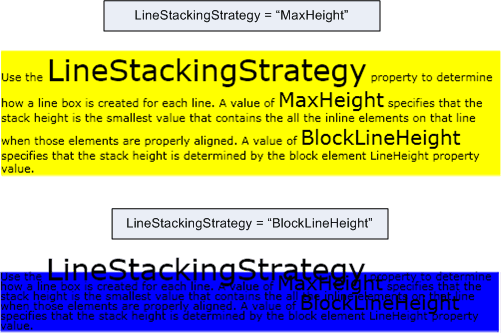
Das folgende Beispiel zeigt, wie Sie mithilfe der LineStackingStrategy Eigenschaft bestimmen, wie die Zeilenfelder für Textzeilen einer .TextBlock Der erste TextBlock hat einen LineStackingStrategy Wert von MaxHeight und der zweite TextBlock hat einen Wert von BlockLineHeight.
<Page xmlns="http://schemas.microsoft.com/winfx/2006/xaml/presentation"
  xmlns:x="http://schemas.microsoft.com/winfx/2006/xaml">
  <StackPanel>

    <!-- This TextBlock has a LineStackingStrategy set to "MaxHeight". -->
    <TextBlock LineStackingStrategy="MaxHeight" LineHeight="10" Width="500" TextWrapping="Wrap"
     Background="Yellow">
      Use the <Span FontSize="30">LineStackingStrategy</Span> property to determine how a line box is
      created for each line. A value of <Span FontSize="20">MaxHeight</Span> specifies that the stack
      height is the smallest value that contains all the inline elements on that line when those
      elements are properly aligned. A value of <Span FontSize="20">BlockLineHeight</Span> specifies
      that the stack height is determined by the block element LineHeight property value.
    </TextBlock>

    <!-- Here is the same TextBlock but the LineStackingStrategy is set to "BlockLineHeight". -->
    <TextBlock LineStackingStrategy="BlockLineHeight" LineHeight="10" Width="500" TextWrapping="Wrap"
     Background="Blue" Margin="0,40,0,0">
      Use the <Span FontSize="30">LineStackingStrategy</Span> property to determine how a line box is
      created for each line. A value of <Span FontSize="20">MaxHeight</Span> specifies that the stack
      height is the smallest value that contains all the inline elements on that line when those
      elements are properly aligned. A value of <Span FontSize="20">BlockLineHeight</Span> specifies
      that the stack height is determined by the block element LineHeight property value.
    </TextBlock>

  </StackPanel>
</Page>
Die folgende Abbildung zeigt das Ergebnis des vorherigen Codes.
Hinweise
Informationen zur Abhängigkeitseigenschaft
| Element | Wert |
|---|---|
| Bezeichnerfeld | LineStackingStrategyProperty |
Auf Metadateneigenschaften festgelegt true |
AffectsMeasure, AffectsRenderInherits |
