Hinweis
Für den Zugriff auf diese Seite ist eine Autorisierung erforderlich. Sie können versuchen, sich anzumelden oder das Verzeichnis zu wechseln.
Für den Zugriff auf diese Seite ist eine Autorisierung erforderlich. Sie können versuchen, das Verzeichnis zu wechseln.
前一篇介紹了如何利用 Windows Azure 的網站託管服務來快速架設網站,對於開發人員來說,其實也可以利用這樣的服務,部署你的 PHP 或 NodeJS 網站,而且並不一定要使用 Microsoft 的開發工具,這篇文章將以在 Mac OSX 下的操作環境,搭配 git 來部署網站。
開啟 git 部署功能
在前一篇文章中介紹了如何使用 Windows Azure 的管理介面來建立網站,在建立好網站後,便能夠在管理網站的 dashboard 中開啟 git 部署功能:
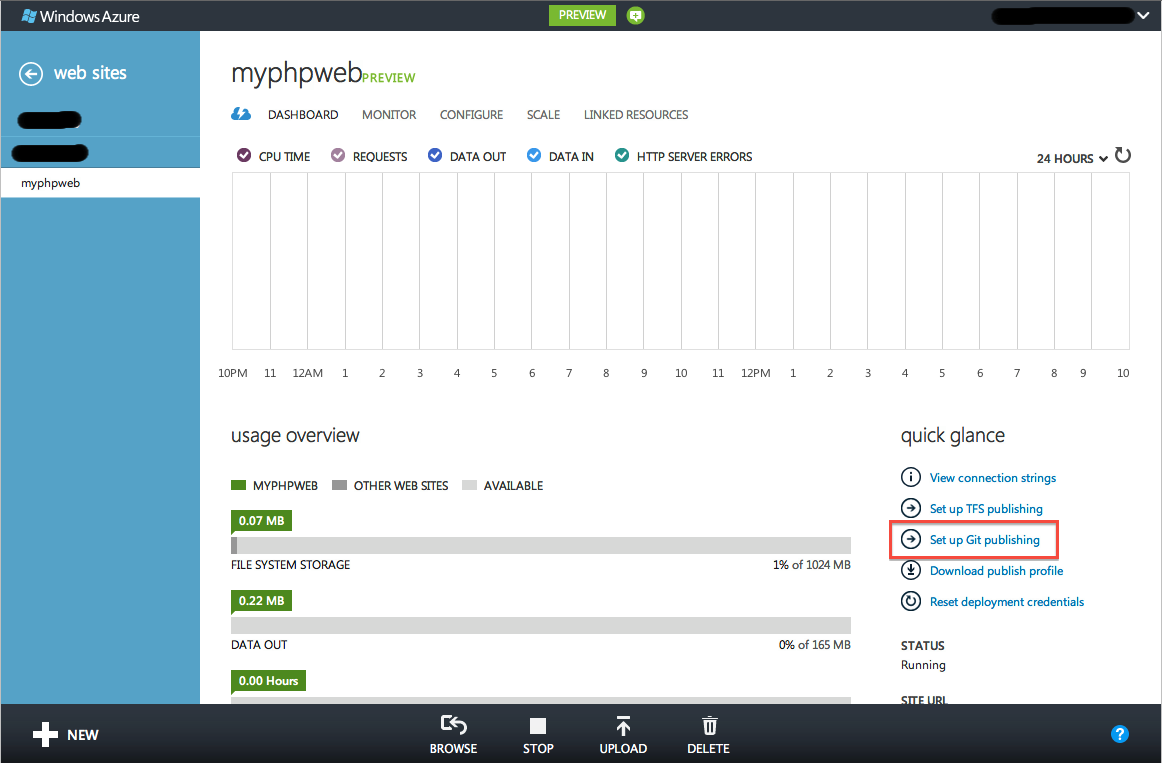
開始 git 部署功能
按下「Set up Git publishing」的功能之後,Windows Azure 便會開始為這個網站服務建立 git repository,看到下方的畫面就表示建立成功,可以準備開始部署了:

完成建立 git repository,準備開始部署
這個畫面也會顯示 git repository 的 URL,如果還沒安裝 git 的話,也可以參考下方的說明。
使用 git 部署網站
開啟 git 部署功能後,便可以在開發機上建立環境,首先建立一個 index.php 的檔案,內容如下:
 <?php
echo "Hello, world (from PHP on Windows Azure)";
接著,在你的開發機器上建立一個本地端的 git repository,並且完成第一個 commit:

建立本地端的 git repository
接下來,就是要將這個 commit 部署到 Windows Azure 的網站服務上,記住你網站服務的 URL,然後利用下方的指令將 remote repository 加入,並且把本地端的 commit push 上去:

部署到 Windows Azure
在 push 時需要你的 Windows Azure 部署帳號密碼,可以在管理介面中的 dashboard 來設定 credentials,如果設定過卻忘記了,可以 reset credentials 來重新設定:

設定部署的帳號密碼
git push 成功後便完成部署,這時可以打開網址來確認:

部署 PHP 網站成功
而當你 push 多個 commit 進入 repository 後,也可以在 Windows Azure 的管理介面(部署成功後,會在導覽列上多一個「DEPLOYMENTS」)切換上線的網站要使用哪一次的 commit:

從 repository 中選擇要上線的 commit
部署 NodeJS 網站的差異
若您是以 NodeJS 作為網站開發的程式語言,建立網站或是開啟 git 部署設定的方式都跟上述的方式一模一樣,不過由於 Windows Azure 是以 iisnode 的模組來執行 NodeJS 的應用程式,所以除了要部署的 *.js 檔案之外,還要加上一個 Web.config 檔案,用來告訴 iisnode 要以哪一個 js 檔案作為開始:
 (Web.config 檔案)
<?xml version="1.0" encoding="utf-8"?>
<configuration>
  <system.webServer>
    <modules runAllManagedModulesForAllRequests="false" />

    <!-- indicates that the server.js file is a node.js application
      to be handled by the iisnode module -->
    <handlers>
      <add name="iisnode" path="server.js" verb="*" modules="iisnode" />
    </handlers>
    <rewrite>
      <rules>
        <clear />
        <rule name="app" enabled="true" patternSyntax="ECMAScript" stopProcessing="true">
          <match url="server\.js.+" negate="true" />
          <conditions logicalGrouping="MatchAll" trackAllCaptures="false" />
          <action type="Rewrite" url="server.js" />
        </rule>
      </rules>
    </rewrite>
  </system.webServer>
</configuration>
你可以直接照抄這個檔案,不過要注意其中 <add name="iisnode" path...> 的部份(還有 <match url...>),這個例子是以 server.js 檔案作為 iisnode 預設執行的檔案,你可以將它換成你需要的檔名(如:使用 Express 開發框架就會想要換成 app.js)
結語
Windows Azure 的網站託管服務,不僅可以快速建立網站之外,也可以搭配像是 OSX + git 的開發環境來部署你的 PHP 或 NodeJS 網站應用程式,如果這與您的開發環境相似,不妨試試 Windows Azure 吧!
有任何的問題,請到 Windows Azure 官方技術論壇來討論發問囉~