Hinweis
Für den Zugriff auf diese Seite ist eine Autorisierung erforderlich. Sie können versuchen, sich anzumelden oder das Verzeichnis zu wechseln.
Für den Zugriff auf diese Seite ist eine Autorisierung erforderlich. Sie können versuchen, das Verzeichnis zu wechseln.
Vendor Workflow
Why this feature is cool!
When a new vendor is added to the system, there is certain data that needs to be entered in Vendor Maintenance. Often times this information is entered by multiple individuals and involves a step by step process. Furthermore, there might be tasks that need to be done outside of the system, such as ensuring that there is a signed contract with the vendor. Microsoft Dynamics GP 2010 will incorporate a new vendor workflow that will provide users the ability to route vendors for approval and assign actionable tasks to users to help facilitate the setting up of a new vendor.
· Vendor tasks are displayed in Microsoft Dynamics GP, Microsoft Outlook and Microsoft SharePoint (Windows SharePoint Services or Office SharePoint Server).
· The vendor can be routed to one or more people for approval or to complete an actionable task.
· The conditions in which a vendor can be routed can be specific to each business. (Example: Route to a user if a shipping method doesn’t exist.)
· If users are out of office, their approval tasks can be automatically routed to another user to act on their behalf.
· If a user does not take action on their task, there are various options for escalating the vendor for approval.
· The workflow history of a vendor approval is consolidated and easily visible within Microsoft Dynamics GP or Microsoft SharePoint.
· When a vendor is approved, the person submitting the vendor workflow (an originator) will receive a notification that the vendor has been approved.
What does it look like?
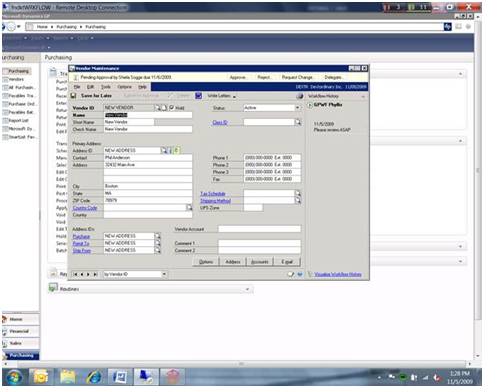
Vendor Maintenance (Cards >> Purchasing >> Vendors)