Hinweis
Für den Zugriff auf diese Seite ist eine Autorisierung erforderlich. Sie können versuchen, sich anzumelden oder das Verzeichnis zu wechseln.
Für den Zugriff auf diese Seite ist eine Autorisierung erforderlich. Sie können versuchen, das Verzeichnis zu wechseln.
Gilt für:  Mitarbeitermandanten Externe Mandanten (weitere Informationen)
Dieses Tutorial ist der letzte Teil einer Reihe, in der das Erstellen einer React-Single-Page-Anwendung (SPA) und das Vorbereiten für die Authentifizierung mit der Microsoft Identity Platform demonstriert wird. In Teil 2 dieser Reihe haben Sie einer React-SPA funktionale Komponenten hinzugefügt und eine reaktionsschnelle Benutzeroberfläche erstellt. In diesem letzten Schritt wird gezeigt, wie Sie die Anmelde- und Abmeldefunktionalität in Ihrer App testen.
In diesem Tutorial erfahren Sie:
- Hinzufügen von Code zur claimUtils.js Datei zum Erstellen der Anspruchstabelle
- An- und Abmelden bei der Anwendung
- Anzeigen der vom ID-Token zurückgegebenen Ansprüche
Voraussetzungen
- Abschluss der Voraussetzungen und Schritte im Tutorial: Erstellen von Komponenten für das Anmelden und Abmelden in einer React Einzelseiten-App.
Hinzufügen von Code zur claimUtils.js-Datei (optional)
Um eine Tabelle hinzuzufügen, die das Feature hat, vom ID-Token zurückgegebene Ansprüche anzuzeigen, können Sie Code in die Datei claimUtils.js einfügen. Dieser Codeausschnitt füllt die Anspruchstabelle mit der entsprechenden Beschreibung und dem entsprechenden Wert auf.
- Öffnen Sie utils/claimUtils.js , und fügen Sie den folgenden Codeausschnitt hinzu:
export const createClaimsTable = (claims) => {
    let claimsObj = {};
    let index = 0;

    Object.keys(claims).forEach((key) => {
        if (typeof claims[key] !== 'string' && typeof claims[key] !== 'number') return;
        switch (key) {
            case 'aud':
                populateClaim(
                    key,
                    claims[key],
                    "Identifies the intended recipient of the token. In ID tokens, the audience is your app's Application ID, assigned to your app in the Microsoft Entra admin center.",
                    index,
                    claimsObj
                );
                index++;
                break;
            case 'iss':
                populateClaim(
                    key,
                    claims[key],
                    'Identifies the issuer, or authorization server that constructs and returns the token. It also identifies the external tenant for which the user was authenticated. If the token was issued by the v2.0 endpoint, the URI will end in /v2.0. The GUID that indicates that the user is a consumer user from a Microsoft account is 9188040d-6c67-4c5b-b112-36a304b66dad.',
                    index,
                    claimsObj
                );
                index++;
                break;
            case 'iat':
                populateClaim(
                    key,
                    changeDateFormat(claims[key]),
                    'Issued At indicates when the authentication for this token occurred.',
                    index,
                    claimsObj
                );
                index++;
                break;
            case 'nbf':
                populateClaim(
                    key,
                    changeDateFormat(claims[key]),
                    'The nbf (not before) claim identifies the time (as UNIX timestamp) before which the JWT must not be accepted for processing.',
                    index,
                    claimsObj
                );
                index++;
                break;
            case 'exp':
                populateClaim(
                    key,
                    changeDateFormat(claims[key]),
                    "The exp (expiration time) claim identifies the expiration time (as UNIX timestamp) on or after which the JWT must not be accepted for processing. It's important to note that in certain circumstances, a resource may reject the token before this time. For example, if a change in authentication is required or a token revocation has been detected.",
                    index,
                    claimsObj
                );
                index++;
                break;
            case 'name':
                populateClaim(
                    key,
                    claims[key],
                    "The name claim provides a human-readable value that identifies the subject of the token. The value isn't guaranteed to be unique, it can be changed, and it's designed to be used only for display purposes. The profile scope is required to receive this claim.",
                    index,
                    claimsObj
                );
                index++;
                break;
            case 'preferred_username':
                populateClaim(
                    key,
                    claims[key],
                    'The primary username that represents the user. It could be an email address, phone number, or a generic username without a specified format. Its value is mutable and might change over time. Since it is mutable, this value must not be used to make authorization decisions. It can be used for username hints, however, and in human-readable UI as a username. The profile scope is required in order to receive this claim.',
                    index,
                    claimsObj
                );
                index++;
                break;
            case 'nonce':
                populateClaim(
                    key,
                    claims[key],
                    'The nonce matches the parameter included in the original /authorize request to the IDP. If it does not match, your application should reject the token.',
                    index,
                    claimsObj
                );
                index++;
                break;
            case 'oid':
                populateClaim(
                    key,
                    claims[key],
                    'The oid (user’s object id) is the only claim that should be used to uniquely identify a user in an external tenant. The token might have one or more of the following claim, that might seem like a unique identifier, but is not and should not be used as such.',
                    index,
                    claimsObj
                );
                index++;
                break;
            case 'tid':
                populateClaim(
                    key,
                    claims[key],
                    'The tenant ID. You will use this claim to ensure that only users from the current external tenant can access this app.',
                    index,
                    claimsObj
                );
                index++;
                break;
            case 'upn':
                populateClaim(
                    key,
                    claims[key],
                    '(user principal name) – might be unique amongst the active set of users in a tenant but tend to get reassigned to new employees as employees leave the organization and others take their place or might change to reflect a personal change like marriage.',
                    index,
                    claimsObj
                );
                index++;
                break;
            case 'email':
                populateClaim(
                    key,
                    claims[key],
                    'Email might be unique amongst the active set of users in a tenant but tend to get reassigned to new employees as employees leave the organization and others take their place.',
                    index,
                    claimsObj
                );
                index++;
                break;
            case 'acct':
                populateClaim(
                    key,
                    claims[key],
                    'Available as an optional claim, it lets you know what the type of user (homed, guest) is. For example, for an individual’s access to their data you might not care for this claim, but you would use this along with tenant id (tid) to control access to say a company-wide dashboard to just employees (homed users) and not contractors (guest users).',
                    index,
                    claimsObj
                );
                index++;
                break;
            case 'sid':
                populateClaim(key, claims[key], 'Session ID, used for per-session user sign-out.', index, claimsObj);
                index++;
                break;
            case 'sub':
                populateClaim(
                    key,
                    claims[key],
                    'The sub claim is a pairwise identifier - it is unique to a particular application ID. If a single user signs into two different apps using two different client IDs, those apps will receive two different values for the subject claim.',
                    index,
                    claimsObj
                );
                index++;
                break;
            case 'ver':
                populateClaim(
                    key,
                    claims[key],
                    'Version of the token issued by the Microsoft identity platform',
                    index,
                    claimsObj
                );
                index++;
                break;
            case 'uti':
            case 'rh':
                index++;
                break;
            case '_claim_names':
            case '_claim_sources':
            default:
                populateClaim(key, claims[key], '', index, claimsObj);
                index++;
        }
    });

    return claimsObj;
};

/**
 * Populates claim, description, and value into an claimsObject
 * @param {String} claim
 * @param {String} value
 * @param {String} description
 * @param {Number} index
 * @param {Object} claimsObject
 */
const populateClaim = (claim, value, description, index, claimsObject) => {
    let claimsArray = [];
    claimsArray[0] = claim;
    claimsArray[1] = value;
    claimsArray[2] = description;
    claimsObject[index] = claimsArray;
};

/**
 * Transforms Unix timestamp to date and returns a string value of that date
 * @param {String} date Unix timestamp
 * @returns
 */
const changeDateFormat = (date) => {
    let dateObj = new Date(date * 1000);
    return `${date} - [${dateObj.toString()}]`;
};
Ausführen Ihres Projekts und Anmelden
Nachdem alle erforderlichen Codeschnipsel hinzugefügt wurden, kann die Anwendung jetzt in einem Webbrowser aufgerufen und getestet werden.
Öffnen Sie ein neues Terminalfenster, und führen Sie den folgenden Befehl aus, um Ihren Express-Webserver zu starten.
npm startKopieren Sie die
http-URL, die im Terminal angezeigt wird, z. B.http://localhost:3000, und fügen Sie sie in einen Browser ein. Wir empfehlen die Verwendung einer privaten oder inkognito-Browsersitzung.Melden Sie sich mit einem Konto an, das für den Mandanten registriert ist.
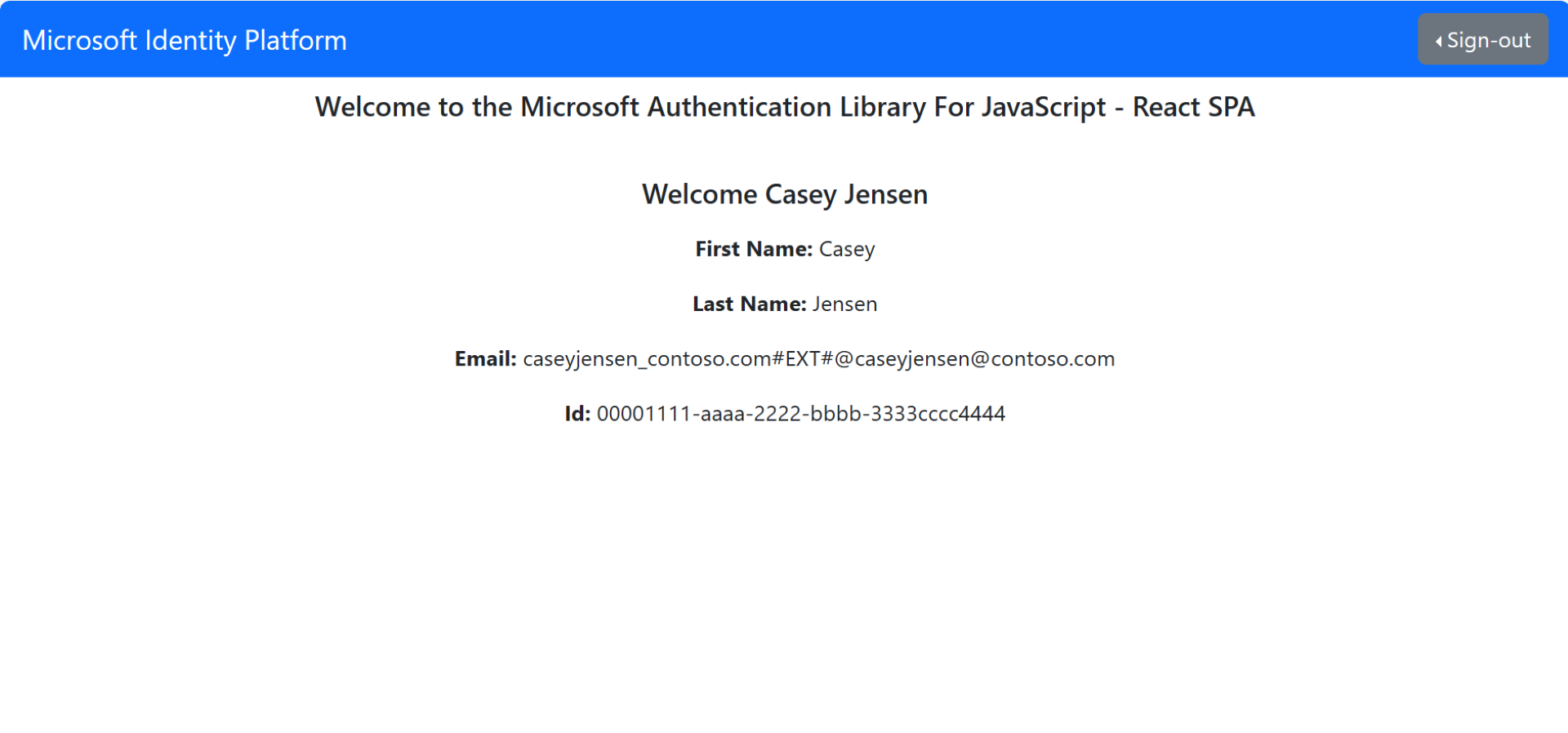
Eine Schnittstelle ähnlich dem folgenden Screenshot wird angezeigt, die angibt, dass Sie sich bei der Anwendung angemeldet haben. Wenn Sie die Anspruchstabelle hinzugefügt haben, können Sie die vom ID-Token zurückgegebenen Ansprüche anzeigen.
Abmelden von der Anwendung
- Suchen Sie die Abmelden-Schaltfläche auf der Seite und wählen Sie sie aus.
- Sie werden aufgefordert, ein Konto zum Abmelden auswählen. Wählen Sie das Konto aus, das Sie zum Anmelden verwendet haben.
Es wird eine Meldung angezeigt, die angibt, dass Sie sich abgemeldet haben. Sie können nun das Browserfenster schließen.
Verwandte Inhalte
- Schnellstart: Schützen einer ASP.NET Core-Web-API mit der Microsoft Identity Platform.
- Erfahren Sie mehr, indem Sie eine React SPA erstellen, die Benutzer in der folgenden mehrteiligen Tutorial-Reihe anmeldet.
- Aktivieren der Kennwortzurücksetzung.
- Anpassen des Standardbrandings
- Konfigurieren der Anmeldung mit Google