Hinweis
Für den Zugriff auf diese Seite ist eine Autorisierung erforderlich. Sie können versuchen, sich anzumelden oder das Verzeichnis zu wechseln.
Für den Zugriff auf diese Seite ist eine Autorisierung erforderlich. Sie können versuchen, das Verzeichnis zu wechseln.
This article is not available for the selected development language.
Middleware
Turn middleware is how a 2.1 app runs logic on every activity it receives — before that activity reaches your handlers. Use it for cross-cutting concerns like logging, metrics, and request enrichment.
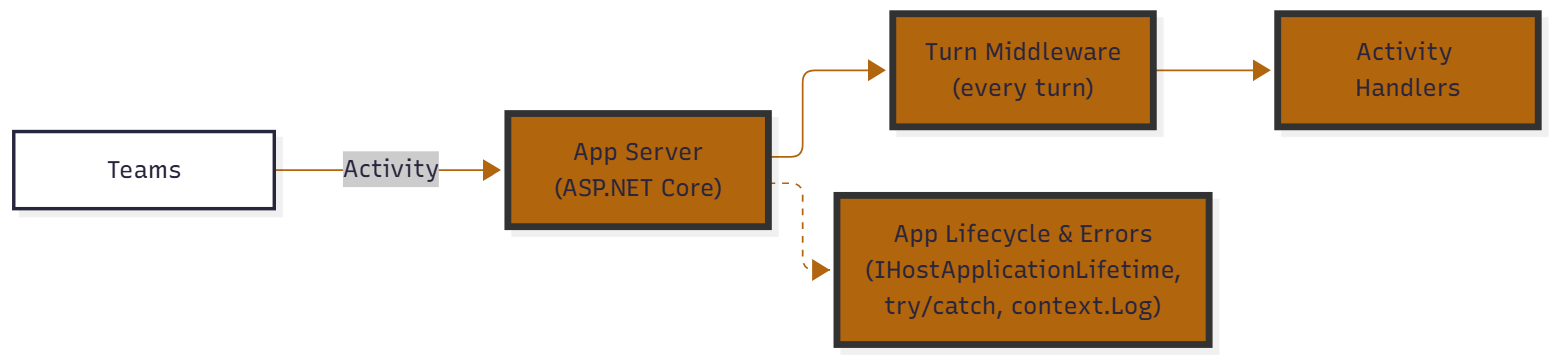
Relationship to SDK 2.0
If you're coming from SDK 2.0, the plugin event bus is gone. The table below maps each thing you used to handle in 2.0 onto its 2.1 mechanism:
SDK 2.0 (Legacy)
| Event Name | Description |
|---|---|
start |
Triggered when your application starts. Useful for setup or boot-time logging. |
signin |
Triggered during a sign-in flow via Teams. |
error |
Triggered when an unhandled error occurs in your app. Great for diagnostics. |
activity |
A catch-all for incoming Teams activities (messages, commands, etc.). |
activity.response |
Triggered when your app sends a response to an activity. Useful for logging. |
activity.sent |
Triggered when an activity is sent (not necessarily in response). |
SDK 2.1 (current)
In SDK 2.1 there is no separate plugin event bus. Instead, these concerns map onto standard .NET building blocks:
| What you want to react to | How you handle it in 2.1 |
|---|---|
| Cross-cutting logic on every turn (logging, metrics, enrichment) | Turn middleware — implement ITurnMiddleware and register with teams.UseMiddleware(...) |
| Incoming Teams activity | Dedicated handlers (OnMessage, OnMembersAdded, OnInstall, …) or OnEvent for custom event activities |
| App start / stop | ASP.NET Core IHostApplicationLifetime (ApplicationStarted, ApplicationStopping) |
| Sign-in completed / failed | teams.GetOAuthFlow(name).OnSignInComplete(...) / OnSignInFailure(...) |
| Unhandled error in a handler | try/catch with context.Log, or standard ASP.NET Core exception handling (BotHandlerException wraps the failure) |
Turn middleware
Turn middleware runs on every incoming activity, in registration order, before your activity handlers. Implement ITurnMiddleware — do your work, then call nextTurn to pass control down the pipeline — and register it with teams.UseMiddleware(...). This is the right place for logging, metrics, or any logic that should apply to the whole app.
For example, to observe (a catch-all) and log every incoming activity:
SDK 2.0 (Legacy)
When an activity is received, log its JSON payload.
app.OnActivity((sender, @event) =>
{
    app.Logger.Info(@event.Activity.ToString());
});
SDK 2.1 (current)
using Microsoft.Teams.Apps;
using Microsoft.Teams.Core;
using Microsoft.Teams.Core.Schema;

internal class ActivityLoggingMiddleware : ITurnMiddleware
{
    public async Task OnTurnAsync(
        BotApplication botApplication,
        CoreActivity activity,
        NextTurn nextTurn,
        CancellationToken cancellationToken = default)
    {
        // When an activity is received, log its payload.
        Console.WriteLine(activity.ToString());
        await nextTurn(cancellationToken);
    }
}
Register it during startup:
teams.UseMiddleware(new ActivityLoggingMiddleware());
Handling errors
SDK 2.0 (Legacy)
app.OnError((sender, @event) =>
{
    // do something with the error
    app.Logger.Info(@event.Exception.ToString());
});
SDK 2.1 (current)
Handle errors where they occur and log them through context.Log:
teams.OnMessage(async (context, cancellationToken) =>
{
    try
    {
        // ... your handler logic
    }
    catch (Exception ex)
    {
        // do something with the error
        context.Log.Error(ex.ToString());
    }
});
For app-wide error handling, use standard ASP.NET Core exception-handling middleware — failures during activity processing surface as a BotHandlerException that wraps the original exception and the offending activity.