Hinweis
Für den Zugriff auf diese Seite ist eine Autorisierung erforderlich. Sie können versuchen, sich anzumelden oder das Verzeichnis zu wechseln.
Für den Zugriff auf diese Seite ist eine Autorisierung erforderlich. Sie können versuchen, das Verzeichnis zu wechseln.
TableLayout ist einViewGroup das untergeordnete Element anzeigtView -Elemente in Zeilen und Spalten.
Starten Sie ein neues Projekt mit dem Namen HelloTableLayout.
Öffnen Sie die Datei Resources/Layout/content_main.xml, und fügen Sie Folgendes ein:
<?xml version="1.0" encoding="utf-8"?>
<TableLayout xmlns:android="http://schemas.android.com/apk/res/android"
    android:layout_width="fill_parent"
    android:layout_height="fill_parent"
    android:stretchColumns="1">

    <TableRow
        android:layout_width="match_parent"
        android:layout_height="match_parent">
        <TextView
            android:layout_width="wrap_content"
            android:layout_height="wrap_content"
            android:layout_column="1"
            android:text="Open..."
            android:padding="3dip"/>
        <TextView
            android:layout_width="wrap_content"
            android:layout_height="wrap_content"
            android:text="Ctrl-O"
            android:gravity="right"
            android:padding="3dip"/>
    </TableRow>

    <TableRow
        android:layout_width="match_parent"
        android:layout_height="match_parent">
        <TextView
            android:layout_width="wrap_content"
            android:layout_height="wrap_content"
            android:layout_column="1"
            android:text="Save..."
            android:padding="3dip"/>
        <TextView
            android:layout_width="wrap_content"
            android:layout_height="wrap_content"
            android:text="Ctrl-S"
            android:gravity="right"
            android:padding="3dip"/>
    </TableRow>

    <TableRow
        android:layout_width="match_parent"
        android:layout_height="match_parent">
        <TextView
            android:layout_width="wrap_content"
            android:layout_height="wrap_content"
            android:layout_column="1"
            android:text="Save As..."
            android:padding="3dip"/>
        <TextView
            android:layout_width="wrap_content"
            android:layout_height="wrap_content"
            android:text="Ctrl-Shift-S"
            android:gravity="right"
            android:padding="3dip"/>
    </TableRow>

    <View
        android:layout_width="wrap_content"
        android:layout_height="2dip"
        android:background="#FF909090"/>

    <TableRow
        android:layout_width="match_parent"
        android:layout_height="match_parent">
        <TextView
            android:layout_width="wrap_content"
            android:layout_height="wrap_content"
            android:text="X"
            android:padding="3dip"/>
        <TextView
            android:layout_width="wrap_content"
            android:layout_height="wrap_content"
            android:text="Import..."
            android:padding="3dip"/>
    </TableRow>

    <TableRow
        android:layout_width="match_parent"
        android:layout_height="match_parent">
        <TextView
            android:layout_width="wrap_content"
            android:layout_height="wrap_content"
            android:text="X"
            android:padding="3dip"/>
        <TextView
            android:layout_width="wrap_content"
            android:layout_height="wrap_content"
            android:text="Export..."
            android:padding="3dip"/>
        <TextView
            android:layout_width="wrap_content"
            android:layout_height="wrap_content"
            android:text="Ctrl-E"
            android:gravity="right"
            android:padding="3dip"/>
    </TableRow>

    <View
        android:layout_width="wrap_content"
        android:layout_height="2dip"
        android:background="#FF909090"/>

    <TableRow
        android:layout_width="match_parent"
        android:layout_height="match_parent">
        <TextView
            android:layout_width="wrap_content"
            android:layout_height="wrap_content"
            android:layout_column="1"
            android:text="Quit"
            android:padding="3dip"/>
    </TableRow>
</TableLayout>
Beachten Sie, dass dies der Struktur einer HTML-Tabelle ähnelt. TheTableLayout -Element ähnelt dem HTML-Element <table> ;TableRow ist wie ein <tr> Element, aber für die Zellen können Sie jede Art von View Element verwenden. In diesem Beispiel wird einTextView wird für jede Zelle verwendet. Zwischen einigen Zeilen gibt es auch eine grundlegende View, die verwendet wird, um eine horizontale Linie zu zeichnen.
Stellen Sie sicher, dass Ihre HelloTableLayout-Aktivität dieses Layout imOnCreate()-Methode:
protected override void OnCreate (Bundle savedInstanceState)
{
    base.OnCreate (savedInstanceState);
    SetContentView (Resource.Layout.Main);
}
Die SetContentView(int)) -Methode lädt die Layoutdatei für die , die Activitydurch die Ressourcen-ID angegeben wird – Resource.Layout.Main bezieht sich auf die Layoutdatei Resources/Layout/Main.axml .
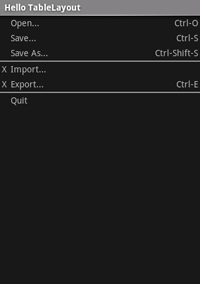
Führen Sie die Anwendung aus. Daraufhin sollte Folgendes angezeigt werden:
Referenzen
Teile dieser Seite sind Änderungen, die auf Arbeiten basieren, die vom Android Open Source-Projekt erstellt und freigegeben wurden und gemäß den in der Creative Commons 2.5 Attribution License beschriebenen Begriffen verwendet werden.