Microsoft Foundry Agent Service uses three core runtime components—agents, conversations, and responses—to power stateful, multi-turn interactions. An agent uses a model from the Foundry model catalog, along with instructions and tools. A conversation persists history across turns. A response is the output the agent produces when it processes input.
Choose components based on the behavior and state your application needs:
| Component |
Relationship |
Use it when |
| Agent |
Supplies reusable model, instructions, and tools to a response. |
Multiple requests need the same behavior or tool configuration. |
| Conversation |
Supplies persisted input and output items to responses. |
Later turns need server-side history. |
| Response |
Runs a model or agent against input and produces output items. |
Every interaction needs one unit of execution, with or without an agent or conversation. |
Start with a response for a single interaction. Add an agent for reusable behavior, a conversation for persisted history, or both. For implementation details, go directly to create an agent, generate responses, or work with conversations and conversation items.
The components work together in a predictable lifecycle. For example, consider a support assistant that answers a follow-up question:
- The application selects an agent that defines the support instructions and tools.
- It creates a conversation and adds the customer's first question as an input item.
- A response runs the agent against the conversation and appends output items.
- The next response uses the same conversation, so the agent can answer a follow-up question in context.
Without a conversation, the application can instead carry context forward by referencing a previous stored response or by resending earlier items. Streaming and background mode change how the application receives a response, not the relationship among agents, conversations, and responses.
The following diagram illustrates how these components interact in a typical agent loop.
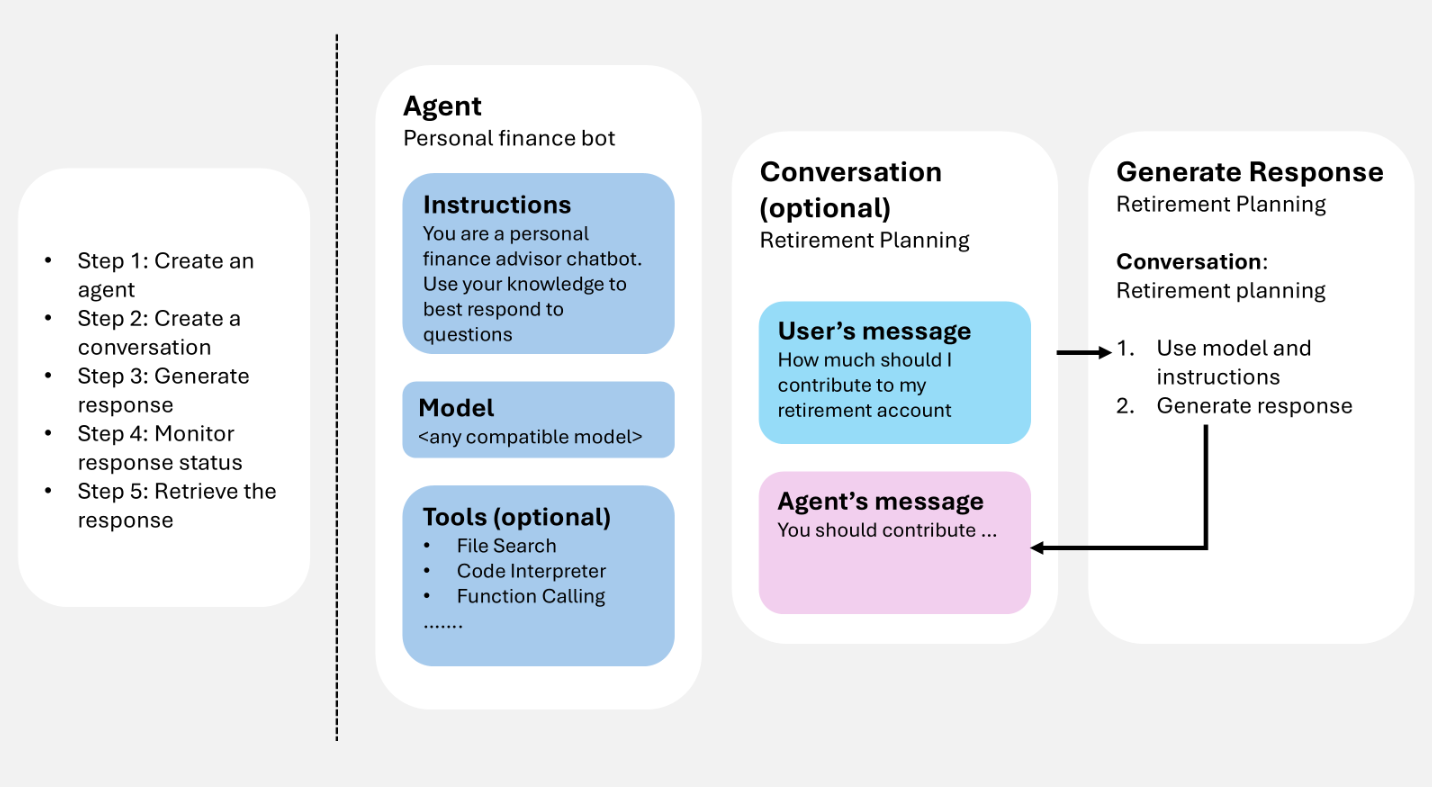
You provide user input (and optionally conversation history), the service generates a response (including tool calls when configured), and the resulting items can be reused as context for the next turn.
If you use a coding agent like GitHub Copilot to design how agents, conversations, and responses work together, the Microsoft Foundry Skill can help apply these components to your app's workflow.
Prerequisites
To run the samples in this article, you need:
pip install "azure-ai-projects>=2.0.0"
pip install azure-identity
dotnet add package Azure.AI.Projects
dotnet add package Azure.AI.Projects.Agents
dotnet add package Azure.AI.Extensions.OpenAI
dotnet add package Azure.Identity
npm install @azure/ai-projects
npm install @azure/identity
Use Node.js 22 or later with @azure/ai-projects 2.8.0.
<dependency>
    <groupId>com.azure</groupId>
    <artifactId>azure-ai-agents</artifactId>
    <version>2.2.0</version>
</dependency>
<dependency>
    <groupId>com.azure</groupId>
    <artifactId>azure-identity</artifactId>
    <version>1.18.4</version>
</dependency>
No SDK installation required. Use Azure CLI to obtain an access token:
az login
Create an agent
An agent is a persisted orchestration definition that combines AI models, instructions, code, tools, parameters, and optional safety or governance controls.
Store agents as named, versioned assets in Microsoft Foundry. During response generation, the agent definition works with interaction history (conversation or previous response) to process and respond to user input.
The following example creates a prompt agent with a name, model, and instructions. Use the project client for agent creation and versioning.
from azure.identity import DefaultAzureCredential
from azure.ai.projects import AIProjectClient
from azure.ai.projects.models import PromptAgentDefinition

# Format: "https://resource_name.services.ai.azure.com/api/projects/project_name"
PROJECT_ENDPOINT = "your_project_endpoint"

# Create project client to call Foundry API
project = AIProjectClient(
    endpoint=PROJECT_ENDPOINT,
    credential=DefaultAzureCredential(),
)

# Create a prompt agent
agent = project.agents.create_version(
    agent_name="my-agent",
    definition=PromptAgentDefinition(
        model="gpt-5-mini",
        instructions="You are a helpful assistant.",
    ),
)
print(f"Agent: {agent.name}, Version: {agent.version}")
using Azure.Identity;
using Azure.AI.Projects;

// Format: "https://resource_name.services.ai.azure.com/api/projects/project_name"
var projectEndpoint = "your_project_endpoint";

// Create project client to call Foundry API
AIProjectClient projectClient = new(
    endpoint: new Uri(projectEndpoint),
    tokenProvider: new DefaultAzureCredential());

// Create a prompt agent
ProjectsAgentVersion agent = await projectClient.AgentAdministrationClient
    .CreateAgentVersionAsync(
        agentName: "my-agent",
        options: new(
            new DeclarativeAgentDefinition("gpt-5-mini")
            {
                Instructions = "You are a helpful assistant.",
            }));
Console.WriteLine($"Agent: {agent.Name}, Version: {agent.Version}");
import { DefaultAzureCredential } from "@azure/identity";
import { AIProjectClient } from "@azure/ai-projects";

// Format: "https://resource_name.services.ai.azure.com/api/projects/project_name"
const PROJECT_ENDPOINT = "your_project_endpoint";

// Create project client to call Foundry API
const project = new AIProjectClient(PROJECT_ENDPOINT, new DefaultAzureCredential());

// Create a prompt agent
const agent = await project.agents.createVersion(
  "my-agent",
  {
    kind: "prompt",
    model: "gpt-5-mini",
    instructions: "You are a helpful assistant.",
  },
);
console.log(`Agent: ${agent.name}, Version: ${agent.version}`);
import com.azure.ai.agents.AgentsClientBuilder;
import com.azure.ai.agents.AgentsClient;
import com.azure.ai.agents.models.PromptAgentDefinition;
import com.azure.identity.DefaultAzureCredentialBuilder;

// Format: "https://resource_name.services.ai.azure.com/api/projects/project_name"
String projectEndpoint = "your_project_endpoint";

// Create agents client to call Foundry API
AgentsClient agentsClient = new AgentsClientBuilder()
    .credential(new DefaultAzureCredentialBuilder().build())
    .endpoint(projectEndpoint)
    .buildAgentsClient();

// Create a prompt agent
PromptAgentDefinition definition = new PromptAgentDefinition("gpt-5-mini");
definition.setInstructions("You are a helpful assistant.");

var agent = agentsClient.createAgentVersion("my-agent", definition);
System.out.println("Agent: " + agent.getName() + ", Version: " + agent.getVersion());
# Configuration
ENDPOINT="https://{resource_name}.services.ai.azure.com/api/projects/{project_name}"
ACCESS_TOKEN="$(az account get-access-token --resource https://ai.azure.com/ --query accessToken -o tsv)"

# Create a prompt agent
curl -X POST "${ENDPOINT}/agents?api-version=v1" \
  -H "Authorization: Bearer ${ACCESS_TOKEN}" \
  -H "Content-Type: application/json" \
  -d '{
    "name": "my-agent",
    "definition": {
      "kind": "prompt",
      "model": "gpt-5-mini",
      "instructions": "You are a helpful assistant."
    }
  }'
Note
Agents are now identified using the agent name and agent version. They don't have a GUID called AgentID anymore.
For additional agent types (hosted), see Agent development lifecycle.
Tools extend what an agent can do beyond generating text. When you attach tools to an agent, the agent can call external services, run code, search files, and access data sources during response generation—using tools such as web search or function calling.
You can attach one or more tools when you create an agent. During response generation, the agent decides whether to call a tool based on the user input and its instructions. The following example creates an agent with a web search tool attached.
from azure.identity import DefaultAzureCredential
from azure.ai.projects import AIProjectClient
from azure.ai.projects.models import PromptAgentDefinition, WebSearchTool

PROJECT_ENDPOINT = "your_project_endpoint"

project = AIProjectClient(
    endpoint=PROJECT_ENDPOINT,
    credential=DefaultAzureCredential(),
)

# Create an agent with a web search tool
agent = project.agents.create_version(
    agent_name="my-tool-agent",
    definition=PromptAgentDefinition(
        model="gpt-5-mini",
        instructions="You are a helpful assistant that can search the web.",
        tools=[WebSearchTool()],
    ),
)
print(f"Agent: {agent.name}, Version: {agent.version}")
using Azure.Identity;
using Azure.AI.Projects;

var projectEndpoint = "your_project_endpoint";

AIProjectClient projectClient = new(
    endpoint: new Uri(projectEndpoint),
    tokenProvider: new DefaultAzureCredential());

// Create an agent with a web search tool
ProjectsAgentVersion agent = await projectClient.AgentAdministrationClient
    .CreateAgentVersionAsync(
        agentName: "my-tool-agent",
        options: new(
            new DeclarativeAgentDefinition("gpt-5-mini")
            {
                Instructions = "You are a helpful assistant that can search the web.",
                Tools = { ResponseTool.CreateWebSearchTool() },
            }));
Console.WriteLine($"Agent: {agent.Name}, Version: {agent.Version}");
import { DefaultAzureCredential } from "@azure/identity";
import { AIProjectClient } from "@azure/ai-projects";

const PROJECT_ENDPOINT = "your_project_endpoint";
const project = new AIProjectClient(PROJECT_ENDPOINT, new DefaultAzureCredential());

// Create an agent with a web search tool
const agent = await project.agents.createVersion(
  "my-tool-agent",
  {
    kind: "prompt",
    model: "gpt-5-mini",
    instructions: "You are a helpful assistant that can search the web.",
    tools: [{ type: "web_search_preview" }],
  },
);
console.log(`Agent: ${agent.name}, Version: ${agent.version}`);
import com.azure.ai.agents.AgentsClientBuilder;
import com.azure.ai.agents.AgentsClient;
import com.azure.ai.agents.models.PromptAgentDefinition;
import com.azure.ai.agents.models.WebSearchPreviewTool;
import com.azure.identity.DefaultAzureCredentialBuilder;
import java.util.Collections;

String projectEndpoint = "your_project_endpoint";

AgentsClient agentsClient = new AgentsClientBuilder()
    .credential(new DefaultAzureCredentialBuilder().build())
    .endpoint(projectEndpoint)
    .buildAgentsClient();

// Create an agent with a web search tool
WebSearchPreviewTool webSearchTool = new WebSearchPreviewTool();
PromptAgentDefinition definition = new PromptAgentDefinition("gpt-5-mini");
definition.setInstructions("You are a helpful assistant that can search the web.");
definition.setTools(Collections.singletonList(webSearchTool));

var agent = agentsClient.createAgentVersion("my-tool-agent", definition);
System.out.println("Agent: " + agent.getName() + ", Version: " + agent.getVersion());
ENDPOINT="https://{resource_name}.services.ai.azure.com/api/projects/{project_name}"
ACCESS_TOKEN="$(az account get-access-token --resource https://ai.azure.com/ --query accessToken -o tsv)"

# Create an agent with a web search tool
curl -X POST "${ENDPOINT}/agents?api-version=v1" \
  -H "Authorization: Bearer ${ACCESS_TOKEN}" \
  -H "Content-Type: application/json" \
  -d '{
    "name": "my-tool-agent",
    "definition": {
      "kind": "prompt",
      "model": "gpt-5-mini",
      "instructions": "You are a helpful assistant that can search the web.",
      "tools": [{ "type": "web_search_preview" }]
    }
  }'
For the full list of available tools and how to add them to a Toolbox, see the Toolbox overview. For best practices, see Best practices for using tools.
Generate responses
Response generation invokes the agent. The agent uses its configuration and any provided history (conversation or previous response) to perform tasks by calling models and tools. As part of response generation, the agent appends items to the conversation.
You can also generate a response without defining an agent. In this case, you provide all configurations directly in the request and use them only for that response. This approach is useful for simple scenarios with minimal tools.
Additionally, you can fork the conversation at the first response ID or second response ID
Generate a response with an agent
The following example generates a response using an agent reference, then sends a follow-up question using the previous response as context.
from azure.identity import DefaultAzureCredential
from azure.ai.projects import AIProjectClient

# Format: "https://resource_name.services.ai.azure.com/api/projects/project_name"
PROJECT_ENDPOINT = "your_project_endpoint"
AGENT_NAME = "your_agent_name"

# Create clients to call Foundry API
project = AIProjectClient(
    endpoint=PROJECT_ENDPOINT,
    credential=DefaultAzureCredential(),
)
openai = project.get_openai_client(agent_name=AGENT_NAME)

# Generate a response using the agent
response = openai.responses.create(
    input="What is the largest city in France?",
)
print(response.output_text)

# Ask a follow-up question using the previous response
follow_up = openai.responses.create(
    previous_response_id=response.id,
    input="What is the population of that city?",
)
print(follow_up.output_text)
using Azure.Identity;
using Azure.AI.Projects;
using Azure.AI.Extensions.OpenAI;

// Format: "https://resource_name.services.ai.azure.com/api/projects/project_name"
var projectEndpoint = "your_project_endpoint";
var agentName = "your_agent_name";

// Create project client to call Foundry API
AIProjectClient projectClient = new(
    endpoint: new Uri(projectEndpoint),
    tokenProvider: new DefaultAzureCredential());

// Generate a response using the agent
ProjectResponsesClient responsesClient
    = projectClient.ProjectOpenAIClient.GetProjectResponsesClientForAgent(agentName);
ResponseResult response = await responsesClient.CreateResponseAsync(
    "What is the largest city in France?");
Console.WriteLine(response.GetOutputText());

// Ask a follow-up question using the previous response
ResponseResult followUp = await responsesClient.CreateResponseAsync(
    new CreateResponseOptions
    {
        PreviousResponseId = response.Id,
        InputItems = { ResponseItem.CreateUserMessageItem(
            "What is the population of that city?") },
    });
Console.WriteLine(followUp.GetOutputText());
import { DefaultAzureCredential } from "@azure/identity";
import { AIProjectClient } from "@azure/ai-projects";

// Format: "https://resource_name.services.ai.azure.com/api/projects/project_name"
const PROJECT_ENDPOINT = "your_project_endpoint";
const AGENT_NAME = "your_agent_name";

// Create clients to call Foundry API
const project = new AIProjectClient(PROJECT_ENDPOINT, new DefaultAzureCredential());
const openai = project.getOpenAIClient();

// Generate a response using the agent
const response = await openai.responses.create(
  { input: "What is the largest city in France?" },
  { body: { agent_reference: { name: AGENT_NAME, type: "agent_reference" } } },
);
console.log(response.output_text);

// Ask a follow-up question using the previous response
const followUp = await openai.responses.create(
  {
    input: "What is the population of that city?",
    previous_response_id: response.id,
  },
  { body: { agent_reference: { name: AGENT_NAME, type: "agent_reference" } } },
);
console.log(followUp.output_text);
import com.azure.ai.agents.*;
import com.azure.ai.agents.models.AgentReference;
import com.azure.ai.agents.models.AzureCreateResponseOptions;
import com.azure.identity.DefaultAzureCredentialBuilder;
import com.openai.models.responses.Response;
import com.openai.models.responses.ResponseCreateParams;

// Format: "https://resource_name.services.ai.azure.com/api/projects/project_name"
String projectEndpoint = "your_project_endpoint";
String agentName = "your_agent_name";

// Create clients to call Foundry API
AgentsClientBuilder builder = new AgentsClientBuilder()
    .credential(new DefaultAzureCredentialBuilder().build())
    .endpoint(projectEndpoint);
ResponsesClient responsesClient = builder.buildResponsesClient();

// Generate a response using the agent
AgentReference agentRef = new AgentReference(agentName);

Response response = responsesClient.createAzureResponse(
    new AzureCreateResponseOptions().setAgentReference(agentRef),
    ResponseCreateParams.builder()
        .input("What is the largest city in France?"));
System.out.println(response.output());

// Ask a follow-up question using the previous response
Response followUp = responsesClient.createAzureResponse(
    new AzureCreateResponseOptions().setAgentReference(agentRef),
    ResponseCreateParams.builder()
        .input("What is the population of that city?")
        .previousResponseId(response.id()));
System.out.println(followUp.output());
# Configuration
ENDPOINT="https://{resource_name}.services.ai.azure.com/api/projects/{project_name}"
ACCESS_TOKEN="$(az account get-access-token --resource https://ai.azure.com/ --query accessToken -o tsv)"
AGENT_NAME="your_agent_name"

# Generate a response using an agent
RESPONSE=$(curl -s -X POST "${ENDPOINT}/openai/v1/responses" \
  -H "Authorization: Bearer ${ACCESS_TOKEN}" \
  -H "Content-Type: application/json" \
  -d '{
    "input": "What is the largest city in France?",
    "agent_reference": {
      "name": "'"${AGENT_NAME}"'",
      "type": "agent_reference"
    }
  }')
RESPONSE_ID=$(echo "$RESPONSE" | jq -r '.id')

# Ask a follow-up question using the previous response
curl -X POST "${ENDPOINT}/openai/v1/responses" \
  -H "Authorization: Bearer ${ACCESS_TOKEN}" \
  -H "Content-Type: application/json" \
  -d '{
    "input": "What is the population of that city?",
    "previous_response_id": "'"${RESPONSE_ID}"'",
    "agent_reference": {
      "name": "'"${AGENT_NAME}"'",
      "type": "agent_reference"
    }
  }'
When an agent uses tools during response generation, the response output contains tool call items alongside the final message. You can iterate over response.output to inspect each item and display tool calls—such as web searches, function calls, or file searches—before printing the text response.
from azure.identity import DefaultAzureCredential
from azure.ai.projects import AIProjectClient

PROJECT_ENDPOINT = "your_project_endpoint"
AGENT_NAME = "your_agent_name"

project = AIProjectClient(
    endpoint=PROJECT_ENDPOINT,
    credential=DefaultAzureCredential(),
)
openai = project.get_openai_client(agent_name=AGENT_NAME)

response = openai.responses.create(
    input="What happened in the news today?",
)

# Print each output item, including tool calls
for item in response.output:
    if item.type == "web_search_call":
        print(f"[Tool] Web search: status={item.status}")
    elif item.type == "function_call":
        print(f"[Tool] Function call: {item.name}({item.arguments})")
    elif item.type == "file_search_call":
        print(f"[Tool] File search: status={item.status}")
    elif item.type == "message":
        print(f"[Assistant] {item.content[0].text}")
using Azure.Identity;
using Azure.AI.Projects;
using Azure.AI.Extensions.OpenAI;

var projectEndpoint = "your_project_endpoint";
var agentName = "your_agent_name";

AIProjectClient projectClient = new(
    endpoint: new Uri(projectEndpoint),
    tokenProvider: new DefaultAzureCredential());

ProjectResponsesClient responsesClient
    = projectClient.ProjectOpenAIClient.GetProjectResponsesClientForAgent(agentName);
ResponseResult response = await responsesClient.CreateResponseAsync(
    "What happened in the news today?");

// Print each output item, including tool calls
foreach (var item in response.OutputItems)
{
    switch (item)
    {
        case ResponseWebSearchCallItem webSearch:
            Console.WriteLine($"[Tool] Web search: status={webSearch.Status}");
            break;
        case ResponseFunctionCallItem functionCall:
            Console.WriteLine($"[Tool] Function call: {functionCall.Name}({functionCall.Arguments})");
            break;
        case ResponseFileSearchCallItem fileSearch:
            Console.WriteLine($"[Tool] File search: status={fileSearch.Status}");
            break;
        case ResponseOutputMessage message:
            Console.WriteLine($"[Assistant] {message.Content[0].Text}");
            break;
    }
}
import { DefaultAzureCredential } from "@azure/identity";
import { AIProjectClient } from "@azure/ai-projects";

const PROJECT_ENDPOINT = "your_project_endpoint";
const AGENT_NAME = "your_agent_name";

const project = new AIProjectClient(PROJECT_ENDPOINT, new DefaultAzureCredential());
const openai = project.getOpenAIClient();

const response = await openai.responses.create(
  { input: "What happened in the news today?" },
  { body: { agent_reference: { name: AGENT_NAME, type: "agent_reference" } } },
);

// Print each output item, including tool calls
for (const item of response.output) {
  switch (item.type) {
    case "web_search_call":
      console.log(`[Tool] Web search: status=${item.status}`);
      break;
    case "function_call":
      console.log(`[Tool] Function call: ${item.name}(${item.arguments})`);
      break;
    case "file_search_call":
      console.log(`[Tool] File search: status=${item.status}`);
      break;
    case "message":
      console.log(`[Assistant] ${item.content[0].text}`);
      break;
  }
}
import com.azure.ai.agents.*;
import com.azure.ai.agents.models.AgentReference;
import com.azure.ai.agents.models.AzureCreateResponseOptions;
import com.azure.identity.DefaultAzureCredentialBuilder;
import com.openai.models.responses.Response;
import com.openai.models.responses.ResponseCreateParams;
import com.openai.models.responses.ResponseOutputItem;

String projectEndpoint = "your_project_endpoint";
String agentName = "your_agent_name";

AgentsClientBuilder builder = new AgentsClientBuilder()
    .credential(new DefaultAzureCredentialBuilder().build())
    .endpoint(projectEndpoint);
ResponsesClient responsesClient = builder.buildResponsesClient();

AgentReference agentRef = new AgentReference(agentName);
Response response = responsesClient.createAzureResponse(
    new AzureCreateResponseOptions().setAgentReference(agentRef),
    ResponseCreateParams.builder()
        .input("What happened in the news today?"));

// Print each output item, including tool calls
for (ResponseOutputItem item : response.output()) {
    item.webSearchCall().ifPresent(ws ->
        System.out.println("[Tool] Web search: status=" + ws.status()));
    item.functionCall().ifPresent(fc ->
        System.out.println("[Tool] Function call: " + fc.name()
            + "(" + fc.arguments() + ")"));
    item.fileSearchCall().ifPresent(fs ->
        System.out.println("[Tool] File search: status=" + fs.status()));
    item.message().ifPresent(msg ->
        System.out.println("[Assistant] "
            + msg.content().get(0).asOutputText().text()));
}
ENDPOINT="https://{resource_name}.services.ai.azure.com/api/projects/{project_name}"
ACCESS_TOKEN="$(az account get-access-token --resource https://ai.azure.com/ --query accessToken -o tsv)"
AGENT_NAME="your_agent_name"

RESPONSE=$(curl -s -X POST "${ENDPOINT}/openai/v1/responses" \
  -H "Authorization: Bearer ${ACCESS_TOKEN}" \
  -H "Content-Type: application/json" \
  -d '{
    "input": "What happened in the news today?",
    "agent_reference": {
      "name": "'"${AGENT_NAME}"'",
      "type": "agent_reference"
    }
  }')

# Print each output item, including tool calls
echo "$RESPONSE" | jq -r '.output[] |
  if .type == "web_search_call" then "[Tool] Web search: status=\(.status)"
  elif .type == "function_call" then "[Tool] Function call: \(.name)(\(.arguments))"
  elif .type == "file_search_call" then "[Tool] File search: status=\(.status)"
  elif .type == "message" then "[Assistant] \(.content[0].text)"
  else "[Unknown] \(.type)"
  end'
Generate a response without storing
By default, the service stores response history server-side, so you can reference previous_response_id for multi-turn context. If you set store to false, the service doesn't persist the response. You must carry forward the conversation context yourself by passing previous output items as input to the next request.
This approach is useful when you need full control over conversation state, want to minimize stored data, or work in a zero-data-retention environment.
from azure.identity import DefaultAzureCredential
from azure.ai.projects import AIProjectClient

PROJECT_ENDPOINT = "your_project_endpoint"
AGENT_NAME = "your_agent_name"

project = AIProjectClient(
    endpoint=PROJECT_ENDPOINT,
    credential=DefaultAzureCredential(),
)
openai = project.get_openai_client(agent_name=AGENT_NAME)

# Generate a response without storing
response = openai.responses.create(
    input="What is the largest city in France?",
    store=False,
)
print(response.output_text)

# Carry forward context client-side by passing previous output as input
follow_up = openai.responses.create(
    input=[
        {"role": "user", "content": "What is the largest city in France?"},
        {"role": "assistant", "content": response.output_text},
        {"role": "user", "content": "What is the population of that city?"},
    ],
    store=False,
)
print(follow_up.output_text)
using Azure.Identity;
using Azure.AI.Projects;
using Azure.AI.Extensions.OpenAI;

var projectEndpoint = "your_project_endpoint";
var agentName = "your_agent_name";

AIProjectClient projectClient = new(
    endpoint: new Uri(projectEndpoint),
    tokenProvider: new DefaultAzureCredential());

// Generate a response without storing
ProjectResponsesClient responsesClient
    = projectClient.ProjectOpenAIClient.GetProjectResponsesClientForAgent(agentName);
ResponseResult response = await responsesClient.CreateResponseAsync(
    new CreateResponseOptions
    {
        InputItems = { ResponseItem.CreateUserMessageItem(
            "What is the largest city in France?") },
        Store = false,
    });
Console.WriteLine(response.GetOutputText());

// Carry forward context client-side by passing previous output as input
ResponseResult followUp = await responsesClient.CreateResponseAsync(
    new CreateResponseOptions
    {
        InputItems =
        {
            ResponseItem.CreateUserMessageItem(
                "What is the largest city in France?"),
            ResponseItem.CreateAssistantMessageItem(
                response.GetOutputText()),
            ResponseItem.CreateUserMessageItem(
                "What is the population of that city?"),
        },
        Store = false,
    });
Console.WriteLine(followUp.GetOutputText());
import { DefaultAzureCredential } from "@azure/identity";
import { AIProjectClient } from "@azure/ai-projects";

const PROJECT_ENDPOINT = "your_project_endpoint";
const AGENT_NAME = "your_agent_name";

const project = new AIProjectClient(PROJECT_ENDPOINT, new DefaultAzureCredential());
const openai = project.getOpenAIClient();

// Generate a response without storing
const response = await openai.responses.create(
  { input: "What is the largest city in France?", store: false },
  { body: { agent_reference: { name: AGENT_NAME, type: "agent_reference" } } },
);
console.log(response.output_text);

// Carry forward context client-side by passing previous output as input
const followUp = await openai.responses.create(
  {
    input: [
      { role: "user", content: "What is the largest city in France?" },
      { role: "assistant", content: response.output_text },
      { role: "user", content: "What is the population of that city?" },
    ],
    store: false,
  },
  { body: { agent_reference: { name: AGENT_NAME, type: "agent_reference" } } },
);
console.log(followUp.output_text);
import com.azure.ai.agents.*;
import com.azure.ai.agents.models.AgentReference;
import com.azure.ai.agents.models.AzureCreateResponseOptions;
import com.azure.identity.DefaultAzureCredentialBuilder;
import com.openai.models.responses.Response;
import com.openai.models.responses.ResponseCreateParams;
import com.openai.models.responses.EasyInputMessage;
import java.util.List;

String projectEndpoint = "your_project_endpoint";
String agentName = "your_agent_name";

AgentsClientBuilder builder = new AgentsClientBuilder()
    .credential(new DefaultAzureCredentialBuilder().build())
    .endpoint(projectEndpoint);
ResponsesClient responsesClient = builder.buildResponsesClient();

// Generate a response without storing
AgentReference agentRef = new AgentReference(agentName);

Response response = responsesClient.createAzureResponse(
    new AzureCreateResponseOptions().setAgentReference(agentRef),
    ResponseCreateParams.builder()
        .input("What is the largest city in France?")
        .store(false));
System.out.println(response.output());

// Carry forward context client-side by passing previous output as input
Response followUp = responsesClient.createAzureResponse(
    new AzureCreateResponseOptions().setAgentReference(agentRef),
    ResponseCreateParams.builder()
        .inputOfResponse(List.of(
            EasyInputMessage.builder()
                .role(EasyInputMessage.Role.USER)
                .content("What is the largest city in France?").build(),
            EasyInputMessage.builder()
                .role(EasyInputMessage.Role.ASSISTANT)
                .content(response.outputText()).build(),
            EasyInputMessage.builder()
                .role(EasyInputMessage.Role.USER)
                .content("What is the population of that city?").build()))
        .store(false));
System.out.println(followUp.output());
ENDPOINT="https://{resource_name}.services.ai.azure.com/api/projects/{project_name}"
ACCESS_TOKEN="$(az account get-access-token --resource https://ai.azure.com/ --query accessToken -o tsv)"
AGENT_NAME="your_agent_name"

# Generate a response without storing
RESPONSE=$(curl -s -X POST "${ENDPOINT}/openai/v1/responses" \
  -H "Authorization: Bearer ${ACCESS_TOKEN}" \
  -H "Content-Type: application/json" \
  -d '{
    "input": "What is the largest city in France?",
    "store": false,
    "agent_reference": {
      "name": "'"${AGENT_NAME}"'",
      "type": "agent_reference"
    }
  }')
OUTPUT_TEXT=$(echo "$RESPONSE" | jq -r '.output[] | select(.type=="message") | .content[0].text')

# Carry forward context client-side by passing previous output as input
curl -X POST "${ENDPOINT}/openai/v1/responses" \
  -H "Authorization: Bearer ${ACCESS_TOKEN}" \
  -H "Content-Type: application/json" \
  -d '{
    "input": [
      {"role": "user", "content": "What is the largest city in France?"},
      {"role": "assistant", "content": "'"${OUTPUT_TEXT}"'"},
      {"role": "user", "content": "What is the population of that city?"}
    ],
    "store": false,
    "agent_reference": {
      "name": "'"${AGENT_NAME}"'",
      "type": "agent_reference"
    }
  }'
Conversations and conversation items
Conversations are durable objects with unique identifiers. After creation, you can reuse them across sessions.
Conversations store items, which can include messages, tool calls, tool outputs, and other data.
Create a conversation
The following example creates a conversation with an initial user message. Use the OpenAI client (obtained from the project client) for conversations and responses.
from azure.identity import DefaultAzureCredential
from azure.ai.projects import AIProjectClient

# Format: "https://resource_name.services.ai.azure.com/api/projects/project_name"
PROJECT_ENDPOINT = "your_project_endpoint"

# Create clients to call Foundry API
project = AIProjectClient(
    endpoint=PROJECT_ENDPOINT,
    credential=DefaultAzureCredential(),
)
openai = project.get_openai_client()

# Create a conversation with an initial user message
conversation = openai.conversations.create(
    items=[
        {
            "type": "message",
            "role": "user",
            "content": "What is the largest city in France?",
        }
    ],
)
print(f"Conversation ID: {conversation.id}")
using Azure.Identity;
using Azure.AI.Projects;
using Azure.AI.Extensions.OpenAI;

// Format: "https://resource_name.services.ai.azure.com/api/projects/project_name"
var projectEndpoint = "your_project_endpoint";

// Create project client to call Foundry API
AIProjectClient projectClient = new(
    endpoint: new Uri(projectEndpoint),
    tokenProvider: new DefaultAzureCredential());

// Create a conversation
ProjectConversation conversation
    = await projectClient.ProjectOpenAIClient.GetProjectConversationsClient().CreateProjectConversationAsync();
Console.WriteLine($"Conversation ID: {conversation.Id}");
import { DefaultAzureCredential } from "@azure/identity";
import { AIProjectClient } from "@azure/ai-projects";

// Format: "https://resource_name.services.ai.azure.com/api/projects/project_name"
const PROJECT_ENDPOINT = "your_project_endpoint";

// Create clients to call Foundry API
const project = new AIProjectClient(PROJECT_ENDPOINT, new DefaultAzureCredential());
const openai = project.getOpenAIClient();

// Create a conversation with an initial user message
const conversation = await openai.conversations.create({
  items: [
    {
      type: "message",
      role: "user",
      content: "What is the largest city in France?",
    },
  ],
});
console.log(`Conversation ID: ${conversation.id}`);
import com.azure.ai.agents.AgentsClientBuilder;
import com.azure.identity.DefaultAzureCredentialBuilder;
import com.openai.models.conversations.Conversation;
import com.openai.services.blocking.ConversationService;

// Format: "https://resource_name.services.ai.azure.com/api/projects/project_name"
String projectEndpoint = "your_project_endpoint";

// Create conversations client to call Foundry API
ConversationService conversationService = new AgentsClientBuilder()
    .credential(new DefaultAzureCredentialBuilder().build())
    .endpoint(projectEndpoint)
    .buildOpenAIClient()
    .conversations();

// Create a conversation
Conversation conversation = conversationService.create();
System.out.println("Conversation ID: " + conversation.id());
# Configuration
ENDPOINT="https://{resource_name}.services.ai.azure.com/api/projects/{project_name}"
ACCESS_TOKEN="$(az account get-access-token --resource https://ai.azure.com/ --query accessToken -o tsv)"

# Create a conversation with an initial user message
curl -X POST "${ENDPOINT}/openai/v1/conversations" \
  -H "Authorization: Bearer ${ACCESS_TOKEN}" \
  -H "Content-Type: application/json" \
  -d '{
    "items": [
      {
        "type": "message",
        "role": "user",
        "content": "What is the largest city in France?"
      }
    ]
  }'
When to use a conversation
Use a conversation when you want:
- Multi-turn continuity: Keep a stable history across turns without rebuilding context yourself.
- Cross-session continuity: Reuse the same conversation for a user who returns later.
- Easier debugging: Inspect what happened over time (for example, tool calls and outputs).
When a conversation is used to generate a response (with or without an agent), the full conversation is provided as input to the model. The generated response is then appended to the same conversation.
Note
If the conversation exceeds the model's supported context size, the model will automatically truncate the input context. The conversation itself is not truncated, but only a subset of it is used to generate the response.
If you don't create a conversation, you can still build multi-turn flows by using the output from a previous response as the starting point for the next request. This approach gives you more flexibility than the older thread-based pattern, where state was tightly coupled to thread objects. For migration guidance, see Migrate to the Agents SDK.
Conversation item types
Conversations store items rather than only chat messages. Items capture what happened during response generation so the next turn can reuse that context.
Common item types include:
- Message items: User or assistant messages.
- Tool call items: Records of tool invocations the agent attempted.
- Tool output items: Outputs returned by tools (for example, retrieval results).
- Output items: The response content you display back to the user.
Add items to a conversation
After you create a conversation, use conversations.items.create() to add subsequent user messages or other items.
# Add a follow-up message to an existing conversation
openai.conversations.items.create(
    conversation_id=conversation.id,
    items=[
        {
            "type": "message",
            "role": "user",
            "content": "What about Germany?",
        }
    ],
)
// In C#, send follow-up input directly
// through the responses client
var followUp = await responsesClient.CreateResponseAsync(
    "What about Germany?");
Console.WriteLine(followUp.GetOutputText());
// Add a follow-up message to an existing conversation
await openai.conversations.items.create(
  conversation.id,
  {
    items: [
      {
        type: "message",
        role: "user",
        content: "What about Germany?",
      },
    ],
  },
);
// In Java, send follow-up input directly
// through the responses client
AgentReference agentRef = new AgentReference("my-agent");

Response followUp = responsesClient.createAzureResponse(
    new AzureCreateResponseOptions().setAgentReference(agentRef),
    ResponseCreateParams.builder()
        .input("What about Germany?"));
System.out.println(followUp.output());
# Add items to an existing conversation
CONVERSATION_ID="conv_abc123"

curl -X POST "${ENDPOINT}/openai/v1/conversations/${CONVERSATION_ID}/items" \
  -H "Authorization: Bearer ${ACCESS_TOKEN}" \
  -H "Content-Type: application/json" \
  -d '{
    "items": [
      {
        "type": "message",
        "role": "user",
        "content": "What about Germany?"
      }
    ]
  }'
Use a conversation with an agent
Combine a conversation with an agent reference to maintain history across multiple turns. The agent processes all items in the conversation and appends its output automatically.
from azure.identity import DefaultAzureCredential
from azure.ai.projects import AIProjectClient

PROJECT_ENDPOINT = "your_project_endpoint"
AGENT_NAME = "your_agent_name"

# Create clients to call Foundry API
project = AIProjectClient(
    endpoint=PROJECT_ENDPOINT,
    credential=DefaultAzureCredential(),
)
openai = project.get_openai_client(agent_name=AGENT_NAME)

# Create a conversation for multi-turn chat
conversation = openai.conversations.create()

# First turn
response = openai.responses.create(
    conversation=conversation.id,
    input="What is the largest city in France?",
)
print(response.output_text)

# Follow-up turn in the same conversation
follow_up = openai.responses.create(
    conversation=conversation.id,
    input="What is the population of that city?",
)
print(follow_up.output_text)
using Azure.Identity;
using Azure.AI.Projects;
using Azure.AI.Extensions.OpenAI;

var projectEndpoint = "your_project_endpoint";
var agentName = "your_agent_name";

AIProjectClient projectClient = new(
    endpoint: new Uri(projectEndpoint),
    tokenProvider: new DefaultAzureCredential());

// Create a conversation for multi-turn chat
ProjectConversation conversation
    = await projectClient.ProjectOpenAIClient.GetProjectConversationsClient().CreateProjectConversationAsync();

// First turn
ProjectResponsesClient responsesClient
    = projectClient.ProjectOpenAIClient.GetProjectResponsesClientForAgent(
        agentName, conversation);
ResponseResult response = await responsesClient.CreateResponseAsync(
    "What is the largest city in France?");
Console.WriteLine(response.GetOutputText());

// Follow-up turn in the same conversation
ResponseResult followUp = await responsesClient.CreateResponseAsync(
    "What is the population of that city?");
Console.WriteLine(followUp.GetOutputText());
import { DefaultAzureCredential } from "@azure/identity";
import { AIProjectClient } from "@azure/ai-projects";

const PROJECT_ENDPOINT = "your_project_endpoint";
const AGENT_NAME = "your_agent_name";

const project = new AIProjectClient(PROJECT_ENDPOINT, new DefaultAzureCredential());
const openai = project.getOpenAIClient();

// Create a conversation for multi-turn chat
const conversation = await openai.conversations.create();

// First turn
const response = await openai.responses.create(
  { conversation: conversation.id, input: "What is the largest city in France?" },
  { body: { agent_reference: { name: AGENT_NAME, type: "agent_reference" } } },
);
console.log(response.output_text);

// Follow-up turn in the same conversation
const followUp = await openai.responses.create(
  { conversation: conversation.id, input: "What is the population of that city?" },
  { body: { agent_reference: { name: AGENT_NAME, type: "agent_reference" } } },
);
console.log(followUp.output_text);
import com.azure.ai.agents.*;
import com.azure.ai.agents.models.AgentReference;
import com.azure.ai.agents.models.AzureCreateResponseOptions;
import com.azure.identity.DefaultAzureCredentialBuilder;
import com.openai.models.conversations.Conversation;
import com.openai.models.responses.Response;
import com.openai.models.responses.ResponseCreateParams;
import com.openai.services.blocking.ConversationService;

String projectEndpoint = "your_project_endpoint";
String agentName = "your_agent_name";

AgentsClientBuilder builder = new AgentsClientBuilder()
    .credential(new DefaultAzureCredentialBuilder().build())
    .endpoint(projectEndpoint);
ResponsesClient responsesClient = builder.buildResponsesClient();
ConversationService conversationService
    = builder.buildOpenAIClient().conversations();

// Create a conversation for multi-turn chat
Conversation conversation = conversationService.create();

// First turn
AgentReference agentRef = new AgentReference(agentName);
Response response = responsesClient.createAzureResponse(
    new AzureCreateResponseOptions().setAgentReference(agentRef),
    ResponseCreateParams.builder()
        .conversation(conversation.id())
        .input("What is the largest city in France?"));
System.out.println(response.output());

// Follow-up turn in the same conversation
Response followUp = responsesClient.createAzureResponse(
    new AzureCreateResponseOptions().setAgentReference(agentRef),
    ResponseCreateParams.builder()
        .conversation(conversation.id())
        .input("What is the population of that city?"));
System.out.println(followUp.output());
ENDPOINT="https://{resource_name}.services.ai.azure.com/api/projects/{project_name}"
ACCESS_TOKEN="$(az account get-access-token --resource https://ai.azure.com/ --query accessToken -o tsv)"
AGENT_NAME="your_agent_name"

# Create a conversation
CONVERSATION=$(curl -s -X POST "${ENDPOINT}/openai/v1/conversations" \
  -H "Authorization: Bearer ${ACCESS_TOKEN}" \
  -H "Content-Type: application/json" \
  -d '{}')
CONVERSATION_ID=$(echo "$CONVERSATION" | jq -r '.id')

# First turn
curl -s -X POST "${ENDPOINT}/openai/v1/responses" \
  -H "Authorization: Bearer ${ACCESS_TOKEN}" \
  -H "Content-Type: application/json" \
  -d '{
    "input": "What is the largest city in France?",
    "conversation": "'"${CONVERSATION_ID}"'",
    "agent_reference": {
      "name": "'"${AGENT_NAME}"'",
      "type": "agent_reference"
    }
  }'

# Follow-up turn in the same conversation
curl -X POST "${ENDPOINT}/openai/v1/responses" \
  -H "Authorization: Bearer ${ACCESS_TOKEN}" \
  -H "Content-Type: application/json" \
  -d '{
    "input": "What is the population of that city?",
    "conversation": "'"${CONVERSATION_ID}"'",
    "agent_reference": {
      "name": "'"${AGENT_NAME}"'",
      "type": "agent_reference"
    }
  }'
For examples that show how conversations and responses work together in code, see Create and use memory in Foundry Agent Service.
Streaming and background responses
For long running operations, you can return results incrementally using streaming or run completely asynchronously using background mode. In these cases, you typically monitor the response until it finishes and then consume the final output items.
Stream a response
Streaming returns partial results as they're generated. This approach is useful for showing output to users in real time.
from azure.identity import DefaultAzureCredential
from azure.ai.projects import AIProjectClient

# Format: "https://resource_name.services.ai.azure.com/api/projects/project_name"
PROJECT_ENDPOINT = "your_project_endpoint"
AGENT_NAME = "your_agent_name"

# Create clients to call Foundry API
project = AIProjectClient(
    endpoint=PROJECT_ENDPOINT,
    credential=DefaultAzureCredential(),
)
openai = project.get_openai_client(agent_name=AGENT_NAME)

# Stream a response using the agent
stream = openai.responses.create(
    input="Explain how agents work in one paragraph.",
    stream=True,
)
for event in stream:
    if hasattr(event, "delta") and event.delta:
        print(event.delta, end="", flush=True)
using Azure.Identity;
using Azure.AI.Projects;
using Azure.AI.Extensions.OpenAI;

// Format: "https://resource_name.services.ai.azure.com/api/projects/project_name"
var projectEndpoint = "your_project_endpoint";
var agentName = "your_agent_name";

// Create project client to call Foundry API
AIProjectClient projectClient = new(
    endpoint: new Uri(projectEndpoint),
    tokenProvider: new DefaultAzureCredential());

// Stream a response using the agent
ProjectResponsesClient responsesClient
    = projectClient.ProjectOpenAIClient.GetProjectResponsesClientForAgent(agentName);
await foreach (StreamingResponseUpdate update
    in responsesClient.CreateResponseStreamingAsync(
        "Explain how agents work in one paragraph."))
{
    if (update is StreamingResponseOutputTextDeltaUpdate textDelta)
    {
        Console.Write(textDelta.Delta);
    }
}
import { DefaultAzureCredential } from "@azure/identity";
import { AIProjectClient } from "@azure/ai-projects";

// Format: "https://resource_name.services.ai.azure.com/api/projects/project_name"
const PROJECT_ENDPOINT = "your_project_endpoint";
const AGENT_NAME = "your_agent_name";

// Create clients to call Foundry API
const project = new AIProjectClient(PROJECT_ENDPOINT, new DefaultAzureCredential());
const openai = project.getOpenAIClient();

// Stream a response using the agent
const stream = await openai.responses.create(
  { input: "Explain how agents work in one paragraph.", stream: true },
  { body: { agent_reference: { name: AGENT_NAME, type: "agent_reference" } } },
);
for await (const event of stream) {
  if (event.type === "response.output_text.delta") {
    process.stdout.write(event.delta);
  }
}
import com.azure.ai.agents.*;
import com.azure.ai.agents.models.AgentReference;
import com.azure.ai.agents.models.AzureCreateResponseOptions;
import com.azure.core.util.IterableStream;
import com.azure.identity.DefaultAzureCredentialBuilder;
import com.openai.models.responses.ResponseCreateParams;
import com.openai.models.responses.ResponseStreamEvent;

// Format: "https://resource_name.services.ai.azure.com/api/projects/project_name"
String projectEndpoint = "your_project_endpoint";
String agentName = "your_agent_name";

AgentsClientBuilder builder = new AgentsClientBuilder()
    .credential(new DefaultAzureCredentialBuilder().build())
    .endpoint(projectEndpoint);
ResponsesClient responsesClient = builder.buildResponsesClient();

// Stream a response using the agent
AgentReference agentRef = new AgentReference(agentName);
IterableStream<ResponseStreamEvent> events =
    responsesClient.createStreamingAzureResponse(
        new AzureCreateResponseOptions()
            .setAgentReference(agentRef),
        ResponseCreateParams.builder()
            .input("Explain how agents work in one paragraph."));
for (ResponseStreamEvent event : events) {
    event.outputTextDelta()
        .ifPresent(textEvent ->
            System.out.print(textEvent.delta()));
}
# Configuration
ENDPOINT="https://{resource_name}.services.ai.azure.com/api/projects/{project_name}"
ACCESS_TOKEN="$(az account get-access-token --resource https://ai.azure.com/ --query accessToken -o tsv)"
AGENT_NAME="your_agent_name"

# Stream a response using an agent (returns server-sent events)
curl -N -X POST "${ENDPOINT}/openai/v1/responses" \
  -H "Authorization: Bearer ${ACCESS_TOKEN}" \
  -H "Content-Type: application/json" \
  -d '{
    "input": "Explain how agents work in one paragraph.",
    "stream": true,
    "agent_reference": {
      "name": "'"${AGENT_NAME}"'",
      "type": "agent_reference"
    }
  }'
For details about response modes and how to consume outputs, see Responses API.
Run an agent in background mode
Background mode runs the agent asynchronously, which is useful for long-running tasks such as complex reasoning or image generation. Set background to true and then poll for the response status until it completes.
from time import sleep
from azure.identity import DefaultAzureCredential
from azure.ai.projects import AIProjectClient

PROJECT_ENDPOINT = "your_project_endpoint"
AGENT_NAME = "your_agent_name"

# Create clients to call Foundry API
project = AIProjectClient(
    endpoint=PROJECT_ENDPOINT,
    credential=DefaultAzureCredential(),
)
openai = project.get_openai_client(agent_name=AGENT_NAME)

# Start a background response using the agent
response = openai.responses.create(
    input="Write a detailed analysis of renewable energy trends.",
    background=True,
)

# Poll until the response completes
while response.status in ("queued", "in_progress"):
    sleep(2)
    response = openai.responses.retrieve(response.id)

print(response.output_text)
using Azure.Identity;
using Azure.AI.Projects;
using Azure.AI.Extensions.OpenAI;

var projectEndpoint = "your_project_endpoint";
var agentName = "your_agent_name";

AIProjectClient projectClient = new(
    endpoint: new Uri(projectEndpoint),
    tokenProvider: new DefaultAzureCredential());

// Start a background response using the agent
ProjectResponsesClient responsesClient
    = projectClient.ProjectOpenAIClient.GetProjectResponsesClientForAgent(agentName);
ResponseResult response = await responsesClient.CreateResponseAsync(
    new CreateResponseOptions
    {
        InputItems = { ResponseItem.CreateUserMessageItem(
            "Write a detailed analysis of renewable energy trends.") },
        Background = true,
    });

// Poll until the response completes
while (response.Status is "queued" or "in_progress")
{
    await Task.Delay(2000);
    response = await responsesClient.RetrieveResponseAsync(response.Id);
}
Console.WriteLine(response.GetOutputText());
import { DefaultAzureCredential } from "@azure/identity";
import { AIProjectClient } from "@azure/ai-projects";

const PROJECT_ENDPOINT = "your_project_endpoint";
const AGENT_NAME = "your_agent_name";

const project = new AIProjectClient(PROJECT_ENDPOINT, new DefaultAzureCredential());
const openai = project.getOpenAIClient();

// Start a background response using the agent
let response = await openai.responses.create(
  {
    input: "Write a detailed analysis of renewable energy trends.",
    background: true,
  },
  { body: { agent_reference: { name: AGENT_NAME, type: "agent_reference" } } },
);

// Poll until the response completes
while (response.status === "queued" || response.status === "in_progress") {
  await new Promise((r) => setTimeout(r, 2000));
  response = await openai.responses.retrieve(response.id);
}
console.log(response.output_text);
import com.azure.ai.agents.*;
import com.azure.ai.agents.models.AgentReference;
import com.azure.ai.agents.models.AzureCreateResponseOptions;
import com.azure.identity.DefaultAzureCredentialBuilder;
import com.openai.models.responses.Response;
import com.openai.models.responses.ResponseCreateParams;
import com.openai.models.responses.ResponseStatus;

String projectEndpoint = "your_project_endpoint";
String agentName = "your_agent_name";

// Create clients to call Foundry API
AgentsClientBuilder builder = new AgentsClientBuilder()
    .credential(new DefaultAzureCredentialBuilder().build())
    .endpoint(projectEndpoint);
ResponsesClient responsesClient = builder.buildResponsesClient();

// Start a background response using the agent
AgentReference agentRef = new AgentReference(agentName);

Response response = responsesClient.createAzureResponse(
  new AzureCreateResponseOptions().setAgentReference(agentRef),
  ResponseCreateParams.builder()
    .input("Write a detailed analysis of renewable energy trends.")
    .background(true));

while (response.status().orElse(null) == ResponseStatus.QUEUED
  || response.status().orElse(null) == ResponseStatus.IN_PROGRESS) {
  Thread.sleep(1000);
  response = responsesClient.getResponseService().retrieve(response.id());
}

System.out.println("Response status: " + response.status().orElse(null));
System.out.println(response.output());
ENDPOINT="https://{resource_name}.services.ai.azure.com/api/projects/{project_name}"
ACCESS_TOKEN="$(az account get-access-token --resource https://ai.azure.com/ --query accessToken -o tsv)"
AGENT_NAME="your_agent_name"

# Start a background response using an agent
RESPONSE=$(curl -s -X POST "${ENDPOINT}/openai/v1/responses" \
  -H "Authorization: Bearer ${ACCESS_TOKEN}" \
  -H "Content-Type: application/json" \
  -d '{
    "input": "Write a detailed analysis of renewable energy trends.",
    "background": true,
    "agent_reference": {
      "name": "'"${AGENT_NAME}"'",
      "type": "agent_reference"
    }
  }')
RESPONSE_ID=$(echo "$RESPONSE" | jq -r '.id')

# Poll until the response completes
STATUS=$(echo "$RESPONSE" | jq -r '.status')
while [ "$STATUS" = "queued" ] || [ "$STATUS" = "in_progress" ]; do
  sleep 2
  RESPONSE=$(curl -s -X GET "${ENDPOINT}/openai/v1/responses/${RESPONSE_ID}" \
    -H "Authorization: Bearer ${ACCESS_TOKEN}")
  STATUS=$(echo "$RESPONSE" | jq -r '.status')
done
echo "$RESPONSE" | jq -r '.output[0].content[0].text'
Attach memory to an agent (preview)
Memory gives agents the ability to retain information across sessions, so they can personalize responses and recall user preferences over time. Without memory, each conversation starts from scratch.
Foundry Agent Service provides a managed memory solution (preview) that you configure through memory stores. A memory store defines which types of information the agent should retain. Attach a memory store to your agent, and the agent uses stored memories as additional context during response generation.
The following example creates a memory store and attaches it to an agent.
from azure.identity import DefaultAzureCredential
from azure.ai.projects import AIProjectClient
from azure.ai.projects.models import (
    MemoryStoreDefaultDefinition,
    MemoryStoreDefaultOptions,
)

PROJECT_ENDPOINT = "your_project_endpoint"

project = AIProjectClient(
    endpoint=PROJECT_ENDPOINT,
    credential=DefaultAzureCredential(),
)

# Create a memory store
options = MemoryStoreDefaultOptions(
    chat_summary_enabled=True,
    user_profile_enabled=True,
)
definition = MemoryStoreDefaultDefinition(
    chat_model="gpt-5.2",
    embedding_model="text-embedding-3-small",
    options=options,
)
memory_store = project.beta.memory_stores.create(
    name="my_memory_store",
    definition=definition,
    description="Memory store for my agent",
)
print(f"Memory store: {memory_store.name}")
using Azure.Identity;
using Azure.AI.Projects;

#pragma warning disable AAIP001

var projectEndpoint = "your_project_endpoint";

AIProjectClient projectClient = new(
    new Uri(projectEndpoint),
    new DefaultAzureCredential());

// Create a memory store
MemoryStoreDefaultDefinition memoryStoreDefinition = new(
    chatModel: "gpt-5.2",
    embeddingModel: "text-embedding-3-small");
memoryStoreDefinition.Options = new(
    userProfileEnabled: true,
    chatSummaryEnabled: true);

MemoryStore memoryStore = await projectClient.MemoryStores
    .CreateMemoryStoreAsync(
        name: "my_memory_store",
        definition: memoryStoreDefinition,
        description: "Memory store for my agent");
Console.WriteLine($"Memory store: {memoryStore.Name}");
import { DefaultAzureCredential } from "@azure/identity";
import { AIProjectClient } from "@azure/ai-projects";

const PROJECT_ENDPOINT = "your_project_endpoint";
const project = new AIProjectClient(PROJECT_ENDPOINT, new DefaultAzureCredential());

// Create a memory store
const memoryStore = await project.beta.memoryStores.create(
  "my_memory_store",
  {
    kind: "default",
    chat_model: "gpt-5.2",
    embedding_model: "text-embedding-3-small",
    options: {
      user_profile_enabled: true,
      chat_summary_enabled: true,
    },
  },
  { description: "Memory store for my agent" },
);
console.log(`Memory store: ${memoryStore.name}`);
import com.azure.ai.agents.AgentsClientBuilder;
import com.azure.ai.agents.BetaMemoryStoresClient;
import com.azure.ai.agents.models.MemoryStoreDefaultDefinition;
import com.azure.ai.agents.models.MemoryStoreDetails;
import com.azure.identity.DefaultAzureCredentialBuilder;

String projectEndpoint = "your_project_endpoint";

// Create memory stores client
BetaMemoryStoresClient memoryStoresClient = new AgentsClientBuilder()
    .credential(new DefaultAzureCredentialBuilder().build())
    .endpoint(projectEndpoint)
    .beta()
    .buildBetaMemoryStoresClient();

// Create a memory store
MemoryStoreDefaultDefinition definition =
    new MemoryStoreDefaultDefinition("gpt-5.2", "text-embedding-3-small");
MemoryStoreDetails memoryStore = memoryStoresClient
    .createMemoryStore("my_memory_store", definition,
        "Memory store for my agent", null);
System.out.println("Memory store: " + memoryStore.getName());
ENDPOINT="https://{resource_name}.services.ai.azure.com/api/projects/{project_name}"
API_VERSION="2025-11-15-preview"
ACCESS_TOKEN="$(az account get-access-token --resource https://ai.azure.com/ --query accessToken -o tsv)"

# Create a memory store
curl -X POST "${ENDPOINT}/memory_stores?api-version=${API_VERSION}" \
  -H "Authorization: Bearer ${ACCESS_TOKEN}" \
  -H "Content-Type: application/json" \
  -d '{
    "name": "my_memory_store",
    "description": "Memory store for my agent",
    "definition": {
      "kind": "default",
      "chat_model": "gpt-5.2",
      "embedding_model": "text-embedding-3-small",
      "options": {
        "chat_summary_enabled": true,
        "user_profile_enabled": true
      }
    }
  }'
For conceptual details, see Memory in Foundry Agent Service. For full implementation guidance, see Create and use memory.
Security and data handling
Because conversations and responses can persist user-provided content and tool outputs, treat runtime data like application data:
- Avoid storing secrets in prompts or conversation history. Use connections and managed secret stores instead (for example, Set up a Key Vault connection).
- Use least privilege for tool access. When a tool accesses external systems, the agent can potentially read or send data through that tool.
- Be careful with non-Microsoft services. If your agent calls tools backed by non-Microsoft services, some data might flow to those services. For related considerations, see the Toolbox overview.
Limits and constraints
Limits can depend on the model, region, and the tools you attach (for example, streaming availability and tool support). For current availability and constraints for responses, see Responses API.
Related content