Note
Access to this page requires authorization. You can try signing in or changing directories.
Access to this page requires authorization. You can try changing directories.
Important
This feature is in Beta.
Observe and analyze cost for all Unity AI Gateway traffic by model service, target model, requesting principal, and tags.
Note
Cost observability is based on Azure Databricks billing records. For request-level usage analytics such as token counts, latency, requester details, and request tags, see Model usage for Unity AI Gateway services.
Requirements
- Unity AI Gateway enabled for your account.
- A Azure Databricks workspace in a Unity AI Gateway supported region.
- The billable usage system table enabled for your account. See Enable system tables.
Attribution
Unity AI Gateway provides cost attribution through the billable usage system table (system.billing.usage).
Unity AI Gateway enriches MODEL_SERVING billing records in system.billing.usage with service-specific metadata, so you can attribute Azure Databricks cost to the associated services, target models, principals, and service tags. For the complete schema and field definitions, see the Billing usage system table reference.
The billable usage system table includes cost attribution for Azure Databricks-hosted models. For external model cost analysis in the dashboard, see External model cost.
For requests served through a Unity AI Gateway model service, Azure Databricks populates the following fields on MODEL_SERVING records in system.billing.usage:
| Field | Description |
|---|---|
usage_metadata.ai_gateway_endpoint_name |
The name of the Unity AI Gateway model service that received the request. This is the Unity Catalog fully qualified name, in the form <catalog>.<schema>.<modelservice>. |
usage_metadata.ai_gateway_endpoint_id |
The ID of the Unity AI Gateway model service. |
usage_metadata.ai_gateway_destination_model |
The destination model that handled the request, for example GPT-5.2. |
usage_metadata.ai_gateway_destination_id |
The ID of the target that handled the request. |
identity_metadata.run_by |
The user or service principal that issued the request. |
custom_tags |
Service tags configured on the Unity AI Gateway model service, such as team or cost_center. See Configure Unity AI Gateway endpoints (legacy). |
Unity AI Gateway populates these fields for both real-time and batch inference requests routed through it.
Observability
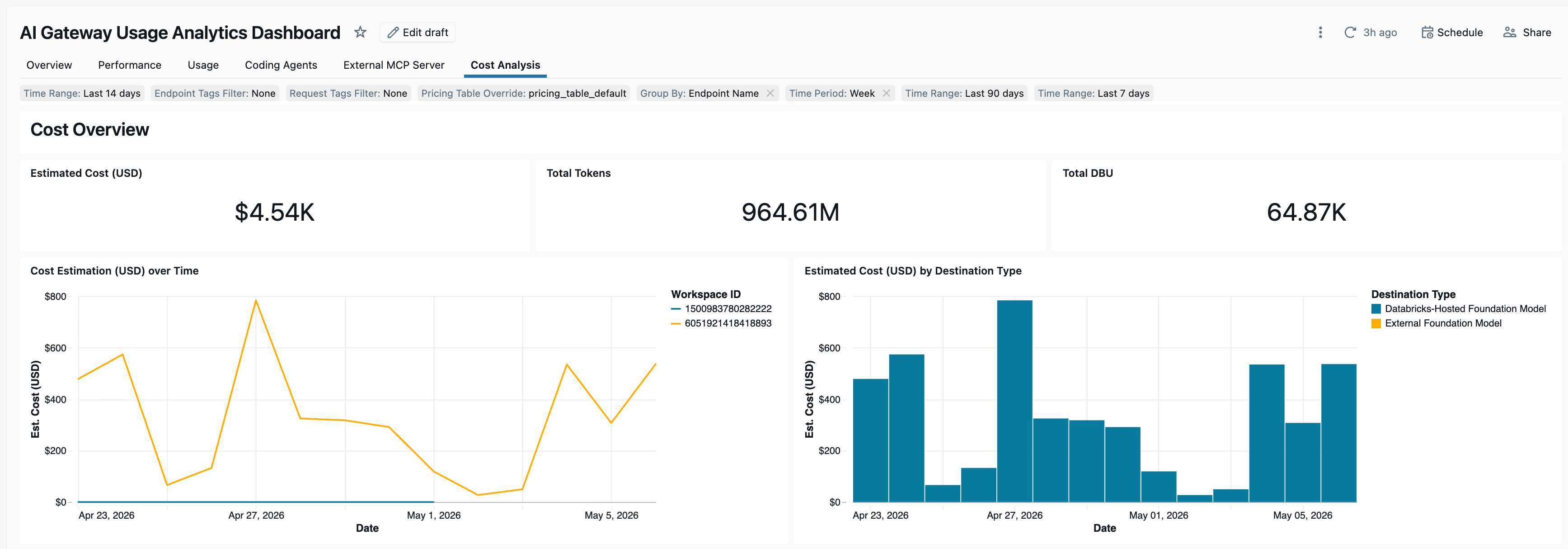
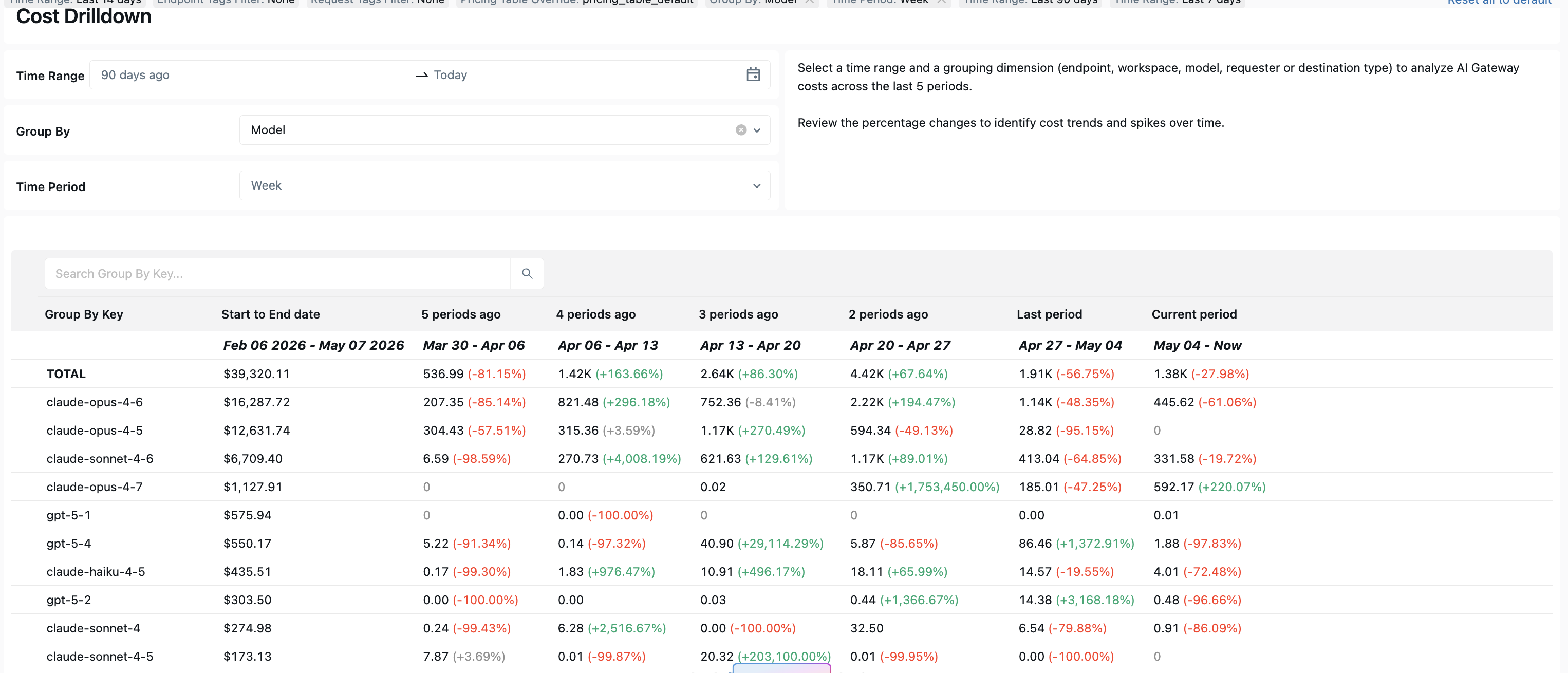
The built-in usage dashboard includes a Cost Analysis page for monitoring cost and analyzing cost breakdowns over time. You can analyze cost across multiple dimensions, including:
- Model service
- Target model
- Requesting user or service principal
- Service tags
- Request tags
To open the dashboard, click View Dashboard from the AI Gateway page. For details on importing and updating the dashboard, see Built-in usage dashboard.
Note
Cost observability is available in dashboard version 0.4 and above. Account admins must update the dashboard to receive the latest template changes. See Built-in usage dashboard.
Tag-based analysis
The Cost Analysis page includes tag-based views and filters so you can analyze cost using service tags and request tags.
Service tags are configured on the Unity AI Gateway model service and apply to all requests sent to that model service. Request tags are attached to individual requests and enable more granular attribution within the same model service, such as by project, feature, environment, or end user.
Tag filters accept a semicolon-separated list in the format <entry1>;<entry2>;<entry3>, where each entry is specified as either:
<key>to match all values for a tag key. For example,teammatches all requests with theteamtag.<key>=<value>to match a specific tag key-value pair. For example,team=ml-platform;env=prodmatches requests tagged withteam=ml-platformandenv=prod.
For information about configuring and querying request tags, see Tag requests and model services for usage tracking.
External model cost
The usage dashboard can be configured to include cost estimates for external models by specifying a model pricing table in the Pricing Table Override setting. The pricing table is user-managed and must be provided as input to the dashboard.

The pricing table must include the following fields:
| Field | Type | Description |
|---|---|---|
model |
STRING | The model name used for cost attribution in the dashboard. |
input_token_price |
DOUBLE | The price for input tokens. |
output_token_price |
DOUBLE | The price for output tokens. |
cache_read_input_token_price |
DOUBLE | The price for cache-read input tokens, when supported. |
cache_write_input_token_price |
DOUBLE | The price for cache-write input tokens, when supported. |
Note
Cost estimates for external models are for informational purposes only. These figures are calculated based on list or override prices and might not reflect your final provider invoice. Databricks is not liable for discrepancies in third-party billing.
Analyzing cost
Tip
Genie Code (Agent mode) can do this for you. Try this example prompt:
Query system.billing.usage to show AI Gateway DBU cost for the past 30 days, broken down by usage_metadata.ai_gateway.endpoint_name, destination model, and requesting user. Filter to MODEL_SERVING records. Show top 10 in each.
The following queries analyze cost for Azure Databricks-hosted models in system.billing.usage. Cost can be broken down by model service, target model, principal, and service tag.
By model service
SELECT
  usage_metadata.ai_gateway_endpoint_name AS endpoint_name,
  SUM(usage_quantity) AS dbus
FROM system.billing.usage
WHERE billing_origin_product = 'MODEL_SERVING'
  AND usage_metadata.ai_gateway_endpoint_name IS NOT NULL
  AND usage_unit = 'DBU'
  AND usage_date >= current_date() - INTERVAL 30 DAYS
GROUP BY endpoint_name
ORDER BY dbus DESC;
By destination model
SELECT
  usage_metadata.ai_gateway_destination_model AS destination_model,
  SUM(usage_quantity) AS dbus
FROM system.billing.usage
WHERE billing_origin_product = 'MODEL_SERVING'
  AND usage_metadata.ai_gateway_endpoint_name IS NOT NULL
  AND usage_unit = 'DBU'
  AND usage_date >= current_date() - INTERVAL 30 DAYS
GROUP BY destination_model
ORDER BY dbus DESC;
By user or service principal
SELECT
  identity_metadata.run_by AS run_by,
  SUM(usage_quantity) AS dbus
FROM system.billing.usage
WHERE billing_origin_product = 'MODEL_SERVING'
  AND usage_metadata.ai_gateway_endpoint_name IS NOT NULL
  AND identity_metadata.run_by IS NOT NULL
  AND usage_unit = 'DBU'
  AND usage_date >= current_date() - INTERVAL 30 DAYS
GROUP BY run_by
ORDER BY dbus DESC;
By service tag
Service tags propagate to the billing records in custom_tags, so you can allocate cost by dimensions such as team, environment, project, or cost center.
SELECT
  custom_tags['team'] AS team,
  SUM(usage_quantity) AS dbus
FROM system.billing.usage
WHERE billing_origin_product = 'MODEL_SERVING'
  AND usage_metadata.ai_gateway_endpoint_name IS NOT NULL
  AND custom_tags['team'] IS NOT NULL
  AND usage_unit = 'DBU'
  AND usage_date >= current_date() - INTERVAL 30 DAYS
GROUP BY team
ORDER BY dbus DESC;
To add tags such as team, project, or cost_center to a model service, see Configure Unity AI Gateway endpoints (legacy).
Limitations
- Spend attribution applies to
MODEL_SERVINGrecords insystem.billing.usage. Requests routed to external models that are billed directly by the external provider do not appear insystem.billing.usage. - For model services with multiple destinations, such as traffic splitting or fallbacks,
ai_gateway_destination_modelandai_gateway_destination_ididentify the destination that ultimately served the request.